
Most guides to Totally Science alternatives chase the same dead end: a list of proxy mirrors that work on Monday and vanish by Friday. I went a different direction. After opening dozens of so-called unblocked game pages, the pattern was hard to miss. Pop-up ads piled on top of each other, download buttons that were not real buttons, and copycat domains borrowing a familiar name to look trustworthy. That is the real problem with chasing the next unblocked link, and it is why this guide focuses on safer, more useful alternatives instead of another address that might disappear.
Totally Science became popular for a simple reason: people want quick, browser-based access to games and light tools without installing anything. The goal here is to keep that convenience while pointing you toward sites that are safe, school-appropriate, and actually worth a student's time, the kind that mix free educational games with genuine fun. Some are pure learning platforms, some are casual play, and one comes with a clear caution.
Quick note on access: whether any site here opens for you depends on your school, workplace, or local network rules and your device policy. Safe does not always mean allowed, and that is a call for your school or workplace to make.
Short on time? Here is the fast version, matched to what you actually need.
• Best overall safer alternative: Coolmath Games, the closest safe stand-in for quick browser games.
• Best for math and logic practice: Hooda Math, classroom-friendly drills that do not feel like a worksheet.
• Best for creative learning: Scratch, where students build instead of just watch.
• Best for coding practice: Code.org, structured lessons that many schools already trust.
• Best for younger students: PBS Kids Games, gentle and age-appropriate.
• Best for casual browser games: CrazyGames, the most variety, with supervision advised.
• Best for science-focused learning: NASA Kids' Club, real space content from an official source.
A side-by-side look at how the picks compare on the things parents and teachers ask about first.
| Site | Best For | Educational Value | Ad / Distraction Level | Account Needed | Safety Note | Best User Type |
| Coolmath Games | Logic and math browser games | Medium to High | Moderate (display ads) | Not required | Long-running, clearly owned, no proxy behavior | Casual players on breaks |
| Hooda Math | Math practice and number puzzles | High | Low to Moderate | Not required | Classroom focus, light ads | Math learners, teachers |
| Scratch | Creative coding projects | Very High | Very Low | Optional (to save work) | Run by MIT, moderated community | Makers, beginner coders |
| Code.org | Structured coding lessons | Very High | None | Optional (free) | Nonprofit, ad-free, school-trusted | Coding students, classrooms |
| PBS Kids Games | Early-learning games | High (early years) | Low | Not required | Public media, age-appropriate | Younger kids, families |
| CrazyGames | Casual browser games | Low to Medium | High (frequent ads) | Not required | Large mixed library, supervise younger users | Casual gamers (supervised) |
| NASA Kids' Club | Space and science activities | High | None | Not required | Official government site, ad-free | Science-curious kids |
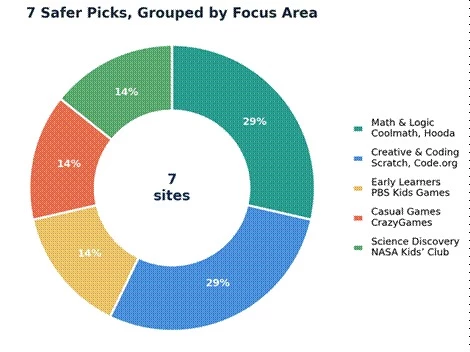
The lineup is deliberately balanced: math and logic, creative and coding, early learners, casual play, and science each get a seat, so there is a safer match for almost any reason a student lands on a site like Totally Science.
Every site here was scored with the Safe-Play Review Standard, a 5-part rubric built for student-facing browser tools. Each site was opened on both a desktop browser and a phone, then checked for account requirements, ad behavior, redirect patterns, and the kinds of content a school device would flag. Sites run by a school, library, museum, or government body were noted, since clear ownership is a strong safety signal.
Each dimension is scored on a 10-point scale, and a weighted average produces the overall rating:
• Safety signals (30%): clear ownership, no proxy behavior, sensible permissions, and clean ad and redirect behavior.
• Learning value (25%): how much a session builds or teaches, not just how long it fills.
• Game variety (15%): the range and freshness of activities.
• Ease of use (15%): how quickly a student can start without setup.
• Distraction control (15%): ad load and focus, where a higher score means fewer distractions.
Scores are editorial. They reflect hands-on review against the criteria above, never paid placement, and no site can buy a higher rank. Where a site falls short, the limitation is stated plainly.
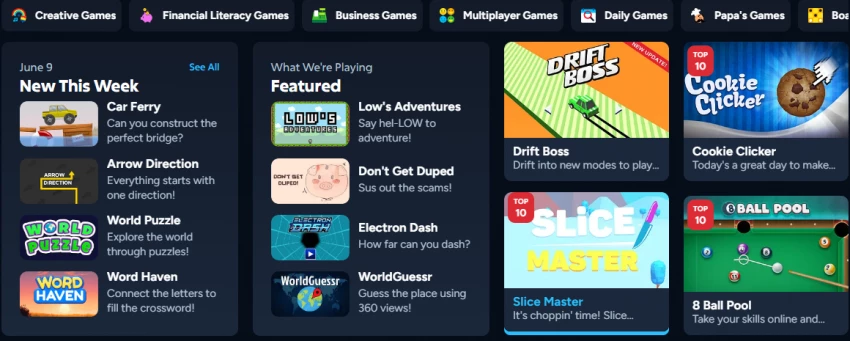
Coolmath Games is still the most familiar name in logic-based browser play, and for good reason. It hosts hundreds of games organized around logic, numbers, strategy, and quick reflexes, from running and platform titles to grid puzzles. Despite the name, it leans more toward puzzle-style thinking than direct instruction, which is part of the appeal during a short break.
Where it feels safer than a typical unblocked clone: it is a long-running, branded site with a clear owner, no proxy layer, and a stable domain, so you are far less likely to hit a fake download or an endless redirect. The trade-off is display advertising, including game promos that pull attention, and not every title is strictly educational. It fits students who want a quick, brain-engaging break and casual players who like puzzle mechanics.
Parent and teacher note: ads are present, so younger users do better with a content blocker or supervision. Confirm you are on coolmathgames.com to avoid copycats.
My take: this is the closest honest replacement for the “I just want to play something quick” itch, minus the sketchy mirror-site baggage. It stays my default first suggestion.
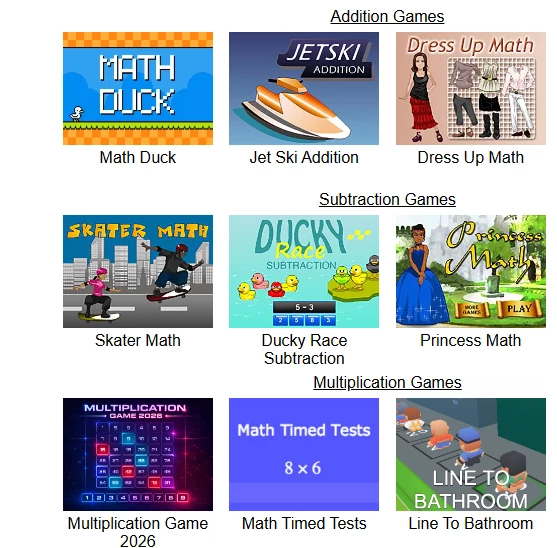
Hooda Math keeps the focus close to numbers, logic, and classroom-friendly play. The catalog leans into math practice, escape-style logic puzzles, and timed number games sorted by grade and topic, which makes it easy for a teacher to point students toward something relevant. Entertainment value is real but secondary, since the games are built to reinforce skills like multiplication, fractions, and problem-solving.
Compared with an unblocked portal, Hooda Math stays narrow on purpose, so there is less mixed or age-inappropriate content to wander into, and the ad load is lighter. The limitations are honest: variety is smaller than a general game site, and the visuals feel plain next to flashier portals, which some students notice. It is a strong fit for math learners and teachers who want practice that does not feel like a worksheet.
Parent and teacher note: a solid pick for supervised classroom time. Still glance at the ad slots on shared devices.
My take: it will not wow a kid chasing spectacle, but for math reps disguised as play, it is one of the more honest options on this list.
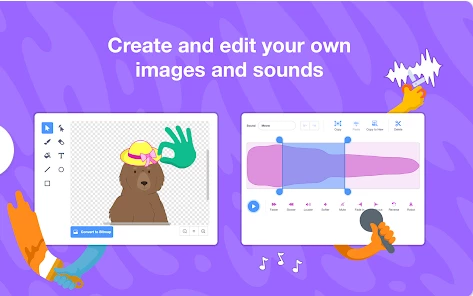
Scratch gives students something better than passive screen time: a place to build. Run by the MIT Media Lab, it is a block-based coding playground where kids create animations, games, and interactive stories, then share them in a moderated community. The learning value is very high, because the “game” is the act of making one, and projects range from simple sprite animations to genuinely clever student-built games.
Against a typical unblocked site, the gap is wide: clear, trusted ownership, almost no advertising, and a creative output instead of a time sink. The catch is a learning curve, and an optional account is needed to save and publish work, which means a little setup. It suits curious makers and beginner coders, roughly upper-elementary and older.
Parent and teacher note: the community is moderated, but review sharing settings and talk through online etiquette before a child publishes.
My take: if a student is going to spend an hour in a browser, I would rather it be here. It is the rare site that sends them away having made something.
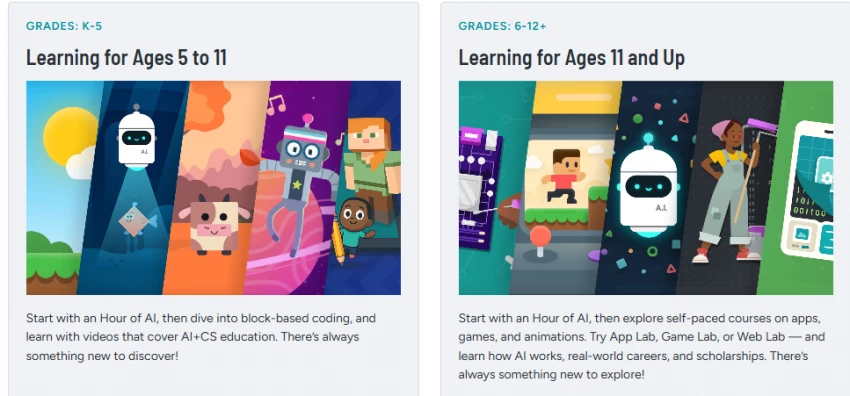
Code.org turns play into real coding practice, and it does it for free. This nonprofit offers structured courses, hour-long activities, and themed tutorials that teach the logic behind programming, often using familiar characters and game-like challenges to keep younger learners engaged. Learning value is as high as it gets in this list, and it is fully ad-free. Many schools already use it, which speaks to its classroom credibility.
Set against an unblocked game site, the difference is night and day: no ads, no proxy behavior, clear ownership, and a real skill at the end. The honest limitation is that it is a learning platform first, so pure game variety is lower, and some students will find it more like school than play. A free account helps track progress. It is built for students interested in coding and teachers who want a safe, curriculum-ready option.
Parent and teacher note: ad-free and widely school-approved. Accounts collect basic progress data, so review the privacy settings for younger users.
My take: not the pick for someone who just wants to mess around, but for “I want to actually learn something,” it is the strongest option here.
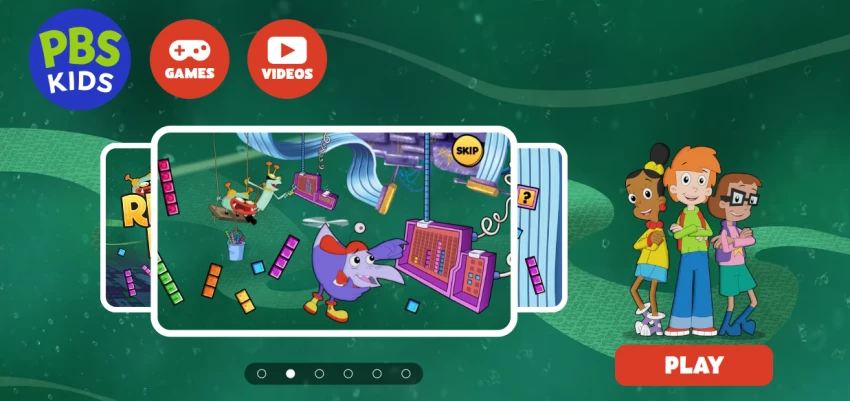
PBS Kids Games is the safer pick when the player is on the younger side. Built around public-media shows kids already know, the site offers gentle games tied to early literacy, numbers, and social-emotional themes. Content is designed for young audiences, so the tone, difficulty, and imagery stay age-appropriate.
Compared with a general unblocked portal, the advantages are obvious: trusted public-media backing, a light ad presence, and games vetted for early learners. The flip side is that older students outgrow it quickly, and the challenge level is modest by design. It fits younger kids and families who want screen time that stays wholesome.
Parent and teacher note: among the most parent-friendly options here. Still set time limits, since easy wins can be moreish for little ones.
My take: for a 5 to 9 year old, this is the option I would actually hand a device for. It is calm, safe, and quietly educational.

CrazyGames has the variety students crave, but it asks for more careful browsing. This is a large casual-game portal with thousands of browser titles across action, puzzle, racing, io, and multiplayer categories, refreshed often. For pure entertainment variety, nothing else on this list comes close.
That is also where the caution comes in. The catalog is mixed, some titles lean toward shooting or mild violence, and the site runs frequent ads, including interstitials between games. It is a legitimate, well-known portal rather than a sketchy mirror, which is a genuine point in its favor, but it is built for entertainment, not learning. It works best for casual gamers who want choice, ideally with an adult nearby for younger users.
Parent and teacher note: filter by age-appropriate categories, expect ads, and treat this as supervised, break-time entertainment rather than a classroom tool.
My take: I include it because the variety is genuinely strong and the site is reputable, but I would not point a young child here unsupervised. Check the category and the ads before settling in.

NASA Kids' Club is built for science curiosity more than casual gaming. It is a free, government-run hub of space-themed games and activities aimed at younger learners, covering rockets, planets, and simple problem-solving with real NASA imagery. The educational value is high and the trust level is about as strong as it gets, since it is an official agency site with no ads.
Against a typical unblocked portal, the contrast is stark: accurate content, clear ownership, and zero commercial clutter. The limitation is selection. The activity count is small, and the experience is aimed at curiosity rather than fast-paced fun, so it works best as a supplement, not a main attraction. It is a natural fit for science-curious kids and classrooms exploring space topics.
Parent and teacher note: an easy yes on safety. Pair it with a space lesson or a documentary to get the most from a short visit.
My take: it will not hold a gamer's attention for an hour, but for a kid who looks up at the night sky and asks questions, it is a small, safe gem.
Run through this quick checklist before bookmarking any new game or learning site, whether it is on this list or not.
• Ads and pop-ups: expect some ads on free sites, but be wary of pop-ups that open new tabs, cover the screen, or are hard to close.
• Redirects and unknown downloads: a safe game site should not push downloads or bounce you to other domains. Close anything that prompts an install.
• Age suitability: match the site to the user's age. A portal that suits a teen may not suit a 6 year old.
• Data collection and accounts: prefer sites that work without an account. If one is required, check what data it asks for and share no more than needed.
• School device rules: access depends on your school, workplace, or local network policy. Safe does not mean allowed on a managed device.
• Teacher or parent approval: for younger users, get a quick sign-off before adding a new site.
• Browser permissions: decline requests for camera, microphone, or location unless a feature genuinely needs them.
• Misleading mirror sites: copycats imitate popular names to look legitimate. Type the official address yourself rather than trusting a random search result.
• Classroom-unfriendly categories: even reputable portals carry titles with violence or open chat that are not classroom-appropriate. Filter by category.
• Official domain verification: confirm the real domain before playing. For reference, the official addresses are coolmathgames.com, hoodamath.com, scratch.mit.edu, code.org, pbskids.org/games, crazygames.com, and nasa.gov, where NASA Kids' Club lives within the main NASA site.
Different people land on these sites for different reasons. Here is the shortlist by what you are actually trying to do.
• Students who want casual games during breaks: Coolmath Games for puzzle-style play, or CrazyGames for variety if an adult is nearby and ads are expected.
• Parents looking for safer game sites: PBS Kids Games for younger children and Coolmath Games for older kids who want quick fun.
• Teachers looking for classroom-friendly activities: Hooda Math for skills practice and Code.org for structured lessons.
• Students interested in coding: Code.org for guided courses and Scratch for open-ended building.
• Younger kids needing age-appropriate games: PBS Kids Games first, with NASA Kids' Club for early science curiosity.
• Users who want math and logic practice: Hooda Math for focused drills and Coolmath Games for logic puzzles.
• Science-focused learners: NASA Kids' Club for space topics, with Scratch for hands-on simulations students can build themselves.
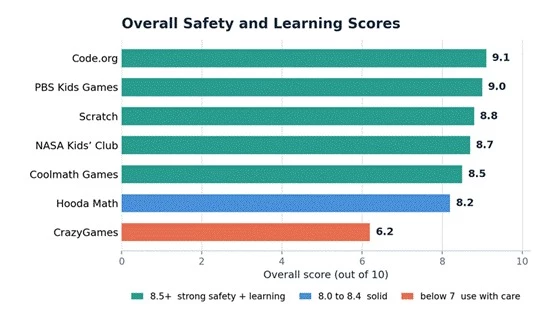
Each site earns a score out of 10 across 5 dimensions: safety, learning value, game variety, ease of use, and distraction level. The overall rating is a weighted average that leans on safety and learning value, since those matter most for student use. A quick note on the distraction column: a higher number means fewer distractions, so 10 is best and a low score flags a busy, ad-heavy experience. Ratings reflect hands-on review, not popularity or paid placement.
| Site | Safety | Learning Value | Game Variety | Ease of Use | Distraction Level | Overall Rating |
| Coolmath Games | 9 | 8 | 8 | 9 | 8 | 8.5 |
| Hooda Math | 9 | 8 | 7 | 8 | 8 | 8.2 |
| Scratch | 9 | 10 | 8 | 7 | 9 | 8.8 |
| Code.org | 10 | 10 | 6 | 8 | 10 | 9.1 |
| PBS Kids Games | 10 | 9 | 7 | 9 | 9 | 9.0 |
| CrazyGames | 6 | 3 | 10 | 9 | 5 | 6.2 |
| NASA Kids' Club | 10 | 9 | 5 | 8 | 10 | 8.7 |
Code.org and PBS Kids Games top the table on safety and learning value, while CrazyGames scores lowest overall despite the highest variety, a reminder that more games is not the same as a better choice for students.
A few categories of sites I steer around, or at least open with real caution. I am not naming specific domains, because they change constantly. The warning signs do not.
I avoid sites that bury you in pop-ups or open a new tab with every click. I treat proxy-heavy pages, the ones whose main pitch is slipping past a filter, as a hard pass, both because they are often unsafe and because dodging a school's rules is not something I will help with. Fake download buttons, the ones dressed up to look like a play button, are an instant close. And I skip portals that lead with adult or violent game categories, especially anywhere a younger user might browse.
A couple of quieter red flags matter just as much. If a site has no clear owner, no contact page, and no privacy policy, there is no way to judge how it handles data, so I do not trust it with any. And copycat domains, the ones borrowing a famous name with a slightly different spelling or ending, are built to fool you. When in doubt, type the real address yourself.
I am also wary of any page that asks for permissions it does not need, such as your camera or location for a simple puzzle game, and anything that openly encourages bypassing school or network filters. If a site's main selling point is evasion, that is the sign to walk away.
After all the testing, here is where I land. If you want the closest safe replacement for quick browser games, start with Coolmath Games for logic and puzzle play and Hooda Math for math practice that does not feel like homework. If you would rather a student create and learn, Scratch and Code.org are the standouts: one for open-ended building, the other for structured coding, and both are about as safe as the web gets for kids. For younger learners, PBS Kids Games is my pick for gentle, age-appropriate fun, and NASA Kids' Club is the one I reach for when a child is curious about space and science.
CrazyGames is the only entry I recommend with a caveat. The variety is genuinely the best on this list, but the ads are frequent and the catalog is mixed, so I would keep it to supervised, break-time play and check the age fit before settling in.
If I had to hand a single site to a student today with no other context, it would be Coolmath Games for the casual itch and Code.org for anyone ready to learn something real. And one last reminder that holds for every option here: whether a site opens at all comes down to your school, workplace, or local network rules, so check what your device allows before you rely on any of them.
Share your thoughts about this article.
Be the first to post a comment!
If you teach anywhere near a device cart, you have probably heard the chant. Hal...
Deepak Mehra1 month ago