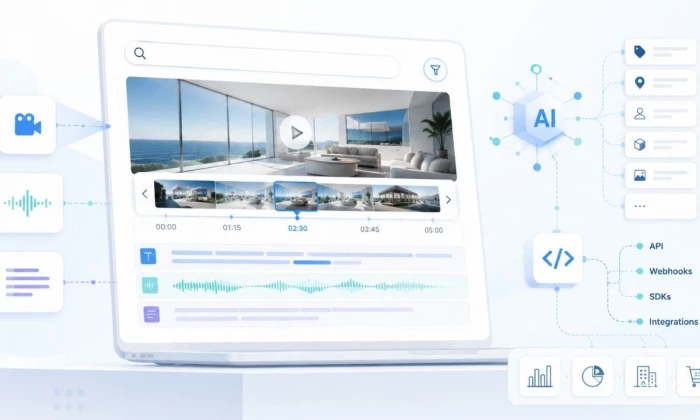
Most teams already have the video. What they do not have is a way to search it. A media company might hold decades of footage, a SaaS team might have thousands of sales calls, and a school might have years of recorded lectures. The hard part is not storing those files, it is finding the exact moment that matters and turning video into data you can query.
Twelve Labs approaches this as a multimodal video understanding problem, combining what is seen, heard, and said rather than relying on filenames or transcripts alone.
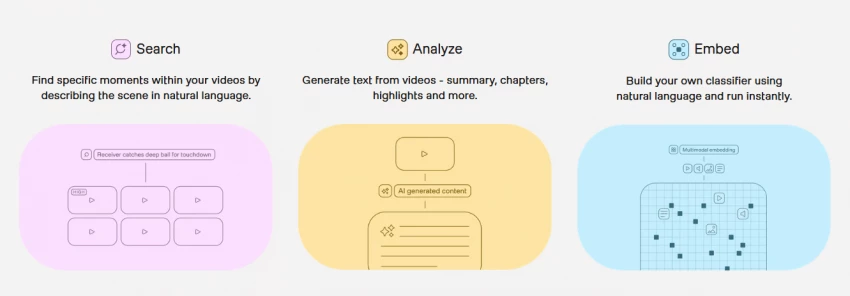
This guide explains how that workflow fits together, where it is a strong fit and where it is not, and how to think about cost before indexing a large archive. Specific prices, limits, and model details are left for verification against the official documentation, since they change.
| Fast Answer: Twelve Labs is a video intelligence platform and API for searching, indexing, embedding, and analyzing video using multimodal AI. Instead of relying only on filenames, tags, or transcripts, it can help developers build systems that search inside videos using natural language, extract insights, and find relevant moments. It is best suited for video-heavy businesses, media archives, edtech, sports analysis, security review, and AI apps that need deep video understanding. |
A compact orientation before the technical detail.
| Area | Practical Detail |
| Tool name | Twelve Labs |
| Main category | Video intelligence API and multimodal video understanding |
| Core use | Search, index, embed, and analyze video |
| Best audience | Developers, media teams, AI startups, enterprises, video platforms |
| Main strength | Natural-language search and understanding across video, audio, and language |
| Main caution | API pricing and indexing cost need careful calculation |
| Not ideal for | Users needing a simple no-code video editor |
| Official sources to check | Docs, pricing page, pricing calculator, API reference |
| Last updated | [Add date] |
The clearest way to understand Twelve Labs is as a pipeline rather than a feature list. Video goes in, it is processed into something searchable, and your application queries the result. The diagram traces that path; the table explains the business value of each stage.
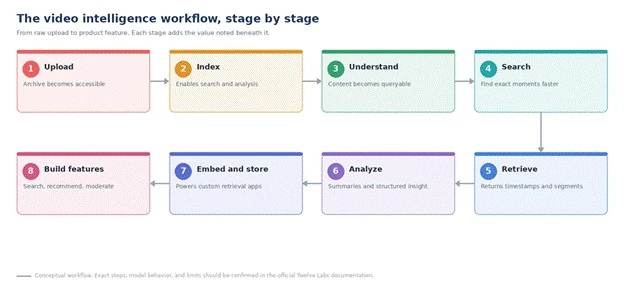
The video intelligence pipeline, from upload to product feature.
| Workflow Stage | Practical Meaning | Business Value |
| Upload | Video enters the system | Makes the archive accessible |
| Indexing | AI processes video content | Enables search and analysis |
| Search | User asks natural-language queries | Finds exact moments faster |
| Retrieval | Relevant timestamps or segments are returned | Saves manual review time |
| Analysis | System extracts summaries or insights | Converts video into structured knowledge |
| Embeddings | Video, audio, image, or text represented for retrieval | Supports custom AI apps |
| Application layer | Results power product features | Search, recommendations, moderation, analytics |
Four API areas do most of the work. The panel shows what each one takes in and produces; the sections below add the practical detail. Model names and versions are not stated here, since they change; confirm the current models in the official model pages and API reference.
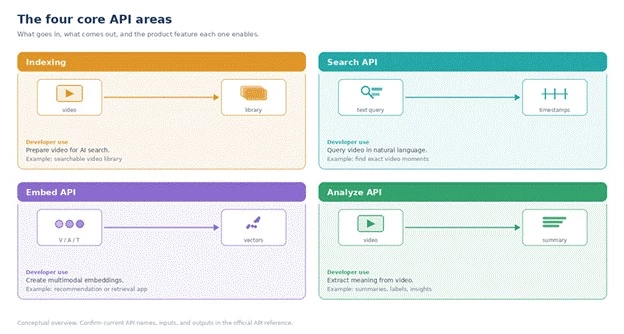
Indexing, Search, Embed, and Analyze, by input and output.
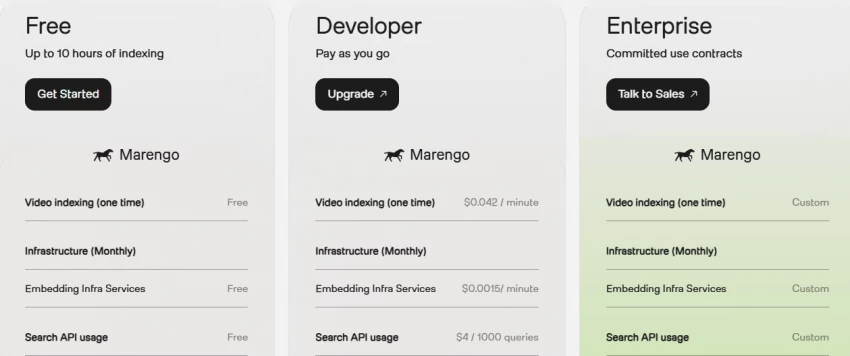
Indexing is the foundation. A video usually has to be processed before it can be searched or analyzed, so this is where most of the upfront cost and time sits. Estimate it carefully against the size of your archive.
• There is typically a one-time indexing cost per video; verify the current rate.
• Indexing may be billed by the minute; verify on the pricing page.
• Infrastructure or storage-style costs may apply; verify whether they are separate.
• Estimating total archive size early prevents budget surprises later.
The Search API is the headline capability: ask for a moment in natural language and get back where it happens. Queries describe meaning rather than keywords, for example:
• "Find the moment where a player celebrates after scoring."
• "Show clips where a customer complains about pricing."
• "Find scenes with a red car near a building."
• "Find the part where the instructor explains gradient descent."
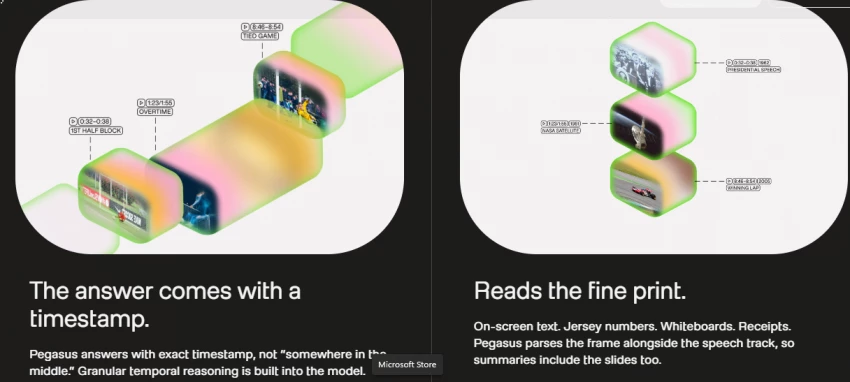
For developers building their own retrieval, the Embed API turns video and related media into vectors you can store and search yourself.
• Useful for retrieval and ranking.
• Useful for building custom search systems.
• May support video, audio, image, and text inputs; verify the current list.
• Can be paired with a vector database such as Pinecone, Weaviate, or LanceDB.
The Analyze API turns a video into structured output rather than just locating a moment.
• Summarization of a video or segment.
• Extraction of specific information.
• Classification or labeling.
• Question answering over a video.
• Other structured insights; confirm the exact capabilities in the docs
| API Area | Developer Use | Example Product Feature |
| Indexing | Prepare video for AI search | Searchable video library |
| Search API | Query video using natural language | Find exact video moments |
| Embed API | Create multimodal embeddings | Recommendation or retrieval app |
| Analyze API | Extract meaning from video | Summaries, labels, insights, reports |
| Pricing calculator | Estimate monthly usage cost | Budget planning before launch |
The same workflow supports very different products. A few concrete examples show where it earns its place.
For broadcasters, publishers, documentary teams, and content libraries, it can turn a dormant archive into a searchable asset:
• Find old footage by description.
• Locate specific scenes inside long videos.
• Search interviews for a topic or quote.
• Build an internal media search tool.
• Tag archives automatically.
For courses, lectures, bootcamps, and training libraries, it helps learners get to the right moment:
• Search inside lectures.
• Find the exact explanation of a concept.
• Create chapter summaries.
• Let students jump straight to relevant moments.
For coaches, athletes, sports-tech apps, and analysts, it can index plays and actions:
• Find specific plays.
• Classify actions.
• Search moments by natural language.
• Summarize practice footage.
• Support athlete review workflows.
For product teams reviewing interviews, sales calls, demos, and webinars, it surfaces the moments that matter:
• Find customer objections.
• Extract feedback themes.
• Search demo recordings.
• Locate competitor mentions.
For teams that review footage, it can speed up the first pass, with care:
• Review footage faster.
• Search for specific events.
• Summarize long video logs.
• Flag moments for human review.
For creators and marketing teams sitting on long recordings, it helps find the reusable parts:
• Find highlight clips.
• Search webinars for quote-worthy moments.
• Create short clips from long videos.
• Identify product mentions.
• Build a searchable brand video library.
| Use Case | Video Type | Twelve Labs Value | Human Review Needed |
| Media archive | News, interviews, footage | Find exact scenes | Yes |
| EdTech | Lectures, tutorials | Jump to relevant explanations | Sometimes |
| Sports | Match and practice clips | Search plays and actions | Yes |
| Product research | Calls, demos, interviews | Extract user feedback moments | Yes |
| Compliance | CCTV and training videos | Surface events faster | Always |
| Marketing | Webinars, podcasts, demos | Find reusable clips | Yes |
Cost is the part most teams underestimate, because a video AI bill is rarely one line. Use the official pricing page and the pricing calculator, and account for every part of the workflow you will actually use. The categories below are listed only as things to verify, not as quoted prices.
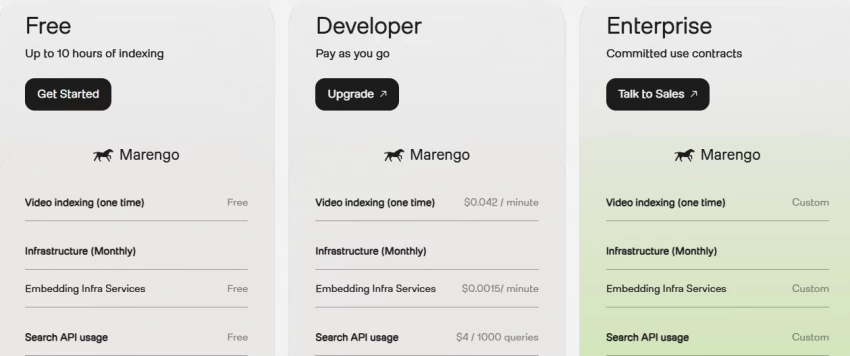
Before committing, walk a product team through these questions. Answering them honestly tends to decide the build-or-not question faster than any demo.
| Check | Question |
| Video volume | How many minutes will be indexed monthly? |
| Query volume | How many searches will users run? |
| File types | Are supported formats confirmed? |
| Latency | Is indexing and search speed acceptable? |
| Accuracy | Does it find the right moments in test videos? |
| API complexity | Can the dev team integrate it quickly? |
| Security | Does it meet company data requirements? |
| Cost model | Are indexing and query costs understood? |
| Scale | Can it handle production volume? |
| Human review | Are high-risk results reviewed by people? |
| Alternatives | Has it been compared with cloud-native APIs? |
No single tool covers every video task. The table maps common needs to where Twelve Labs fits and which alternatives are worth comparing for that specific job.
| Workflow Need | Twelve Labs | Other Options to Compare |
| Semantic video search | Strong fit | Google Video Intelligence, Azure AI Video Indexer |
| Cloud-native video labeling | Compare carefully | Google Video Intelligence, AWS Rekognition Video |
| Video moderation | Depends on workflow | AWS Rekognition, Hive, Azure AI Content Safety |
| Meeting or video transcript search | May be more than needed | Otter, Fireflies, Descript, Recall.ai |
| Video editing or clip creation | Not a video editor | Runway, Descript, OpusClip |
| Vector search over video | Strong with embeddings | LanceDB, Pinecone, Weaviate plus embeddings |
| Enterprise archive search | Strong candidate | Cloud-native media asset management tools |
| Factor | Twelve Labs | Google Video Intelligence |
| Main focus | Multimodal video understanding and semantic search | Structured video analysis and labels |
| Query style | Natural-language search, verify | Label, object, and transcript-oriented workflows |
| Best for | Finding exact moments by meaning | Cloud-native video metadata extraction |
| Developer fit | API-first video intelligence apps | Google Cloud workflows |
| Pricing | Verify Twelve Labs pricing | Verify Google Cloud pricing |
| Output style | Search, analyze, embed, verify | Labels, shots, objects, text, speech, verify |
| Best choice | Meaning-based video retrieval | Structured metadata pipelines |
| Factor | Twelve Labs | Azure AI Video Indexer |
| Main focus | Multimodal semantic video understanding | Video indexing, transcripts, insights, Azure workflows |
| Best for | Building video search and retrieval apps | Microsoft and Azure media workflows |
| Search style | Natural-language, verify | Metadata, transcript, and insight search |
| Enterprise fit | Verify security and compliance docs | Strong Azure ecosystem fit |
| Pricing | Verify | Verify |
| Best choice | Custom semantic video intelligence | Azure-native video indexing |
It fits best where there is enough video that manual search has stopped working, and least where the job is casual or better served by a simpler tool. The chart ranks common situations by fit; the table gives the reasoning.
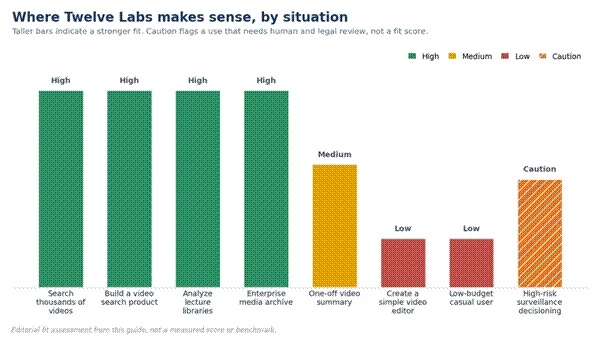
Editorial fit assessment from this guide, not a measured score. Caution marks a use that needs human and legal review.
| Situation | Fit Level | Reason |
| Search thousands of videos | High | Natural-language retrieval can save time |
| Build a video search product | High | API-first workflow |
| Analyze lecture libraries | High | Helps locate concepts and explanations |
| Create a simple video editor | Low | Not the main purpose |
| One-off video summary | Medium | Useful, but may be overkill |
| Enterprise media archive | High | Strong use case if cost works |
| Low-budget casual user | Low | API pricing and setup may be too technical |
| High-risk surveillance decisioning | Caution | Human review and legal checks required |
A few areas need deliberate handling. The safer approach for each is straightforward once it is planned for.
| Risk Area | Safer Approach |
| Large archive cost | Use the pricing calculator before indexing everything |
| Sensitive video | Review privacy, security, and data retention |
| False positives | Keep human review |
| Production latency | Test indexing and search speed |
| Regulated use | Get legal and compliance review |
| Surveillance or security | Avoid automated final decisions |
| User-uploaded content | Add moderation and consent policies |
| Vendor lock-in | Design an export and fallback strategy |
At a product level, the architecture is a hub: a backend mediates between the user, Twelve Labs, and your data stores. A user uploads a video; the backend sends it to Twelve Labs; the video is indexed; metadata and timestamps are stored in a database; the user searches with natural language; the API returns relevant moments; the app displays the clips or timestamps; and a person verifies the result when it matters.
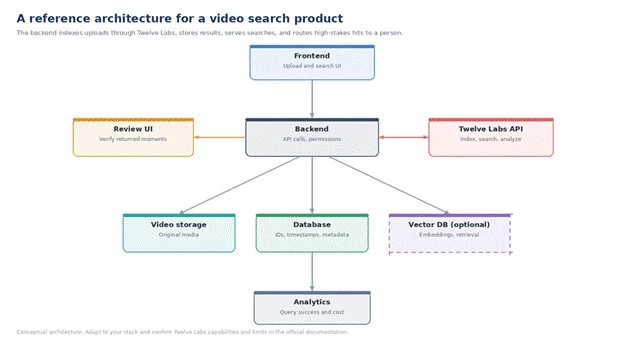
A reference architecture for a video search product. Adapt it to your stack.
| Layer | Role |
| Frontend | Upload and search interface |
| Backend | Handles API calls and permissions |
| Video storage | Stores original media |
| Twelve Labs API | Indexes, searches, and analyzes video |
| Database | Stores video IDs, timestamps, and metadata |
| Vector DB, if used | Stores embeddings and retrieval data |
| Review UI | Lets users verify returned moments |
| Analytics | Tracks query success and cost |
Twelve Labs makes the most sense when a team has enough video that manual search no longer works. If the goal is to find exact moments, summarize recordings, or build video-aware AI products, it can be a strong infrastructure layer. But teams should start with a small test set, measure search quality, calculate indexing and query costs, and keep human review in any workflow where mistakes could create real-world harm.
Put plainly: this is API and product infrastructure, not a casual video editor. Plan cost before indexing a large archive, treat the best fit as teams building searchable video products or internal video intelligence, and test with your own sample videos before scaling.
| Bottom line: Use Twelve Labs to make large video libraries searchable and queryable. Start small, measure search quality, model the full cost, and keep a person in the loop for high-stakes decisions. |
Share your thoughts about this article.
Be the first to post a comment!
What actually happens in the space between the moment an app builder produces a...
Nitin5 days ago
A marketing team in 2023 that wanted a two-minute product explainer typically bo...
Sakshi Dhingra1 month ago

Two years ago, an AI presenter on screen was a talking point. Today it is a line...
Parveen Verma1 month ago

Quick answer: ChatGPT is owned and operated by OpenAI Group PBC, a for-profit pu...
Sakshi Dhingra1 month ago

Here is the exact moment most people end up asking this question. You have final...
Nitin1 month ago

A stolen password does not always look suspicious to a login system. If the user...
Deepak Mehra1 month ago