I don’t judge remote-desktop software by feature lists alone. I judge it by how quickly it connects, how little it breaks, and how much it costs me over time. From that lens, UltraViewer occupies a very specific, and often misunderstood, position in the remote support ecosystem.
This is not a glossy, enterprise-polished platform.
It is a Windows-first, cost-efficient remote support utility designed to remove friction, not add layers.
Below is a complete, no-marketing, evidence-based breakdown.
UltraViewer is best understood as a support-first tool, not a general remote-access ecosystem.
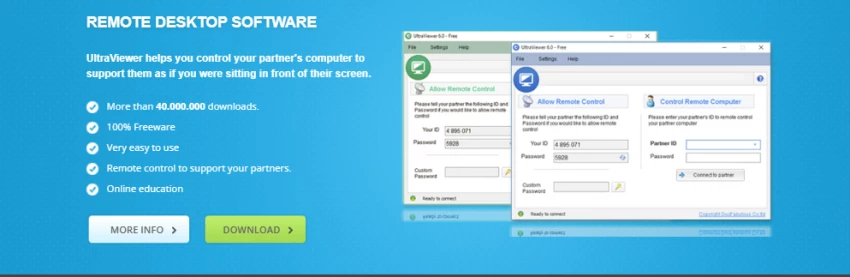
Its design decisions reveal three priorities:
Unlike tools built for IT departments with compliance overhead, UltraViewer is optimized for:
This explains both its popularity and its misuse.
UltraViewer uses a session-based connection model rather than persistent device pairing.
What this means in practice
From a safety standpoint, this is a deliberate trade-off:
This model is particularly suitable for customer-observed support, where trust matters.
In real use, UltraViewer feels fast because it is lightweight, not because it’s technically advanced.
Input Responsiveness
Visual Handling
This makes UltraViewer well-suited for:
Less ideal for:
File transfer is built directly into the chat interface, which reduces context switching.
Practical limits
For most support workflows (logs, installers, documents), this is sufficient.
Paid tiers extend file size limits but do not turn UltraViewer into a file-management tool, and that’s intentional.
UltraViewer allows:
One technician → multiple client machines
One screen → multiple viewers (training use cases)
This is especially useful for:
However, session orchestration remains manual. There’s no centralized dashboard like you’d find in enterprise tools.
UltraViewer is Windows-centric by design.
Strong support
Windows XP → Windows 11
Windows Server editions
Portable (no-install) version available
Weak or inconsistent
If your workflow depends on cross-platform parity, UltraViewer will feel limiting.
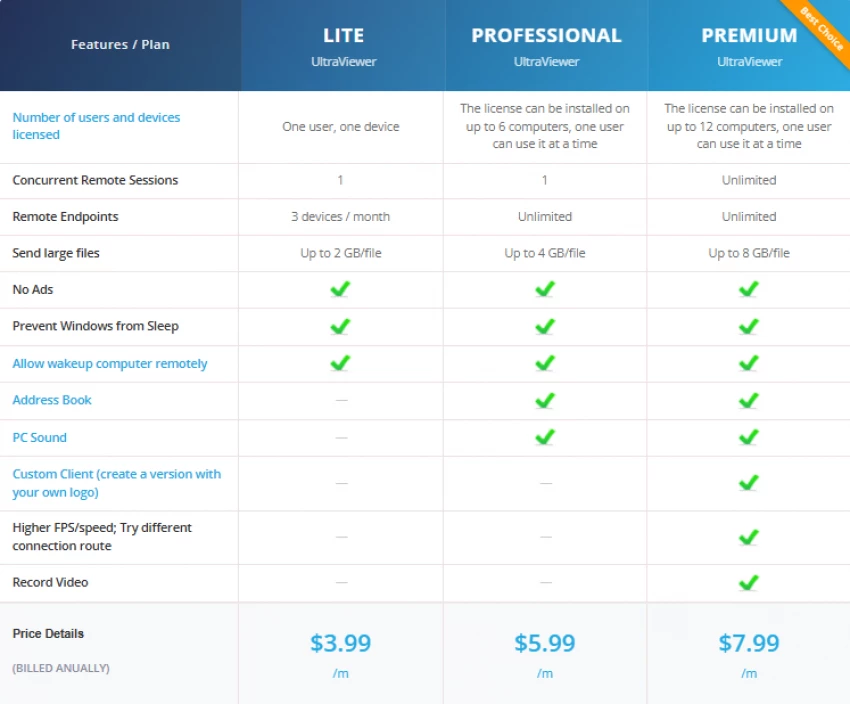
UltraViewer’s pricing model is one of its strongest differentiators.
| Tier | Typical Use | Cost Efficiency |
| Free | Personal or rare support | Extremely high |
| Lite | Solo technician | Excellent |
| Professional | Daily support work | Very high |
| Premium | Branding & recording | Still low |
Compared to mainstream competitors charging 10× more, UltraViewer’s pricing reflects a volume-friendly, SMB-first philosophy.
UltraViewer is legitimate software that is often misused through social engineering.
Built-In Security Controls
Why It Appears in Scam Reports
This leads to the common, but incorrect, question:
Is UltraViewer unsafe? → see {#ultraviewer-safety}
The risk lies in who you connect with, not what you use.
When I look at UltraViewer’s ratings across platforms, I don’t see a contradiction, I see two completely different audiences reviewing two very different experiences.
On technical review platforms like SourceForge and SoftwareSuggest, users are reviewing the software itself. These are people who intentionally installed UltraViewer to solve a problem. Their feedback focuses on connection speed, stability, ease of use, and pricing. In that context, UltraViewer scores well because it does exactly what those users expect it to do.
On consumer platforms like Trustpilot, the situation is very different. Many reviewers there never chose UltraViewer. They encountered it during a tech-support scam, where someone pressured them into installing the software. Their negative experience is real, but it’s rooted in deception by a third party, not in UltraViewer malfunctioning or behaving maliciously.
I’ve seen this same cycle repeat with AnyDesk and TeamViewer during peak scam waves. As soon as scammers shift tools, ratings follow the abuse pattern. The software changes very little; the social engineering context changes everything.
That’s why I don’t treat ratings as absolute truth. I ask why someone is reviewing before I ask how many stars they gave. In UltraViewer’s case, understanding the motivation behind reviews tells me far more about real-world safety and usability than the average score alone.
I don’t see UltraViewer as a tool that’s trying to “beat” competitors feature by feature. Its competitive advantage is much narrower, and more intentional. UltraViewer doesn’t compete on ecosystem breadth. It competes on how fast I can start helping someone and how little it costs me to do so.
When I compare UltraViewer with AnyDesk, the trade-off is clear. UltraViewer wins decisively on price and ease of onboarding. I don’t have to explain accounts, permissions, or device registration to a non-technical user. However, AnyDesk pulls ahead the moment I need consistent performance across macOS, Linux, mobile devices, or managed environments. UltraViewer is the cheaper, simpler choice; AnyDesk is the broader one.
Against TeamViewer, the contrast is even sharper. UltraViewer feels lighter and more straightforward, especially for one-off support sessions. TeamViewer, on the other hand, is built for organizations that need centralized management, detailed logging, compliance tooling, and unattended access at scale. I see UltraViewer as the right tool for individuals and small teams, while TeamViewer makes sense only when enterprise requirements justify the cost and complexity.
When I compare UltraViewer with Chrome Remote Desktop, the decision usually comes down to intent. Chrome Remote Desktop integrates beautifully with the Google ecosystem and works well for personal device access. But it lacks many of the practical support features I rely on, like integrated chat, structured file transfer, and session control. UltraViewer offers more hands-on support functionality, even if it doesn’t benefit from Google’s seamless account-based experience.
In short, I position UltraViewer as a purpose-built support tool rather than a universal remote-access platform. If my priority is quick, affordable, Windows-based assistance, UltraViewer fits naturally. If my priority shifts toward cross-platform reach, enterprise governance, or ecosystem integration, that’s where its competitors start to make more sense.
| Dimension | Score |
| Ease of Use | 9.0 / 10 |
| Connection Stability | 8.5 / 10 |
| Pricing Value | 9.5 / 10 |
| Security Design | 7.8 / 10 |
| Cross-Platform Support | 5.5 / 10 |
| UI Modernity | 6.0 / 10 |
Overall Score: 8.0 / 10
After evaluating UltraViewer beyond feature checklists and ratings, my conclusion is clear: UltraViewer is a legitimate, practical remote-support tool that succeeds by staying simple, but only within the boundaries it was designed for.
I trust UltraViewer in Windows-only, real-time support scenarios where the person on the other end needs to see everything I’m doing and retain the ability to interrupt or disconnect at any moment. That transparency is not accidental, it’s baked into how UltraViewer handles sessions, passwords, and visibility.
Where UltraViewer struggles is not performance or pricing, but context. Its name appears frequently in scam discussions because it is easy to misuse, not because it is technically unsafe. In my view, that distinction matters. The same pattern exists with AnyDesk and TeamViewer, yet UltraViewer often takes disproportionate blame due to its free availability.
I would personally recommend UltraViewer to:
I would not recommend it for:
If you understand those boundaries and use it responsibly, UltraViewer remains quietly effective in 2026, not flashy, not over-engineered, but reliable where it counts.
My final rating:
8.0 / 10 for Windows-centric remote support
6.0 / 10 as a universal remote-access platform
Be the first to post comment!

There’s a very specific frustration that most developers go through at some poin...
Sakshi Dhingra1 week ago

At first, it doesn’t feel like a tool.It feels like a shortcut you weren’t suppo...
Sakshi Dhingra2 weeks ago
As a business leader or marketing professional, the constant challenge has alway...
Sakshi Dhingra2 weeks ago
AI avatar video tools have quickly become one of the fastest-growing categories...
Sakshi Dhingra2 weeks ago

As a content creator, managing a diverse range of video content is a daily chall...
Sakshi Dhingra3 weeks ago

The first time I realized something was wrong with my content was late at night...
Sakshi Dhingra3 weeks ago