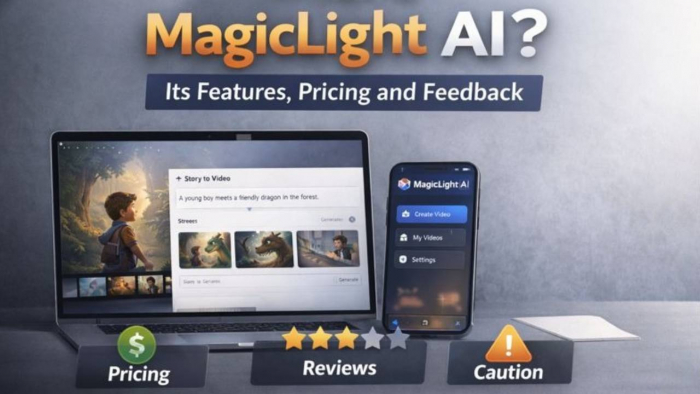
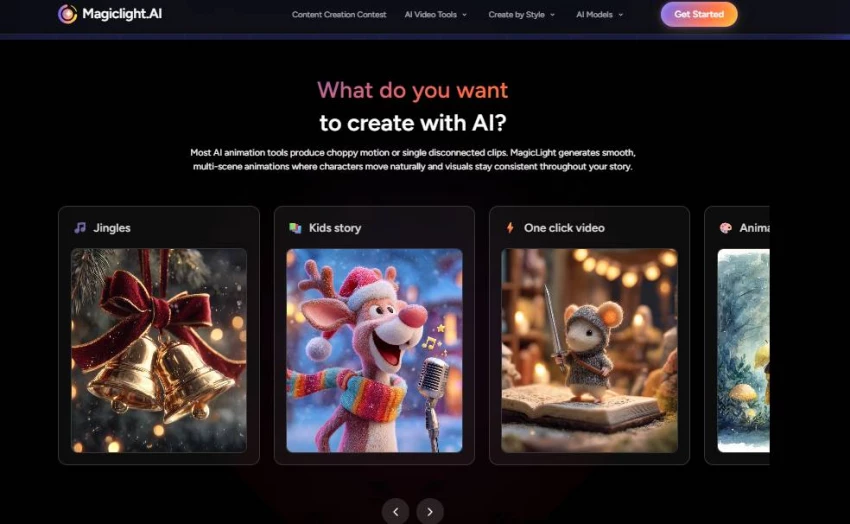
MagicLight AI caught my attention because it promises something most AI video generators still avoid: a complete story rather than a collection of disconnected five-second clips.
The platform says it can take an idea or script, divide it into scenes, design recurring characters, add voices and subtitles, and turn the result into a video lasting as long as 50 minutes. That sounds particularly attractive for children’s story channels, educational videos, animated explainers, faceless YouTube creators, and anyone trying to produce a recurring series without learning traditional animation software.
Once I looked beyond the headline claims, however, the decision became less about the number of available features and more about three practical questions:
Can the characters remain recognisable after several scenes? How many usable minutes do the included credits really produce? And what happens when a paid generation fails?
Those questions matter because MagicLight has an ambitious product idea, but its pricing information, app disclosures, and user feedback do not always tell the same story.
Editorial testing disclosure: For this update, I went through MagicLight’s live public dashboard, creation categories, current pricing page, mobile listings, Terms, Privacy Policy, and recent independent reviews. I did not purchase a paid plan or complete a paid 50-minute render. Output-quality observations below are therefore labelled as vendor claims or user-reported experiences rather than presented as personal generation results.
MagicLight AI at a glance
Area
Practical finding
Main purpose
Turning scripts, ideas, stories, images, or music into multi-scene videos
Strongest use case
Character-led stories, simple animations and faceless narrative videos
Maximum advertised length
Up to 50 minutes on the web; mobile descriptions sometimes state 30 minutes
Free access
Available, but the exact free allowance is not consistently explained
Paid starting price
$12 monthly or an advertised effective $6 monthly with annual billing
Export
Paid plans advertise 1080p, no watermark and commercial usage rights
Main advantage
Script, storyboard, character, voice and export tools in one workflow
Main concern
Credit consumption, regeneration costs, support complaints and conflicting plan details
Overall position
Worth testing for experimental story content, but not yet a safe blind purchase for client work
What MagicLight AI Claims to Do vs What It Actually Does?
Here’s a clear comparison based on official messaging vs reported user experience:
Claim
Actual Reported Behavior
Turns text into cinematic videos up to 50 minutes long.
Users do get long videos but often encounter inconsistent quality and credits exhaustion before finishing large projects.
Characters stay consistent across scenes.
Many users report continuity issues, e.g., characters changing appearance.
Voiceovers & lip sync are professional.
Voice quality and lip sync are often criticized as limited or low-quality.
Free trial to test features.
True, but free credits are limited and depleted quickly.
Commercial rights included
Mixed user satisfaction — some feel output isn’t usable for professional work.
Broad style library (Disney, Pixar, anime).
Officially available, but quality of outputs varies widely. User reviews note major inconsistencies.
How MagicLight AI Works
MagicLight AI’s workflow is cloud-based and roughly follows these steps:
Input: You type a description, script, or story idea.
AI Planning: The AI breaks the text into scenes and creates a storyboard (scene order, visuals, characters).
Visual Generation: Based on your description and selected style, the system generates corresponding visuals or animations.
Audio Integration: The tool adds voiceovers and lip sync based on script dialogue.
Editing & Export: You preview the video in-app, refine elements, and export a finished video file.
There’s no public technical whitepaper detailing the underlying models . So “how magic happens under the hood” in AI terms is not documented publicly.
Key Features Explained
Story and script generation
MagicLight can begin with either a complete script or a short idea. Its official Story to Video page says the system can expand an idea into scenes, characters and dialogue before converting the script into a storyboard. Users can then shorten, expand or revise sections.
This is useful when the objective is speed rather than perfect creative control. A teacher could enter a topic such as the water cycle, while a story-channel creator could provide a short plot and let the platform build an initial structure.
The weakness of heavily automated script creation is that the result may become more generic than the original idea. Recent mobile reviews include complaints that simple stories were rewritten in an unnecessarily complicated way or no longer matched the intended audience. These are individual user reports rather than controlled tests, but they reinforce the need to review the script before paying to animate it.
My practical recommendation is to bring a prepared script into MagicLight instead of asking the tool to invent the entire story. A clean script gives you a clearer reference when judging whether the generated storyboard follows your instructions.
Storyboard editing
The storyboard stage is potentially more valuable than the final one-click generation.
MagicLight says users can rearrange shots, replace visuals, change characters and refine individual scene descriptions before export. This is where creators should detect continuity problems while they are still cheaper to correct.
A strong review should not simply say that the storyboard editor exists. It should test whether:
Test
Evidence to capture
Scene order
Did the visual sequence follow the original script?
Character identity
Did the face, age, clothing and hairstyle remain stable?
Prompt editing
Did a revised scene prompt correct the specific mistake?
Credit behaviour
Was the estimated cost shown before regeneration?
Version recovery
Could the user return to an earlier storyboard version?
Export readiness
Were subtitles, narration and aspect ratio correct before rendering?
This table should be completed with actual GeniusFirms testing screenshots before the page claims a full hands-on output test.
Character consistency
Recurring characters are central to MagicLight’s positioning. The official product pages say a saved character can be reused across scenes and future videos with the same general appearance.
Public reviews are much less consistent. Some users report that character quality has improved, while others describe changes in clothing, hair, facial details or anatomy between scenes. Trustpilot’s current review summary also identifies character inconsistency and anatomical errors as common complaints.
This does not mean the feature never works. It means “consistent character” should be treated as a goal rather than a guaranteed result.
A useful test would use one character across four deliberately different scenes:
Standing inside a kitchen
Walking through a park
Speaking in a classroom
Appearing at night under different lighting
The reviewer should compare the face, hairstyle, clothing colour, approximate age and body proportions in every frame.
Long-form video generation
MagicLight’s web pages repeatedly advertise videos lasting up to 50 minutes. Its Android and Apple listings, however, commonly describe subscription-based videos of up to 30 minutes.
That does not necessarily mean one claim is false. The allowance may differ by workflow, platform, model, subscription or app version. But the difference should be explained rather than combining “30–50 minutes” into one unqualified statement.
More importantly, an advertised maximum duration does not tell us whether a user has enough credits to create, revise and successfully export a polished video of that length.
For a serious long-form project, I would divide the production into shorter chapters. A five-minute section is easier to review and regenerate than a single 30-minute project with one continuity error near the end.
Voices, subtitles and lip-sync
MagicLight includes voice generation, multilingual narration, subtitles, voice cloning and lip-sync. Its official story workflow states that narration is available in more than 30 languages, including English, Spanish and Hindi.
These tools reduce the need to move between separate voice, caption and editing platforms. That is a real workflow advantage.
The risk is that an all-in-one feature may not equal a specialist tool in every category. User feedback includes reports of audio errors, failed downloads and poor synchronisation after credits had already been spent. The Apple listing contains an example in which a user reported spending 2,880 credits before encountering an unsupported audio/video error.
Creators should therefore test one short dialogue scene before building an entire narrated project.
Pricing Model
MagicLight currently promotes four paid levels alongside its free plan. The prices below use the upper plan cards on the official pricing page.
Plan
Monthly billing
Effective monthly price with annual billing
Credits shown on main plan card
Advertised one-click story allowance
Free
$0
$0
Not clearly listed on the pricing card
Limited testing
Standard
$12
$6
7,000 per month
Up to 10
Pro
$35
$17.50
45,000 per month
Up to 80
Ultra
$90
$45
150,000 per month
Up to 250
Ultimate
$150
$75
280,000 per month
Up to 370
The paid cards also advertise 1080p exports, no watermark, commercial usage rights, character and image regeneration, and support for projects lasting up to 50 minutes.
User Reviews & Sentiment Analysis
MagicLight’s reputation depends heavily on where the feedback is collected.
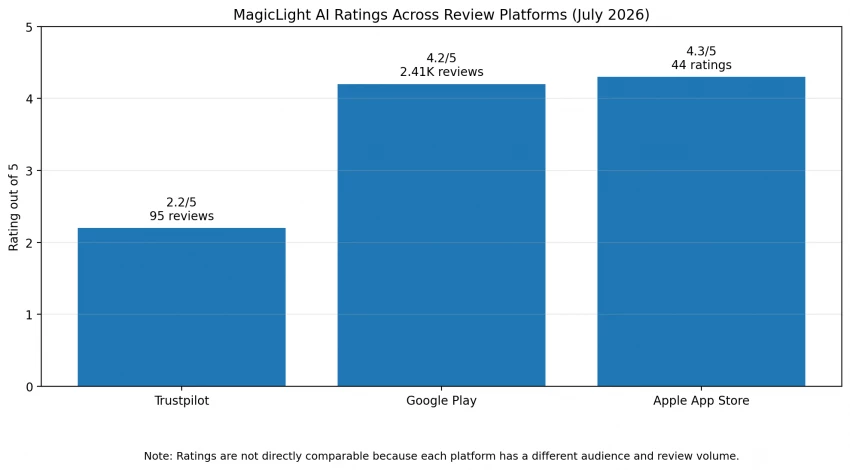
As checked in July 2026, Trustpilot displayed 2.2/5 from 95 reviews. Google Play showed approximately 4.2/5 from 2.41K reviews, while Apple’s Indian App Store listing showed 4.3/5 from 44 ratings. These scores should not be treated as directly comparable because each platform has a different audience, moderation process, sample size and product version.
Platform
Displayed rating
Review volume
Recurring themes visible in recent feedback
Trustpilot
2.2/5
95
Credit use, inconsistency, support and subscription complaints
Google Play
4.2/5
Around 2.41K
Convenient mobile workflow, but recent complaints about cost, speed and accuracy
Apple App Store
4.3/5
44 ratings
Positive general ratings alongside payment, activation and export complaints
Positive reviews praise the underlying concept, visual direction, convenient templates and time saved when the workflow succeeds. Negative reviews tend to focus on prompt accuracy, character drift, repeated credit costs, payment problems and slow or unclear support.
Comparison With Alternatives
MagicLight should not be compared with every AI video platform as though they solve the same problem.
Tool
Main workflow
Better suited to
Main trade-off
MagicLight AI
Script or story into a multi-scene character video
Animated stories, recurring characters and faceless narrative channels
Credit predictability and output consistency need careful testing
InVideo AI
Prompt into script, stock or generated visuals, voice, subtitles and transitions
Marketing, explainers and quick faceless videos
Less focused on maintaining one animated character throughout a long story
Pictory
Scripts, articles, URLs or long content into structured videos
Blog repurposing, training and informational videos
More media-and-narration focused than cinematic character storytelling
HeyGen
Scripts delivered by realistic AI avatars
Training, sales, onboarding and presenter-led videos
Not designed primarily for animated multi-character story worlds
InVideo automatically generates scripts, selects stock or generated media and adds voiceovers, subtitles, music and transitions. Pictory concentrates on turning scripts, articles and other source material into structured videos. HeyGen is more specialised in realistic avatar-led presentation videos.
MagicLight remains the more interesting option when the main requirement is a recurring animated story. HeyGen is the clearer fit for a presenter, Pictory for repurposing written content, and InVideo for broader marketing or faceless-video automation.
Practical pros and limitations
Strengths
Limitations
Combines script, scenes, characters, voices and export
Credit cost can become difficult to predict after retries
More story-focused than basic clip generators
Character and prompt consistency complaints remain common
Guided workflows for several content formats
Official pricing details currently conflict
Web and mobile availability
Web and mobile duration claims differ
Free entry point for basic exploration
Free allowances are not consistently described
Paid commercial-use allowance
Terms generally make paid fees non-refundable
Storyboard editing before final export
Support and subscription complaints appear in independent reviews
Final Verdict
MagicLight AI is not just another AI clip generator. Its effort to combine writing, storyboarding, recurring characters, voices, subtitles and longer video production gives it a clear identity.
The concept is strongest for independent creators who want to turn written stories into visual content without assembling five different tools. The public interface is approachable, the creation modes are easy to understand, and long-form story support remains a meaningful differentiator.
The hesitation comes from the buying experience surrounding the product. The official pricing page contains conflicting credit allowances, the web and mobile pages do not fully agree on maximum duration, and recent customer reviews repeatedly raise concerns about costly regenerations, prompt accuracy, billing and support.
My practical conclusion is to treat MagicLight as a tool to test with one small, non-critical project, not as a platform to purchase annually before measuring the real credit cost.
Begin with a short script, use one recurring character, record the credits before and after every generation, test one correction, export the result and contact support with a genuine question. That small exercise will reveal more about the platform’s value than any advertised maximum number of videos.