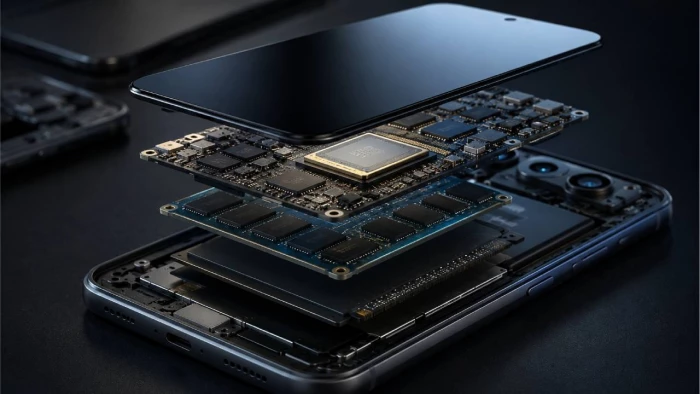
Two Android phones can have the same amount of RAM, similar storage capacity, and even the same screen refresh rate—and still feel completely different in everyday use.
One opens apps instantly, keeps several apps ready in the background, scrolls smoothly, and handles games without turning into a pocket heater. The other may have an impressive-looking specification sheet but still feel sluggish after a few hours of use.
So, what actually makes an Android phone fast?
It is not one specification.
Real-world performance comes from the interaction between the processor, GPU, RAM, storage, software optimization, thermal design, display system, and increasingly, dedicated AI hardware.
RAM matters, but more RAM is not automatically better. A powerful chipset can be limited by poor thermal management. Fast storage can improve app loading but cannot compensate for a weak processor. And excellent hardware can still feel slow if the software is poorly optimized.
Here is how the pieces fit together.
A useful way to think about smartphone performance is as a chain:
CPU → RAM → storage → GPU → thermal system → software
The chain is not strictly linear, because these components constantly interact.
The CPU handles general-purpose computation. The GPU handles graphics workloads. RAM keeps active data close to the processor. Storage holds apps and files and supplies data when it is not already in memory. The thermal system determines how long the hardware can sustain its performance. Android and the manufacturer's software layer decide how efficiently the whole system uses those resources.
That is why comparing phones using only one specification can be misleading.
A phone with 16GB of RAM is not automatically faster than an 8GB model. Likewise, a higher CPU clock speed does not necessarily mean better sustained performance.
When people talk about a phone's "processor," they are usually talking about the system-on-chip (SoC).
A modern Android SoC is much more than a CPU. It can contain:
● CPU cores for general computing
● GPU cores for graphics
● NPU or AI accelerators for machine-learning workloads
● Image signal processors for photography
● Video encode and decode hardware
● Memory controllers
● Connectivity components
● Security hardware
The CPU is responsible for tasks such as launching applications, processing instructions, handling system operations, and running many parts of an app.
The GPU becomes critical when the workload involves graphics, including 3D gaming, high-resolution interfaces, image processing, and some computational workloads.
The NPU is becoming increasingly important because more AI processing is moving directly onto smartphones. Modern phones can perform tasks such as image enhancement, speech processing, translation, summarization, and other AI features locally instead of sending every operation to a cloud server.
For example, Qualcomm's Snapdragon 8 Elite Gen 5 platform combines its Oryon CPU, Adreno GPU, and Hexagon NPU to target CPU, graphics, and on-device AI workloads.
That is why the phrase "phone processor" can undersell what is actually happening inside a modern smartphone.
A processor's advertised clock speed is not enough to predict real performance.
Architecture, core design, cache, memory bandwidth, power efficiency, software scheduling, and sustained thermal behavior all matter.
Two chips running at similar frequencies can therefore deliver very different results.
For everyday users, the practical question is not:
"Which phone has the highest GHz number?"
It is:
"Which phone can complete my typical workloads quickly and consistently?"
That is a much better performance question.
RAM is where Android keeps data that needs fast access while apps and system processes are running.
Android's memory-management system intentionally uses available RAM to keep processes cached so that users can return to recently used apps without starting everything from scratch. When memory pressure increases, Android can reclaim memory and terminate cached processes.
That explains an important distinction:
RAM primarily affects multitasking and continuity, not raw processor speed.
Suppose you open:
1. Chrome
2. Google Maps
3. WhatsApp
4. YouTube
5. A camera app
6. A game
If the phone has enough available memory, Android can keep more of those workloads resident. If memory becomes constrained, background processes may be removed and apps may need to reload.
The result is experienced as:
● More app reloads
● Slower switching
● Lost app state
● Longer waits when returning to demanding apps
This is why RAM can make a phone feel faster even when the CPU has not changed.
There is no universal number because memory requirements depend on the workload, operating system, manufacturer software, and applications.
For a deeper breakdown of the practical differences between 6GB, 8GB, 12GB, and 16GB configurations, see [how much RAM an Android phone actually needs].
The key takeaway is simple:
Buy enough RAM for your workload, not the biggest number on the specification sheet.
More RAM only becomes useful when the phone's workload can actually take advantage of it.
RAM gets most of the attention, but storage also has a major effect on perceived performance.
Your phone's storage contains:
● The Android operating system
● Installed applications
● Photos and videos
● App data
● Cached files
● Downloaded content
● System files
When an application needs information that is not already available in RAM, the system may need to retrieve it from storage.
That makes storage performance important for operations such as:
● App installation
● App loading
● Large file transfers
● Game loading
● Photo and video processing
● System updates
● Moving large amounts of data
Android phones commonly use Universal Flash Storage, or UFS.
The generation of UFS can make a significant difference. Samsung describes UFS 4.0 as a flagship smartphone storage technology and says it offers roughly twice the speed of its previous generation while improving power efficiency by 45%.
The exact real-world improvement varies by device, workload, controller, firmware, and other hardware, so headline sequential-speed numbers should not be treated as a direct prediction of app performance.
Still, the underlying principle is important:
Faster storage reduces the time required to move data between persistent storage and the rest of the system.
That becomes particularly useful as applications and games become larger.
This is one of the most common smartphone-spec misunderstandings.
A phone advertised as:
12GB RAM + 256GB storage
does not have 268GB of "memory" in the same sense.
RAM and storage perform different jobs.
| Component | Primary job | Speed | Data retained after shutdown? |
| RAM | Holds active data and processes | Very fast | No |
| Storage | Holds apps and files | Slower than RAM | Yes |
| zRAM | Compressed memory used during memory pressure | Slower than normal RAM | No |
Android itself distinguishes RAM, zRAM, and storage as different memory resources. CPU and GPU access the device's RAM, while storage holds persistent operating-system and application data.
This is also why "virtual RAM" features should not be treated as a direct replacement for physical RAM.
When Android uses compressed memory or moves less-active data through memory-management mechanisms, it is dealing with a constrained resource—not magically adding physical LPDDR memory.
For normal messaging and web browsing, the CPU usually receives more attention.
Gaming changes the equation.
Modern mobile games can place heavy demands on:
● GPU compute
● Graphics memory bandwidth
● CPU scheduling
● RAM
● Storage
● Display refresh rate
● Thermal management
A phone can have 16GB of RAM and still deliver poor gaming performance if its GPU is weak or the system cannot sustain its performance under heat.
Android's performance tools can even analyze GPU memory-bandwidth behavior and fetch stalls to identify situations where graphics workloads are waiting on memory. Android Developers notes that fetch-stall measurements above 5% can indicate inefficient memory use or poor use of cache for certain workloads.
That is a much more useful way to understand gaming performance than simply looking at RAM capacity.
A phone may deliver excellent frame rates during the first few minutes of a demanding game.
Then the chassis heats up.
To control temperature and power consumption, the system can reduce CPU or GPU performance. This is called thermal throttling.
The result can be:
● Lower average FPS
● More frame-time spikes
● Increased touch latency
● Reduced sustained performance
● A warmer phone
This is why short benchmark runs can sometimes make a phone look better than it performs during a long gaming session.
Recent 2026 testing of flagship Android hardware has also shown why sustained performance matters: a newer or differently configured chip can outperform another in certain short benchmarks while thermal behavior changes the result during extended workloads.
For gamers, sustained performance is often more important than the highest score achieved for a few minutes.
You cannot usually see thermal design in a phone's headline specification.
But it can make a huge difference.
A smartphone has a tiny physical footprint compared with a desktop computer. There is limited space for heat dissipation, while the processor, display, battery, cameras, and wireless radios can all generate heat.
Manufacturers therefore use different combinations of:
● Vapor chambers
● Graphite layers
● Thermal interface materials
● Heat spreaders
● Internal frame designs
● Software-based power management
The goal is not simply to prevent the phone from becoming hot.
It is to maintain a useful performance level without excessive power consumption or unsafe temperatures.
This produces an important distinction:
Peak performance = how fast the phone can run briefly.
Sustained performance = how fast it can continue running under a prolonged workload.
For gaming, video rendering, large file processing, and other intensive workloads, sustained performance is usually the more meaningful metric.
Hardware does not operate in isolation.
Android's runtime, system services, drivers, manufacturer interface, background processes, and individual applications all influence responsiveness.
Google's Android documentation provides a good example through Baseline Profiles.
Android Developers says Baseline Profiles can improve code execution speed by about 30% from the first launch for the relevant optimized code paths by allowing Android Runtime to precompile important code using ahead-of-time compilation.
In Google's current benchmark example, an app's measured startup time was 229ms with a Baseline Profile compared with 324.8ms without compilation in that specific test setup. That is an example rather than a universal improvement for every Android app.
The bigger lesson is more important than the individual numbers:
Software optimization can materially change how fast hardware feels.
A well-optimized app can start and respond quickly on hardware that looks ordinary on a specification sheet.
A poorly optimized app can feel sluggish on a flagship.
A phone showing only a small amount of "free RAM" is not necessarily running badly.
Android is designed to use memory efficiently rather than leaving large amounts sitting unused.
Google describes Android's approach as effectively treating unused memory as a wasted resource: the system keeps applications cached when possible and reclaims memory when resources become constrained.
When memory pressure becomes significant, Android can use mechanisms such as zRAM and ultimately terminate processes to recover resources.
So a better performance question is not:
"How much RAM is free?"
It is:
"How well does the phone maintain the apps and workloads I actually use?"
If switching between your most-used apps rarely causes reloads, the memory system is doing its job.
Smartphone performance used to be discussed mainly in terms of CPU and GPU.
That is changing.
On-device AI increasingly relies on dedicated neural-processing hardware, often called an NPU or AI accelerator.
These processors can handle workloads such as:
● Generative AI features
● Voice recognition
● Image enhancement
● Translation
● Object recognition
● Photo segmentation
● Personalization
● Camera processing
The advantage of local AI is not simply speed.
It can also reduce the amount of data that needs to be sent to a remote server and can enable features when an internet connection is unavailable.
Qualcomm's current flagship mobile platforms, for example, combine CPU, GPU, and NPU hardware specifically to support increasingly sophisticated on-device AI experiences.
That means future smartphone performance comparisons will increasingly need to ask:
How fast is the phone at AI workloads?
—not just:
How fast is its CPU?
There is another performance factor that is easy to overlook: the display.
A 120Hz display can update twice as frequently as a 60Hz display.
That does not mean every app automatically becomes twice as fast.
But higher refresh rates can make supported animations, scrolling, and touch interactions look smoother.
The important distinction is between smoothness and processing speed.
A faster display cannot fix a slow processor.
Likewise, a powerful processor cannot make a 60Hz screen behave exactly like a 120Hz panel.
The best experience comes when the system can consistently produce frames fast enough to take advantage of the display's refresh rate.
Battery specifications are another area where smartphone marketing can become confusing.
A larger battery can provide more energy capacity, but it does not automatically mean better performance.
Performance depends on:
● SoC efficiency
● Display power consumption
● Modem efficiency
● Software optimization
● Battery capacity
● Thermal behavior
● Charging and power-management systems
A highly efficient chipset can sometimes provide better endurance than a less efficient processor paired with a larger battery.
The same principle applies to performance:
Efficiency is part of performance.
A processor that delivers high performance while consuming less power gives manufacturers more flexibility to sustain workloads without generating excessive heat.
Benchmarks are useful.
They give reviewers and buyers standardized ways to compare hardware under controlled conditions.
But they are not the complete picture.
A benchmark might measure:
● Single-core CPU performance
● Multi-core CPU performance
● GPU rendering
● AI processing
● Storage speed
● Web performance
● Thermal stability
The problem comes when one score is treated as a complete representation of the phone.
For example, two phones can have similar short CPU benchmark results but behave differently after sustained workloads because of differences in cooling and power limits.
A better evaluation combines:
Short burst performance + sustained performance + real-world responsiveness + battery efficiency.
That combination tells you much more.
The right specification depends on how you use the device.
If your workload is mainly:
● Messaging
● Web browsing
● Banking
● Navigation
● Video streaming
● Social media
you do not need the most powerful chipset or maximum RAM configuration.
A balanced mid-range phone with adequate RAM, modern storage, good software support, and an efficient processor can feel excellent.
If you regularly switch between many apps, use split-screen features, keep browser tabs open, or use productivity applications, RAM becomes more important.
Look for:
● Adequate physical RAM
● Efficient memory management
● Fast storage
● Strong mid-range or flagship chipset
The goal is to reduce unnecessary app reloads.
Gaming changes the priority list.
Look closely at:
1. GPU performance
2. Sustained thermal performance
3. CPU performance
4. Display refresh rate
5. RAM
6. Storage speed
7. Battery efficiency
Do not buy a gaming phone simply because the specification sheet says "16GB RAM."
The GPU and cooling system may have a much larger impact on the actual experience.
Creators should pay attention to more than RAM.
Look for:
● ISP capability
● CPU performance
● GPU performance
● NPU capabilities
● Storage speed
● Storage capacity
● Video encoding hardware
● Sustained thermal performance
High-resolution video files can become extremely large, so storage capacity and sustained write performance also matter.
If AI features are important, examine the complete SoC rather than just the CPU.
The NPU, memory subsystem, software support, and application ecosystem all matter.
The phone needs to be capable not only of running an AI model, but of doing so efficiently enough to preserve battery life and maintain acceptable temperatures.
When comparing two phones, this framework is more useful than simply counting specifications:
| Component | What it affects | Importance |
| CPU | App processing, system responsiveness | High |
| GPU | Gaming and graphics | High for gamers |
| RAM | Multitasking and app retention | High |
| Storage | Loading and file operations | Medium to high |
| Thermal design | Sustained performance | High for heavy users |
| NPU | On-device AI | Increasingly important |
| Software | Responsiveness and optimization | Very high |
| Display | Perceived smoothness | Medium to high |
| Battery efficiency | Sustained use and endurance | High |
There is no single winner across every category.
A phone designed for gaming may prioritize GPU performance and cooling. A productivity-focused flagship may emphasize RAM, CPU performance, display quality, and software features. A budget phone may prioritize efficiency and value.
Share your thoughts about this article.
Be the first to post a comment!

A stolen password does not always look suspicious to a login system. If the user...
Deepak Mehra4 days ago

The short versionA Claude API key is created in the Claude Console at platform.c...
Harpreet Singh1 week ago

ChatGPT is owned by OpenAI, a San Francisco-based artificial intelligence compan...
Harpreet Singh2 weeks ago

Most teams already have the video. What they do not have is a way to search it....
Mighva Verma1 month ago

IoT analytics starts with a simple problem: connected devices keep sending data,...
Vesper Barnes1 month ago

Every modern enterprise now operates two workforces. The first is the employees,...
Deepak Mehra2 months ago