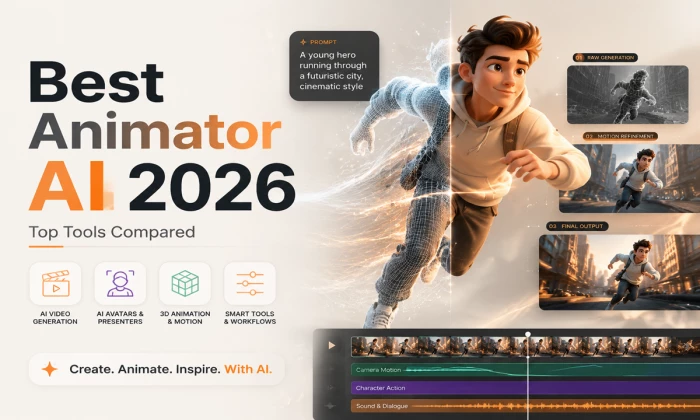
Traditional animation is brutal on time, skill and budget. A single minute of polished 2D can eat days of keyframing, and 3D is worse. That is exactly the wall AI animation tools have spent the last two years demolishing.
Type a sentence and get a moving shot. Feed in a script and get a presenter. Set two poses and let the physics engine fill the motion. The catch in 2026 is not whether these tools work, it is that there are too many good ones, and the honest answer to which is best depends entirely on what you are trying to make.
The short answer There is no single best animator AI, there is a best one for your job. For cinematic, high-realism shots, Runway Gen-4.5 and Google Veo 3.1 lead. For fast social clips, Pika 2.5. For business explainers, Vyond. For presenter and training video, Synthesia or HeyGen. And if you want power for free, Blender is unmatched. Judge on speed, realism, control, cost and ease of use. |
One framing that saves a lot of confusion: animator AI tools split into two families that barely compete with each other. On one side sit the generative video models that hallucinate motion from a prompt or a still image. On the other sit the template and avatar tools that give you reusable characters, scenes and timelines. The first feels cinematic and experimental; the second feels structured and repeatable. Pick the wrong family and no amount of budget will make the tool fit your workflow.
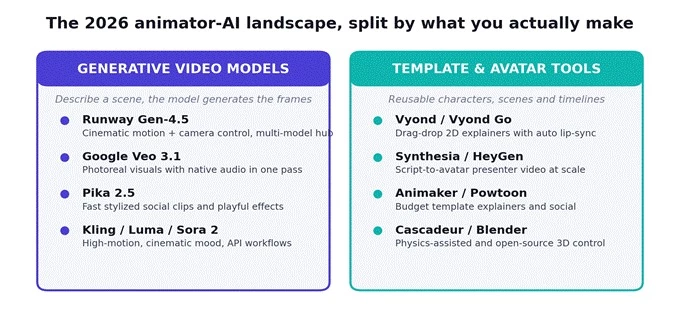
The two families of animator AI: generative models that invent motion, and template/avatar tools that assemble it.
Before the deep dives, here is the shortlist most creators and teams actually choose between in 2026, with the one-line reason each earns a place. Prices are approximate entry points and shift constantly, so treat them as a starting map rather than a quote.
| Tool | Type | Entry price | Best at |
| Runway Gen-4.5 | Generative video | ~$12/mo | Cinematic motion, camera control, multi-model hub |
| Google Veo 3.1 | Generative video | ~$20/mo* | Photoreal visuals with native audio in one pass |
| Pika 2.5 | Generative video | ~$8/mo | Fast, stylized short clips for social feeds |
| Vyond / Vyond Go | Template 2D | ~$49/mo | Drag-drop explainers with auto lip-sync |
| Synthesia | AI avatar | ~$18-29/mo | Script-to-presenter training video at scale |
| HeyGen | AI avatar | ~$24/mo | Natural avatars, huge language and voice range |
| Cascadeur | 3D, AI-assisted | Free / ~$8+ | Physics-accurate character motion for games |
| Blender | 2D & 3D suite | Free | Full open-source pipeline, endlessly extensible |
*Veo is typically reached through a Google AI subscription (around $20/month for the Pro tier) or per-second API pricing, rather than a standalone animation plan. More on that below.
Two things the older guides get wrong First, the model names have moved. Runway is on Gen-4.5, not Gen-3; Veo is on 3.1, not 2; Pika is on 2.5. Anything citing the older versions is out of date. Second, OpenAI's Sora 2 consumer app was discontinued in April 2026 and is now API-only with a planned sunset, so it is no longer a simple pick-and-use choice for most creators. The field moves fast, and this guide is a mid-2026 snapshot. |
Strip away the marketing and a handful of technical capabilities separate a tool you will keep from one you will abandon after the trial. Here is what to weigh, and why each matters in practice.
Text-to-motion. How well the tool turns a written prompt into coherent movement. The generative models own this; template tools mostly do not attempt it.
Character consistency. Whether a face, product or prop survives from one shot to the next. This is where most tools still stumble, and where the good ones justify their price.
Native audio sync. Whether sound and lip movement come out of the same pass. Veo 3.1 and the avatar tools do this natively; many generative models leave you to add audio separately.
Multi-shot output. Whether you can build a sequence with continuity rather than a single isolated clip. Critical for narrative, less so for a one-off social hit.
Control depth. How much say you have over timing, camera and choreography. Generative tools trade precision for speed; timeline tools like Blender trade speed for precision.
Cost and ease of use. The two that quietly decide everything. A brilliant tool you cannot afford or cannot learn is not the best tool for you.
No single tool maxes out every row, and that is the whole point. The matrix below shows how the strengths pull in different directions, which is exactly why the right pick depends on the job in front of you.
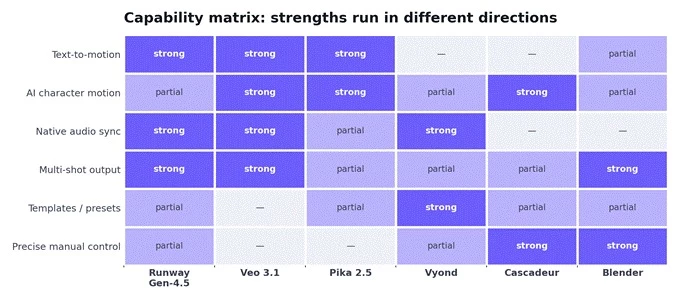
Capability matrix across six leading tools. Strengths cluster differently, so there is no universal winner.
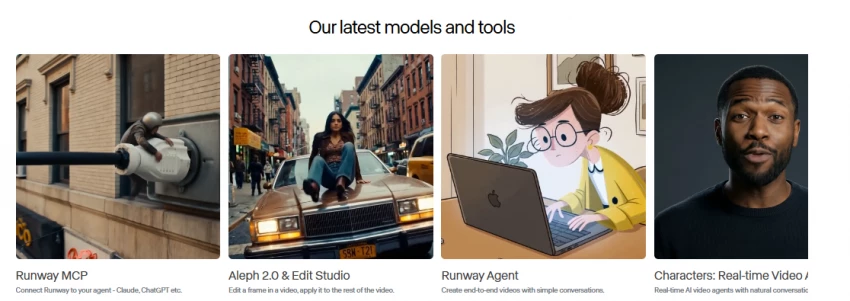
Runway is the tool most working creators reach for when output quality matters, and Gen-4.5 is its current flagship. Its edge is control: motion brush, camera direction and a polished editing interface that make it the most productive option per finished second even when it is not the cheapest. Quietly, it has also become a multi-model marketplace, bundling Google Veo 3.1 and Kling inside one subscription, so a single Runway plan can replace several separate ones.
On price, plans run from a Free tier of 125 one-time credits (a demo, nothing more) to Standard at roughly $12 a month billed annually for 625 monthly credits, Pro around $28, and higher tiers for heavy iteration. The credit math is the thing to watch: on Standard, 625 credits is only about 25 seconds of top-model video, so the winning habit is to draft on the cheap Turbo model and reserve the flagship for final renders.
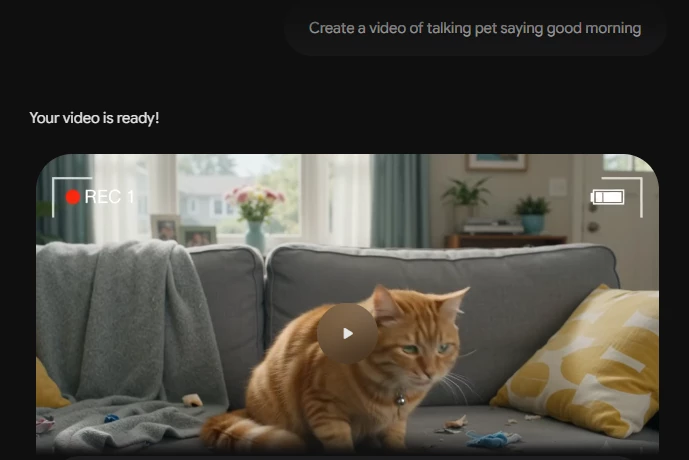
If your priority is photoreal visuals with audio that arrives already synced, Veo 3.1 is the benchmark. It generates dialogue and ambient sound in the same pass as the picture, which removes a whole editing step, and it excels at realistic marketing concepts and image-to-video work. Access is the wrinkle: rather than a standalone animation plan, you reach Veo through a Google AI subscription (roughly $20 a month for the Pro tier, more for Ultra) or through per-second API pricing on Vertex AI, where new accounts get a sizeable free credit allowance to test with.

Pika is the budget favorite for social-first creators, and it leans into that identity. Its branded tools, effects like melt and explode, object swaps, and audio-driven lip-sync, are built for the fast what-if loop that feeds Reels, TikTok and Shorts. A free tier offers a small monthly credit allowance for testing, and paid plans start low, around $8 a month on annual billing, climbing with resolution and volume. It is excellent for stylized short clips and less suited to long-form or strictly cinematic narrative work.
For workplace training, explainers and animated presentations, Vyond is the tool teams keep buying. It is a template-driven 2D system with pre-built characters and scenes, seamless AI voiceover, and lip-sync convincing enough for internal comms or client pitches, and Vyond Go adds prompt-to-video speed on top. It is pricier than most consumer tools and has no permanent free plan, only a limited trial, but for teams making videos regularly the time saved pays for it.
When the deliverable is a talking presenter, a training module, localization, these two lead, and they are close rivals. Synthesia is the enterprise benchmark with structured editing, a large avatar library and strong compliance credentials; entry plans land around $18 to $29 a month with tight minute caps, and custom avatars carry a steep annual add-on. HeyGen counters with more natural avatars, a huge language and voice range, and more transparent per-seat pricing from roughly $24 a month. Pick Synthesia for polished corporate structure, HeyGen for avatar naturalness and language breadth.
The two picks for people who want to keep their hands on the craft. Cascadeur is the odd one out on this list: instead of generating video from text, it helps 3D animators set key poses while its AI calculates the physics, balance, momentum, weight transfer, in seconds rather than hours. It is free for basic use with affordable Indie and Pro tiers, and it integrates with Unreal, Unity, Blender and Maya. Blender, meanwhile, is the open-source powerhouse: a complete 2D and 3D pipeline, free for everyone, endlessly extensible with AI-assisted plugins. Both demand real skill, and both reward it with control no generative tool can match.
Here is the whole guide compressed into a single decision. Find the row that matches what you are making, and start with the tool beside it.
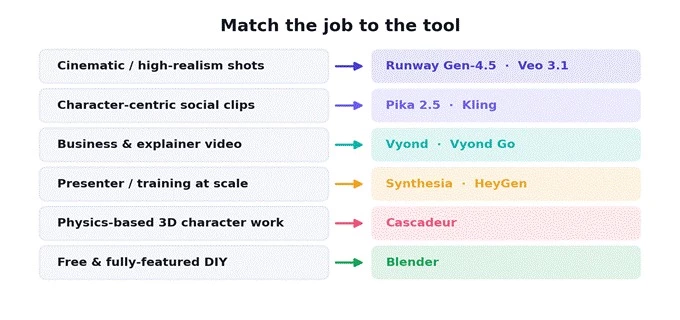
The fastest correct choice comes from matching the tool to the downstream deliverable.
| Use case | Best pick | Why |
| Cinematic, high-realism | Runway Gen-4.5 / Veo 3.1 | Motion coherence, camera control, photoreal audio |
| Character-centric shorts | Pika 2.5 | Fast, stylized, feed-native effects and lip-sync |
| Explainer & business | Vyond | Templates plus AI voiceover and auto lip-sync |
| Presenter / training | Synthesia / HeyGen | Script-to-avatar at scale, many languages |
| Physics-based 3D | Cascadeur | AI handles the physics, you keep creative control |
| Free & full-featured | Blender | Open-source 2D/3D suite at zero cost |
Cost is where the two families diverge most sharply. Open-source tools are free but demand skill; generative models are cheap to start but meter you by credits; avatar and business tools cost more but remove the learning curve. The chart below lines up entry prices from free to premium, and flags which tools give you a real free tier versus a trial only.
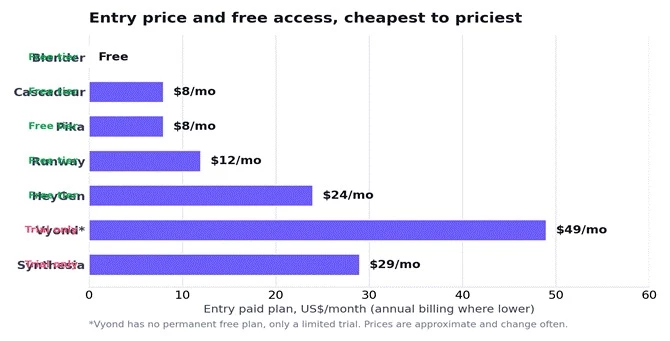
Entry pricing across the field. Open-source is free; generative models start cheap; business tools sit at the top.
Almost every paid tool advertises a free tier, but it is worth being clear-eyed about what those actually are. Across the board they function as demos, enough to judge whether the output suits you, not enough to build a workflow around. Watermarks, tiny credit allowances and capped resolution are the norm.
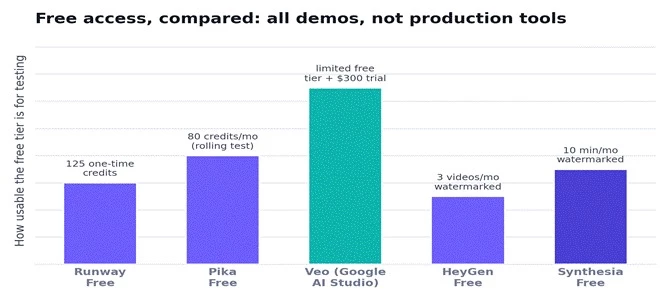
Free tiers compared. Every one is a testing sample rather than a production allowance.
| Tool | Free offering | What it is really for |
| Runway | 125 one-time credits | Testing output quality, then upgrading |
| Pika | ~80 credits/month | Light experimentation with effects |
| Veo | Free tier + $300 trial | Prototyping via Google AI Studio / new Cloud credit |
| Synthesia | ~10 min/month | A quick avatar test, watermarked |
| HeyGen | ~3 videos/month | Trying an avatar before paying |
| Blender | Everything, free | Actual production, forever |
No tool here is without friction. Here is the balanced view of what each does well and where it will frustrate you.
| Tool | Strengths | Trade-offs |
| Runway Gen-4.5 | Best-in-class control and editing; multi-model hub | Credits burn fast; queue times at busy periods |
| Veo 3.1 | Photoreal output with native synced audio | Access tied to Google subs or API pricing |
| Pika 2.5 | Cheap, fast, playful effects for social | Weaker for long or cinematic narrative work |
| Vyond | Easiest path to business explainers | Pricey; no permanent free plan; less raw control |
| Synthesia / HeyGen | Presenter video at scale, many languages | Minute caps and per-seat costs add up |
| Cascadeur | Physics realism with full creative control | Steep learning curve; needs 3D knowledge |
| Blender | Fully free and immensely powerful | Steepest learning curve; not AI by default |
The pace is the story. Major models ship new versions every few months, and each cycle narrows the gap between AI output and hand-crafted animation. A few threads are worth watching.
Consolidation into hubs. Runway bundling Veo and Kling is a sign of things to come: platforms that let you switch models per shot from one subscription rather than juggling several.
Native audio as standard. Veo 3.1 proved that sound and picture from one pass is a genuine workflow saver, and rivals are racing to match it.
Physics and motion control maturing. Tools like Cascadeur and the motion-control features in newer models are bringing frame-interpolation and physically accurate movement into reach without deep expertise.
Prices under pressure. As Google, open-source models and new entrants compete, per-second costs keep falling, which is good news for everyone downstream.
For background on the underlying research, the academic surveys of motion synthesis and character animation are a useful primer, and general roundups like Wikipedia's list of animation software help place these AI tools in the wider landscape.
So, what is the best animator AI? The most useful answer is a question back: what are you making? Reach for Runway Gen-4.5 or Veo 3.1 when you need cinematic realism, Pika 2.5 for quick stylized social clips, Vyond for explainers, Synthesia or HeyGen for presenter video, Cascadeur for physics-based 3D, and Blender when you want serious power for nothing.
The smart move in a market this fast is not to marry one tool. Start with the free tiers, judge the output on your own project, and be willing to switch as the models leapfrog each other every few months. Whatever you pick today, something better is likely a quarter away, and that is the best problem this field has ever had.
Share your thoughts about this article.
Be the first to post a comment!

The same tool can be a 4.7 on one site and a 3.9 on another. Here is what is rea...
Nitin1 month ago

Here is the number worth pinning above your budget: in Gartner Digital Markets r...
Deepak Mehra1 month ago

What Artlist AI is in 2026Artlist began as a royalty-free music library. By 2026...
Deepak Mehra1 month ago

Most AI tool failures do not announce themselves. There is no crash, no angry em...
Nitin1 month ago

The best AI image generator in 2026 is Nano Banana 2 for speed, FLUX.2 for photo...
Parveen Verma1 month ago

“Useful” is a slippery word for a coding assistant. A tool can be brilliant at o...
Sakshi Dhingra1 month ago