Quick answer QuillBot and Stealth Writer are both AI rewriting tools, but they do different jobs. QuillBot is a paraphrasing, grammar, summarizing and citation assistant used heavily by students, academics and ESL writers to refine their own text. Stealth Writer is an AI humanizer: it rewrites AI-generated text to read more naturally and lower AI-detection scores. Choose QuillBot for academic and everyday writing; consider Stealth Writer only for reducing AI-detection on drafts, with the integrity caveats below. |
If you are confused between QuillBot and Stealth Writer, the choice is actually simpler than it looks. QuillBot is built for improving your own writing, paraphrasing, grammar, summaries, citations and clearer expression. Stealth Writer is built for a narrower job: making AI-written text sound more human and reducing AI-detection scores.
So the better tool depends on your real purpose. If you are a student, academic writer, blogger or ESL user who wants cleaner and more polished writing, QuillBot is the safer and more practical choice. If your main concern is humanizing AI-generated drafts, Stealth Writer may help, but its detection results are not always reliable and the ethical risk is higher.
In this comparison, we’ll look at features, pricing, use cases, performance and limitations so you can decide which tool actually fits your writing workflow in 2026.
The table condenses the documented differences. Rows reflect official feature listings and independent testing; the deep-dive sections that follow add context and caveats.
| Feature / aspect | QuillBot | Stealth Writer |
| Primary function | Paraphrasing, grammar, summarizing, citations | Humanizing AI text to lower AI-detection |
| Best known for | Academic & ESL rewriting | AI-detection bypass |
| Rewrite engine | 9 paraphrase modes + synonym slider | “Ghost” models (Mini / Pro / 5.2 / Legacy) |
| Built-in AI detector | Yes | Yes |
| Built-in AI humanizer | Yes | Yes (its core feature) |
| Grammar checker | Yes, advanced | Limited |
| Plagiarism checker | Yes (25,000 words/mo, Premium) | No (claims original output) |
| Citation generator | Yes | No |
| Summarizer | Yes | No |
| Translator | Yes, multilingual | Multilingual rewriting |
| Native SEO tooling | None (refinement only) | None (humanizing only) |
| Integrations | Chrome, MS Word, Google Docs | Web app (paste-in); limited |
| Detection-bypass result | Humanizer scored 0% AI in one test | Inconsistent; fails Originality.ai |
| Free tier | 125-word paraphraser; no plagiarism | ~10 humanizations/day; 1,000 words |
| Paid entry price | $8.33/mo annual ($19.95 monthly) | ~$20/mo (varies by source) |
| Mainstream reviews | G2 4.4★, Capterra 4.5★ | Minimal; Trustpilot low |
| Ownership | Learneo (Course Hero group) | Independent; limited public info |
| Best suited for | Students, academics, ESL, editors | Lowering AI-detection on drafts |
Table 1. Side-by-side summary. Sources: official sites, G2/Capterra, and independent detection tests cited throughout.

QuillBot launched in 2017 as a paraphrasing tool built by three University of Illinois students and has since grown into a full writing suite under Learneo, the Redwood City group (formerly Course Hero) that also operates Scribbr, LanguageTool, CliffsNotes and Symbolab. Across that ecosystem the company reports tens of millions of users, QuillBot’s own About page cites 35 million writers across 180 countries
Its market perception is consistent: a fast, affordable assistant for people who already have ideas and need help expressing them. The toolset includes a nine-mode paraphraser (Standard, Fluency, Formal, Academic, Creative, Simple, Shorten, Expand and Custom) with a synonym slider, plus a grammar checker, summarizer, plagiarism checker, citation generator, translator, AI detector and AI humanizer.
Pricing is simple. A permanent free plan caps the paraphraser at 125 words and excludes the plagiarism checker; Premium unlocks everything for $19.95/month or $99.95/year (about $8.33/month), with a Student plan near $6.25/month and Teams pricing around $7.50 per user. A three-day money-back guarantee replaces a traditional trial.
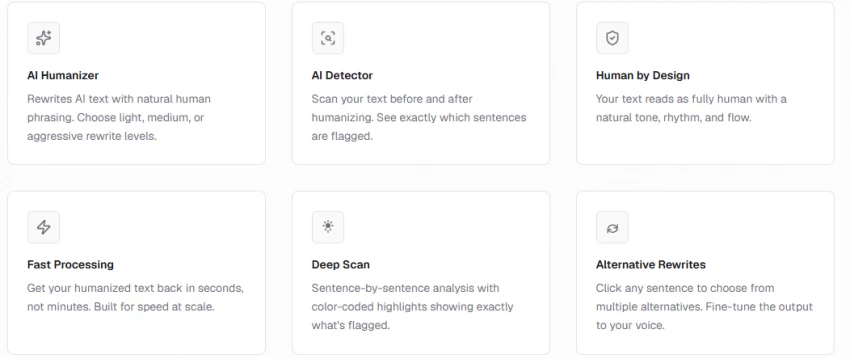
Stealth Writer (stealthwriter.ai) sits in the AI-humanizer niche that emerged in response to AI detectors. The product is deliberately narrow: an AI humanizer, an AI detector and a basic generator. You paste AI-written text, pick a model and rewrite level, and it returns several human-styled variations, each with a self-reported AI score.
Its audience skews toward marketers, SEO writers and students who want AI drafts to read naturally and to clear detection checks. The free tier offers roughly ten humanizations a day on the entry “Ghost Mini” model with a 1,000-word limit; paid tiers raise word counts, daily limits and model access (Ghost Pro and newer Ghost variants), and are commonly listed from around $20/month, though figures differ across sources.The site states that submitted text is not stored after processing.
Both tools rewrite text, but with different intent. QuillBot’s modes let you trade fidelity for fluency Formal and Academic stay close to the source while polishing tone; Creative and Simple move further and the synonym slider controls how aggressively vocabulary changes. Stealth Writer’s levels instead optimise for a single outcome: making the text read as human to a detector, which tends to shorten sentences, simplify phrasing and introduce small irregularities.
The illustrative block below shows the difference in approach for the same sentence (representative of each tool’s typical behaviour, not a captured output):
QuillBot — paraphrase (Formal mode) Original: “The study shows that regular exercise improves memory over time.”→ “The research demonstrates that consistent physical activity enhances memory retention across time.” | Stealth Writer — humanize (medium) Original: “The study shows that regular exercise improves memory over time.”→ “Studies suggest exercise helps your memory. Keep at it, and over time the effect adds up.” |
QuillBot preserves register and meaning; Stealth Writer loosens both to sound conversational. Neither is “better” in the abstract it depends on whether you want a faithful rewrite or a detection-dodging one.
This is the category Stealth Writer is built for, so it deserves real numbers. In a published independent test of a 1,000-word AI essay, Stealth Writer’s humanized output still registered as AI to varying degrees: roughly 18% on ZeroGPT and 20% on GPTZero (likely passes), but 28% on Turnitin, 30% on Copyleaks and 38% on Originality.ai (a clear fail). GPTZero’s own hands-on review reached the same conclusion: its detector still flagged the output.
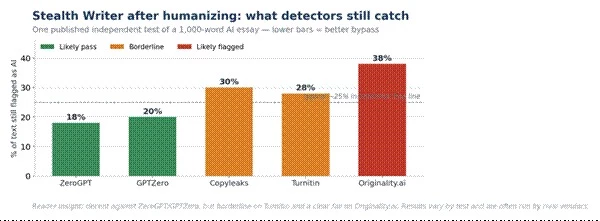
Figure 1. Percentage of a humanized 1,000-word essay still flagged as AI, by detector (one published independent test; lower is better). Many such tests are run by rival vendors, so treat the exact figures as directional.
The honest takeaway is that detection-bypass is partial and inconsistent fine against weaker detectors, unreliable against Turnitin and Originality.ai. And the capability is not unique: in one comparison, QuillBot’s own humanizer scored 0% AI on the same text that Stealth Writer left at 40% on Originality.ai. If lowering detection is the goal, QuillBot is not automatically the weaker option.
Neither tool is a dedicated SEO suite in the mould of Surfer or Clearscope; neither scores content against a SERP or builds keyword briefs. Stealth Writer markets itself as “SEO-friendly” because human-reading text is less likely to be filtered, and QuillBot is widely used to rewrite syndicated or wire copy so it is not flagged as duplicate content. In both cases, SEO scoring happens downstream in other tools a point the workflow diagram later makes concrete.
QuillBot offers explicit grammar correction and tone-aware modes, which is why editors and ESL writers rely on it. Stealth Writer’s style options serve the humanizing goal (casual, academic, professional) rather than correctness; its grammar is generally acceptable but can wobble on complex clauses, and outputs usually need a human pass. The radar below summarises where each tool is strong.
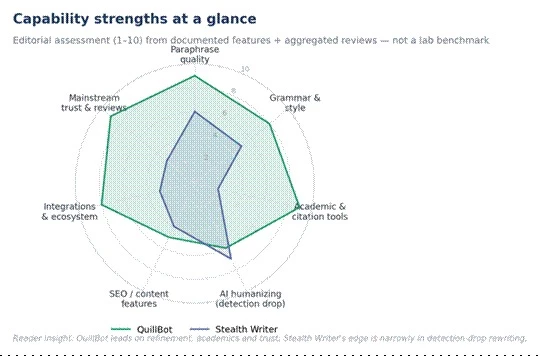
Figure 2. Capability strengths (editorial assessment, 1–10, from documented features and aggregated reviews — not a lab benchmark).
Capability summary:
• QuillBot: stronger paraphrase control, grammar, academic/citation tooling, integrations and mainstream trust.
• Stealth Writer: narrowly focused on detection-drop rewriting, with multiple models and rewrite levels.
• Shared: both now include an AI detector and an AI humanizer; both rewrite multilingually.
QuillBot’s Academic mode, summarizer and citation generator map directly onto research workflows: condense sources, rephrase for clarity, and produce formatted references. Its plagiarism checker (up to 25,000 words/month on Premium) adds an originality check.The integrity line matters, though: paraphrasing to understand and cite is legitimate; paraphrasing to disguise copied work is not, and some reviewers flag that tension directly.
For marketers, Stealth Writer fits a specific slot: take an AI draft, humanize it, self-check the score, then push it into SEO tooling and a CMS. It does not outline articles or research keywords; it is a finishing step, not a drafting one. The diagram shows where each tool sits.
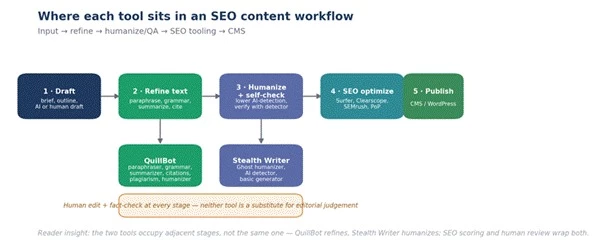
Figure 3. Where each tool fits in a content pipeline. QuillBot refines; Stealth Writer humanizes; SEO scoring and human review wrap both.
Typical audiences differ accordingly QuillBot leans academic and ESL, Stealth Writer leans marketer and SEO as the orientation chart illustrates.
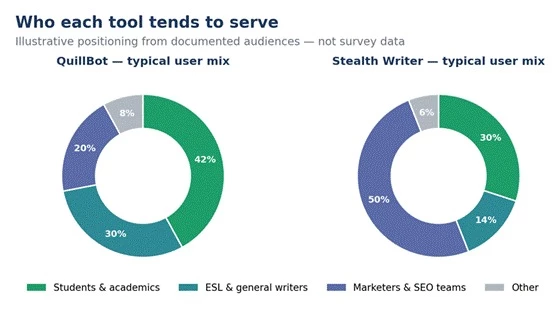
Figure 4. Illustrative audience orientation from documented positioning (not survey data).
Quality has a qualitative and a quantitative side. The qualitative scores below are an editorial read; the quantitative table reports the one area with published test numbers.
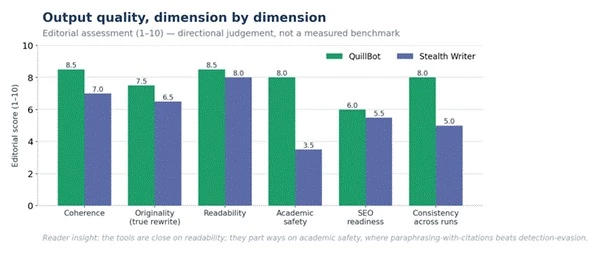
Figure 5. Output quality by dimension (editorial assessment, 1–10). The tools are close on readability and diverge most on academic safety.
Detection-test results, consolidated (single published test; competitor-run, so directional):
| Detector | Original AI text | After Stealth Writer | Verdict |
| ZeroGPT | High (90s) | 18% | Likely pass |
| GPTZero | High (90s) | 20% | Likely pass |
| Copyleaks | High (90s) | 30% | Borderline |
| Turnitin | High (90s) | 28% | Borderline |
| Originality.ai | High (90s) | 38% | Likely flagged |
Table 2. AI-detection scores before and after humanizing, one published test. Lower after-scores are better. Source: an independent (competitor-published) 2026 review.
On raw throughput and cost-per-1,000-words, neither vendor publishes reliable benchmarks, so any such figure should be treated as marketing rather than measurement. What is documented is that Stealth Writer returns several variations per run with self-detection scores, and that its output like QuillBot’s needs human editing before publication.
After writing the introduction, I wanted to check how it looked in AI detection tools before adding it to the article. So, I pasted the following 162-word content into two different checkers:
AI video tools are genuinely exciting, but most beginners get stuck at the practical stage. You know you want to make a video, yet the questions pile up. Where do you start? How do you sign up? Where do you type the prompt? How do you add a reference? Which settings matter, and how do you get the final file?
I hit the same wall, so I tested Seedance 2.5 on Topview from a fresh account and noted every step. This guide walks through the full process with real images, from the first click to downloading your MP4.
Seedance 2.5 is available on Topview, and it is built across all the tools on Topview, so you are not limited to one narrow feature. At the time of writing, Topview is running an offer of 30 days of Unlimited Seedance 2.5 Generation along with an 80% off promotion. Offers change often, so confirm the current details on Topview before buying or publishing commercially.
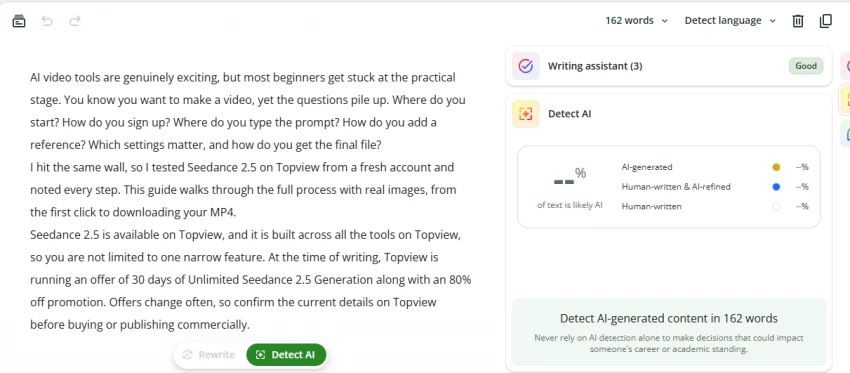
In the first tool, the writing assistant marked the content as Good. The AI detection box did not give a clear percentage score, but the content was scanned successfully. This means the section looked readable and well-structured, but the AI detection result was not very detailed.
Then I checked the same content in another AI detection tool. This tool gave a much stricter result. It showed 0% human and marked the text as AI Detected. The deep scan also highlighted many lines from the intro, especially the opening explanation and question-based sentences.
This showed that even though the content was useful and clear, it still sounded too smooth in some places. To make it stronger, I would add more real testing observations, small personal notes, and specific details from the actual Topview workflow.
| Testing Point | First Tool Output | Second Tool Output | What It Means |
| Word count checked | 162 words | 162 words | Same content was tested in both tools |
| Writing quality | Marked as “Good” | Not focused on writing quality | The content was clear and readable |
| AI detection result | No clear percentage shown | 0% human, AI detected | The second tool judged it more strictly |
| Highlighted content | Not clearly highlighted | Many lines highlighted | Intro sounded too polished in parts |
| Main issue found | Limited AI result detail | Strong AI detection warning | More personal testing details are needed |
| Final takeaway | Content is readable | Needs more human touch | Add real screenshots, steps, and practical notes |
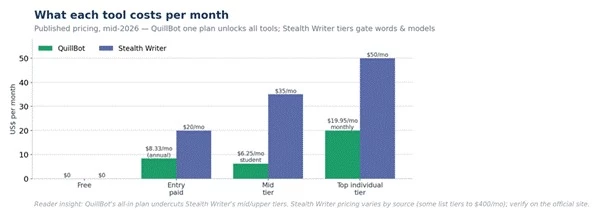
Figure 6. Published monthly pricing, mid-2026. QuillBot’s single plan unlocks all tools; Stealth Writer’s tiers gate words and models.
Free ($0) covers light paraphrasing and grammar with a 125-word cap and no plagiarism checker. Premium is $19.95/month or $99.95/year (≈$8.33/month), unlocking unlimited paraphrasing, all nine modes, the plagiarism checker (25,000 words/month) and faster processing. A Student plan runs near $6.25/month with a valid .edu address, and Teams starts around $7.50 per user with centralised billing.
A free tier provides about ten humanizations a day on Ghost Mini with a 1,000-word limit. Paid plans raise those limits and add stronger models; common listings start near $20/month and rise through mid tiers (around $35–$50/month), while some sources describe a wider ladder up to $400/month for high-volume use. Because the figures diverge, confirm current pricing and word limits on the official site before subscribing.
For most individuals, QuillBot is the stronger value: one affordable plan covers many genuinely distinct tools. Stealth Writer only earns its cost if detection-drop is a recurring, specific need and even then, buyers should weigh the inconsistent results and the cheaper or comparable alternatives (including QuillBot’s own humanizer).
Integration depth is one of the clearer separations between the two.
• Chrome browser extension for writing across most web apps.
• Microsoft Word add-in and Google Docs support for in-document rewriting.
• Part of the Learneo ecosystem (Scribbr, LanguageTool, Symbolab), so it sits alongside related study and writing tools.
• Primarily a paste-in web app; you bring text to it rather than it living in your editor.
• A built-in AI detector for before/after checks within the same interface.
• No widely documented native plugins for Word, Docs or major SEO suites; movement between tools is manual.
The review picture is where the two tools differ most sharply, and it is worth reading carefully.
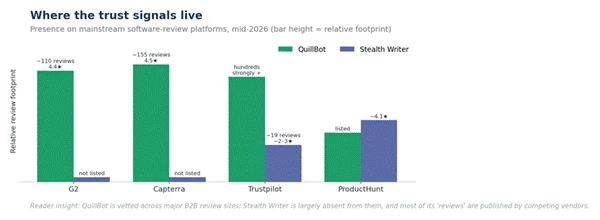
Figure 7. Presence on mainstream software-review platforms, mid-2026. Bar height reflects relative footprint.
QuillBot carries roughly 4.4/5 on G2 and 4.5/5 on Capterra across 150+ verified reviews, with broadly positive Trustpilot sentiment. Praise centres on ease of use, paraphrase quality and value; the common complaints are the restrictive free-tier word cap, occasional meaning drift in rewrites, and slow email support.
Representative themes from those platforms include a freelance designer using it to polish client communications, and a small digital newsroom using the paraphraser to rewrite licensed wire copy so it is editorially distinct and avoids duplicate-content penalties a concrete SEO use case drawn from verified G2 reviews.
Stealth Writer is largely absent from G2, Capterra and TrustRadius. Independent compilations report a low Trustpilot standing (in the low single digits across a small number of reviews) with recurring billing and cancellation complaints and weak support, alongside a more favourable ProductHunt score. Crucially, most “Stealth Writer review” articles online are published by rival humanizer vendors that conclude you should buy their tool instead so both the praise and the criticism deserve a skeptical read.
| Aspect | QuillBot | Stealth Writer |
| Data storage | Governed by Learneo privacy policy; account-based | States submitted text is not stored after processing |
| Content ownership | You own your input and output | Vendor states users own the output |
| Plagiarism control | Built-in plagiarism checker (25k words/mo) | None; relies on rewrite being original |
| Academic-integrity posture | Positions tools as writing aids, not ghostwriters | Markets detection-bypass, including vs Turnitin |
| Detection reliability | Has its own detector; detectors give false positives too | Bypass is partial; detectors evolve continuously |
| Responsible-use guidance | Encourages original work and proper citation | Reviewers urge disclosure and fact-checking |
Table 3. Security, data and ethics comparison. Compliance claims should be verified against each vendor’s current policy.
Two honest points belong here. First, AI detection is imperfect in both directions human writing is sometimes flagged as AI so no score, passed or failed, should be treated as proof. Second, on search, Google has said that appropriate use of AI is not against its guidelines and that it rewards helpful, high-quality content however it is produced; chasing “undetectable” output is therefore a weaker strategy than producing genuinely useful pages.[26] Using a humanizer to disguise copied or AI-written work in academic or client settings carries real reputational and policy risk, and that risk sits with the user, not the tool.
Because neither product scores content for search, teams pair them with dedicated SEO tools. A practical chain looks like this:
• Draft or rewrite in QuillBot (clarity, grammar, summarizing, citations), or humanize an AI draft in Stealth Writer.
• Run the result through a SERP-based optimizer Surfer SEO, Clearscope or PageOptimizer Pro to align with target keywords and intent.
• Use SEMrush or similar for keyword research, briefs and tracking around the piece.
• Publish to the CMS, then monitor performance and refine.
Movement between these stages is mostly copy-paste or export; neither writing tool offers deep native connectors to the SEO suites, so build the handoff into your process rather than expecting automation.
The same mistakes recur with both tools. A short checklist prevents most of them:
• Don’t over-paraphrase. Aggressive rewriting can drift from the original meaning; always reread for accuracy.
• Don’t treat a passed detector score as a guarantee detectors change, and Originality.ai in particular often still flags humanized text.
• Don’t publish unedited output. Both tools need a human pass for tone, facts and citations.
• Don’t use humanizing to disguise work in academic or client contexts without disclosure; check the relevant policy first.
• Do match the tool to the task: QuillBot for refining your own writing, Stealth Writer only for a specific detection-drop need.
After comparing QuillBot and Stealth Writer, the better choice depends on what you need the tool for. QuillBot is the stronger all-round writing assistant. It helps with paraphrasing, grammar, summaries, citations, plagiarism checks and everyday writing improvement, which makes it more useful for students, bloggers, academics, ESL writers and professionals.
Stealth Writer, on the other hand, is built for one specific purpose: humanizing AI-generated text and reducing AI-detection scores. It can be useful in that narrow situation, but its results are not always consistent, and relying on it only to bypass detectors can create trust and integrity issues.
Personally, I would choose QuillBot for most writing workflows because it is more complete, affordable and practical. It improves writing without pushing users toward risky shortcuts. Stealth Writer only makes sense if your main goal is to make an AI-written draft sound more natural, and even then, the final content should always be reviewed, fact-checked and edited by a human.
Overall, QuillBot is the better choice for safe, reliable and everyday writing support, while Stealth Writer is better suited for users who specifically need AI humanizing features. For most people, QuillBot offers better long-term value.
Share your thoughts about this article.
Be the first to post a comment!

AutoDraft AI looks appealing on the surface. It promises consistent cartoon char...
Muskan Kansay1 month ago
If you write scripts, build products, or publish videos, you have probably wonde...
Sakshi Dhingra1 month ago
Are you tired of spending hours creating invoices for your clients? I was,...
Sakshi Dhingra2 months ago
How I approached this review: I researched Wegic AI through its public site, pri...
Sakshi Dhingra2 months ago

PicLumen has been quietly creeping into AI creator circles for over a year now,...
Sakshi Dhingra2 months ago

The thing that broke me, finally, was the seventh-grade Egypt quiz.It was a Thur...
Sakshi Dhingra3 months ago