
Choosing the wrong AI photo editor wastes more time than editing by hand.
AI photo editing has moved well beyond simple filters. Creators now use AI tools to swap faces, clean backgrounds, remove objects, sharpen low-quality images, build profile photos, prepare product visuals, and produce social media creatives in minutes. The friction is no longer capability. It is selection. Picking the wrong tool for a specific job can cost more time than the manual edit it was meant to replace, because every AI photo editor is tuned for a different strength.
This comparison treats the Best AI Photo Editing Tools question as a matching problem rather than a ranking. Pica, Remaker AI, Akool AI, and Cutout Pro all promise faster editing, but they are not built for the same user or the same image task. Pica leans toward fast, casual face swaps. Remaker AI bundles face swap with a broader image toolkit. Akool AI is built around business, avatar, and video-driven workflows. Cutout Pro is oriented toward practical cleanup: backgrounds, objects, and product images.
Before any feature breakdown, this matrix gives an immediate answer. Find the editing job in the left column and the recommended starting tool follows. The reasoning is expanded in later sections.
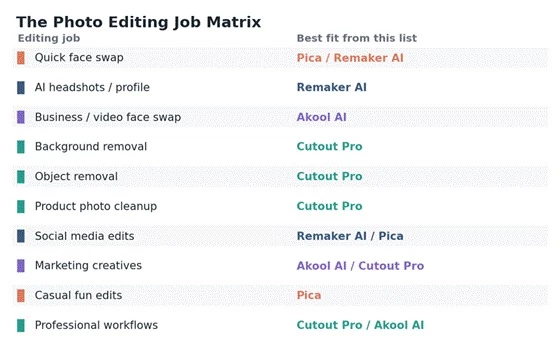
Figure 1. The photo editing job matrix. Match the job first, then the tool.
| Editing job | Best tool from this list | Why it fits best |
| Quick face swap | Pica or Remaker AI | Both focus strongly on AI face replacement |
| AI headshots / profile photos | Remaker AI | Better fit for profile-style visual experiments and headshot output |
| Business / video face swap | Akool AI | Stronger when image and video face swap are both needed |
| Background removal | Cutout Pro | More focused on cleanup and image utility tasks |
| Object removal | Cutout Pro | Built for practical image cleanup |
| Product photo cleanup | Cutout Pro | More suitable for ecommerce-style visuals |
| Social media edits | Remaker AI or Pica | Faster creative image workflows |
| Marketing creatives | Akool AI or Cutout Pro | Depends on video / avatar versus photo cleanup need |
| Casual fun edits | Pica | Simple face swap and image edits |
| Professional workflows | Cutout Pro or Akool AI | More business-oriented use cases |
Marketing pages rarely fail. Real images do. The review-team assessment in this article judges each tool against practical checks that decide whether an edit is publishable or just a screenshot demo.
| Review check | Why it matters |
| Face accuracy | Face swaps must preserve identity without looking fake |
| Skin tone and lighting match | Poor blending makes an edit obvious at a glance |
| Hair and edge handling | AI tools often fail around hairlines and outlines |
| Background cleanup | Critical for product, profile, and social images |
| Object removal quality | Bad cleanup leaves smudges and distortions |
| Output resolution | Low-quality downloads reduce real usefulness |
| Speed | Creators need fast results for regular publishing |
| Ease of use | Tools should work without Photoshop skills |
| Pricing clarity | Credits, downloads, and subscriptions can be confusing |
| Commercial-use terms | Brands need clear usage rights |
| Privacy and consent | Face and image uploads need extra caution |
| Review signals | User feedback reveals reliability, support, and billing issues |
Face swap is the single job where three of these four tools overlap most directly. The differences show up in alignment, skin-tone blending, lighting match, expression preservation, side-angle handling, and whether video face swap is part of the workflow.
Pica positions itself as a budget-friendly, single, multi-face, and video face swap tool, with web and iPhone access; reporting indicates plans around a weekly tier near $5.99 and monthly pricing around $9.99 (roughly $59.99 annually). Remaker AI treats face swap as one tool inside a broader suite that also includes background removal, upscaling, and image generation, on a credit model where a simple face swap typically costs around 1 credit. Akool AI is built for studio-grade, high-motion video face swap aimed at ad and campaign production, where face swap is documented at around 4 credits per image. Cutout Pro is not primarily a face swap tool.
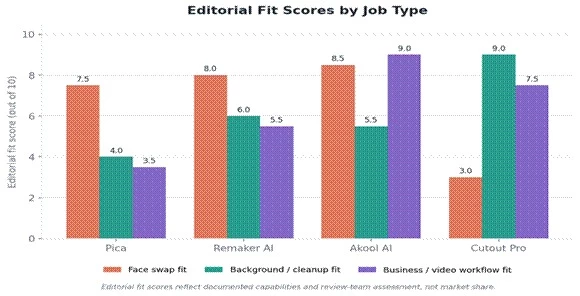
Figure 2. Editorial fit scores across three job types. Scores reflect documented capabilities and review-team assessment, not market share.
| Tool | Face swap strength | Where it can struggle | Best use case |
| Pica | Simple, creator-friendly swaps | Complex angles and lighting need checking | Casual edits, profile experiments |
| Remaker AI | Strong swap plus broader image tools | Realism depends on input quality | Social visuals, creative face edits |
| Akool AI | Business / video-style swap workflows | May be more than casual users need | Marketing, avatars, video and image campaigns |
| Cutout Pro | Not mainly a face swap tool | Weakest choice for face replacement | Better for cleanup than face swap |
Cleanup is the category where the comparison flips. Cutout Pro is oriented around background removal, object removal, and photo enhancement, with batch processing and an AI passport-photo workflow. Reviews credit it with strong edge handling on hair and fur, while noting accuracy drops on fine hair, glass, and semi-transparent objects relative to premium competitors.
| Cleanup task | Best tool | Why |
| Remove background from portraits | Cutout Pro | More focused cleanup workflow |
| Remove background from product images | Cutout Pro | Better fit for ecommerce-style needs |
| Remove small unwanted objects | Cutout Pro | Practical cleanup orientation |
| Creative background replacement | Remaker AI | Better for fast AI-style edits |
| Campaign visuals with people | Akool AI | Better when business / video workflows are involved |
Background tools should always be tested on difficult edges before committing to a paid plan: hair, glasses, jewelry, hands, product shadows, and transparent objects are where AI cutouts most often break down. Cutout Pro supports unlimited low-resolution previews, which makes this kind of edge testing possible before spending credits.
Profile images sit between face swap and enhancement. Remaker AI and Pica both offer headshot-style output, while Akool AI extends into business presenter avatars and talking-photo personas. Cutout Pro contributes clean cutouts rather than identity generation.
| Profile image need | Best tool direction | Reason |
| LinkedIn-style profile photo | Remaker AI | AI headshot-style output fits this need |
| Casual avatar / profile edit | Pica | Simple, creative image editing |
| Business presenter / avatar content | Akool AI | Better when image and video persona tools are needed |
| Clean cutout for profile design | Cutout Pro | Better for background removal and clean edges |
AI headshots should not be treated as a replacement for professional photography without manual review. Over-smoothing and identity drift are common failure modes: outputs can look polished but subtly stop resembling the person, which is a problem for any image meant to represent a real professional.
Product images demand a different discipline than face edits. They need clean background removal, consistent lighting, sensible shadow handling, accurate object edges, batch processing, transparent backgrounds, marketplace-ready dimensions, and size consistency across a catalog. This is squarely Cutout Pro territory.
| Tool | Product image usefulness | Practical notes |
| Cutout Pro | High | Best fit for background and object cleanup at scale |
| Remaker AI | Medium | Useful for quick edits, less product-specialized |
| Pica | Low to medium | Better for people / face edits than products |
| Akool AI | Medium | Useful for marketing creatives, not pure product cleanup |
Daily creator work is a mix of Instagram posts, thumbnails, profile pictures, memes, face edits, and short-form video assets. The right tool depends on whether the creator mostly edits people, products, or campaign visuals.
| Creator need | Better tool choice | Why |
| Fun face swap content | Pica | Simple and fast |
| Mixed AI image edits | Remaker AI | Broader editing toolkit in one account |
| Creator-brand campaigns | Akool AI | Better for business-facing visuals |
| Clean product / social assets | Cutout Pro | Better cleanup reliability |
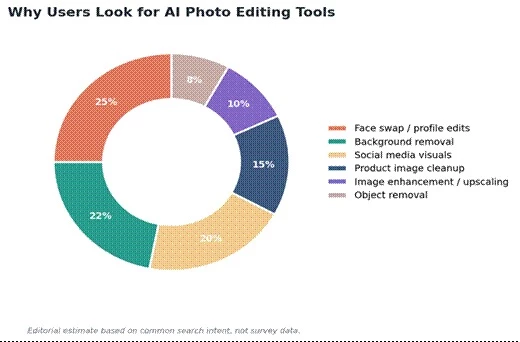
Figure 3. Editorial estimate of common reasons users reach for AI photo editors. This is a decision-support estimate, not survey data.
Marketing use raises the bar on commercial-use terms, brand consistency, bulk editing, collaboration, and export quality. Akool AI documents enterprise-oriented tiers (reported from $30 per month for Pro up to $500 per month for Business, with annual billing reducing cost), and is positioned around avatar and video campaign production. Cutout Pro covers the product-cutout side, and Remaker AI offers commercial rights on paid plans for face-swap creative testing.
| Business need | Best fit |
| Product image cleanup | Cutout Pro |
| AI campaign visuals | Akool AI |
| Face-swap creative testing | Remaker AI |
| Casual content variations | Pica |
| Avatar / video-driven brand content | Akool AI |
| Fast background cleanup | Cutout Pro |
AI photo tools often look free until a real publishing need hits a gate: credit limits, watermark restrictions, HD download caps, batch limits, video export costs, commercial-use restrictions, subscription upsells, and pay-per-generation pricing. The diagram below maps the points where free editing quietly becomes paid editing.
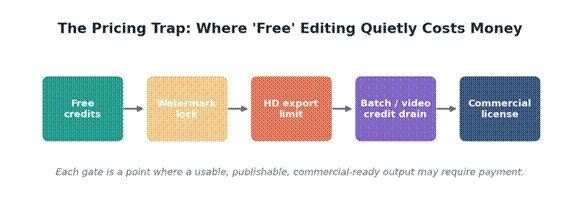
Figure 4. The pricing trap. Each gate is a point where a usable, publishable, or commercial-ready output may require payment.
| Pricing factor | Why it matters |
| Free credits | Good for testing, rarely enough for real production use |
| Pay-per-credit | Cost depends on how many edits fail and need redoing |
| Subscription plans | Useful for regular creators, wasteful for one-time edits |
| HD exports | Low-resolution free downloads may not be publishable |
| Watermarks | Free outputs may not be usable for client work |
| Batch processing | Important for ecommerce and agencies |
| Commercial license | Required for any brand or client work |
| Refund / cancel policy | Worth confirming before paying |
Verified pricing snapshot
| Tool | Free access | Paid plans / credits | Watermark | Commercial use | Notes |
| Pica | Free trial, limited swaps | Reported ~$5.99/wk, ~$9.99/mo, ~$59.99/yr | On free outputs | On paid plans | Verify current tiers on pica-ai.com |
| Remaker AI | 30 credits + ~5 free daily | Credit packs reported $5.99 (200) to $299 (20,000) | No watermark on exports (reported) | Paid plans only | One-time credits, reported not to expire; read auto-renew terms |
| Akool AI | Free trial credits | Reported Pro ~$30/mo to Business ~$500/mo | On free tier | On paid plans | Credit-heavy for video; annual billing reduces cost |
| Cutout Pro | ~5 credits + low-res previews | Reported from ~$5/mo; PAYG ~$2.99 for 3 credits | On free / preview | On paid plans | HD uses 2 credits; video 3 to 5 credits/sec |
Face and image editing tools handle some of the most sensitive data a person can upload. The checklist below is the minimum standard before editing any image that contains an identifiable person.
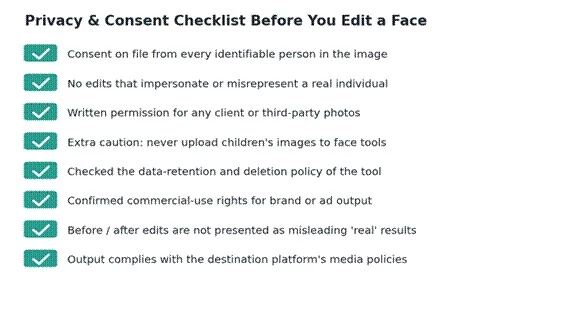
Figure. A privacy and consent checklist to run before editing any face.
| Risk area | Why it matters |
| Face swap consent | People should control the use of their likeness |
| Impersonation | Edited images can mislead viewers and cause real harm |
| Client photos | Agencies need written permission before editing |
| Children's images | Extra privacy caution is required; avoid uploading entirely |
| Data retention | Uploaded images may be stored temporarily before deletion |
| Commercial rights | Client and ad use need clear, documented terms |
| Misleading edits | False before / after results damage trust |
| Platform policies | Social platforms increasingly restrict deceptive media |
On data handling specifically, reporting indicates Remaker AI deletes uploaded files within about 48 hours and Cutout Pro auto-deletes within roughly 24 hours under a GDPR-aligned policy, though the disputed 2024 incident noted above is a reason to avoid uploading sensitive imagery to any tool. Always confirm the current privacy and deletion policy directly with the provider.
| Tool | Main weakness to watch |
| Pica | Can be too narrow if users need full photo editing beyond face swaps |
| Remaker AI | Output realism varies, especially in hard lighting or complex edits; video credits drain fast |
| Akool AI | More business and video-oriented than simple photo users need; credit system reads as opaque |
| Cutout Pro | Strong cleanup, but not a creative face / editing platform; a disputed 2024 data incident remains a trust factor |
Pica is at its best on a single, well-lit, front-facing swap. Push it toward full photo editing, batch product work, or complex compositing and it runs out of road quickly. For users whose needs will grow beyond face swaps, a broader tool avoids a second subscription later.
Remaker AI's breadth is its strength and its risk. The same account covers swap, enhancement, background removal, and generation, but realism is input-dependent and a single video enhancement can consume 50 to 100 or more credits, making costs hard to predict. Budgeting around video work is the main planning task.
Akool AI is genuinely strong at high-motion video face swap and avatar production, but that power is aimed at agencies and brands. Casual users often pay for capability they will not use, and several reviews flag the credit accounting as difficult to forecast.
Cutout Pro is a reliable cleanup workhorse, not a creative studio. It will not generate headshots or run convincing face swaps, accuracy dips on fine hair and transparent objects, and the disputed 2024 security report means sensitive or enterprise imagery is better handled elsewhere.
This is the core recommendation system. Identify the main image job, then start with the first tool and fall back to the backup if pricing, output, or terms do not fit.
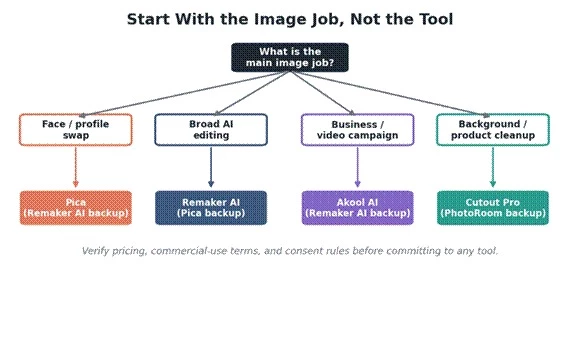
Figure . Start with the image job, not the tool.
| If the main need is | Choose first |
| Face swap | Pica |
| Face swap plus more editing tools | Remaker AI |
| Business video / image campaigns | Akool AI |
| Background removal | Cutout Pro |
| Product image cleanup | Cutout Pro |
| AI headshots | Remaker AI |
| Social media designs | Canva AI |
| Mobile creative editing | Picsart AI |
| Brand-safe AI generation | Adobe Firefly |
| Image upscaling / restoration | VanceAI |
Pica is strongest when the task is a simple face swap or casual, creator-style image editing.
Remaker AI is the better pick when users want face swap plus a broader AI image editing toolkit in one account.
Akool AI makes the most sense for business, avatar, face-swap, and video-oriented marketing workflows.
Cutout Pro is the practical choice for background removal, object cleanup, product image edits, and ecommerce-friendly visuals.
None of these tools should be chosen only because it is popular. The right choice depends on image type, output-quality needs, pricing, safety, and usage rights.
The bottom line The best AI photo editing tool is not the one with the longest feature list. It is the one that solves the exact image problem without creating quality, privacy, or copyright risk. |
Share your thoughts about this article.
Be the first to post a comment!

The same tool can be a 4.7 on one site and a 3.9 on another. Here is what is rea...
Nitin1 month ago

Here is the number worth pinning above your budget: in Gartner Digital Markets r...
Deepak Mehra1 month ago

What Artlist AI is in 2026Artlist began as a royalty-free music library. By 2026...
Deepak Mehra2 months ago

Most AI tool failures do not announce themselves. There is no crash, no angry em...
Nitin2 months ago

The best AI image generator in 2026 is Nano Banana 2 for speed, FLUX.2 for photo...
Parveen Verma2 months ago

“Useful” is a slippery word for a coding assistant. A tool can be brilliant at o...
Sakshi Dhingra2 months ago