Planning a trip usually starts with excitement, and quickly turns into browser chaos. One tab for flights, another for hotels, a few blogs for “must-see” places, and suddenly you’re knee-deep in conflicting advice. That’s the gap AI travel planners like Wonderplan AI are trying to fill.
Wonderplan doesn’t claim to book your trip or find secret deals. Instead, it focuses on something simpler: turning a rough travel idea into a usable plan. And it does this without charging anything, which naturally raises some curiosity and a bit of skepticism.
So what happens when you actually use it?
What Wonderplan AI Is Trying to Do (and What It Isn’t)
Wonderplan AI works best when you treat it like a planning assistant, not a travel agent. You tell it where you’re going, how long you have, what kind of traveler you are, and roughly how much you want to spend. From there, it lays out a day-by-day structure.
It’s not:
- A booking platform
- A price-tracking tool
- A replacement for checking real-world details
And that’s important, because when expectations are realistic, the tool makes a lot more sense.
The First Few Minutes: Getting a Plan on the Page
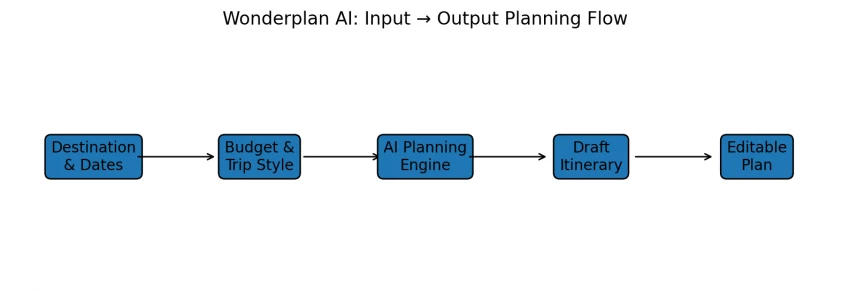
One of the nicest things about Wonderplan AI is how little effort it takes to get started. There’s no long questionnaire, no account wall, and no upsell halfway through.
Within minutes, you get:
- A multi-day itinerary
- A logical flow of activities
- A rough sense of pacing
For people who get stuck at the “where do I even begin?” stage, this alone can be a relief.
Reading the Itinerary: Helpful, but Not Gospel
The itineraries themselves feel like a solid first draft.
You’ll usually see:
- Popular attractions you’d expect
- A reasonable balance between busy days and lighter ones
- Activities grouped by theme (sightseeing, food, culture)
What you won’t always see:
- Hyper-local recommendations
- Perfect geographic efficiency
- Real-time availability awareness
In a few cases, you may notice the plan sending you back and forth across a city more than a local would. That’s not a deal-breaker, but it’s a reminder that AI still benefits from a human sense check.
This is the point where Wonderplan starts to feel genuinely helpful rather than just impressive on first use. You’re not treated as a passive recipient of an AI-generated plan. Instead, the itinerary behaves more like a working draft, something you’re expected to interact with.
You can remove activities that don’t match your interests without the entire plan falling apart. If a particular day feels overloaded, it’s easy to spread things out or shift items to another day. Likewise, if a section of the trip feels too slow, you can compress it without needing to regenerate everything from scratch.
What stands out is that these edits don’t feel like you’re “breaking” the plan. The structure adapts as you make changes, which reduces the frustration that often comes with rigid AI tools that insist on their original logic. In practice, this makes the experience feel less like correcting a machine and more like refining a rough outline.
This flexibility also matters psychologically. Once you realize the plan won’t resist your input, you stop worrying about getting things “right” the first time. You experiment more, compare alternatives, and gradually shape something that reflects how you want to travel—not how the AI thinks you should.
That sense of control is what turns Wonderplan from a novelty into a practical planning companion, and it’s also what makes it easier to trust the rest of the tool—knowing that nothing is final unless you decide it is.
Budgets and Cost Awareness: Direction, Not Precision
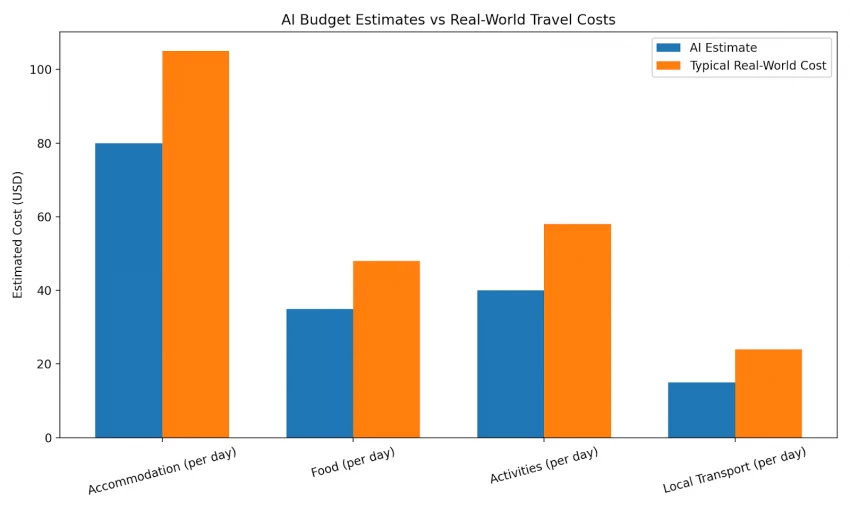
Wonderplan AI includes estimated costs tied to budget levels. These are useful for:
- Sanity-checking trip affordability
- Comparing destinations
- Avoiding obvious over-planning
They’re not useful for:
- Final booking decisions
- Locking in prices
Think of these numbers as signals, not commitments.
Planning With Other People (Surprisingly Helpful)
If you’ve ever planned a group trip, you know the pain of scattered messages and half-updated documents. Wonderplan’s shared planning and chat features help centralize decisions.
Even if the itinerary itself changes later, having everyone looking at the same plan reduces confusion—and arguments.
What People Are Saying
Public reviews for Wonderplan AI exist, but they’re still limited in number.
So far, the tone is mostly positive:
- People like how fast it works
- The interface feels approachable
- The free pricing lowers the barrier to trying it
More neutral or critical takes point out that:
- Routes sometimes need manual correction
- Details still need verification
That balance feels honest—and typical for early-stage AI tools.
How reliable is this tool, really?
Pricing transparency:
Wonderplan AI is currently free, with no hidden checkout flow or forced subscriptions.
Data sources:
It relies on aggregated travel data and common points of interest, not live booking inventories.
Human verification required:
Opening hours, ticket availability, prices, and transit details should always be confirmed externally.
Review limitations:
Existing ratings are based on very small sample sizes and should not be treated as statistically representative.
Best practice:
Use Wonderplan AI to create ~70–80% of your plan, then validate the remaining details yourself.
This approach aligns with how most travel experts recommend using AI planning tools today.
So, Who Is Wonderplan AI Actually Good For?
It tends to work best for:
- First-time planners
- Budget-focused travelers
- Groups coordinating trips
- People who want a starting point, not a final answer
It’s less helpful if you need:
- Tight schedules
- Luxury-level personalization
- Live pricing and booking integration
Final Verdict: Is Wonderplan AI Worth It?
Wonderplan AI offers a unique and helpful experience for those looking to streamline the often overwhelming task of planning a trip. Its ease of use, flexibility, and ability to quickly generate rough itineraries make it a great companion for first-time planners, budget travelers, and groups trying to coordinate trips. While it doesn’t offer full-scale booking or live pricing, the free tool excels at helping users get started and create a basic, well-structured plan.
However, it’s important to note that it’s not perfect. Routes sometimes need correction, and the details must be verified manually. Treat it as a starting point rather than a final solution.
For those looking for a free, simple tool to kick-start their trip planning, Wonderplan AI is a valuable resource. But for luxury trips, tight schedules, or live pricing, you’ll need to rely on more specialized tools or manual checks.
FAQs About Wonderplan AI
Q1: Is Wonderplan AI free to use?
Yes, Wonderplan AI is completely free to use, with no hidden charges or forced subscriptions. You can access all of its core features without having to pay.
Q2: How accurate are the itineraries created by Wonderplan AI?
While Wonderplan AI provides a solid starting point, the itineraries are a rough draft. You will need to manually check and validate the details such as hours, prices, and availability to ensure the accuracy of your plan.
Q3: Can I use Wonderplan AI for booking flights or hotels?
No, Wonderplan AI does not handle bookings. It helps you plan your trip by suggesting activities, places, and creating itineraries, but you will need to use other tools or services to book flights, hotels, and other aspects of your trip.
Q4: Does Wonderplan AI allow me to share my itinerary with others?
Yes, Wonderplan AI has shared planning and chat features that allow you to collaborate with others in real-time, making it easier to plan group trips and keep everyone on the same page.