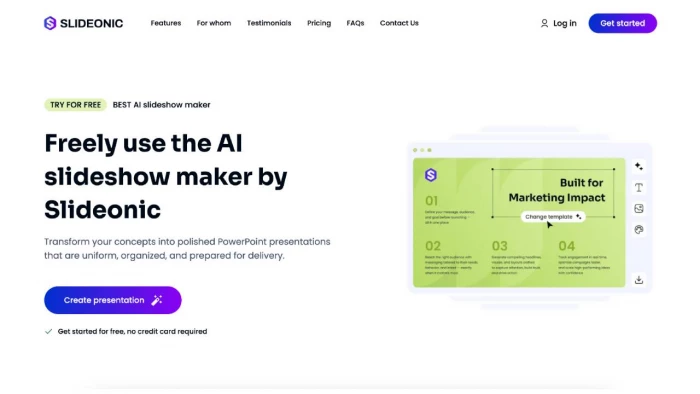
Most presentation tools make you work. You start with a blank slide, choose a template, type in the content, change the layout, change the typefaces, and continue for every slide. The method hasn't altered much in twenty years. The problem with any AI slide generator is whether the output is actually useful - or just a faster way to a mediocre deck.
The workflow is simpler than many AI slide generators claim in their marketing materials. Three steps, end-to-end.
First you provide a topic, paste a text or upload a source file - be it a PDF, a Word document or an existing presentation. If you're a first-time user of Slideonic AI slideshow maker, you'll usually get your entire presentation or pitch deck in only minutes and then download it as a PPT or PDF. The AI takes your input and structures the content rationally - it's not just filling a blank layout with placeholder text. The slides that result feature headings, body copy and style choices that are a result of what you actually put in.
Three specific things the platform does with content that are worth knowing:
● Text to PPT - takes a textual brief, outline or paragraph and turns it into a complete presentation
● PDF and Word to slides - takes static documents and turns them to editable slide format
● AI research mode - the tool can investigate a topic on its own and develop a draft structure before creating the final deck
That last function is the most unusual. Enter a topic you haven't fully prepared yet and Slideonic will produce a logical outline section by section before producing the slides. It's not a replacement for knowing your subject, but it's a good scaffold when you're starting from the ground up.

Different users get different things from an AI-powered presentation maker, and Slideonic is no different.
The biggest benefit is for business teams who take how to make professional slides with AI as a real workflow question, not just a curiosity. A campaign performance report, a client proposal, or a strategic update that would take two hours to format manually takes twenty minutes using Slideonic. The output is clean enough for client-facing use. Marketers that produce recurring presentation formats - weekly updates, quarterly reviews - find the consistency valuable across team members as well.
If you're a student defending a thesis, presenting a project or handing in a course assignment, the time you save is real. The AI presentation software does the formatting, so you can focus on the argument and delivery. Educators developing lecture materials get a structured starting point without having to fight with templates - particularly handy for anyone teaching across various disciplines or developing fresh material regularly.
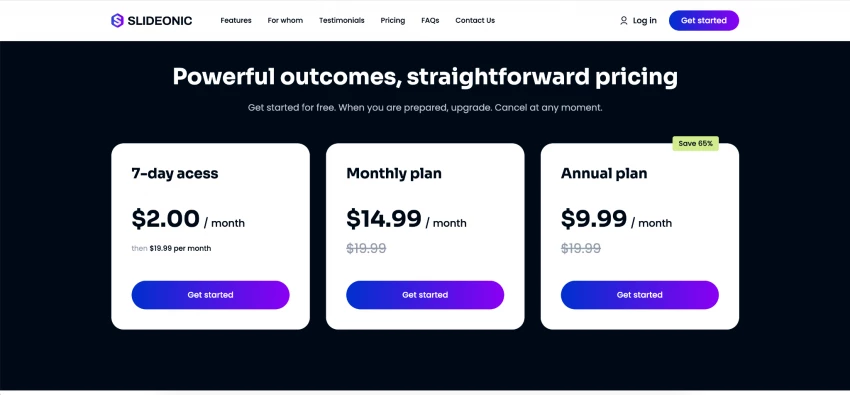
Slideonic has a tiered model with a genuinely usable free plan.
| Plan | Price | Included |
| Free | $0 | 1 presentation per day, no card needed |
| 7-Day Trial | $2.00 | Full access for one week |
| Monthly | $14.99/month | Unlimited generation, all features |
| Annual | $9.99/month | Same as monthly, billed yearly |
There's no credit card required for the free tier, so it's easy to try it out properly before committing. The $9.99/month annual plan is competitive with other best AI presentation tools in this category.
One thing to flag for business users: files uploaded to Slideonic are deleted after generation and not used to train the AI models. That matters for anyone dealing with proprietary documents, client data or confidential materials.
The best slideshow maker online is a crowded field. Here's a look at how different tools tackle the same problem:
| Tool | Primary Use Case | Output Format |
| Slideonic | Create full deck from text or documents | PPT, PDF |
| Gamma | Interactive digital presentations | Web-only |
| Beautiful.ai | Design-focused slide building | PPT |
| Canva AI | Good visuals and marketing material | Multiple |
| Tome | Storytelling product decks | Web-only |
The key advantage for Slideonic is the native PPT export - the output is fully compatible with Microsoft PowerPoint and Google Slides, which matters when you need to share the deck, have a colleague edit it or integrate it into an existing workflow. Tools that only generate web output require an extra step the moment you need to hand the file off.
● Slideonic works fully in the browser - no installation required, available from any device
● For niche or highly visual topics, adding specific image keywords to your prompt helps guide the AI
● For technical or complex topics, more detailed input produces more structured output
● Works well alongside desktop software after export for those wanting granular per-slide control
Most professionals and teams want answers to the same practical questions before committing to a new tool. Here are the most common ones about Slideonic.
Yes. Slideonic exports directly to editable PowerPoint format, unlike platforms that lock your presentation into a web-only dashboard. Once downloaded, open the file in Microsoft PowerPoint, Google Slides, or Apple Keynote to change layouts, edit content, or add your own images.
The AI supports Microsoft Word documents (DOCX), Adobe PDFs and plain text files (TXT). The tool processes the text, extracts the key ideas and organises them across an appropriate number of slides.
No. The free tier is completely free, never expires, and doesn't require a credit card to start. It gives you one full presentation per day from the standard template catalog. Paid plans unlock unlimited daily generation, faster processing and priority formats.
Yes. All source files are encrypted during processing and automatically deleted from the servers after the slideshow is created. Source data is never used to train AI models - important for anyone working with confidential business information.
The core promise of a presentation maker with AI is to produce meaningful content, not filler text in a template. Slideonic delivers on that for most practical use cases. Text to PPT and document conversion functions work well. The output is clean, exportable and compatible with standard tools. Pricing is accessible and a free tier requires no card.
How to make slides faster with AI has a genuine answer this year, and Slideonic is one of the more practical ones. For professionals, marketers, students and educators who build presentations regularly and want to stop spending hours on formatting, the free version is worth testing on a real project. That's the quickest way to see if it fits.
Share your thoughts about this article.
Be the first to post a comment!
AI photo editors are becoming increasingly ambitious. Some focus on image genera...
Parveen Verma3 weeks ago

You know that strange moment when an AI-assisted draft is technically fine, but...
Parveen Verma2 months ago
The draft looked fine. That was the problem. It had clean grammar, neat paragrap...
Parveen Verma2 months ago
AI-assisted writing often creates a second problem after the draft is finished....
Parveen Verma2 months ago

Blogging consistently without running yourself into the ground isn’t really abou...
Parveen Verma2 months ago

Online shopping has become more complex in 2026. Prices fluctuate faster. Retail...
Parveen Verma6 months ago