Technology
6 min read
Autodraft AI 2026: The Animation Engine That Thinks Like a Creator
Imagine crafting animated stories from simple prompts, no studios, no bulky software, just you and your ideas. Autodraft AI 2026 is redefining animation workflows with a blend of intuitive AI and creative control. Whether you’re a solo storyteller, educator, or marketer, Autodraft AI brings your vision to life with unprecedented speed and style consistency.
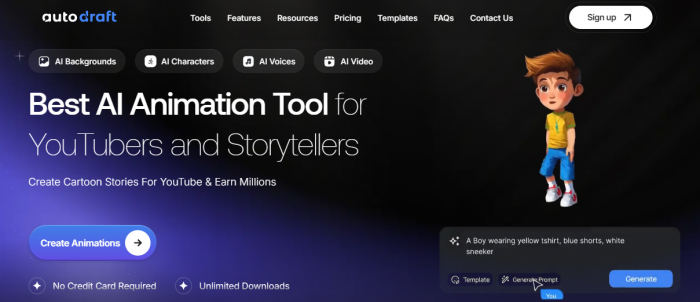
Autodraft AI is positioned as an AI-assisted animation and visual storytelling tool. Rather than functioning as a general AI image generator, it focuses on character-based scene creation and simplified animation workflows. Its distinguishing elements relate to character stability, preset animation systems, and integrated production tools.
1. Character Consistency Approach
A common limitation in AI-generated visual tools is character inconsistency. When generating multiple scenes, faces, proportions, clothing details, and expressions often change unintentionally.
Autodraft attempts to address this through a character persistence system sometimes referred to as “style memory.” The goal is to maintain recognizable character structure across scenes. In practical use, this can help reduce visible drift in facial features, outfit design, and overall proportions.
However, like most AI systems, consistency may still vary depending on prompt quality, scene complexity, and output settings.
2. Script-Based Scene Generation
The platform allows users to input scripts or scene descriptions and generate animated sequences. This includes automatic background creation, basic motion elements, camera positioning, and optional lip-sync when voice is added.
This removes the need for manual timeline editing in basic scenarios. That said, users looking for detailed frame-by-frame control or advanced animation editing may still require traditional software.
3. Preset Action Library
Autodraft includes a collection of preset character actions, facial expressions, and pose variations. These presets simplify repetitive animation tasks, particularly for content that relies on dialogue scenes or recurring characters.
While useful for speeding up production, preset-driven systems can limit flexibility compared to fully manual animation pipelines.
4. Resolution and Output
The platform includes an upscaling feature intended to improve clarity in exported visuals. This is relevant for creators publishing to platforms such as YouTube or social media. Output quality depends on scene detail and system configuration, and may not match professional animation studio rendering.
5. Unified Workflow Design
Autodraft combines character creation, scene generation, voice integration, and animation controls within a single interface. This reduces the need to switch between multiple applications for basic production workflows.
For some users, this centralization simplifies content creation. For others, especially professionals who prefer granular control, it may feel more restrictive.
Formats: MP4, PNG, JPEG
Platforms: Web (mobile, tablet, desktop optimized)
Languages: English, Spanish, French, German
Workflow: Text prompt → scene → refine → render
Autodraft’s mobile-first optimization is why many indie creators say it’s “the first animation tool I can actually use on my phone without hating myself.”
Credits = animation currency.
| Plan | Price | Credits | Includes |
|---|---|---|---|
| Base | $11.99/month | 1,000 | Video, image, character generation, 4K exports |
| Pro | $41.96/month | 4,000 | Everything in Base + faster rendering, team collaboration |
Prices include taxes.
A free trial gives 100 credits with watermark.
Autodraft is designed for people who want results fast, but also want stylistic control without being animators.
1. YouTube & TikTok Creators
Most users say it cuts production time by 70–90%.
2. Educators & eLearning Instructors
3. Marketers & Agencies
4. Webtoon / Comic Artists
The Style Memory feature is a dream for:
| Tool | Key Strength | Where Autodraft Wins |
| Adobe After Effects | Pro-grade manual control | Lacks built-in AI, slower workflow |
| Renderforest | User-friendly templates | Limited character customization |
| Midjourney | Stunning still visuals | No animation tools |
| Autodraft AI | Mobile-first, AI-powered | Style consistency, prompt-to-video |
Public reviews across platforms such as G2, AppSumo, and SoftwareAdvice show generally positive sentiment, with ratings typically falling in the 4.0–4.6 range. Feedback tends to focus on workflow efficiency, character consistency, and accessibility.
Several users report that the platform significantly reduces manual animation workload, particularly for YouTube creators producing regular animated content. Instead of building scenes frame-by-frame, they rely on presets and automated sequencing to speed up production.
Comic and webtoon creators often mention the Pose Maker tool as helpful for maintaining recurring character structure across panels. Consistency is a recurring theme in positive reviews, especially for projects involving episodic storytelling.
Mobile accessibility is another commonly noted advantage. Some users appreciate being able to draft scenes or storyboard concepts from a browser without needing high-end desktop software.
Common Criticisms
At the same time, reviews highlight certain limitations.
Some users report that advanced tools require a learning period. While the platform simplifies many tasks, understanding prompt layers, character controls, and animation presets may take time.
Facial expressions and subtle emotional transitions are occasionally described as mechanical or less nuanced compared to hand-drawn animation or high-end production tools. This can affect realism in dialogue-heavy scenes.
Another noted limitation is the absence of offline functionality. The platform is fully cloud-based, meaning a stable internet connection is required for all operations.
| Category | Score |
|---|---|
| Character Consistency | 9/10 |
| Ease of Use | 8.5/10 |
| Prompt-to-Video Accuracy | 8/10 |
| Mobile Optimization | 9/10 |
| Rendering Speed | 8/10 |
| Facial Expression Realism | 7/10 |
| Advanced Control Depth | 6.5/10 |
| Value for Money | 8/10 |
Autodraft AI 2026 earns its title, “The Animation Engine That Thinks Like a Creator”, not because it replaces studios, but because it understands what creators actually struggle with: consistency, speed, and workflow friction.
It doesn’t overwhelm you with timelines.
It doesn’t force complex rigging.
It doesn’t reset your character’s face every scene.
Instead, it focuses on what matters most in modern content creation:
Is it perfect? No.
Advanced animators will still want deeper manual control, and facial micro-expressions can occasionally feel artificial.
But for solo creators, educators, marketers, and episodic storytellers, Autodraft AI delivers something far more valuable than perfection:
Momentum.
Autodraft AI doesn’t just generate animation, it removes hesitation from the creative process.
And in 2026, that’s what thinking like a creator truly means.
Q: Can Autodraft AI replace professional animation studios?
A: For most indie creators, educators, and marketers, Autodraft AI offers a powerful alternative. However, complex, high-budget projects may still require manual studio work.
Q: Is there a free trial?
A: Yes, Autodraft AI offers a free trial with 100 credits and watermarked exports.
Q: What platforms does Autodraft AI support?
A: Autodraft AI is web-based and optimized for mobile, tablet, and desktop.
Q: Can I use Autodraft AI for commercial projects?
A: Yes, the Pro and Enterprise plans include commercial licenses.
Q: How does Autodraft AI handle non-English languages?
A: Autodraft AI supports English, Spanish, French, and German, with improved lip-sync accuracy for non-English voices in 2026.
What stood out for me is how everything is in one place. Characters, backgrounds, voiceovers, even editing. I didn’t have to switch between tools like before. Once you get used to it, it makes the whole workflow much smoother.
Why this comparison is differentMost comparisons between Semrush and Ahrefs thro...
Suraj Malik3 days ago

The first thing that stands out about Dippy AI is not the anime visuals or the N...
Suraj Malik1 week ago
I still remember the first time I installed Remix OS. It didn’t feel like I was...
Sakshi Dhingra2 weeks ago

Managing remote employees is very different from managing people in an office. W...
Sakshi Dhingra1 month ago
A school gradebook sounds like a simple thing until you watch what happens when...
Sakshi Dhingra1 month ago
The Growing Buzz Around EditPro in the AI Editing SpaceIn 2026, the name “EditPr...
Sakshi Dhingra1 month ago
Megan Phillips
Mar 19, 2026Sometimes the rendering takes longer than expected, and there’s no clear progress feedback. You’re just waiting and hoping it works, which gets annoying after a while.