Technology
3 min read
Autodraft: Animation Tool for Creators and Its Alternatives
Autodraft is an AI-based platform built for creators who want to make images, storyboards, sketches, and animations faster. It allows users to turn text, sketches, or colors into full images. With powerful features like voice cloning, character generation, and video tools, it’s made for professionals and beginners who want quality output in less time.
With AI increasingly shaping creator workflows (check this Forbes breakdown on the top AI tools for content creators:, Autodraft fits perfectly into the new creative tech stack.
Autodraft offers monthly and yearly plans for individuals and teams.
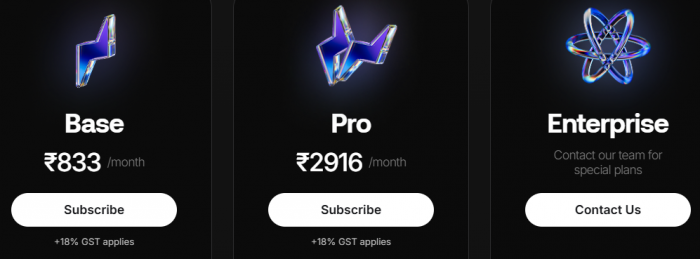
Monthly Plans
| Plan | Price/Month | Credits/Month | Features Included |
| Base | ₹833 | 1000 | All core tools, AI voice, image, and 4K |
| Pro | ₹2916 | 4000 | More credits, all Base features |
| Enterprise | Contact Team | Custom | Advanced support and training tools |
All prices are subject to 18% GST.
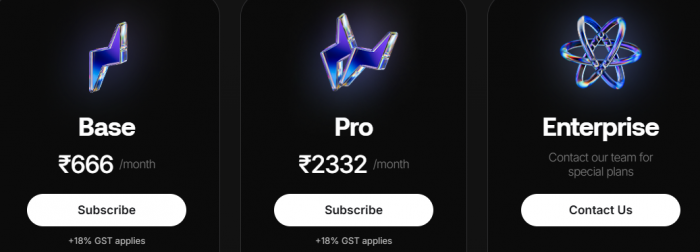
Yearly Plans
| Plan | Monthly Price | Credits/Year | Best For |
| Base | ₹666 | 12000 | Creators with light usage |
| Pro | ₹2332 | 50000 | Teams and professionals with high demand |
| Enterprise | Contact Team | Custom | Large companies and studios use |
Autodraft offers many benefits for users:
Autodraft is designed to meet the needs of both individuals and teams across creative industries.
With AI powering creator growth (see Statista insights on AI in creator marketing), Autodraft sits right in a high-demand tier.
| Tool Name | Focus Area |
| Animaker | Simple animations and explainer videos |
| Vyond | Business-friendly animation platform |
| Canva (with AI) | Design and AI image generation |
| Renderforest | Video creation and branding tools |
| Adobe After Effects | High-end video effects and motion design |
Each of these tools has its strengths depending on what you need. You can check it out here for another easy-to-use option that lets you create engaging animations quickly.
Autodraft is best suited for:
It’s not built to replace Adobe After Effects or Blender for cinematic work, but it’s a powerful, accessible middle ground for people who want to bring ideas to life faster.
If you’re exploring modern AI design workflows, GeniusFirms’ coverage of emerging tools like Gatsbi AI and HappyScribe gives valuable insights into how platforms like Autodraft are shaping the creator economy.
| Category | Rating |
|---|---|
| Ease of Use | ⭐⭐⭐⭐☆ |
| Output Quality | ⭐⭐⭐⭐⭐ |
| Speed | ⭐⭐⭐⭐⭐ |
| Value | ⭐⭐⭐⭐☆ |
| Best For | Creators & growing teams |
Be the first to post comment!
Why this comparison is differentMost comparisons between Semrush and Ahrefs thro...
Suraj Malik2 days ago

The first thing that stands out about Dippy AI is not the anime visuals or the N...
Suraj Malik6 days ago
I still remember the first time I installed Remix OS. It didn’t feel like I was...
Sakshi Dhingra2 weeks ago

Managing remote employees is very different from managing people in an office. W...
Sakshi Dhingra1 month ago
A school gradebook sounds like a simple thing until you watch what happens when...
Sakshi Dhingra1 month ago
The Growing Buzz Around EditPro in the AI Editing SpaceIn 2026, the name “EditPr...
Sakshi Dhingra1 month ago