Blackbox AI and Cursor are two of the most talked about AI coding assistants of 2026, but they take very different routes to the same goal. Blackbox AI is a multi-model platform that plugs into 35+ IDEs and routes your prompt through hundreds of models, while Cursor is an AI-native editor built on a VS Code fork that keeps completion, chat, and agents inside a single environment. Developers usually choose based on IDE preference, budget predictability, and how much autonomous agent work they want.
That paragraph is the short answer. The long answer, which is the one that actually matters if you code for a living, involves credit systems, context windows, some genuinely unhappy Trustpilot pages, and a few surprises I ran into while testing both tools on the same projects. Let me walk you through all of it.
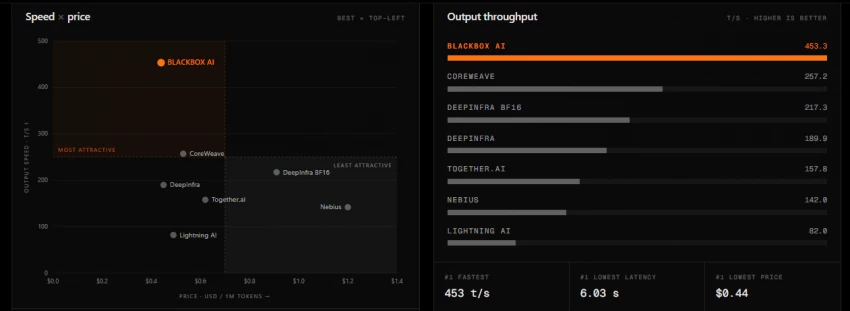
Blackbox AI launched in 2019 out of San Francisco and has grown from a VS Code autocomplete plugin into a multi-agent coding platform. The company claims more than 30 million developer users as of 2026, and its VS Code extension alone reports over 4.2 million installs. The headline feature this year is the Chairman LLM system, which dispatches the same task to multiple models and agents in parallel, scores the candidates, and hands you the best result as a reviewable diff.
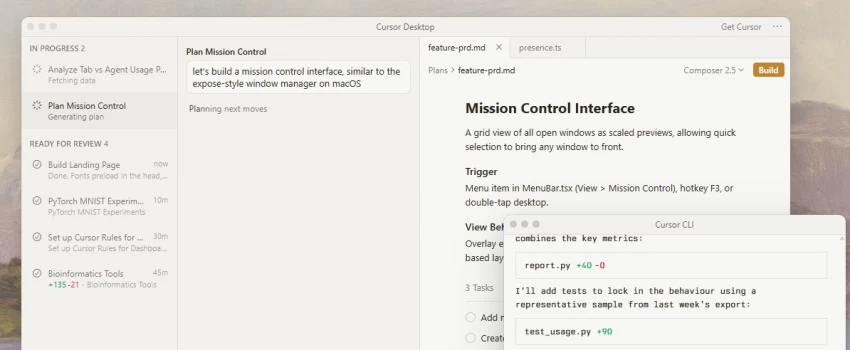
Cursor, built by Anysphere (founded 2022), went the opposite direction. Instead of being a layer you add to your editor, Cursor is the editor. It forks VS Code, indexes your whole repository, and wires AI into every interaction: Tab completions that predict your next edit, a Composer that changes dozens of files in one pass, agent modes, and a first-party model called Composer 2.5 that shipped in 2026.
Both tools target software developers, data scientists, AI engineers, and students, but the fit differs. If you live in JetBrains, or you bounce between IDEs, mobile, and a terminal, Blackbox AI meets you where you are. If you are happy to make one editor your home and want the deepest project context available, Cursor is built for exactly that.
Setup took me under five minutes. The flow looks like this:
• Search for "Blackbox AI" in the VS Code Extensions Marketplace and click Install. A sidebar icon and a movable chat panel appear immediately.
• Sign in with email or GitHub. The free tier does not require a credit card, and the web version at blackbox.ai works without even logging in for basic chat.
• Pick a model from the dropdown at the top of the chat panel. Free accounts get a basic model with daily limits; paid plans unlock Claude, GPT, Gemini, and Grok routing.
• Optionally install the JetBrains plugin, CLI, browser extension, or the standalone Blackbox IDE, all under the same account.
• Download the Cursor app from cursor.com for Windows, macOS, or Linux. It replaces your editor rather than extending it.
• On first launch, Cursor offers to import your VS Code settings, keybindings, themes, and extensions. Mine carried over cleanly, which made the switch feel painless.
• Sign in and let Cursor index your codebase. This one-time indexing step is what powers its repo-wide answers later.
• Start on the free Hobby plan, or activate the student offer if you have an academic email. Verified students currently get a free year of Pro.
One onboarding difference worth flagging: Blackbox AI adds to whatever you already use, so there is nothing to unlearn. Cursor asks you to move house. The move is easy if you come from VS Code and noticeably less smooth if your daily driver is IntelliJ or PyCharm, because Cursor has no JetBrains plugin at all.
Here is how the two stack up on the features developers actually touch every day. Where a capability is not publicly documented, I have marked it as unspecified rather than guessing.
| Feature | Blackbox AI | Cursor | Practical example |
| Code completion | Inline autocomplete across 35+ IDEs, multi-model routing | Tab completions that predict multi-line, multi-edit changes | Generate a typed Python CRUD function as you type |
| Multi-file editing | Agent-driven edits; can lose context on very large repos | Composer applies coordinated changes across dozens of files with one unified diff | Rename a data model and update every import and call site |
| Debugging help | Explains root cause in plain language, applies and tests fixes in sandboxes | Agent traces errors with terminal access; Bugbot add-on reviews PRs | Paste a stack trace and get a proposed patch |
| Model access | 300+ models; Chairman LLM runs several in parallel and picks a winner | Claude, GPT, Gemini, Grok plus first-party Composer 2.5 | Route a tricky refactor to a stronger model mid-task |
| Codebase context | Repository indexing; semantic knowledge graph on higher tiers | Deep whole-repo indexing, generally considered its core strength | Ask where auth middleware is applied and get file-level answers |
| Autonomous agents | CLI agents, remote sandboxed agents, App Builder, voice agent | Agent mode, background Cloud Agents, plan mode | Hand off a ticket and review the diff when it is done |
| Docs generation | Summarizes functions, generates docstrings and READMEs | Auto-docstrings and inline explanations from chat | Generate Google-style docstrings for a utils module |
| Extras | Figma and image to code, Slack integration, mobile apps | iOS app for cloud agents, GitHub and Slack integration | Turn a wireframe screenshot into a React component |
Two asymmetries jump out of that table. Blackbox AI wins on breadth: more IDE surfaces, more models, more input types. Cursor wins on depth: its indexing and Composer make it noticeably better at changes that ripple across a project. Blackbox AI publishes its own head-to-head benchmark at docs.blackbox.ai claiming a 100% task success rate versus 90% for Cursor across ten tasks, but treat that with the skepticism any vendor-run benchmark deserves. Independent reviewers have reported the opposite pattern on complex work, with Blackbox agents needing roughly 30 to 40 percent manual review versus under 10 percent for Cursor.
I ran both assistants against the same small FastAPI project for a week each: a REST API with four resources, a Postgres layer, and a React admin panel. Same tasks, same prompts where possible.
With Blackbox AI in VS Code, the repetitive work melted away. I typed a comment describing a CRUD endpoint, hit Tab a few times, and had the four standard routes scaffolded in a couple of minutes each, which saved me a good twenty minutes across the resource set. The multi-model dropdown became my favorite habit: when a generated SQLAlchemy query looked off, I re-ran the same prompt through a stronger model without leaving the panel and compared the two answers side by side.
Cursor felt different from the first hour. Because it had indexed the whole repo, I could ask it to add soft-delete behavior to one model and it proposed edits across the model file, three route files, and two test files in a single Composer pass, presented as one diff I could accept or reject hunk by hunk. That review-the-diff discipline is genuinely useful; it forced me to read changes I might have rubber-stamped elsewhere. The trade-off was cost awareness. Manually selecting a frontier model for those big passes ate into the monthly credit pool faster than I expected, and I ended up defaulting to Auto mode for routine work.
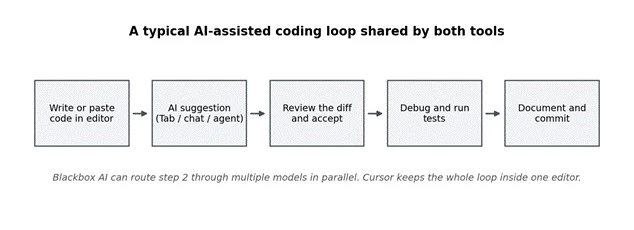
Figure 1. The core AI-assisted loop is the same in both tools. The difference is where the intelligence sits: Blackbox AI fans step 2 out to parallel models, while Cursor deepens it with whole-repo context.
My honest summary after two weeks: Blackbox AI made me faster at producing code, and Cursor made me faster at changing code. Those sound similar but they are different jobs, and it explains why plenty of developers on Reddit admit to keeping both around.
Both tools are effectively language-agnostic because they ride on large general-purpose models. The real differences show up in tooling surfaces and optimization focus rather than raw language lists.
| Language / framework | Blackbox AI | Cursor |
| Python (Django, Flask, FastAPI) | Full support, optimized | Full support, optimized |
| JavaScript / TypeScript (React, Node) | Full support, optimized | Full support, optimized |
| Java / Kotlin | Full, incl. JetBrains and Android Studio plugins | Full in-editor; no JetBrains option |
| C / C++ / Rust / Go | Full support | Full support |
| PHP, Ruby, C# | Full support | Full support |
| SQL, R, Bash, YAML, Dockerfile | Full support | Full support |
| Mobile (Swift, iOS/Android tooling) | Xcode and Android Studio integrations listed | Editor-level support only; dedicated mobile IDE plugins unspecified |
The practical takeaway for polyglot teams: a Java or Android developer keeps their native IDE with Blackbox AI, while with Cursor they would be editing Kotlin in a VS Code-style environment. For web-stack developers the two are functionally equal on language coverage.
This is where the comparison gets spicy, because both companies have restructured pricing recently and both have taken community heat for it. Figures below reflect the official pricing pages as of mid 2026; both vendors adjust often, so verify before you buy.
| Plan | Blackbox AI | Cursor | Highlights |
| Free | $0, unlimited chat on a basic model, basic autocomplete, daily limits | $0 Hobby, limited Tab completions and agent requests | Both are fine for evaluation, tight for daily work |
| Entry paid | Pro, $10/mo with ~$10 in model credits, premium model access | Pro, $20/mo with a $20 credit pool, unlimited Tab and Auto mode | Blackbox undercuts Cursor by half at entry level |
| Mid tier | Pro Plus, $20/mo, multi-agent execution, App Builder, E2E chat encryption | Pro+, $60/mo with roughly 3x Pro usage | Aimed at heavy daily users |
| Power tier | Pro Max, $40/mo, ~$200 credits, unlimited agent requests, SAML SSO | Ultra, $200/mo with ~20x Pro usage | For agent-all-day workflows |
| Teams | Covered by Pro Max and Enterprise (custom) | Teams, $40/seat; Premium seat $120 with 5x usage (June 2026 update) | Cursor split team usage into two pools in June 2026 |
| Annual discount | About 20% | About 20% (Pro effectively ~$16/mo) | Students get a free year of Cursor Pro |
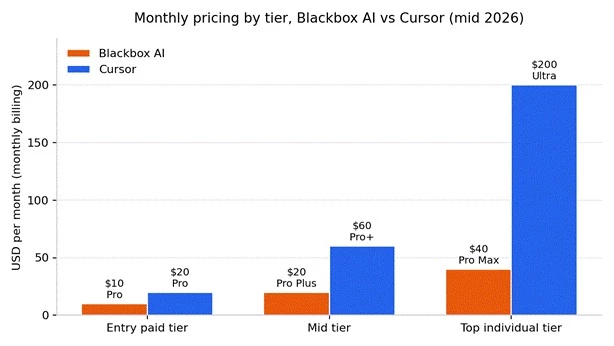
Figure 2. Monthly list prices by tier. Blackbox AI is consistently cheaper on paper, but both platforms meter premium model usage through credits, so real monthly cost depends on how you work.
The number on the pricing page is not the number on your card statement, and that is true for both tools. Blackbox AI credits do not roll over month to month, and several reviewers note the pricing page undercommunicates limits. Cursor moved from request-based to usage-based billing in June 2025, and the fallout is still visible in its reviews: developers report burning through the Pro credit pool in days when manually selecting frontier models, with on-demand overages accumulating quietly afterward. Sticking to Cursor's Auto mode, or Blackbox's included models, is how you keep either bill flat.
One more line item that matters for professional work: data training policies. Cursor's privacy mode guarantees code is not stored by model providers or used for training on paid plans. Blackbox AI reserves training opt-out by default for Enterprise; Pro-tier users need to opt out manually, and free-tier usage may feed product improvement.
Neither vendor publishes independently audited head-to-head benchmarks, so precise accuracy percentages are unspecified. What we do have is a large body of 2026 user reviews plus my own testing, and the pattern across them is consistent enough to score with some confidence.
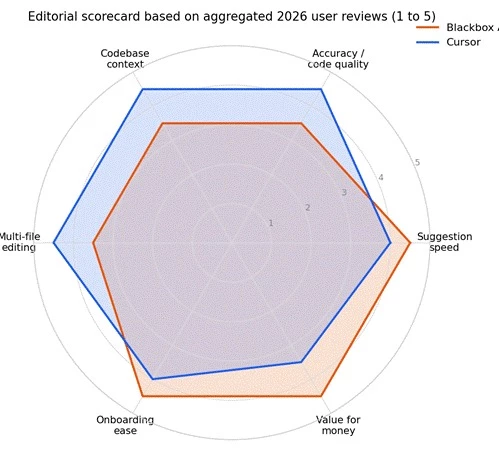
Figure 3. An editorial scorecard, not a lab benchmark. Scores synthesize aggregated G2, Gartner Peer Insights, PeerSpot, and Trustpilot commentary from early to mid 2026, plus hands-on testing on identical tasks.
Suggestion speed: Both are fast; Blackbox AI's lightweight completions feel slightly snappier, and even its own comparison doc concedes execution speeds are comparable on agent tasks, averaging around 4.2 minutes per task for both.
Accuracy and code quality: Cursor edges ahead on complex, multi-file work. G2 reviewers repeatedly credit its whole-codebase understanding, while Blackbox reviews more often mention suggestions needing tweaks on complex logic.
Context awareness: Cursor's indexing is the category benchmark. Blackbox AI indexes repositories too, and higher tiers add a semantic knowledge graph, but independent reviewers report it can lose the thread on very large enterprise repos.
Ease of use: Blackbox AI wins on day one because it slots into your existing editor. Cursor wins by day thirty once its habits click, though several reviewers note it runs heavy on RAM and can lag on lower-spec machines with multiple agents open.
Value for money: Blackbox AI's $10 entry point is roughly half of Cursor's, which matters for students and budget-conscious developers, provided you stay inside the credit limits.
Ratings for both tools split sharply depending on where you look, and understanding that split tells you more than any single number.
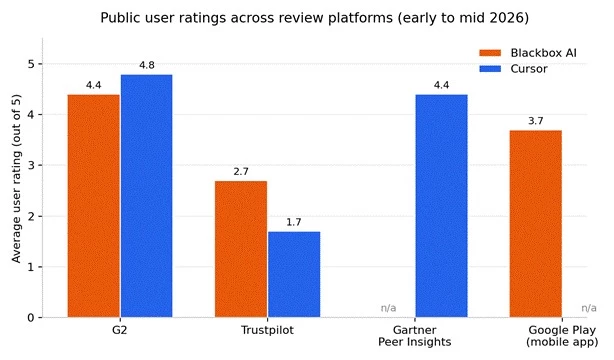
Figure 4. Average public ratings by platform, early to mid 2026. Bars marked n/a indicate the product is not meaningfully rated on that platform.
On developer-focused platforms, both score well. Blackbox AI sits around 4.4 out of 5 on G2, with Capterra and Software Advice above 4.4 as well. Cursor averages roughly 4.8 on G2 and 4.4 across 423 Gartner Peer Insights ratings, and PeerSpot reports a 23.4% category mindshare for Cursor versus 8.2% for Blackbox, with 100% of surveyed Cursor users willing to recommend it. Worth noting: Blackbox's mindshare jumped from 0.9% a year earlier, which is a steep climb.
Consumer review sites tell a rougher story for both. Blackbox AI holds about 2.7 on Trustpilot, driven almost entirely by billing disputes, cancellation friction, and slow support rather than complaints about the code itself. Cursor fares even worse there, around 1.7 across 243 reviews with 77% one-star, again dominated by surprise on-demand charges, refund refusals, and unresponsive support. The pattern is identical for both companies: developers like the product and distrust the billing. Whichever you choose, set spend limits, use monthly billing at first, and watch your statements.
Neither tool offers Google-Docs-style simultaneous cursor editing, so if you have seen "real-time pair programming" claims in older comparisons, treat them as outdated or loose. Collaboration in 2026 looks like this instead:
Cursor Teams ($40/seat): shared chats, commands, and rules across the org, centralized billing, usage analytics, role-based access, SAML SSO, and the Bugbot add-on for automated PR review. The June 2026 update added a Premium seat and split usage pools, which Cursor estimates lowers costs for 90% of teams.
Blackbox AI Pro Max and Enterprise: team collaboration features, centralized billing and management, usage analytics, SAML SSO, native Slack integration, screen-share agent sessions inside VS Code, and on-premise deployment on Enterprise for full data sovereignty.
For engineering managers, the sharper collaboration question is code review culture. Cursor's Composer forces a human through a multi-file diff before anything lands, which acts as a guardrail for junior developers. Blackbox agents can run and self-test code autonomously in sandboxes, which is powerful but shifts more responsibility onto your PR review process.
• Unmatched breadth: 35+ IDEs, CLI, web, mobile, and 300+ models under one $10 subscription.
• Frictionless adoption inside your existing editor, with a genuinely useful free tier.
• Differentiated extras like Figma-to-code, voice coding, and parallel multi-agent runs.
• Aggressive pricing, roughly half of Cursor at every comparable tier.
• Output on complex multi-file tasks needs more manual review than Cursor's, per multiple independent tests.
• Training opt-out is Enterprise-default only; lower tiers must opt out manually.
• Credits expire monthly, and Trustpilot reviews flag billing and cancellation friction.
• Cloud-only, with no offline or local-first mode.
• Best-in-class codebase context; repo-wide refactors through Composer are its signature move.
• Tab completion that predicts entire edits, not just next tokens, plus the fast first-party Composer 2.5 model.
• Strong professional ratings and clear paid-plan privacy guarantees.
• Free Pro year for students and a polished, familiar VS Code feel.
• Usage-based billing is hard to predict; overages have burned enough users to tank its Trustpilot score.
• No JetBrains, Vim, or other IDE options; you adopt the editor or you do not use Cursor.
• Heavy memory footprint on lower-spec machines, and agents can occasionally over-edit beyond the requested scope.
• Higher entry price at $20/mo, and $60 to $200 tiers add up fast for individuals.
Web development: Cursor is the stronger pick for evolving an existing React or Node codebase, where multi-file context pays off daily. Blackbox AI shines when starting from designs, since it converts Figma frames and screenshots into working components.
Python scripting and automation: Both handle utility scripts easily. Blackbox AI's cheaper tier and multi-model chat make it the pragmatic choice for quick one-off tooling.
Data science: Blackbox AI's remote agents can run data analysis tasks in sandboxes, and its breadth of models helps with exploratory work. Cursor's advantage appears when a notebook prototype graduates into a maintained package.
Students and learners: Cursor's free student year is hard to beat if you qualify. Otherwise, Blackbox AI's free tier plus $10 Pro is the gentlest budget path into AI coding assistants for developers in 2026.
Enterprise and legacy modernization: Blackbox AI markets jQuery-to-React and JS-to-TypeScript conversion workflows and offers on-prem deployment; Cursor Enterprise counters with pooled usage, SCIM, audit logs, and an AI code tracking API. Regulated teams should weigh the data-training defaults carefully.
Blackbox AI's ecosystem is a hub-and-spoke: one account fanning out to VS Code, the full JetBrains family, Android Studio, Xcode, a terminal CLI, browser extension, Slack, Figma, mobile apps, and a REST API for automation. That API plus CLI agents make it straightforward to wire code generation into CI/CD pipelines or n8n-style automations.
Cursor's ecosystem is a fortress: everything happens in the editor, which then reaches outward to GitHub, Slack, and your terminal. Background Cloud Agents can pick up tasks from mobile, and Bugbot reviews pull requests automatically. VS Code extensions largely work unchanged, so your linters, themes, and Git tooling carry over. An admin API surfaces usage data for cost tooling, but a general-purpose code generation API for external pipelines is unspecified.
Choose Blackbox AI if: you want AI assistance inside the IDE you already love (especially JetBrains), you value trying many models cheaply, you build front-ends from designs, or your budget caps at about $10 a month.
Choose Cursor if: you are willing to switch editors for the best multi-file, whole-repo AI experience available, you regularly refactor across large codebases, your team wants diff-review guardrails, or you qualify for the student plan.
And if you are still torn, both free tiers coexist happily on one machine. Run them against your real repository for a week each; your own codebase is a better benchmark than anything either vendor publishes.
Share your thoughts about this article.
Be the first to post a comment!

The same tool can be a 4.7 on one site and a 3.9 on another. Here is what is rea...
Nitin1 month ago

Here is the number worth pinning above your budget: in Gartner Digital Markets r...
Deepak Mehra1 month ago

What Artlist AI is in 2026Artlist began as a royalty-free music library. By 2026...
Deepak Mehra2 months ago

Most AI tool failures do not announce themselves. There is no crash, no angry em...
Nitin2 months ago

The best AI image generator in 2026 is Nano Banana 2 for speed, FLUX.2 for photo...
Parveen Verma2 months ago

“Useful” is a slippery word for a coding assistant. A tool can be brilliant at o...
Sakshi Dhingra2 months ago