If you teach anywhere near a device cart, you have probably heard the chant. Half the class wants Blooket, the other half wants Gimkit, and you have about ninety seconds to pick before the energy dies.
I have hosted both platforms across dozens of review sessions, dug through their help docs, pricing pages, and hundreds of educator reviews, and this guide pulls all of that into one place so you can stop guessing.
Quick answer
Blooket and Gimkit are both browser-based classroom quiz games where students join with a code and answer questions inside a game. Blooket offers 25+ game modes with a generous free plan that hosts up to 60 players.
Gimkit runs a strategy economy where students earn and invest virtual cash, adds built-in spaced repetition, and reserves most of its modes for the $59.88/year Pro plan. Blooket wins on free access and variety; Gimkit wins on depth and retention.
Both tools are aimed at K-12 teachers, students, and homeschool educators, and both have crossed from classroom utility into genuine playground currency. Blooket even overtook Kahoot in Google search interest in January 2026 after growing roughly 6,300% since 2020, which tells you how mainstream this category has become. So the real question is not which platform is popular. It is which one fits the way you actually run a lesson.
Blooket launched publicly in October 2020, built by brothers Ben and Tom Stewart, and has since passed 10 million cumulative users with a library of more than 20 million teacher-made question sets. Gimkit is older than most people assume. Josh Feinsilber built it in 2017 as a high school project, and he still runs the company today. That origin story shows in the product: Gimkit feels like it was designed by someone who sat through a thousand boring review games and decided to fix them.
| Platform | Core idea | Best-fit audience | Standout traits |
| Blooket | Quiz questions embedded inside rotating arcade-style games; students collect avatar characters called Blooks | K-12, especially elementary and middle school; homeschool review | 25+ game modes, generous free plan, Khanmigo AI question generator, collectible economy |
| Gimkit | Quiz answers earn virtual cash (GimBucks) that students invest in upgrades and power-ups inside 2D game worlds | Upper elementary through high school; test prep and mastery work | Spaced repetition of missed questions, 13+ video-game-style modes, Assignments for homework, KitCollab |
The one-line difference I give colleagues: Blooket turns a correct answer into a reward roll, while Gimkit turns it into money and a decision. That single design choice explains almost everything else in this comparison, from which grade levels prefer which tool to why their pricing models look so different.
Since a lot of readers land on comparisons like this while literally standing at the front of a classroom, let us get the practical part out of the way first. Logging into Blooket takes under a minute:
1. Go to blooket.com in any browser. There is no app to install; the whole platform runs on the web.
2. Click the Log In button in the top-right corner of the homepage.
3. Enter your email or username and password, or use the Sign in with Google option, which is what most school accounts use.
4. New here? Click Sign Up instead and choose the account type that matches you. Teachers get set-creation and hosting tools; students get the collectible side of the platform.
5. You land on the dashboard, where you can create a question set, browse the Discover library, host a live game, or assign homework.
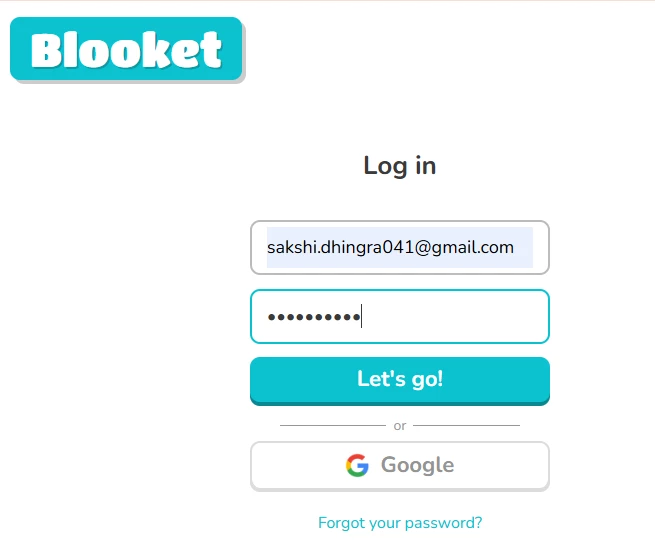
Two details worth knowing. First, students do not need an account to play. They join a live game by going to play.blooket.com and typing the six-digit code you project on the board. Second, Blooket's terms require parental consent for account holders under 13, so if you teach younger grades, have kids skip the account prompt that appears after each game.
The dashboard is refreshingly uncluttered. The left sidebar holds My Sets (question sets you have built or copied), Discover (a searchable library of public sets), Homework (assigned games with deadlines), and Stats (game history and reports). The big Create button walks you through building a set manually, importing from Quizlet or a spreadsheet, or generating questions with the free Khanmigo AI tool that Blooket launched with Khan Academy in January 2025. In my testing, the AI generator produced a usable 15-question vocabulary set in about forty seconds, though I always edit two or three questions before going live.
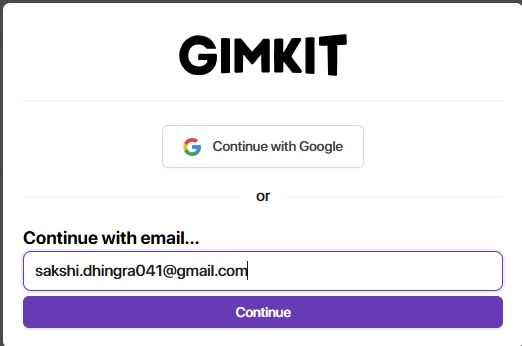
Gimkit's flow is nearly identical: go to gimkit.com, click Sign Up or Log In, and use Google or email credentials. New educator accounts automatically start a 14-day Gimkit Pro trial with no credit card required, which is a genuinely fair way to let you test the paid modes before deciding. Students join live games at gimkit.com/join with a five-digit code, again with no account needed.
Here is the side-by-side that most teachers actually want, based on the platforms' current 2026 feature sets:
| Feature | Blooket | Gimkit |
| Question formats | Multiple choice (with typing variants in some modes); images on questions | Multiple choice and short text input; images and audio require Pro |
| Game modes | 25+ active modes; 18 available free; seasonal modes rotate in and out | 13+ active 2D modes plus the classic Tycoon economy loop; roughly 3 featured modes free at a time |
| Missed-question handling | No systematic resurfacing; students can push past wrong answers in many modes | Built-in spaced repetition resurfaces missed questions on both free and paid plans |
| AI question generation | Khanmigo + Blooket generator, free with no usage caps (since Jan 2025) | In-house AI Question Generator (since Aug 2025), 10 to 30 questions per topic with grade-level targeting |
| Homework / async | Homework assignments free with 14-day deadlines; 365 days on Plus | Assignments are Pro-only; self-paced with due dates, goals, and auto-saved progress |
| Importing | Quizlet import (text), spreadsheet import, copy public sets | Quizlet and CSV import; KitCollab lets students submit questions to build the kit |
| Reports | Basic game stats free; question-by-question and per-student breakdowns on Plus | Question-level breakdowns after games and assignments; downloadable reports; limited real-time analytics |
| Class distribution | Share join codes and homework links to Google Classroom | Share links to Google Classroom; class rosters; report exports |
| Player identity | Nickname join, collectible Blooks tied to optional accounts | Nickname join with optional nickname generator; seasonal cosmetics |
Reading that table, a pattern emerges. Blooket front-loads value into its free plan and monetizes convenience features. Gimkit gives away the pedagogy (the spaced repetition engine works on every plan) but monetizes the games themselves. Neither approach is wrong, but they hit your budget very differently depending on which modes your students fall in love with.
Blooket ships more than 25 active modes in 2026, and 18 of them are free. The catalog spans Gold Quest (collect gold, steal from classmates, mild chaos), Tower Defense, Racing, Cafe, Factory, Crypto Hack, Monster Brawl, and newer additions like Adventure Quest and Quiz Kingdom. Seasonal modes such as Candy Quest and Santa's Workshop rotate through the year, and the platform pushes a fresh mode pack every season. The practical payoff is that the exact same question set feels like a different activity three weeks in a row, which is a quiet superpower for vocabulary drills.
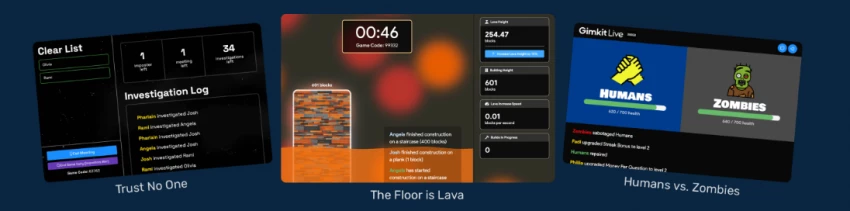
Gimkit runs a tighter catalog of roughly 13 active 2D modes, split between top-down games like Fishtopia, Snowbrawl, Trust No One (a social deduction mode in the Among Us mold), and Capture the Flag, plus platformers like Don't Look Down and Knockback.
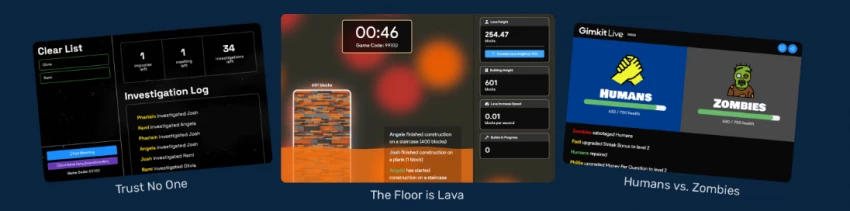
At any given time about three modes are featured and free with unlimited players; the rest technically load on a free account but cap the session at five students, which makes them unusable for a real class. That five-player ceiling on Pro Exclusive modes is the single most common complaint in Gimkit's user reviews, and it is the pressure point that pushes teachers toward Pro.
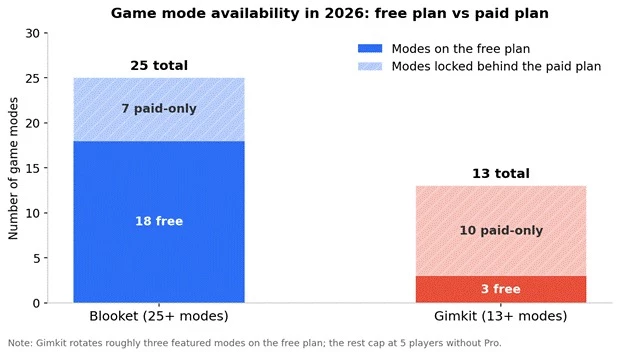
Figure 1. Mode counts on each platform's free and paid tiers as of mid-2026. Blooket leaves most of its catalog open; Gimkit gates the majority of its modes behind Pro, with roughly three featured modes rotating free.
Depth cuts the other way. Gimkit's economy modes force students to make decisions: save GimBucks for a multiplier, buy insurance against a wrong answer, or invest in defense during Trust No One. Older students respond to that strategic layer in a way that Blooket's luck-heavy modes cannot always match. Blooket's own community reviews on Common Sense Education flag the randomness openly; one teacher noted that a student who answers a handful of questions can beat a classmate who answered fifty, because swap and steal mechanics reward timing over knowledge. If your review session needs to feel fair, mode choice matters more than platform choice, and both tools let you tune settings to de-emphasize luck and speed.
Both platforms run freemium models, and both raised prices from their early days, so plenty of older blog posts quote numbers that no longer apply. Here are the current figures, cross-checked against the official help centers and pricing pages in mid-2026:
| Plan | Blooket | Gimkit | Worth noting |
| Free | $0 (Starter): 60 players per game, 18 modes, unlimited question sets, homework up to 14 days | $0 (Basic): unlimited players on ~3 rotating featured modes; other modes cap at 5 players; text-only questions | Blooket's free plan is broader; Gimkit's free plan still includes spaced repetition and reports |
| Paid annual | Blooket Plus: $59.88/year ($4.99/mo equivalent); 300 players, enhanced reports, audio questions, 365-day homework | Gimkit Pro: $59.88/year ($4.99/mo equivalent); all modes uncapped, Assignments, image and audio uploads | Identical annual sticker price; different unlocks |
| Paid monthly | Plus Flex: $9.99/month, cancel anytime | Pro monthly: $14.99/month, cancel anytime | Gimkit monthly breaks even with annual after just 4 months |
| Group / school | Group plans with bulk discounts, quote on inquiry; purchase orders accepted for groups | Department: $650/year for up to 20 teachers; School: $1,000/year for a whole building | Gimkit's school plan drops to roughly $20 per teacher at 50 teachers |
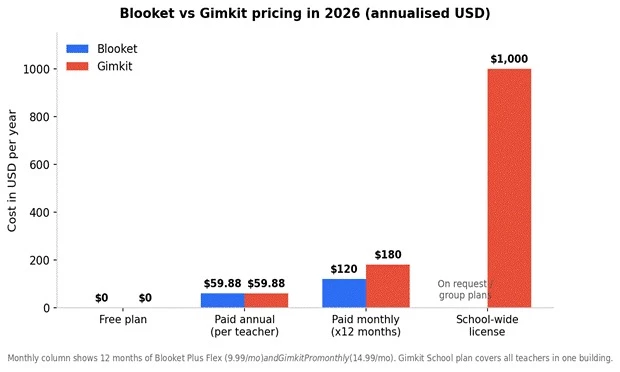
Figure 2. Annualized cost comparison. The annual plans are priced identically at $59.88, but month-to-month billing costs 50% more on Gimkit, and Gimkit is the only one publishing a flat school-wide rate.
A pricing footnote that matters for budgeting: Blooket Plus used to cost $35.88 per year and Plus Flex used to be $4.99 per month before increases brought them to the current $59.88 and $9.99. If your school approved a Blooket line item two years ago, re-check the amount before renewal. Blooket subscriptions are also non-refundable per its terms, so the monthly Flex plan is the safer way to trial paid features. Gimkit is friendlier here, since every new educator account starts with the 14-day Pro trial automatically.
Player caps are where the free plans really diverge, and they are the thing most likely to bite you mid-lesson:
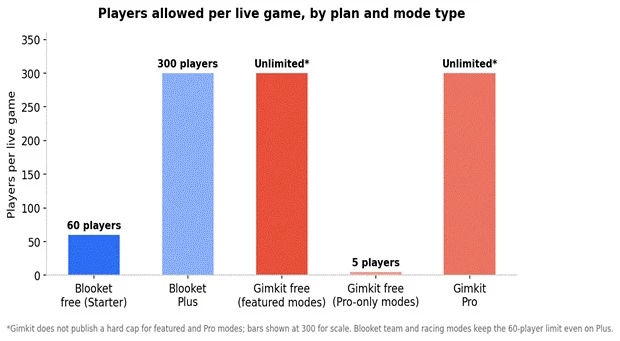
Figure 3. Live-game player allowances by plan. Blooket's 60-player free cap covers nearly every real classroom. Gimkit's free plan is unlimited on featured modes but collapses to 5 players on everything else.
For a single teacher with a class of 30, Blooket free covers you on every mode, all year. Gimkit free covers you only when the mode you want happens to be in the featured rotation that week. That rotation is also why you will find contradictory claims online about whether Gimkit is free for a full class; the honest answer is that it depends on the mode and the week.
To keep this comparison honest, I ran the same 10-question fractions review through both tools with a 5th-grade group, then repeated the experiment with a middle school vocabulary set. Here is how it actually played out.
Monday, Blooket. I logged in with Google, hit Create, imported my questions from a spreadsheet in about three minutes, and hosted Gold Quest. Students joined at play.blooket.com with the code in under a minute, including the kid whose Chromebook always needs a restart. The room got loud fast. The host screen showed a live leaderboard, and afterward the Stats tab gave me overall accuracy per student. What I could not see on the free plan was which specific questions the class bombed; that question-by-question view sits behind Plus. I re-hosted the identical set as Tower Defense on Wednesday and the class treated it like brand-new content, which is exactly the variety advantage Blooket sells.
Tuesday, Gimkit. Same questions, imported via CSV just as quickly. I launched Tycoon, the classic economy mode, from the Play Live button. The vibe was different: quieter, more heads-down, students whispering about whether to buy a multiplier now or bank cash. Two students who had coasted through Blooket got visibly frustrated when their missed questions kept coming back, and that is the spaced repetition engine doing precisely what it is supposed to do. The post-game report showed a question-level breakdown without me paying anything. When I tried to launch Don't Look Down, the mode my students begged for, the free plan capped it at five players and I hit the upgrade wall in real time.
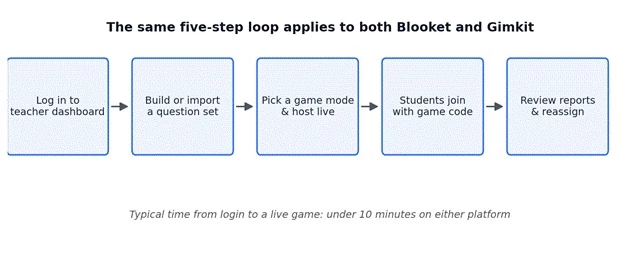
Figure 4. The teacher workflow is functionally identical on both platforms: log in, build or import a set, pick a mode, students join by code, review the report. The differences live inside steps three and five
My takeaway after the week: Blooket was the lower-friction tool for spontaneous review and younger energy. Gimkit produced better retention evidence and noticeably more strategic thinking, but only delivered its full experience once the Pro trial features were in play. Several published studies back up the retention side; an EdTech Hub analysis found roughly 23% higher retention with Gimkit compared to traditional review methods, and a 2025 nursing-education study found it outperformed conventional question-and-answer review.
• Sixty free players and 18 free modes make it the most generous free plan in the category.
• Massive mode variety keeps a single question set fresh for weeks without new prep.
• Free, uncapped Khanmigo AI question generation removes most of the set-building work.
• Streamlined interface that first-time users figure out in one sitting; sets take about five minutes to build.
• Collectible Blooks give younger students a motivation loop beyond the leaderboard.
• Several popular modes lean on luck, so leaderboard results do not always reflect knowledge.
• No systematic resurfacing of missed questions, which limits its value for genuine retrieval practice.
• Question-by-question analytics require the paid Plus plan.
• Multiple-choice-only format restricts what you can assess.
• A large public ecosystem of cheat scripts exists because the game loop is easy to automate, so supervision matters.
• Spaced repetition of missed questions on every plan, including free, which is the strongest learning feature either platform offers.
• Strategy economy that genuinely engages middle and high schoolers who roll their eyes at simpler quiz games.
• Question-level reports available without paying.
• KitCollab lets students co-build the question set, which boosts buy-in.
• Transparent, aggressive school pricing: $1,000 covers an entire building's teachers.
• The free plan's 5-player cap on non-featured modes makes most of the catalog unusable without Pro.
• Fewer modes overall than Blooket, and the featured rotation changes which ones are free.
• Only two question formats, and audio and image attachments require Pro.
• Games reward speed and investment decisions, so some students rush questions to farm cash.
• No offline mode and no native mobile app, so flaky Wi-Fi is a hard stop.
Published review scores will not settle this fight for you. On SoftwareSuggest, both platforms hold identical 4.5 out of 5 ratings from verified users, with Gimkit showing a 90% recommendation rate across its smaller review pool. Common Sense Education's editorial reviews rated both tools well before the program paused new reviews in January 2026, praising Blooket's engagement while cautioning that the gameplay can overshadow the learning, and calling Gimkit a fresh spin on classroom game shows with more student agency than competitors.
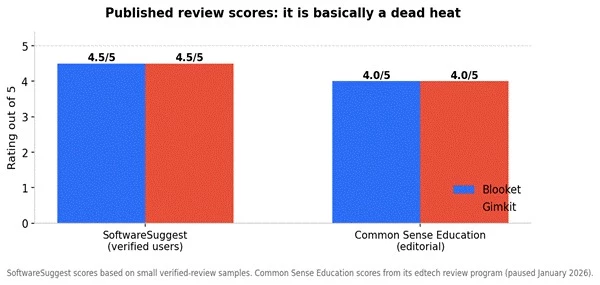
Figure 5. Published review scores across major review sources. The numbers are effectively tied, which is why workflow fit and free-plan limits are better deciding factors than star ratings.
The qualitative reviews are more useful than the stars. Blooket's critics consistently mention the luck factor and the distraction risk; its fans consistently mention that disengaged students voluntarily participate. Gimkit's critics consistently mention the restrictive free tier; its fans consistently mention that games last longer and require actual thinking. Notice that neither platform's fans and critics disagree about the facts. They disagree about what a review game is for.
Both platforms are fully browser-based and work on Chromebooks, laptops, tablets, and phones, which is convenient right up until the network hiccups, because neither offers offline play. Blooket has no dedicated app at all; students simply open the join page in a mobile browser. Gimkit's 2D modes are heavier on the graphics side and occasionally need WebGL settings adjusted on locked-down school devices, and its accessibility record is imperfect: a district web accessibility audit in 2024 marked it as failing, so if you have students using screen readers, test before committing.
On safety and privacy, both platforms let students join by nickname without accounts, keep data collection minimal, and require parental consent for under-13 account creation. One classroom-management note from experience: Blooket's post-game prompt nudges students to create accounts so they can keep their Blooks, so decide your account policy before you host, not after.
After all the tables and charts, the decision usually collapses to a few honest questions:
You teach elementary or want zero-cost variety for whole-class review: Blooket, no contest. The free plan covers 60 players across 18 modes and the AI generator writes your questions.
You need review that actually sticks for a test: Gimkit. The spaced repetition engine forces students back through their misses, and it works on the free plan.
Your students are strategy-motivated middle or high schoolers: Gimkit Pro on the annual plan. The 2D modes are the hook, and the $59.88 annual price beats paying monthly by month four.
Your whole building wants in: Gimkit's $1,000 School plan is the cleanest deployment in the category, working out to about $20 per teacher at 50 teachers.
You cannot decide: run both. Most teachers I know use Blooket for the quick fun review and Gimkit when the review has to count. The tools are complementary more than they are rivals.
There is no single winner here, and any comparison that crowns one is flattening a real trade-off. Blooket is the best free classroom game platform available in 2026 and the obvious pick for elementary teachers, spontaneous review, and anyone whose budget is exactly zero.
Gimkit is the stronger learning tool once money enters the picture, because its spaced repetition, strategy depth, and Assignments feature turn a fun period into practice that measurably sticks. My own shelf has room for both: Blooket on the Fridays when the class needs a win, Gimkit in the two weeks before the unit test when the review has a job to do.
Share your thoughts about this article.
Be the first to post a comment!
Most guides to Totally Science alternatives chase the same dead end: a list of p...
Michael Hicklen2 months ago