
MagicLight AI can be useful when the goal is to create visual content quickly. But once the work moved beyond simple AI visuals, the gaps started showing. Some projects needed cinematic motion. Some needed ready-made social videos. Some needed a talking presenter. Some needed blog-to-video repurposing. Some only needed clean, beginner-friendly editing. That is the point where it stopped making sense to hunt for one best replacement, and started making sense to match each MagicLight AI alternative to the video job it actually solves.
This matters because the tool that wins for a film-style scene is not the tool that wins for a scripted ad, a LinkedIn explainer, or a beginner Instagram post. MagicLight AI itself leans on long-form, character-driven animation generated from a script, with access to models like Sora 2, VEO 3, and Kling for the underlying video. Its real weaknesses, based on documented user feedback, sit in editing depth, character consistency across scenes, and support responsiveness. So the right replacement depends entirely on which of those gaps is blocking the current project.
What follows is not a ranked list of the seven best tools. It is a decision system: a map from the video job in front of you to the tool most likely to finish it well, with honest limits and a pricing-and-rights check before any switch.
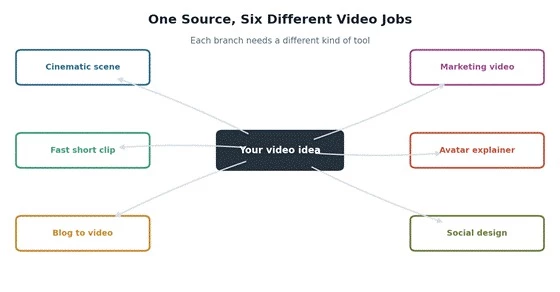
One source idea fans out into six different video jobs, and each branch wants a different kind of tool.
Most searches for MagicLight AI alternatives start with a wrong assumption: that one tool will replace everything MagicLight AI did, only better. AI video tools are not interchangeable. They are built around different jobs, and a mismatch between the job and the tool is where time and money leak.
In practice, the category splits along these lines:
• Some tools generate cinematic AI clips with camera and motion control.
• Some tools build marketing videos from a script or prompt, with stock footage and voiceover.
• Some tools create avatar-led presenter videos.
• Some tools repurpose blogs and articles into structured videos.
• Some tools help beginners design social posts and short clips from templates.
• Some tools are better for fast experimentation than for polished, brand-safe publishing.
Picking by job, not by hype:
| Video job | The wrong-tool problem | Better tool direction |
| Cinematic AI scene | Template tools feel too basic | Runway or Kling AI |
| Fast short clip | Advanced tools slow the workflow | Pika |
| Blog-to-video | Pure AI generators lack structure | Lumen5 |
| Marketing video | Cinematic tools lack scripts and templates | InVideo AI |
| Avatar explainer | Normal video tools have no presenter | HeyGen |
| Social media design | AI generators lack layout control | Canva AI Video |
Instead of a shortlist, here is a replacement map. The left column is the gap MagicLight AI leaves. The middle is the first tool worth checking. The right is the reason. This is the fastest way to skip straight to a relevant trial instead of signing up for everything.
| If MagicLight AI feels weak in | Try this first | Reason |
| Cinematic AI visuals | Runway | More serious AI generation plus a real editing suite |
| Realistic motion | Kling AI | Stronger physics and lifelike movement |
| Fast idea testing | Pika | Built for quick short-form experiments |
| Blog or text repurposing | Lumen5 | Designed to turn written content into video |
| Social ads and marketing clips | InVideo AI | Prompt-to-video and script-to-video workflow |
| Presenter or explainer videos | HeyGen | AI avatars and voice-led delivery |
| Beginner social content | Canva AI Video | Easier templates and layout control |
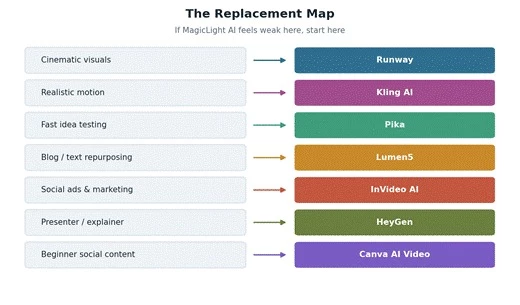
The replacement map: read your gap on the left, jump to the tool on the right.
Sometimes the issue is not speed. It is output quality. When a project needs cinematic movement, realistic lighting, camera motion, or AI-generated scenes that do not feel template-bound, a basic AI visual layer is not enough. Two tools handle this gap from different angles.
Runway has rebuilt itself around the Gen-4 and Gen-4.5 models, and it remains the option working video professionals tend to prefer. The draw is not just generation quality but the creative pipeline around it: text-to-video, image-to-video, video-to-video, motion brush, and a director-style control layer that cheaper generators do not offer. It suits agencies, music videos, ad concepts, and short-film work.
Where Runway fits • Strong text-to-video and image-to-video with a polished editing suite • Motion and camera control that template tools cannot match • A single subscription now also exposes other top models alongside Gen-4.5 |
Where Runway frustrates • Less beginner-friendly than template tools • Clip length per generation is short, so longer pieces require stitching • Runs on a credit system that does not roll over; verify current plan limits before committing |
Pricing reality: Runway uses a tiered subscription plus a credit-per-second model, with a free tier that gives a small one-time credit allocation rather than a monthly refill. The paid entry tier starts in the low-double-digits per month at annual billing, but credit consumption varies sharply by model and resolution. Confirm the live numbers on Runway's official pricing page before deciding.

Kling AI is built around lifelike movement. Its 3.0 generation introduced physics-accurate motion, multi-shot storytelling that links several connected shots, native audio sync, and higher-resolution output. For scenes where bodies, objects, and gravity need to behave believably, it is frequently the stronger choice over a general generator.
Where Kling AI fits • Realistic, physics-aware motion and strong visual storytelling • Image-to-video scenes with believable movement • Readable on-screen text and logos hold up better than some rivals, useful for product and marketing shots |
Where Kling AI frustrates • Credit-based pricing that scales with length, resolution, and audio use • Access, plan tiers, and commercial-use terms shift often and need live verification • Still a generation tool, not a full editing or publishing suite |
Pricing reality: Kling runs on credits spent per second of video, with a free daily allowance for testing and paid tiers that range from budget to high-volume. A short 1080p clip regenerated a few times can consume a meaningful slice of a monthly allocation. Verify current credit rates inside the app before planning a workflow around it.
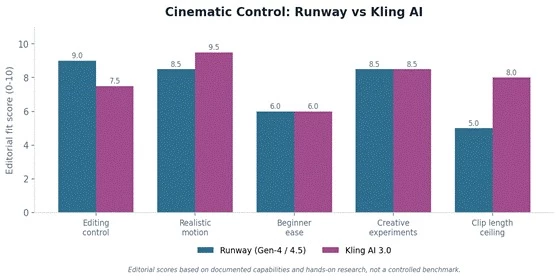
Editorial fit comparison: Runway leads on editing control, Kling AI leads on realistic motion and clip length ceiling.
| Need | Runway | Kling AI |
| More editing control | Stronger fit | Good, depends on host |
| Realistic motion | Strong | Very strong |
| Beginner use | Moderate | Moderate |
| Creative experiments | Strong | Strong |
| Pricing clarity | Verify live | Verify live |
Not every creator needs a cinematic scene. Often the goal is to test a strange idea, make a quick AI clip, build a visual hook, or try several prompts for TikTok, Reels, or Shorts. Polish is not the point; speed and range are.
Pika has leaned into creative control and speed rather than raw length. Its newer engine adds physics-aware interaction, integrated sound effects, and improved lip-sync, which makes it a strong sandbox for generating many concepts fast. It is the tool to reach for when the job is exploration, not final delivery.
Pika makes sense when • You want fast text-to-video and image-to-video ideas • You are testing many prompts or visual hooks • You create short-form, social-ready clips • You value playful, experimental output over polish |
Pika may frustrate you when • You need long-form video • You need perfect character consistency across shots • You need brand-safe, fully polished final output • You need deep, frame-level editing control |
Pricing reality: Pika uses a credit system with a free monthly allowance for testing, watermarked and non-commercial on the free tier. Paid plans unlock higher resolutions, watermark removal, and commercial rights, with credit cost rising for longer clips, higher resolution, and the more advanced effects. Confirm the current tiers on Pika's pricing page.
A marketing video is a different object from an AI-generated scene. It needs structure, a script, captions, stock clips, a brand message, a call to action, and the right export formats. Two tools own this space, and they start from opposite ends.
InVideo AI turns a prompt or script into a full video: footage, voiceover, subtitles, music, and transitions, with the AI making hundreds of small production decisions. Its 2.0 generation also wires in cinematic generation models for the AI-clip portions, which closes much of the quality gap with pure generators while keeping a complete, end-to-end marketing workflow.
Where InVideo AI fits • Prompt-to-video and script-to-video for ads, Shorts, and explainers • Built-in captions, voiceover, stock footage, and voice cloning • Strong choice for non-editors who need a distributable, on-brand result |
Where InVideo AI is weak • Output can feel template-driven without manual refinement • Free tier carries a watermark and tighter limits; AI minutes do not roll over • Generated copy is safe rather than sharp, and command precision is still inconsistent |
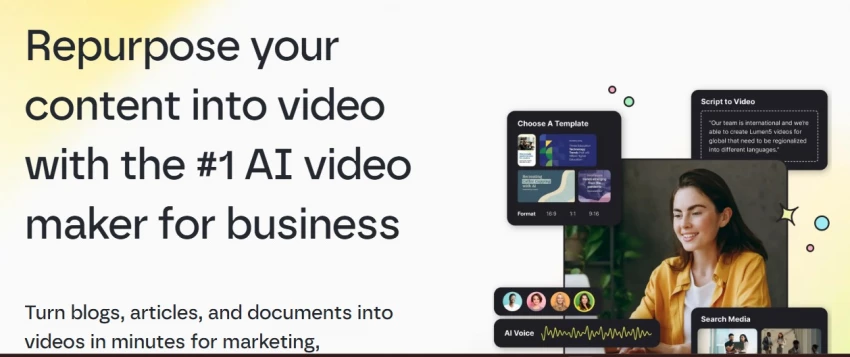
Lumen5 is purpose-built to convert written content into video. Paste a URL or text and it drafts a storyboard, pulls stock media, and lays out captions. It is strongest for B2B content teams repurposing blogs, white papers, and internal updates into clean, on-brand social or LinkedIn videos, with solid brand-kit controls.
Where Lumen5 fits • Blog-to-video and text-to-video for content marketing • Business explainers, LinkedIn content, and educational snippets • Strong brand-kit controls for consistent, repeatable output |
Where Lumen5 is weak • Less cinematic; text-overlay style rather than AI scene generation • Pricing skews toward business tiers, weaker value for solo creators • Customization and length controls are limited; audio rights need checking |
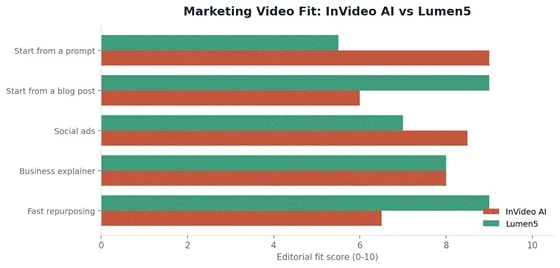
Marketing fit: InVideo AI leads when starting from a prompt or ad brief; Lumen5 leads for blog repurposing and fast text reuse.
| Marketing need | InVideo AI | Lumen5 |
| Start from a prompt | Better fit | Moderate |
| Start from a blog post | Good | Stronger fit |
| Social ads | Strong | Good |
| Business explainer | Strong | Strong |
| Cinematic AI visuals | Weak | Weak |
| Fast repurposing | Good | Strong |
Sometimes a video needs no cinematic effects at all. It needs a person-like presenter for a training module, a product walkthrough, onboarding, or a localized message. That is a different problem, and avatar tools solve it directly.
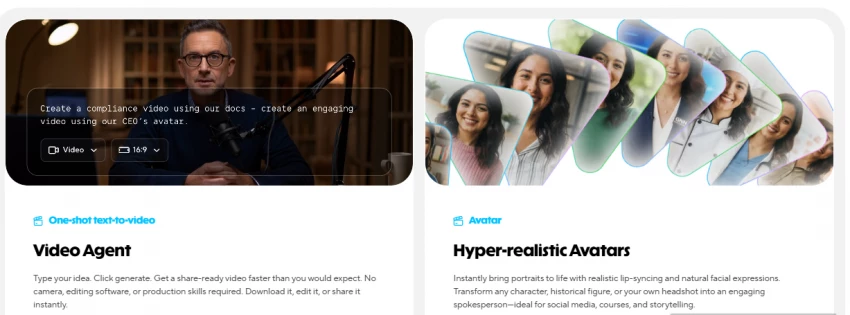
HeyGen generates talking-presenter videos from a script, with AI avatars, voice generation, and lip-sync. Its Avatar IV system can turn a single image into an expressive presenter, and its translator handles dubbing and lip-sync across well over a hundred languages. It is the practical pick for teams that want consistent, repeatable spoken video without a camera crew.
Where HeyGen fits • Training videos, product explainers, and onboarding • Internal communication that would otherwise need filming • Multilingual and localized versions of the same video |
Where HeyGen needs care • Premium avatar generation runs on a credit system that can deplete quickly • Voice and lip-sync quality should be checked per use case • Consent, likeness, and avatar ethics matter; it is not a cinematic replacement |
HeyGen's strongest fit is structured, repeatable spoken content, with localization a standout use case.
| HeyGen is useful for | Why |
| Training videos | Presenter format reads clearly |
| Product explainers | Walkthroughs are easier to follow |
| Internal communication | Saves filming and scheduling time |
| Localization | Generates multilingual versions fast |
| Sales and outreach videos | A human-style presenter feels more direct |
Some users do not need advanced AI generation at all. They need templates, captions, thumbnails, brand colors, simple edits, and fast export for Instagram, TikTok, YouTube, or LinkedIn. For that, a design-first platform beats a generation-first one.
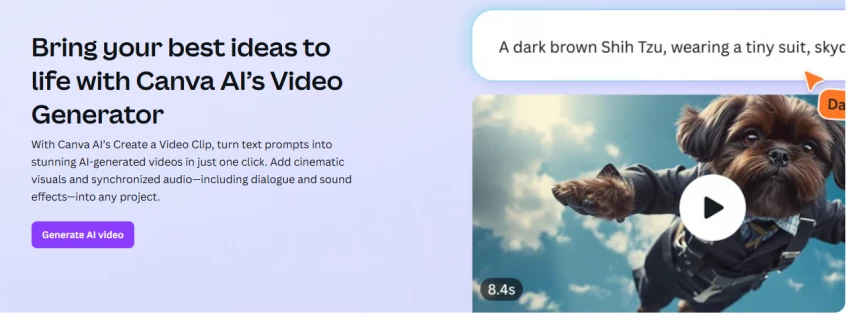
Canva's Magic Studio bundles template-based video editing with light AI generation: drag-and-drop editing, social formats, captions, brand kits, stock media, and short text-to-video clips. The AI scene quality is modest compared with dedicated generators, but the all-in-one workflow and gentle learning curve make it the easiest on-ramp for non-editors.
Canva AI Video works best when • You need social templates and quick designs • You are a beginner who wants minimal setup • You also need thumbnails, posts, and brand colors in one place |
It falls short when. • You need cinematic AI scenes or realistic motion • You need deep video or frame-level control • You want complex, high-fidelity AI generation |
Pricing reality: Canva's free tier is genuinely usable for template-based social video, with a limited monthly pool of AI generations. The Pro tier, priced around fifteen dollars per month for individuals, unlocks the fuller brand kit, larger stock library, and a shared monthly AI-credit allowance used across all Magic Studio features. Check Canva's current pricing page, since credit limits change.
AI video pricing is confusing because tools charge in different units. A single headline price rarely reflects what a real workflow costs. The traps to watch:
| Pricing element | Why it can surprise users |
| Credits | A failed generation can still consume credits |
| Video seconds | Longer clips become expensive quickly |
| Resolution | 1080p or 4K often requires a higher plan |
| Watermark removal | Free plans may not be publish-ready |
| Avatar minutes | Premium presenter time runs out fast |
| Stock footage license | Commercial reuse can carry limits |
| Team seats | Agency workflows cost more, and seats may not add credits |
| Commercial rights | Client work needs explicit, documented terms |
The recurring places AI video budgets leak. Confirm each against the official pricing page before switching.
One rule: do not budget from a blog roundup, this one included. Credit rates, plan inclusions, and watermark rules change often, and several of these tools have adjusted their tiers more than once in the past six months. Open each tool's official pricing page and verify before paying.
AI video raises questions a normal edit does not. Before publishing, especially for client or brand work, run through the rights and safety checklist below.
| Risk | Why it matters |
| Stock footage | May carry licensing limits on reuse |
| Music | Can trigger copyright claims on YouTube and elsewhere |
| AI avatars | Consent and likeness rights apply |
| Voice cloning | Must never be used without permission |
| Brand and client work | Rights and approvals should be documented |
| Synthetic realism | Misleading videos can damage audience trust |
| Platform rules | YouTube, TikTok, and Instagram AI policies may apply |
AI disclosure is increasingly expected, and some platforms require labeling synthetic or altered media. When in doubt, disclose, get written consent for any real likeness or voice, and keep a record of asset licenses for anything client-facing.
A demo reel is marketing. Before committing budget, run a quick trust filter across independent sources, and weight recent feedback most heavily, since these tools change fast.
| Source | Signal to look for |
| G2 / Capterra | Business-user complaints, support quality, ease of use |
| Trustpilot | Billing, cancellation, and customer-service issues |
| Product Hunt | Early creator reactions on launch |
| Real workflow complaints and unedited output examples | |
| Quora | Beginner doubts and head-to-head comparison questions |
| YouTube | Real, unscripted output demos |
| Official pricing pages | Credits, watermark rules, exports, and rights |
| Changelogs | Whether the tool is actively improving |
A note on honesty: review volume for the newest models is still thin, and some reported MagicLight AI complaints, for example around character consistency and support, are worth weighing against equally real praise for its long-form output. Treat any single rating as a data point, not a verdict, and verify the current picture yourself before switching.
There is no single answer, only a decision path:
• For cinematic work, start with Runway.
• For realistic moving scenes, test Kling AI.
• For fast short-form ideas, use Pika.
• For marketing videos, compare InVideo AI and Lumen5.
• For presenter-led training or explainers, use HeyGen.
• For beginner social content, use Canva AI Video.
Start from the job, not the brand name.
The smartest MagicLight AI alternative is not the most popular tool. It is the one that fits the exact video job you are trying to finish
Share your thoughts about this article.
Be the first to post a comment!

The same tool can be a 4.7 on one site and a 3.9 on another. Here is what is rea...
Nitin1 month ago

Here is the number worth pinning above your budget: in Gartner Digital Markets r...
Deepak Mehra1 month ago

What Artlist AI is in 2026Artlist began as a royalty-free music library. By 2026...
Deepak Mehra2 months ago

Most AI tool failures do not announce themselves. There is no crash, no angry em...
Nitin2 months ago

The best AI image generator in 2026 is Nano Banana 2 for speed, FLUX.2 for photo...
Parveen Verma2 months ago

“Useful” is a slippery word for a coding assistant. A tool can be brilliant at o...
Sakshi Dhingra2 months ago