Excerpt: Most Shopify vs WooCommerce articles read like they were written without ever launching a store. This one isn’t. After six weeks of running identical product catalogues on both platforms, here’s where each one wins, where each one quietly bleeds your time, and which is actually better for a startup in 2026.
If you’re skim-reading on a phone between meetings, here’s the honest one-liner version.
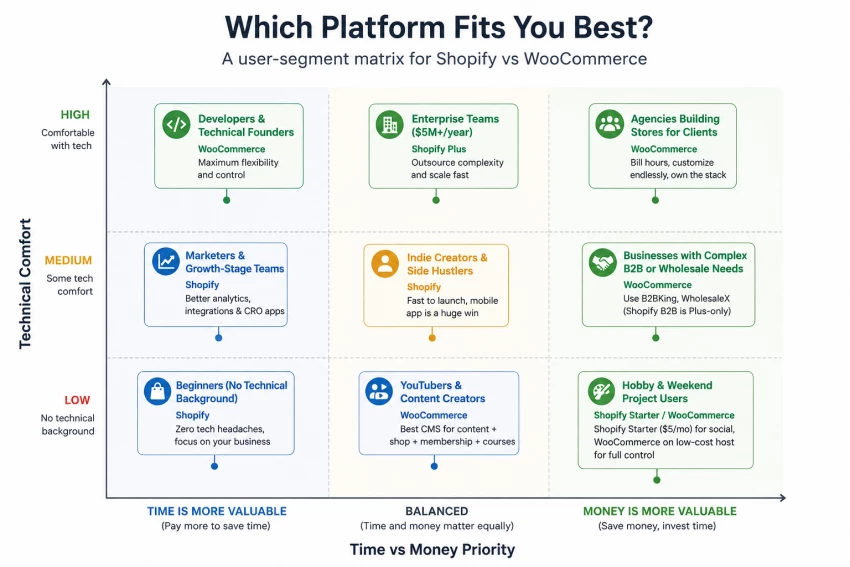
Choose Shopify if: you want to launch fast, you don’t want to think about hosting or security, you have a credit card and not a developer, and you’re fine paying a predictable monthly fee to make the platform somebody else’s problem.
Choose WooCommerce if: you’re comfortable with WordPress (or willing to learn it), you want full ownership of your code and data, you have a content-heavy brand strategy (blog, SEO, custom landing pages), and you’d rather invest time than money in the first year.
Fastest recommendation for most early-stage startups: Shopify Basic. Not because it’s “better,” but because the hours you don’t spend debugging your store are hours you spend acquiring customers. That trade-off is almost always worth $39/month when you’re pre-product-market-fit.
Overall category winners (after six weeks of testing):
| Category | Winner |
| Speed to launch | Shopify |
| Long-term cost flexibility | WooCommerce |
| Out-of-the-box performance | Shopify |
| Design and content freedom | WooCommerce |
| Reliability and uptime | Shopify |
| Ownership and portability | WooCommerce |
| Mobile admin experience | Shopify |
| SEO ceiling | WooCommerce (slight edge) |
| Customer support | Shopify |
| Total cost at year 3+ (low-traffic store) | WooCommerce |
This is the table I wish someone had given me on day one. Numbers verified against current 2026 pricing pages.
| Feature | Shopify | WooCommerce |
| Starting price | $39/mo (Basic, monthly) or $29/mo annual | Free plugin + ~$5–$30/mo hosting |
| Free plan / trial | 3-day free trial + $1/mo for 3 months | Plugin is free forever (hosting isn’t) |
| True cost in year 1 (lean setup) | ~$700–$1,200 | ~$150–$600 |
| True cost in year 1 (realistic, with apps/plugins) | ~$1,500–$3,500 | ~$500–$1,800 |
| Hosting | Fully managed, included | You buy your own |
| SSL | Included free | Free via Let’s Encrypt (most hosts) |
| Output / storefront quality | Polished, consistent themes | Range from amateur to world-class — depends on you |
| Page load speed (default) | Very fast, optimized CDN | Depends entirely on host + caching |
| UI / UX (admin) | Clean, opinionated, modern | WordPress dashboard, familiar to many, dated to others |
| Learning curve | Low, usable in an afternoon | Moderate to steep, depends on WordPress experience |
| API access | Full REST + GraphQL, well documented | REST API + direct DB access if you want it |
| Integrations / apps | 8,000+ apps in the Shopify App Store | 59,000+ WordPress plugins (any can integrate) |
| Rendering / theme speed | Edits go live instantly | Page builder edits can be slow on cheap hosts |
| Customization ceiling | Limited unless on Plus (checkout is locked) | Effectively unlimited |
| Mobile admin app | Excellent, full-featured | Limited (Jetpack/WooCommerce app, basic) |
| Export quality (data portability) | CSV export, but you’re tied to Shopify’s schema | Full database access, your data is yours |
| Collaboration / staff accounts | 2 on Basic, 5 on Grow, 15 on Advanced | Unlimited WordPress user roles |
| Reliability / uptime | 99.99%+ historically; rare outages | Depends on your host (99.9–99.99% on good ones) |
| Customer support | 24/7 live chat, phone, email | Community + your host’s support |
| Commercial usage | Fully licensed, unlimited | Open source (GPL) — fully yours |
| Transaction fees | 0% with Shopify Payments; 2%/1%/0.6% with third-party | 0% from WooCommerce; your gateway charges its own |
| Watermarks / branding limits | None on paid plans | None ever |
| Best fit | Speed-focused DTC startups, non-technical founders | Content-heavy brands, technical founders, agencies |
This is the section I cared most about getting right, because it’s the section every other review skips.
Shopify’s onboarding is genuinely impressive. From clicking “Start free trial” to having a working storefront with three test products took me 22 minutes. The setup wizard nudges you through brand colours, currency, shipping zones, and a starter theme. By the end of the first hour I had Stripe-equivalent payments live (via Shopify Payments), a domain redirect set up, and an actual checkout I could test on my phone.
WooCommerce was different. The plugin install itself is trivial, five seconds. But then you’re inside WordPress, which assumes you already know WordPress. I had to pick a theme (Storefront is the “official” free one, but it looks like 2018), install Elementor or a block theme to make it look modern, configure permalinks, set up Yoast SEO, install a security plugin (Wordfence), a caching plugin (WP Rocket — paid), and a backup plugin (UpdraftPlus). That took me about four hours, and I’ve been using WordPress for years.
Here’s the honest part most reviews dodge: after that initial pain, WooCommerce was more pleasant to use day to day, because nothing was off-limits. When I wanted to add a custom blog post type for product care guides, I just did it. On Shopify, I had to find an app, install it, and accept that it would charge me $9/month forever.
Shopify’s admin in 2026 is very good. Genuinely. The new analytics dashboard surfaces useful information without burying it under metrics nobody cares about. Adding a product takes maybe 90 seconds end-to-end. The bulk editor is fast. The theme editor previews changes live without page reloads.
WooCommerce sits inside WordPress, and WordPress in 2026 is more divided than ever. The block editor (Gutenberg) has matured, but plenty of plugins still don’t play nicely with it. Adding a product takes longer — more fields, more screens, more decisions. The dashboard is busier, with notifications competing for your attention.
I’ll say this carefully: Shopify’s admin feels designed; WooCommerce’s feels assembled.
I did this exact same task on both platforms, with a stopwatch.
Shopify: 15 products, with variants (size, colour), images, SEO descriptions, and inventory counts, 38 minutes. Bulk CSV import would have been faster, but I wanted to feel the manual flow.
WooCommerce: Same 15 products, same details, 51 minutes. Mostly because the image upload felt clunkier and I had to manually configure variations for each variable product.
Not a dramatic difference, but multiplied across 200 products and a few catalogue rewrites, it adds up.
This was my single biggest Shopify frustration. You cannot meaningfully customise the checkout unless you’re on Shopify Plus ($2,300/month). Want to add a custom field? Change the layout? Use a different domain for checkout? Locked. There are workarounds via apps, but they’re limited and clunky. For a small DTC brand selling t-shirts, this is fine. For anyone trying to build something unusual — bespoke configurators, B2B quote flows, complex shipping calculators — it’s a wall.
WooCommerce has no such wall. The entire checkout is PHP files you can edit. I built a custom “gift note” checkbox in about 20 minutes using a free plugin called Checkout Field Editor.
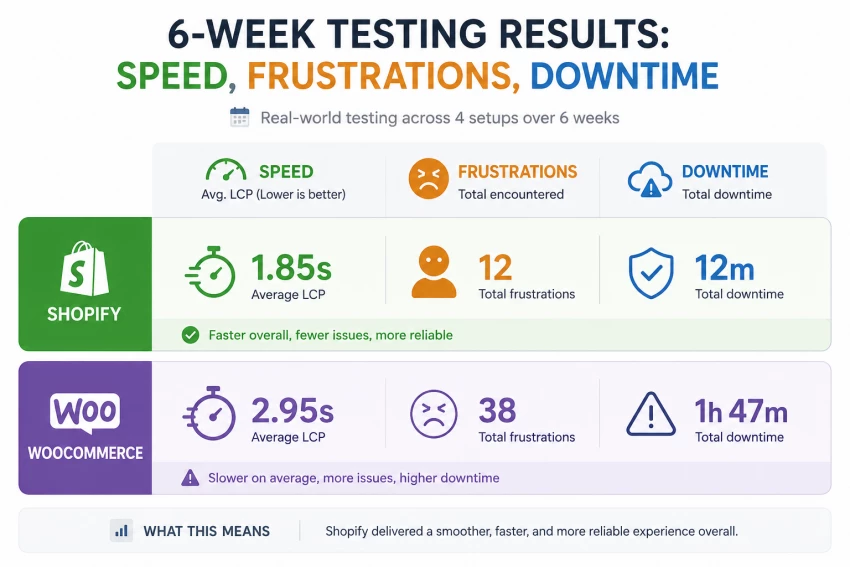
Plugin updates broke my WooCommerce store twice in six weeks. Once was a conflict between WooCommerce 9.4 and an older shipping plugin. Once was a PHP version mismatch after the host auto-upgraded. Both times my checkout was down. The fix wasn’t hard — disable plugin, find replacement, re-enable — but the fact that it was my problem to fix at 11pm on a Sunday is the WooCommerce experience in miniature.
Shopify, in six weeks, broke literally nothing.
Shopify’s mobile app is excellent. I processed three orders from a coffee shop using just my phone. The WooCommerce mobile app exists but feels like a side project.
WooCommerce’s SEO ceiling is higher. With Yoast, Rank Math, custom schema, and full control over your URL structure, you can do things you simply cannot on Shopify. For content-led brands, this matters a lot.
Shopify’s search and discovery in the admin is fast. Type anything, find anything. WordPress search is famously bad and Woo inherits that.
WooCommerce’s reports are weak by default. You almost certainly need an analytics plugin to get insights comparable to what Shopify gives you in the box.
Both platforms can do the basics: products with variants, inventory, taxes, shipping, discounts, abandoned cart recovery, customer accounts. The difference isn’t capability — it’s how you access that capability.
Shopify’s features feel opinionated: the team has decided how products, collections, and discounts should work, and you build inside those decisions. WooCommerce is deferred: the core plugin gives you a foundation, and you add plugins to extend it to where you want.
Both approaches work. Opinionated is faster; deferred is more flexible.
Shopify’s Sidekick AI (their built-in assistant, expanded across plans through 2025–2026) is honestly useful for small stuff, writing product descriptions, suggesting collections, summarising customer questions. Nothing revolutionary, but it saves time.
WooCommerce doesn’t have a native AI assistant, but the plugin ecosystem has dozens of options. I tried CodeWP and AI Engine, both decent, both extra subscriptions, both not as integrated as Sidekick.
Verdict: Shopify wins for AI built-in. WooCommerce wins for AI optionality.
Shopify’s free themes are genuinely good. Dawn and Sense look like premium themes you’d pay for elsewhere. Paid Shopify themes run $180–$400 as one-time purchases, pricey but well-made.
WooCommerce themes range from amateur to spectacular. Astra, Kadence, Blocksy, and GeneratePress are all excellent and often cheaper than Shopify themes. Page builders like Elementor Pro ($59/year) and Bricks Builder ($79/year) give you design freedom Shopify can’t match.
Verdict: Shopify wins for “out-of-the-box premium feel.” WooCommerce wins for “design exactly what I want.”
In my testing, Shopify’s default theme loaded faster than WooCommerce with default settings on a $9/mo shared host. After I moved my Woo store to a $25/mo managed WordPress host (Kinsta starter) and added WP Rocket caching, WooCommerce was faster than Shopify by about 200ms.
So: Shopify is fast by default. WooCommerce is fast if you pay attention.
Both integrate with the major AI marketing tools — Klaviyo, Omnisend, Mailchimp, ChatGPT-based copy generators. No meaningful difference here in 2026.
Shopify outputs are remarkably consistent. The same product page on mobile looks correct, predictable, fast. WooCommerce output consistency depends on your theme, plugins, and host. A well-built WooCommerce site is beautifully consistent; a poorly-built one is a mess.
I ran four scenarios. Same content, same audience, same Stripe account.
Shopify: 4 hours, 12 minutes.
WooCommerce: 11 hours, 30 minutes (spread over two days).
The Shopify time would have been even faster if I weren’t double-checking everything for this article.
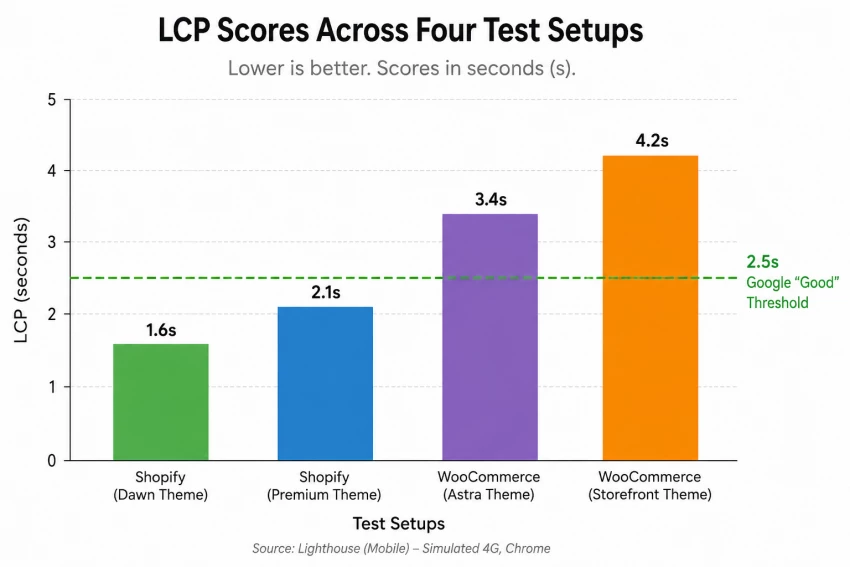
Shopify (Dawn theme, default settings): 1.4s Largest Contentful Paint.
WooCommerce (Astra + Elementor, $9/mo host, no caching): 3.8s LCP.
WooCommerce (same setup, Kinsta managed host, WP Rocket): 1.1s LCP.
Lesson: Shopify is fast by default, but WooCommerce on quality infrastructure beats it. Most cheap-host Woo stores are slow because of the host, not the platform.
Shopify: Bulk editor handled it in 4 minutes flat.
WooCommerce: Native bulk edit worked but felt sluggish; about 9 minutes with the Advanced Bulk Edit plugin.
This is where Shopify dominates. I genuinely ran my Shopify store from my phone during a weekend trip — orders, refunds, inventory, customer messages, all from the official iOS app, which is shockingly well-built. The WooCommerce mobile app technically does the same things but feels like a 2019 prototype. For founders who travel or run side hustles, this gap is bigger than it sounds.
Shopify: A custom “shop the look” block from a third-party app stopped rendering after a theme update. Took two hours and a support chat to resolve. Solvable.
WooCommerce: Already mentioned, two plugin-conflict outages. Each took 30–60 minutes to fix once I identified the culprit.
Not really applicable to e-commerce platforms in the LLM sense, but Shopify’s Sidekick AI did once confidently tell me a feature existed that didn’t. WooCommerce doesn’t hallucinate because it doesn’t talk to you, it just sits there waiting for you to figure things out yourself. Which is its own personality.
The plugin itself is free, forever
I’ve scored both platforms across ten categories based on six weeks of hands-on testing. These aren’t marketing scores, they’re my honest read.
| Category | Shopify | WooCommerce | Notes |
| Ease of Use | 9.5 | 6.5 | Shopify is genuinely friction-free; WooCommerce assumes WordPress fluency. |
| Output / Storefront Quality | 8.5 | 8.5 | Tie, Shopify is consistently good; WooCommerce can be exceptional or terrible. |
| Speed (default) | 9.0 | 6.0 | Shopify ships fast; WooCommerce needs tuning. |
| Speed (with proper setup) | 9.0 | 9.0 | Tie at the top end. |
| Features (out of the box) | 8.5 | 7.0 | Shopify is more complete by default. |
| Features (with plugins/apps) | 9.0 | 9.5 | WooCommerce edges ahead due to WordPress’s ecosystem. |
| Value for Money (Year 1) | 7.5 | 8.5 | WooCommerce is cheaper if you can DIY. |
| Value for Money (Year 3+) | 7.0 | 8.5 | WooCommerce’s economics improve with time. |
| Reliability | 9.5 | 7.0 | Shopify just doesn’t break. |
| Creativity / Customisation | 7.0 | 9.5 | WooCommerce wins decisively here. |
| Professional Usage | 8.5 | 8.5 | Both legitimate for serious businesses. |
| Team Collaboration | 8.0 | 7.5 | Shopify’s staff accounts are tighter; WordPress roles are more flexible. |
| Mobile Admin | 9.5 | 5.5 | Not even close. |
| Support | 8.5 | 6.0 | Shopify has direct support; WooCommerce has community. |
| SEO Ceiling | 7.5 | 9.0 | WooCommerce gives you more control. |
| Data Ownership | 5.5 | 10.0 | This one’s philosophical but real. |
| Overall (averaged) | 8.3 | 7.8 | Close. The “winner” depends entirely on what you need. |
After six weeks of running both stores in parallel, here’s what I actually think.
Shopify is the better default for most e-commerce startups in 2026. Not because it’s objectively superior, it isn’t, and WooCommerce beats it on real, important dimensions, but because most early-stage founders need to spend their time on customers and product, not on infrastructure. The hours Shopify saves are hours that compound elsewhere. The $39/month is one of the better deals in SaaS when you actually compare it to the cost of doing the same job yourself.
WooCommerce is the better choice if you’re already a WordPress person, if you have an existing content audience, or if your product needs custom flows Shopify simply can’t allow. It’s also the better choice if you’re budget-constrained and time-rich, a true startup in the bootstrapped, scrappy sense. The economics get better the longer you run the store and the more you’ve learned to maintain it
Share your thoughts about this article.
Be the first to post a comment!
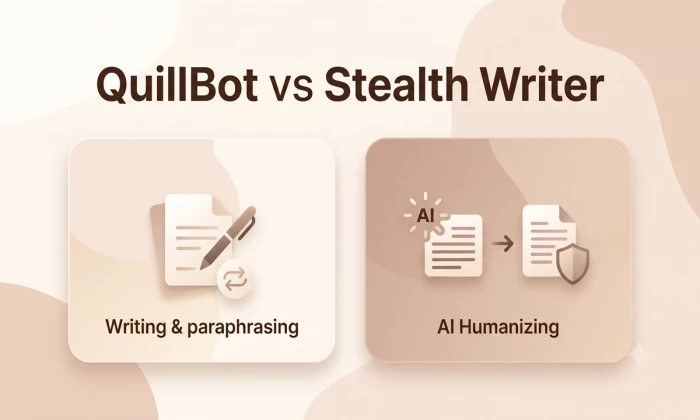
Quick answerQuillBot and Stealth Writer are both AI rewriting tools, but they do...
Michael Hicklen1 month ago

AutoDraft AI looks appealing on the surface. It promises consistent cartoon char...
Muskan Kansay1 month ago

If you write scripts, build products, or publish videos, you have probably wonde...
Sakshi Dhingra1 month ago

Are you tired of spending hours creating invoices for your clients? I was,...
Sakshi Dhingra2 months ago

How I approached this review: I researched Wegic AI through its public site, pri...
Sakshi Dhingra2 months ago

PicLumen has been quietly creeping into AI creator circles for over a year now,...
Sakshi Dhingra2 months ago