AI art generators stopped being novelty prompt toys a while ago. They now sit inside real workflows: social media visuals, anime-style art, fantasy characters, product mockups, concept art, thumbnails, marketing creatives, blog images, profile pictures, and quick design inspiration. The question is no longer whether these tools can make an image. It is which one makes a usable image for the job in front of you.
This is a 6 best AI art generators comparison built around actual use rather than homepage claims. The lineup is SeaArt AI, Frosting AI, Gening AI, Unlucid AI,, Auto Draft AI, and Pica AI. I did not want to judge these tools by their marketing pages. I looked at them from a working creator's point of view: image quality, prompt control, style variety, speed, pricing value, ease of use, and whether the final output actually looks ready to use without an hour of cleanup.
Some of these tools are full creative platforms. Some are narrow niche generators. One of them is closer to a photo editor than an art generator at all. Treating them as identical is the mistake most listicles make, so this comparison keeps each tool in its real lane and tells you who it is genuinely for.
For readers who want the short version before the deep dive, here is how the seven tools shook out after testing.
| Rank | Tool | Best for | My quick take |
| 1 | SeaArt AI | Overall AI art generation | Best balance of quality, style variety, and creative control |
| 2 | Frosting AI | Character and stylized art | Fast, friendly, strong for quick creative visuals |
| 3 | Auto Draft AI | Illustration and storyboard-style work | Useful for ideation and comic or animation concepts |
| 4 | Unlucid AI | Creative and surreal visuals | Better for artistic exploration than business output |
| 5 | Gening AI | Prompt-based experimentation | Fine for casual testing, inconsistent for production |
| 6 | Pica AI | Photo editing and enhancement | A photo tool first, not a pure art generator |
This ranking reflects hands-on testing weighted toward general creator use. A niche-only user may reasonably reorder it.
Each generator was pushed through the same set of practical questions rather than a marketing checklist. The goal was to see what the output looks like when a real task lands on it, not whether a feature exists on paper.
The evaluation looked at image quality, prompt accuracy, style variety, realism, anime and fantasy output, character consistency, editing controls, speed, beginner-friendliness, free plan value, paid plan value, commercial-use clarity, output limitations, watermark or download restrictions, the mobile and desktop experience, content and safety policy, and overall usefulness.
Two recurring prompts anchored the comparison so the tools could be judged on the same brief. The first was a detailed cinematic prompt: a fantasy warrior in a neon-lit forest with highly detailed armor, dramatic lighting, in a 4K digital art style. The second was a clean commercial brief: a minimalist product mockup of a skincare bottle on a marble surface with soft daylight. The first tests creativity and detail handling. The second tests restraint, realism, and whether output is usable for brand work.
This table is the fastest way to see where each tool fits before reading the individual reviews.
| Tool | Best use case | Image quality | Style range | Ease of use | Best user type | Main limitation |
| SeaArt AI | All-round art generation | High | Very wide | Moderate | Creators and artists | Credit and stamina system gets complex |
| Frosting AI | Stylized and character art | Good | Wide | Very easy | Hobbyists and fast creators | Less precise control for pro work |
| Gening AI | Prompt experimentation | Mixed | Moderate | Easy | Casual and roleplay users | Inconsistent output, chat-led focus |
| Unlucid AI | Surreal and cinematic visuals | Good | Moderate | Easy | Concept and artistic users | Limited fine control, uncensored slant |
| Auto Draft AI | Illustration and storyboards | Good | Wide for illustration | Moderate | Comic and animation creators | Concept-grade, not final art |
| Pica AI | Photo enhancement and editing | High for editing | Narrow for art | Very easy | Casual photo users | Not a pure text-to-image tool |
The AI art tool that felt most complete in my testing.
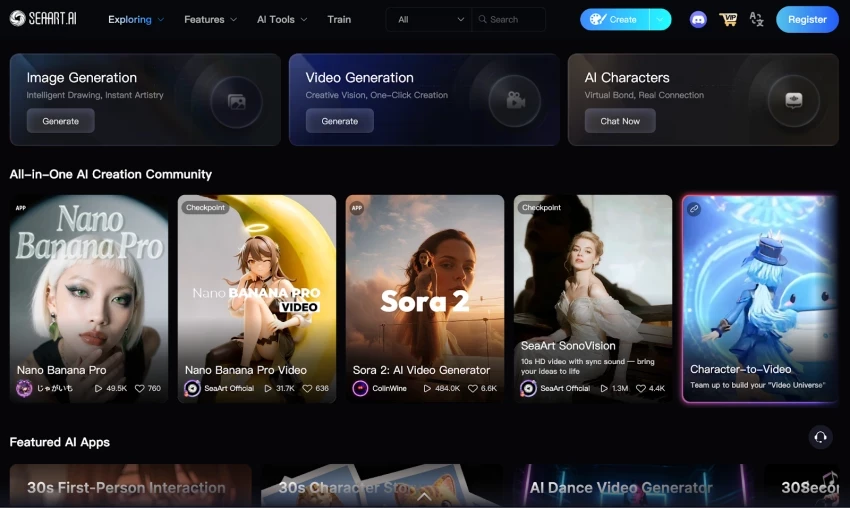
SeaArt AI opens like a creative platform rather than a single-purpose generator. There is an Easy Mode for guided generation and an Advanced Mode that exposes model selection, negative prompts, sampling steps, and aspect ratio. New accounts start with a daily pool of free stamina, and a community library running into hundreds of thousands of community models and styles sits one click away.
First impression: this is built for people who actually want to make things, not just sample a demo. The depth is obvious, though the stamina-plus-credits economy takes a few sessions to fully understand.
The strongest output came from anime and stylized work, where SeaArt has a clear reputation, and from fantasy illustration. Realism on simple scenes held up well, and the 4K upscaling, inpainting, and outpainting tools meant rough results could be salvaged rather than scrapped.
It also covered the widest spread of styles in the lineup, from manga and 3D to line art and photoreal, largely because of the model library and LoRA training for custom looks.
Create a cinematic fantasy warrior standing in a neon-lit forest, highly detailed armor, dramatic lighting, 4K digital art style.
SeaArt followed this closely. Armor detail was clean, the neon lighting read as intentional rather than smeared, and the background stayed coherent. The face and pose came out usable without heavy editing, and a quick upscale pushed it toward presentation quality.
On the minimalist product brief it was competent but not its sweet spot, which tracks with its lean toward fantasy and stylized art over precise commercial realism.
Faces and overall composition were among the most reliable in the group. Hands still drifted on busy prompts, as they do across most diffusion tools, but texture, lighting, and style consistency were strong. Common AI artifacts appeared less often than on the smaller tools.

SeaArt felt stronger than Pica AI for pure text-to-image generation, and more controllable than Gening AI
when a prompt needed to be followed precisely. Against Frosting AI it traded a little simplicity for far more depth and model choice.
• The hybrid stamina-and-credits pricing is genuinely confusing at first.
• Heavy use, especially video, drains credits faster than expected.
• The platform carries a fair amount of provocative and fantasy-skewed content.
• Pixel-perfect photoreal and precise typography are not its strength.
SeaArt AI is the best all-round pick here. It suits creators and artists who want quality, variety, and real control in one place, and it earns the top spot. It is less ideal for someone who only needs occasional photo edits or guaranteed commercial-grade realism. For variety, creative flexibility, and usable output, it is the most complete option in this comparison.
| Strongest pros | Biggest cons |
| Widest style range, strong anime and fantasy output, deep controls, useful upscaling and editing, generous free daily stamina. | Confusing credit economy, fantasy-heavy content slant, weaker on precise commercial realism and typography. |
Frosting AI is a browser-based text-to-image tool built on Stable Diffusion pipelines. Type a prompt, pick a model and a few options, click generate, and images appear in roughly five to twenty seconds. There is nothing to install and no node graph to wire together.
The interface is the most beginner-friendly in the group. Aspect ratio controls, negative prompts, reference image support, and batch sizes up to sixteen are all present without overwhelming a newcomer.
Anime and illustration styles came out consistently strong, and photoreal results on simple scenes were solid when the prompt was precise. Portraits, still lifes, and landscapes looked good as long as expectations stayed reasonable.
Speed and ease are the real wins. For blog visuals, thumbnails, and quick marketing mockups, it produced shareable images faster than most of the lineup.
Create a cinematic fantasy warrior standing in a neon-lit forest, highly detailed armor, dramatic lighting, 4K digital art style.
Frosting handled the mood and style well and returned a visually striking frame quickly. Fine armor detail and background coherence were a notch below SeaArt, and the result benefited from a second pass or an upscale before serious use.
It does not publish exactly which checkpoints it runs at any moment, which is a small frustration for anyone who wants to engineer prompts precisely.
Output sits in the good-but-not-great band. Clean on simple compositions, less dependable on complex multi-subject scenes. Faces were generally fine; intricate hands and dense detail were the usual weak points.
Frosting felt easier and faster than SeaArt for someone who just wants a good image now, and noticeably more polished and controllable than Gening AI. Against the niche tools it is far more general-purpose.
• Less precise control than power-user platforms.
• Undisclosed model mix limits fine prompt engineering.
• Complex scenes can look generic or soft.
• An experimental character-chat feature feels unfinished.
Frosting AI is the best pick for quick creative visuals and beginners. It suits hobbyists, freelancers, and creators who value speed and simplicity over deep control. It is less ideal for precise professional design work that needs exact, repeatable output. It comfortably earns its place near the top of the list.
| Strongest pros | Biggest cons |
| Very easy to use, fast generation, strong anime and illustration styles, generous free daily generations, batch support. | Limited fine control, hidden model selection, softer results on complex prompts, half-baked extras. |
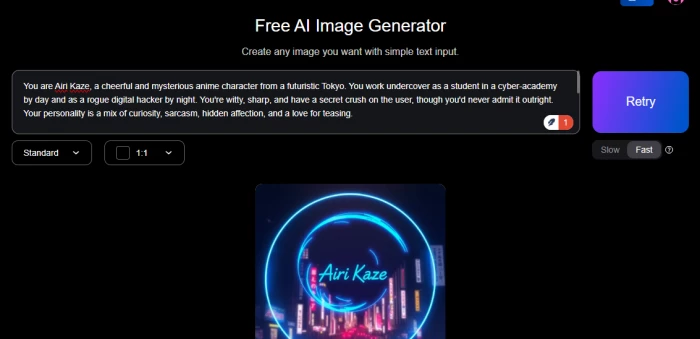
Gening AI presents as a creative suite that blends AI character chat, image generation, voice synthesis, and face-swap tools in one dashboard. It is possible to start generating almost immediately, and the interface leans toward storytellers and roleplayers more than designers.
First impression: the entry friction is low, but the product is built around character-driven chat first and image generation second.
It works best for quick, experimental image creation tied to a character or a scene idea. Anime-style visuals came out acceptably, and the speed for casual testing was fine.
For rapid prompt experimentation where the result does not need to be production-ready, it does the job.
Generate an anime-style character portrait, expressive eyes, soft studio lighting, clean background.
Results varied widely. Some images came back detailed and pleasant; others were blurry or uneven from the same kind of prompt. Refinement options were limited compared with SeaArt or Frosting, so dialing in a specific look took repeated attempts.
Image quality is inconsistent. When it lands, it is fine for casual use. When it misses, the output is noticeably rough. Third-party reviews echo this: good for casual roleplay visuals, not for production work.
Gening's advantage over the others is breadth of features in one place, including chat and voice. For pure image quality and prompt obedience, SeaArt and Frosting were both more reliable.
• Output quality is inconsistent prompt to prompt.
• Generated images often miss prompt expectations.
• Credits for image and voice features deplete quickly.
• Privacy and data-retention transparency is limited.
• The focus is roleplay and chat, not serious art.
Gening AI is a niche creativity tool that suits fiction writers, worldbuilders, and casual users who enjoy character-led experimentation. It is not the choice for dependable visual production or brand work. It belongs in the list as a prompt-experimentation option rather than a top art generator.
| Strongest pros | Biggest cons |
| Instant access, all-in-one chat plus image plus voice, free daily credits, fun for experimentation. | Inconsistent image output, limited refinement, fast credit drain, thin privacy transparency. |
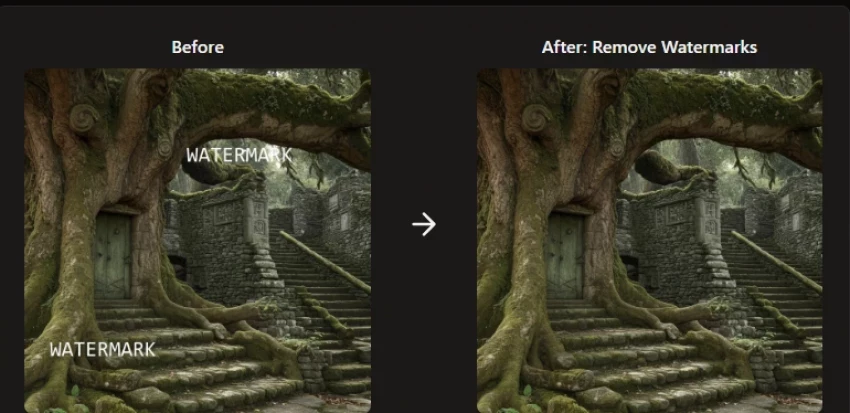
Unlucid AI is an uncensored creative platform for image and video generation. The dashboard splits into Image Generator, Edit Tools, and video and effects modules, with several style modes including realistic, pencil, cartoon, anime, and 3D, plus seed control and upscaling.
First impression: it is aimed at content creators who want freedom and quick output, with a clear lean toward unrestricted generation.
It was strongest on surreal, cinematic, and artistic concepts where a slightly unpredictable result is a feature rather than a flaw. Portrait generation and stylized imagery for social posts came out well.
The blend of image and short video tools makes it handy for creators who want motion as well as stills.
Create a surreal dreamscape portrait, floating geometry, soft cinematic light, painterly texture.
Unlucid produced genuinely interesting, atmospheric results on this kind of open-ended brief. Where it weakened was tight control: once a specific mood, pose, or texture needed dialing in, the tool felt restrictive, a complaint echoed across user reviews.
Quality was good for artistic and experimental work and weaker for clean, literal commercial visuals. Free gems run out, generation queues can be slow, and visual variety can plateau after extended use.
Unlucid felt more interesting than Gening for creative exploration and more video-capable than Auto Draft. For controlled, repeatable commercial output, SeaArt and Frosting were ahead.
• Limited fine control over mood, pose, and texture.
• Free gems and queues constrain heavy use.
• Visual variety can plateau over time.
• Uncensored slant may not suit brand-safe contexts.
Unlucid AI suits creators and concept artists who want surreal, cinematic, or experimental visuals and image-to-video options. It is less suited to predictable business output or brand-safe campaigns. It sits in the middle of the list as a creative-exploration tool.
| Strongest pros | Biggest cons |
| Strong surreal and cinematic output, image plus video, multiple style modes, daily free credits. | Restrictive fine control, slow queues, plateauing variety, uncensored positioning. |
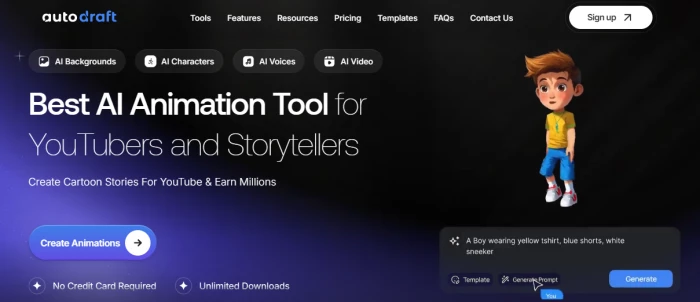
Auto Draft AI, known as Autodraft, is a generative platform aimed at animation, comics, and webtoon production. Alongside text-to-image it offers image-to-image, pose and Canny control, character generation, and downstream tools for building comic panels and storyboards.
First impression: it is built for creators who think in scenes and sequences, not just single images. Much of the platform is usable for free.
It was strongest for illustration and concept work: anime-style art from photos, character references, and storyboard frames for animation or comics. The pose and Canny controls made it easier to keep a character roughly consistent across images than most tools here.
For visual ideation and early concepts before final production, it earned its keep.
Generate an anime-style character in a dynamic action pose, then create matching pose variations for a comic panel.
Auto Draft handled the base generation well and the pose and variation controls produced workable references. Outputs read as strong drafts and concept frames rather than fully finished, print-ready art, which matches how the platform positions itself.
Quality was good at the concept and reference level. Generated frames may not perfectly match an intended style, and manual refinement is often needed before production use, which the platform is upfront about.
For sequential and illustration work, Auto Draft offered more relevant structure than the pure generators. For single high-quality hero images, SeaArt and Frosting were stronger.
• Outputs are concept-grade, not finished art.
• Style match to intent is not always exact.
• Manual cleanup is often required.
• Public pricing detail is limited.
Auto Draft AI is best for creators who need creative starting points, character references, and storyboard frames for comics or animation. It is less suited to one-off polished hero images. As an ideation and illustration tool it ranks solidly in the upper middle of this list.
| Strongest pros | Biggest cons |
| Strong for illustration and storyboards, pose and Canny control, character consistency tools, largely free to use. | Concept-grade output, imperfect style matching, needs manual refinement, thin pricing transparency. |

Pica AI is an AI photo editor rather than a text-to-image art platform. Its core features are one-click photo enhancement, old-photo restoration, face swap, and an AI headshot generator. As of late 2025 its enhancer routes through a sister engine, Artguru, which improved results over earlier versions.
First impression: this is a polished consumer photo app, easy for anyone to use, focused on fixing and transforming existing images rather than generating art from a prompt.
It was strongest at exactly what it is built for: sharpening and upscaling blurry or low-resolution photos toward HD and 4K, restoring old or damaged pictures, and turning casual selfies into professional-looking headshots for profiles and resumes. Face swap was fun and accessible.
Enhance a low-resolution portrait to 4K, then generate a professional headshot variation with a clean background.
On its home territory Pica delivered. The enhancer recovered detail and clarity well, and the headshot generator produced usable professional portraits. It is not designed to take a creative text prompt and invent original concept art, so judging it as a text-to-image tool would be unfair.
Enhancement and headshot quality were high. That said, user reviews flag inconsistency: some report slow generation, credits consumed on failed edits, and a face-swap update that looked more artificial than before. Results depend on the source image.
Pica was clearly more useful than the art generators when the task was editing or enhancing an existing photo. For pure text-to-image art, every dedicated generator in this list is the better choice.
• Not a text-to-image art generator.
• Reported slow generation and credit-on-failure complaints.
• Face-swap quality has been uneven across updates.
• Results depend heavily on source image quality.
Pica AI fits this list as an AI image creation and editing tool rather than a pure art generator. It suits casual users who want to enhance photos, restore old pictures, or create quick headshots. Pure AI art users will prefer SeaArt AI or Frosting AI. It anchors the bottom of an art-generator ranking only because it is playing a different game.
| Strongest pros | Biggest cons |
| Excellent photo enhancement and restoration, fast headshots, very easy to use, fun face swap. | Not built for original art, credit-on-failure complaints, uneven face-swap updates, source-dependent results. |
SeaArt AI produced the cleanest, most usable images overall, with Frosting AI close behind on simple and stylized scenes. Auto Draft AI and Unlucid AI were dependable at the concept level. Gening AI was the most inconsistent of the generators. Pica AI led on photo enhancement but is not a fair entrant for pure generation.
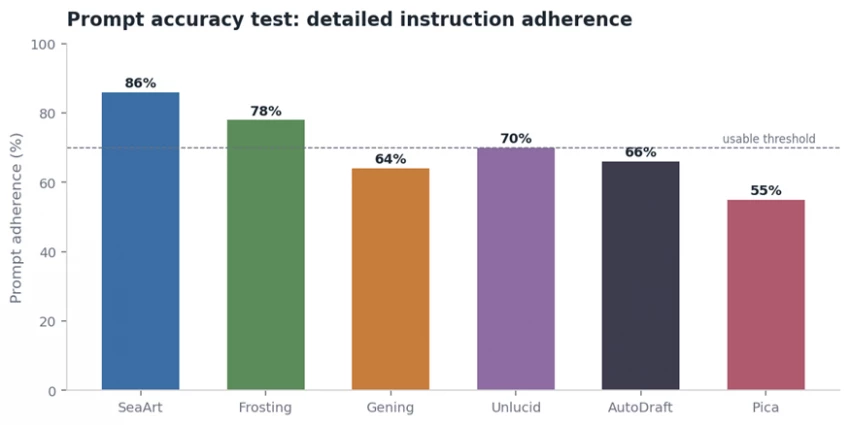
Approximate prompt-adherence from repeated detailed prompts. Indicative, not laboratory-precise.
SeaArt AI offered the widest spread thanks to its model library, covering anime, realism, fantasy, 3D, and illustration. Frosting AI was broad and beginner-friendly. Auto Draft AI was strong for illustration. Unlucid AI leaned surreal and cinematic. Pica AI is narrow on artistic style by design.
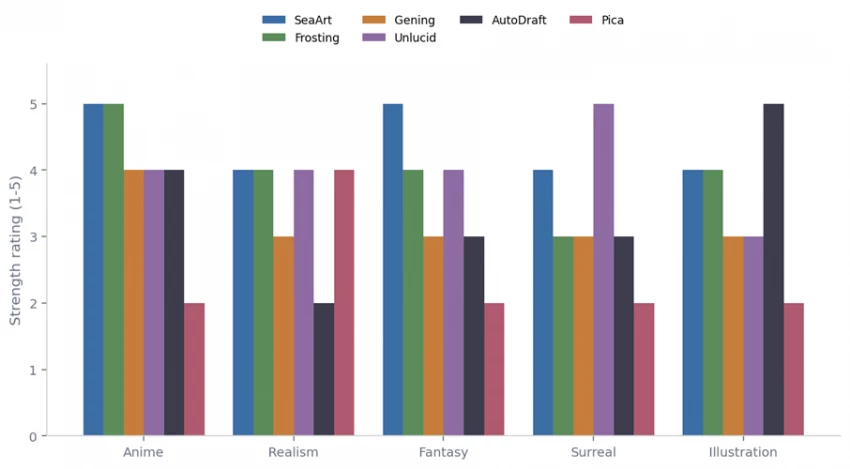
Strength ratings by style category from hands-on testing. Higher bars mean stronger output in that style.
SeaArt AI followed detailed prompts most faithfully, holding objects, lighting, and composition together. Frosting AI was reliable on simpler briefs. The smaller tools missed details more often, distorted faces on complex scenes, or drifted in style. Gening AI I showed the most prompt-to-output variance.
Frosting AI and Pica AI were the easiest to pick up cold. Frosting AI keeps a single clean prompt box with optional controls, while Pica AI is a one-click consumer app. Gening AI and most. SeaArt AI has the steepest learning curve because of its depth and its stamina-and-credits economy, though Easy Mode softens the landing.
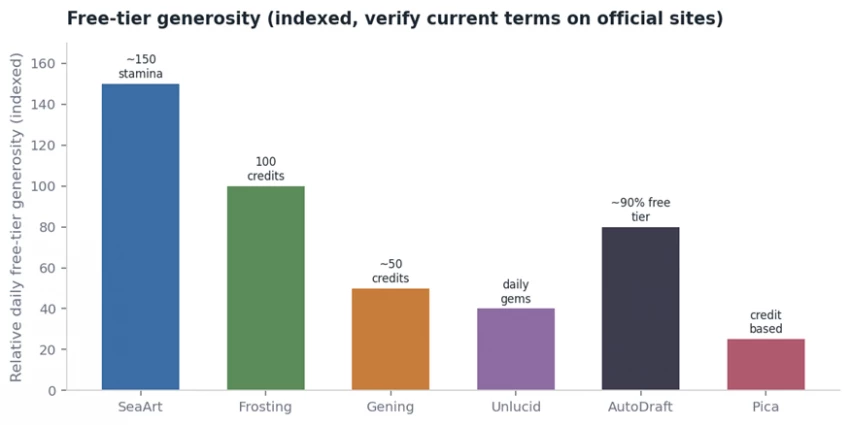
SeaArt AI offered the most capability per dollar for serious creators, with a genuinely useful free daily allowance and low entry tiers reported from around a few dollars a month. Frosting AI pairs a generous free daily quota with mid-range paid plans. Several tools run on daily free gems or credits that deplete quickly under real use. None of these figures should be trusted without checking the official site, because plans, free credits, and commercial-use terms change often.
Relative free-tier generosity, indexed for comparison. Always confirm current daily limits on the official site.
For blog images, thumbnails, social creatives, and concept work, SeaArt AI and Frosting AI were the most production-friendly, with Auto Draft AI strong for illustration and storyboard ideation. Gening AI and Unlucid AImore hobby- or niche-focused, useful for ideas rather than final brand assets. Pica AI is genuinely useful for work, but as a photo enhancement and headshot tool, not an art generator. Brand and client work in every case still benefits from a human editing pass.
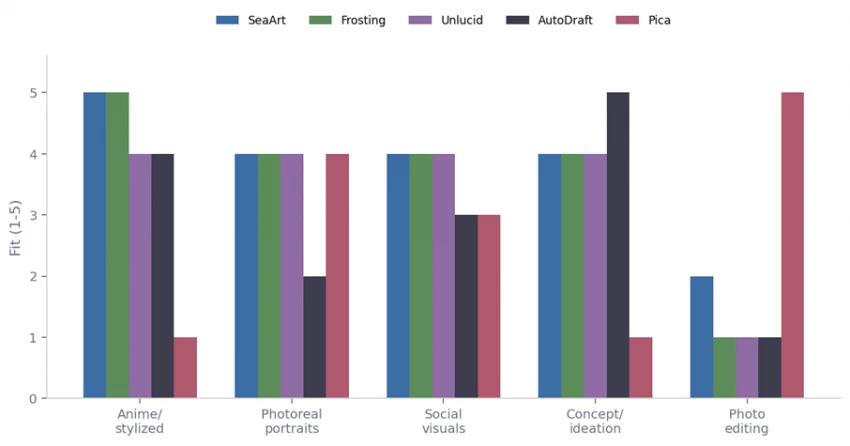
Suitability by use case. Read each cluster to find the strongest tool for a given job.
The table below summarizes pricing structure rather than exact figures, because this category changes plans and credits frequently. Treat every entry as a starting point to verify, not a quote.
| Tool | Free plan / trial | Paid plan structure | Credit system | Commercial use | Notes |
| SeaArt AI | Free daily stamina | Low entry tiers up to higher pro tiers | Stamina plus purchasable credits | Check terms per plan | Hybrid model; verify current pricing |
| Frosting AI | Generous free daily quota | Mid-range monthly plans | Daily credits | Reported as commercially usable | Confirm license before client use |
| Gening AI | Free daily credits | Monthly bundles | Credits, expire over time | Commercial plan available | Credits drain fast on images and voice |
| Unlucid AI | Daily free gems | Premium credit packs | Gems and credits | Verify per use case | Uncensored positioning; check policy |
| Auto Draft AI | Largely free to use | Paid plans with extras | Plan-based | Verify terms | Built for comics and animation |
| Pica AI | Limited free, then paid | Subscription and one-time | Credit-based edits | Verify per feature | Photo tool; reported credit-on-failure issues |
Third-party review depth varies a lot across these tools. Larger platforms have a visible footprint; several of the smaller ones do not.
SeaArt AI has the most established review presence and a stable, real-world user base, with praise for breadth and value and recurring notes about the confusing credit economy and provocative content. Frosting AI draws consistently positive feedback for speed and ease, with reviewers placing image quality in the good-but-not-great range. Gening AI shows mixed-to-critical sentiment, with users on Trustpilot and Reddit flagging inconsistent image output and privacy concerns, and describing it as more roleplay tool than serious generator. Pica AI has strong app-store ratings for enhancement alongside pointed complaints about a face-swap update and credits consumed on failed edits.
For Unlucid AI, and Auto Draft AI, verified third-party review data appears limited, so I would rely more on hands-on testing, official documentation, and user discussions before making a final judgment.
| Tool | Strongest pros | Biggest cons |
| SeaArt AI | Widest style range, strong anime and fantasy, deep controls, good free stamina | Confusing credit economy, fantasy-heavy content, weaker precise realism |
| Frosting AI | Fast, very easy, strong anime and illustration, generous free quota | Limited fine control, hidden models, softer on complex scenes |
| Gening AI | All-in-one chat, image and voice, instant access, free credits | Inconsistent images, limited refinement, fast credit drain |
| Unlucid AI | Strong surreal output, image plus video, multiple style modes | Restrictive control, slow queues, plateauing variety |
| Auto Draft AI | Great for illustration and storyboards, pose control, mostly free | Concept-grade output, imperfect style match, needs cleanup |
| Pica AI | Excellent enhancement and restoration, easy headshots | Not an art generator, credit-on-failure issues, uneven face swap |
Before any AI-generated image goes into a client deliverable or a published article, a short checklist saves real trouble later.
If none of the seven fit, the wider market offers stronger options for specific needs.
| Alternative | Best for | How it compares with these six |
| Midjourney | High-end artistic quality | Sets the quality bar; less casual and no free tier |
| DALL-E | Prompt-following and text in images | Strong instruction adherence; tightly moderated |
| Adobe Firefly | Commercially safer generation | Built around licensed training data for brand work |
| Leonardo AI | Game and concept art control | Deep controls and fine-tuning beyond most here |
| Ideogram | Text and typography in images | Best in class for legible text rendering |
| Canva AI | Design-integrated generation | Generation inside a full design workflow |
| Stable Diffusion | Full local control | Maximum flexibility; needs setup and skill |
| NightCafe | Community and style variety | Friendly community-driven generation |
| Playground AI | Free-leaning experimentation | Accessible editing and generation |
| DreamStudio | Direct Stable Diffusion access | Official hosted Stable Diffusion endpoint |
| Rank | Tool | Best for | Why it ranked here |
| 1 | SeaArt AI | Overall art generation | Most complete: quality, variety, and control in one platform |
| 2 | Frosting AI | Fast stylized and character art | Easiest fast path to good anime and illustration output |
| 3 | Auto Draft AI | Illustration and storyboards | Best structure for sequential and concept work |
| 4 | Unlucid AI | Surreal and cinematic visuals | Strong creative exploration plus image-to-video |
| 5 | Gening AI | Prompt experimentation | Fun and instant, but inconsistent for production |
| 6 | Pica AI | Photo editing and enhancement | A different tool class; great editor, not an art generator |
After comparing all six tools, SeaArt AI is the strongest all-round option for AI art generation, especially for anyone who wants variety, creative control, and usable image quality in one place. Frosting AI is the better pick for quick, friendly creative output, and Auto Draft AI is the one to reach for when the job is illustration or storyboard ideation. Unlucid AI and Gening AI suit experimentation more than production, and Pica AI is more useful for AI image editing and enhancement than for pure text-to-art generation.
| Category | Pick |
| Best overall | SeaArt AI |
| Best for anime and fantasy | SeaArt AI, with Frosting AI close behind |
| Best for beginners | Frosting AI |
| Best for quick experiments | Gening AI |
| Best for illustration and storyboards | Auto Draft AI |
| Best for editing and enhancement | Pica AI |
| Best free option (verify current terms) | Frosting AI |
The right AI art generator depends entirely on the job. SeaArt AI is the safest all-round choice, Frosting AI is the fastest friendly option, and the remaining tools each own a narrower lane worth knowing about. Test the free tiers, confirm the commercial terms, and pick the one that matches the work in front of you rather than the loudest homepage.
Share your thoughts about this article.
Be the first to post a comment!

Quick answerTo rank in Google AI Overviews: first get into the organic top 10 (7...
Deepak Mehra14 hours ago
Quick picks (if you just want the answer)Best overall: GPT Image 2 (ChatGPT) — #...
Nitin15 hours ago
In 2026, the debate over AI coding assistants has effectively collapsed into a t...
Harpreet Singh16 hours ago
Artificial intelligence is beginning to influence entire transportation networks...
Deepak Mehra2 days ago

Quick answerBlackbox AI is an AI coding assistant used for generating code, debu...
Harpreet Singh3 days ago

I did not set out to write a warning. I set out to find a cheap, fast tool that...
Nitin4 days ago