AI image and video tools are easy to find in 2026. Finding one that combines image generation, editing, image-to-video creation, preset effects, relatively few creative restrictions, and a pay-as-you-go system is a little less common.
That is where Unlucid AI has found its audience.
The browser-based platform describes itself as an “uncensored” AI creative tool and currently offers Image Generator, Edit Tools, Video AI, and Effects AI. Its homepage also highlights more than 15 preset video effects, including Dance, Squish, Zoom and Smash.
The appeal is obvious. You can generate something, edit an existing image, or turn a still picture into a short animation without installing models locally or learning a complicated workflow.
The more interesting question is whether Unlucid AI is actually good enough to keep using once the novelty wears off.
After looking through its current product pages, pricing, recent updates, Terms of Service, Privacy Policy, GeniusFirms user comments, independent user discussions and outside testing, the answer is more nuanced than either “great” or “avoid it.”
Review Area
Our Assessment
Best for
Casual creators, experiments, short social visuals and AI enthusiasts
Biggest strength
Low-friction creative experimentation
Biggest weakness
Limited professional control and inconsistent evidence around output reliability
Image generation
Useful for quick concepts and experimentation
Image editing
One of the more interesting parts of the platform
Video creation
Better suited to short AI clips than complex production
Free access
Daily free Gems are available, but the amount can change
Paid pricing
$8.99 to $59.99 Gem bundles
Privacy
Uploads are stated to remain in cloud storage for up to 48 hours
Output ownership
Users retain ownership under the current Terms
Overall rating
3.5/5
Our overall impression is that Unlucid AI makes the most sense as a creative playground rather than a full production environment. It removes a lot of friction from experimenting with images and short videos, but creators who need predictable output, precise revision controls or repeatable client workflows may eventually run into its limits.
How We Researched This Unlucid AI Review
There is an important distinction to make before getting into the review.
For this update, we directly checked Unlucid AI's public website, current Gem pricing, product documentation, July 2026 product updates, Privacy Policy and Terms of Service. We also compared those claims with feedback published on GeniusFirms, a validated G2 review, relevant Reddit discussions and recent third-party testing.
We did not conduct a controlled multi-prompt laboratory benchmark of Unlucid AI's generation models for this update. Where performance observations come from another user's testing, we identify them as such rather than presenting them as our own hands-on results.
That matters because AI output can change significantly between prompts, models, server conditions and product updates. A review saying “the images are amazing” or “the videos are terrible” without showing where that conclusion came from does not tell you very much.
Unlucid AI Has Changed
Unlucid's official About page now positions it around three main jobs: turning images into short videos, AI-assisted photo editing, and generating images from text. Its editing examples include removing objects, changing colors and swapping clothing.
The product has also continued to change during 2026.
According to Unlucid's official changelog, it added nine Effects AI effects in January, another seven in February, six in April and eight more on July 15, 2026. The platform had previously upgraded its Video AI engine in September 2025 with custom prompting, optional starting images and longer video generation.
It does not guarantee quality, but it makes older reviews increasingly unreliable if they describe an earlier version of the platform.
First-Time Setup: Is Unlucid Easy to Get Started With?
What Users Report
Fast sign-up with minimal friction
No local installations or GPU setup required
Works directly in the browser
The Problem
Multiple reviewers note region-based access blocks. In some countries, the homepage shows a restricted or unavailable message with little explanation.
Why this matters for trust: Creators question why a global creative platform would limit access without transparent reasoning—raising doubts about long-term stability.
Interface: How User-Friendly is Unlucid AI?
Compared to complex AI tools, Unlucid AI keeps things simple. It does not overwhelm users with advanced settings, model controls, node workflows, or technical panels.
User sentiment usually points to three things:
The interface is simple.
The learning curve is low.
The design still feels basic compared to polished competitors.
For hobbyists, this simplicity is helpful. They can open the tool, enter a prompt, use an effect, or edit an image without needing much training.
For professionals, the same simplicity can feel limiting. Power users often want more control over seed values, camera movement, timeline editing, prompt weights, style consistency, batch output, and advanced export options.
User Type
Interface Experience
Beginner
Easy and comfortable
Casual creator
Fast and simple
Social media user
Useful for quick visuals
Professional editor
Too limited
AI power user
Not advanced enough
Interface verdict: Good for beginners, but not deep enough for advanced creative workflows.
Unlucid AI Feature Reviews from Creators
Reviews tend to break the features into three main categories:
Image Editing & Generation
Users highlight:
Object removal and replacement
Prompt-based generation with fewer filters
“Good enough” accuracy for social content
Not production-grade, but useful for experimentation.
Video Tools (Mixed Feedback)
Helpful tutorials for beginners
Limited depth for advanced editors
Not competitive with Runway or Adobe Firefly
Best described as intro-level AI video assistance.
Reference Image Support (Most Praised Feature)
This is Unlucid’s standout.
Artists like:
Feeding reference images directly
Getting closer to stylistic matches
More control than Canva’s locked outputs
This flexibility is repeatedly cited as the platform’s biggest strength.
Performance: Speed and Output Quality
Speed
Most users find Unlucid AI reasonably fast for casual generation. It is easier than setting up local Stable Diffusion and faster to start than many technical AI tools.
The official tutorial page also mentions previous upgrades for faster processing and improved video output.
Still, speed depends on:
The selected tool
Image vs video generation
Server load
Prompt complexity
Whether the user is applying effects or edits
Output Quality
Output quality is where reviews become divided.
Casual users often feel impressed because the results are fast and visually interesting. Professionals notice more flaws.
Common quality issues include:
Inconsistent realism
Strange hands or faces
Weak detail in complex scenes
Artifacts around edited areas
Video motion errors
Extra retries needed
Use Case
Quality Verdict
Social media experiments
Good
Moodboards
Good
Meme-style videos
Good
Concept art drafts
Decent
Brand visuals
Mixed
Client projects
Risky
Professional video
Not strong enough
Performance verdict: Good for drafts, concepts, and social content; inconsistent for polished professional work.
Safety: Is Unlucid AI Safe for Regular Users?
Safety is one of the most debated aspects of Unlucid AI, and this is where the platform receives the most criticism from reviewers. Several independent website audits and security checkers rate the domain with low trust signals, often pointing to limited transparency about ownership, company details, and safety policies. Some security analysis platforms even flag the site with a low trust score due to its relatively new domain and unclear operational transparency, which raises caution for new users.
That said, most reviewers agree that the platform is generally safe enough for casual experimentation, such as generating images or testing creative effects. However, it is rarely recommended for professional workflows or business-critical projects because of the limited support, inconsistent reliability, and lack of clear governance structures behind the platform.
The practical takeaway many analysts highlight is simple: Unlucid AI works reasonably well for playful creative use or quick content experiments, but users should avoid relying on it for sensitive data, commercial projects, or confidential workflows.
Privacy: What Happens to Uploaded Content?
Unlucid's current Privacy Policy does explain what happens to uploaded content.
The company says uploaded material used for processing is temporarily stored in cloud storage for up to 48 hours after processing, after which it is automatically deleted from its storage systems. Content can also remain locally in browser storage so users can view previous creations.
Its Terms similarly say generated user content is temporarily stored on encrypted secure servers for up to 48 hours and then deleted.
That is significantly more specific than simply saying the platform provides “unclear data storage information.”
The Privacy Policy also says Unlucid collects account information through Google Sign-In, which may include an email address, name and profile image. It additionally collects device and analytics information such as IP address, browser information, access time and pages or features used. Unlucid states that it does not sell users' personal information.
This does not mean users should upload confidential corporate assets without considering their own organization's privacy requirements. It does mean the platform now provides substantially more information than the older article suggested.
Pricing: Are Gems Worth the Cost?
Unlucid AI uses a Gem-based pricing model. Instead of a simple monthly subscription, users spend Gems to generate or edit content.
Current review sources commonly mention these Gem packs:
Gem Pack
Price
Best For
120 Gems
$8.99
Testing and light use
450 Gems
$29.99
Regular casual creation
1,250 Gems
$59.99
Heavier use
These prices are also reported in current Unlucid review pages.
What Users Like About Gems
No full subscription required
Good for occasional use
Daily free Gems may help beginners
Flexible for light creators
Easy to test before spending more
What Users Dislike About Gems
Retries consume credits
Bad outputs still cost Gems
Video generation can become expensive
Heavy users may prefer subscriptions
Pricing can feel unpredictable
Pricing verdict: Good for light use, but expensive if you need many retries or daily production.
Community Review Roundup: Reddit, Blogs, and Forums
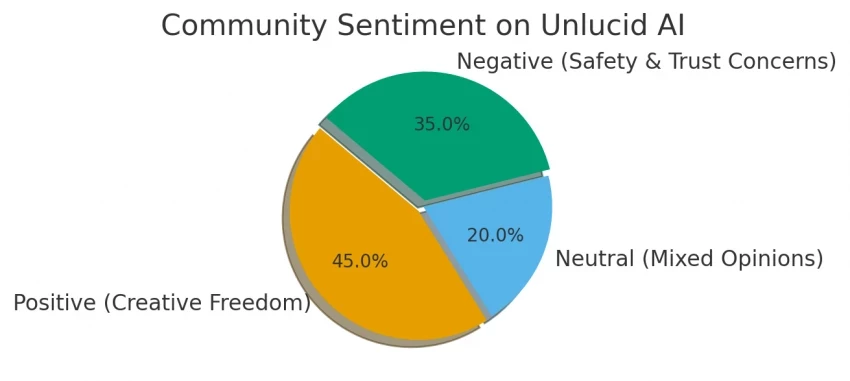
Looking across Reddit, blogs, and AI forums, the pattern is clear:
Positive reviews praise the freedom, simplicity, and creativity.
Negative reviews call out legitimacy issues, lack of transparency, and limited free use.
This polarity makes Unlucid one of those “love it or avoid it” platforms, rarely do users feel neutral.
There is still not a huge pool of high-quality independent Unlucid AI reviews.
G2 shows a 4.5/5 rating, but that score currently comes from just one review, making it far too small a sample for drawing broad conclusions. That reviewer praised the interface and feature accessibility.
The user comments already published on GeniusFirms are more mixed. Some users appreciate the simplicity, free Gems and short-video effects, while another specifically complained about inconsistent output and the cost of repeated attempts.
Reddit discussion adds another useful perspective. One user trying to reproduce the Unlucid workflow in ComfyUI highlighted its reference-image capabilities but also acknowledged occasional errors.
Put those pieces together and the emerging picture is less dramatic than either the enthusiastic or highly negative reviews suggest.
People seem to value convenience, creative flexibility and accessibility. Concerns appear more likely when expectations move toward consistency, sophisticated control or repeated paid generation.
Pros and Cons
Pros
Cons
Browser-based and easy to understand
Limited independent review volume
Image, editing and video tools in one platform
Output may require retries
Daily free Gems available
Retry costs can increase real spending
No mandatory monthly subscription for Gem usage
Less control than advanced production workflows
Active feature development
Company/team information remains limited
Current policies explain storage and ownership
Not ideal for confidential or highly sensitive workflows
Reference-image capabilities are useful for experimentation
Professional reliability is still harder to establish
Final Verdict
Unlucid AI is more credible and better documented today than some older reviews make it appear.
Its current site shows an actively updated creative platform with image generation, image editing, custom Video AI and a growing library of Effects AI presets. The Gem system gives occasional users a way to experiment without immediately taking on another subscription, while daily free Gems make basic testing possible.
The privacy situation also deserves a fairer assessment. Unlucid now publishes specific information about temporary content storage, account data and deletion, while its Terms address generated-content ownership, consent requirements and prohibited uses.
The weaknesses are different.
There is still relatively little substantial independent user-review data, professional controls appear limited, real cost depends heavily on how often you need to regenerate an output, and public information about the company behind the platform remains thinner than we would expect from established business software.
That leaves Unlucid in an interesting position.
It is easy to recommend as something to experiment with. It is much harder to recommend as the foundation of a professional creative workflow.
For casual creation, social content and trying unusual AI ideas, the freedom and low barrier to entry are genuinely appealing. For confidential material, important client campaigns or projects where consistency matters more than experimentation, we would be more cautious.
My experience has been pretty inconsistent. Some outputs look decent, but others feel completely off or low quality. The bigger issue is that every retry uses credits, so you end up spending more just trying to get a usable result.
Unlucid AI is super easy to use and quick to get started with. I love how fast the image edits process, and the results are great for social media content. No installation or setup required, just jump in and create. Perfect for someone who needs speed and simplicity.
I love the daily free credits and fun effects like ‘Squish’ and ‘Dance.’ It’s playful and lets me make short, attention‑grabbing visuals without any design skills