Students using Unstuck AI typically rely on it for lecture transcription, automatic summarization, study notes generation, and flashcard creation. It covers the basics, but specific gaps push students to look elsewhere. Some need better organizational structure for managing notes across multiple subjects. Others want stronger flashcard systems built around spaced repetition. Researchers working with long PDFs or academic papers often find basic summarization insufficient. Students in lecture-heavy environments need real-time transcription accuracy, not just post-lecture summaries.
The alternatives here span four distinct use cases: AI-powered note-taking platforms, flashcard and revision systems, lecture transcription tools, and document-based research assistants. Each solves a specific gap. Choosing the right one depends on your study approach, your course structure, and what the tool needs to do for you.
QUICK ANSWER The strongest Unstuck AI alternatives are Notion AI for organizing and structuring study notes, Quizlet for flashcards and exam revision, Otter.ai for live lecture transcription, Google NotebookLM for document-based learning and research summarization, and ChatGPT for flexible, conversational study support. Each is suited to a different part of the learning process. |
The table below maps each tool to its primary function, core strength, and main limitation to help identify where each fits in a study workflow.
| Tool | Best For | Core Function | Strength | Limitation |
| Unstuck AI | Study summarization | Lecture-to-notes tool | Simple AI study flow | Limited ecosystem |
| Notion AI | Study organization | Notes + AI workspace | All-in-one structure | Requires Notion setup |
| Quizlet | Flashcards & revision | Study + memory tools | Strong exam prep system | Less deep explanation |
| Otter.ai | Lecture transcription | Speech-to-text notes | Accurate transcription | Weak study structuring |
| NotebookLM | Document learning | AI research assistant | Source-based learning | Requires uploaded materials |
| ChatGPT | Flexible study help | AI tutor | Custom explanations | Needs clear prompting |
1 | Notion AI |
Notion AI is embedded directly into the Notion workspace an all-in-one organizational system that lets students build structured databases, note hierarchies, and linked content libraries across every subject they study. The AI layer works on top of that structure, allowing you to summarize existing notes, rewrite content at a different reading level, generate outlines from pasted text, and create tables from unstructured information.
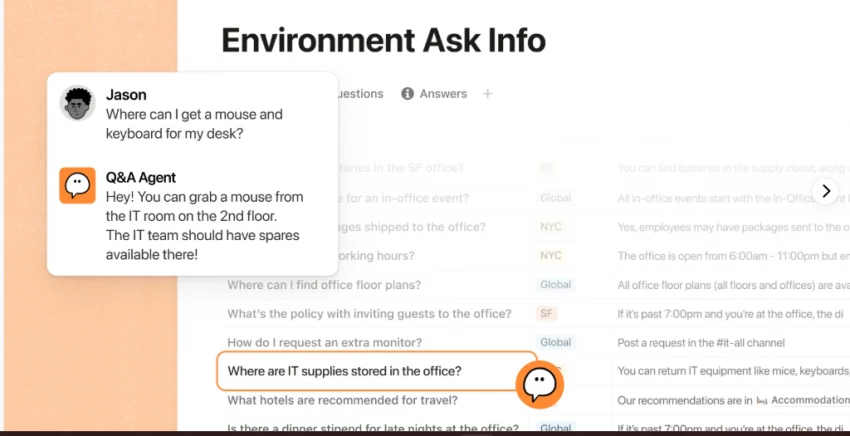
For study use, it is most practical when you are already organizing materials inside Notion. You can paste lecture notes and have the AI generate a structured outline, convert rough notes into summaries, or link concepts across different subject pages. The workspace supports revision calendars, subject hierarchies, and group study through shared pages.
The limitation is the platform itself. Getting the most from Notion AI requires building and maintaining a structured workspace from scratch. Students who prefer quick, minimal setups may find the overhead too high relative to tools that work immediately out of the box. It rewards consistent, long-term use over short-term convenience.
BEST FOR Structured note organization and long-term study planning | CORE LIMITATION Full benefit requires adopting the Notion system and building a workspace from scratch |
2 | Quizlet |
Quizlet has been a dominant study platform for years, and its AI capabilities have expanded to include automatic flashcard generation, practice tests, and adaptive revision modes. The core function remains flashcard creation and spaced repetition, but the platform now allows students to input a topic or paste their notes and receive a ready-to-use study deck with minimal setup.
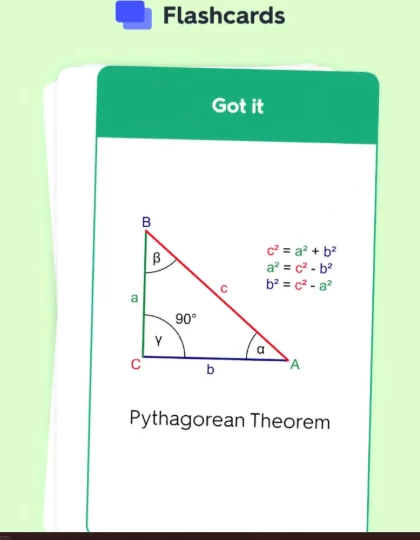
The platform's Learn mode applies adaptive algorithms to focus revision on weaker areas, which is particularly effective for memorization-heavy subjects like vocabulary, biology terms, anatomy, or historical dates. Practice tests and written modes allow students to shift between passive recall and active retrieval a meaningful distinction for exam preparation.
Where Quizlet falls short is in explanation depth. It is built around discrete facts and definitions rather than connected reasoning. For subjects requiring conceptual understanding, argument development, or essay-based learning, its study sets alone are not sufficient. It works best as part of a larger revision strategy rather than as a primary learning tool.
BEST FOR Exam revision, vocabulary learning, and memory-based study prep | CORE LIMITATION Not designed for conceptual explanation or lecture-style learning content |
3 | Otter.ai |
Otter.ai is a transcription-first tool that converts spoken audio into structured text in real time. For students attending live lectures or watching pre-recorded course videos, it captures spoken content into searchable, editable notes with speaker identification. The AI then generates a summary of the transcript, reducing the time needed to review long recordings.
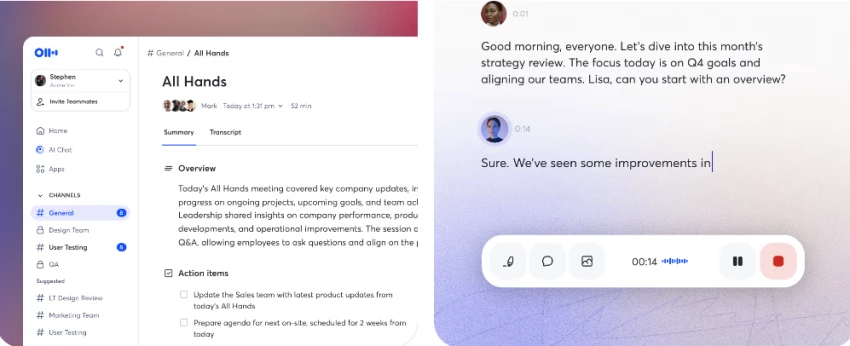
In classroom use, Otter can run in the background on a phone or laptop, automatically timestamping content as the lecture progresses. Students can return to the transcript afterward, search for specific terms, and highlight sections worth reviewing. The summary feature condenses the main points from a full lecture into a shorter overview without requiring manual effort.
The gap in Otter's functionality is structuring content for active revision. It captures and summarizes effectively but does not organize notes into study formats, generate flashcard decks, or build subject-specific learning systems. It works best as the first step in a study workflow capturing the input rather than as a complete solution.
BEST FOR Real-time lecture transcription and audio-to-notes conversion | CORE LIMITATION Does not structure captured content into organized study materials |
4 | Google NotebookLM |
Google NotebookLM takes a document-first approach to AI study assistance. You upload sources, PDFs, Google Docs, text files, or personal notes, and the AI builds its responses entirely from those materials. This makes it particularly useful for research-heavy study contexts where source accuracy and citation integrity matter.
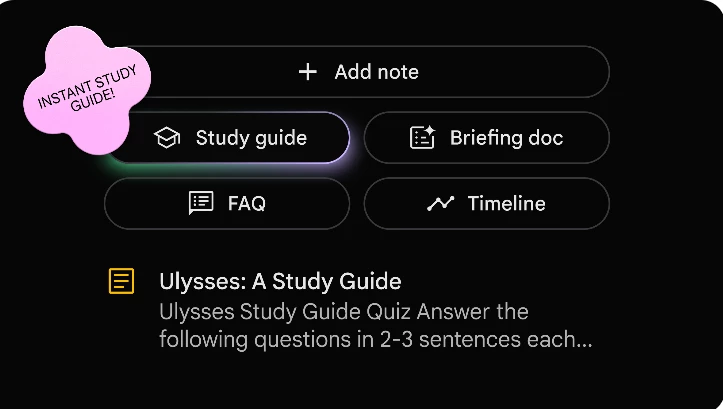
For academic use, students can upload course readings, textbook chapters in PDF form, or their own compiled notes, then ask the AI to summarize, compare concepts, or explain connections between documents. NotebookLM generates structured summaries, audio overviews, and study guides based exclusively on the provided source files.
The constraint is by design: the AI does not generate information beyond what is uploaded. This limits it for open-ended or exploratory study, but makes it significantly more reliable for structured research where accuracy is critical. Students writing papers or preparing for subject-specific exams benefit most from this approach.
BEST FOR Document-based learning, research summarization, and source-specific study | CORE LIMITATION Cannot assist beyond uploaded materials; quality depends on source completeness |
5 | ChatGPT (AI Study Assistant) |
ChatGPT functions as a flexible AI tutor that adapts to virtually any study need depending on how it is prompted. Students use it to summarize lecture notes, explain complex concepts in simpler terms, generate practice quizzes, create structured study guides, translate academic language into plain English, and prepare for essay-based exams.
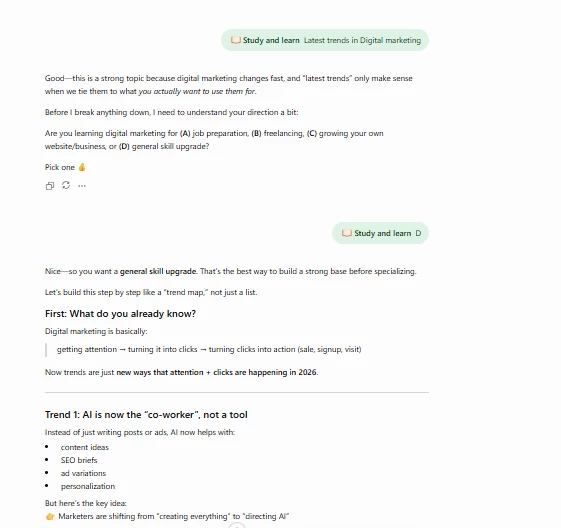
Unlike purpose-built study tools, ChatGPT does not present a fixed study interface. A well-framed prompt can produce exam-focused summaries, Socratic questioning sessions, concept comparisons, or step-by-step explanations across any subject including mathematics, law, engineering, and humanities. The same session can shift from explaining a concept to generating practice questions to summarizing key points for revision.
The limitation is prompt dependency. Output quality is tied to how clearly the user frames their request. Students who use vague prompts tend to get generic responses; those who specify subject, level, output format, and purpose get significantly more targeted results. For students willing to learn effective prompting, it becomes one of the more versatile tools in this list.
BEST FOR Personalized explanations, topic deep-dives, and flexible support across subjects | CORE LIMITATION Effectiveness depends heavily on how clearly the user frames their study needs |
Understanding where each tool fits in the study process prevents over-reliance on any single platform and makes a combined workflow more effective.
Unstuck AI Focused study summarization tool built for direct student use. Simple flow, limited ecosystem depth. | Notion AI AI inside a full organizational workspace. Best for managing knowledge across multiple subjects over time. |
Quizlet Memorization and spaced repetition system. The most targeted tool for recall-based exam preparation. | Otter.ai Transcription and lecture capture. Converts audio to searchable text. Best used at the start of a study workflow. |
NotebookLM Source-locked AI assistant. Reliable for research-based learning where accuracy to uploaded materials is critical. | ChatGPT Flexible conversational tutor. Broadest range of functions but requires intentional prompting for targeted outputs. |
No tool in this comparison is universally superior. The decision depends on what part of the study process is currently the weakest link in your workflow.
| Study Need | Best Tool |
| Organized study notes across multiple subjects | Notion AI |
| Exam revision and memory reinforcement | Quizlet |
| Capturing live or recorded lectures | Otter.ai |
| Research-based learning from PDFs and documents | NotebookLM |
| Flexible AI tutoring and concept explanation | ChatGPT |
Unstuck AI covers straightforward study summarization effectively, but specific learning scenarios require capabilities it does not provide.
• Students managing notes across multiple subjects, semesters, or group projects need a full organizational workspace not just a summarizer. Notion AI provides that infrastructure.
• Students preparing for exams through repetition need a dedicated flashcard and spaced repetition system. Quizlet's adaptive revision modes are built around this specific need.
• Researchers working with academic papers, textbooks, or multiple source documents need AI that cross-references materials with source accuracy. NotebookLM is designed for this purpose.
• Students attending live lectures or recording video classes need real-time transcription with speaker separation and timestamp control. Otter.ai is engineered for that task.
• Students who need customized explanations, open-ended concept exploration, or AI-generated practice questions need a general-purpose AI tutor. ChatGPT provides that flexibility.
• Anyone needing multiple functions transcription, organization, and revision will need to combine tools. No single platform handles all of these tasks with equal depth.
After comparing these tools, I realized there isn't one perfect replacement for Unstuck AI because each one solves a different problem. If I wanted a place to organize all my study materials, I'd choose Notion AI. For memorizing concepts before exams, Quizlet makes the most sense. Otter.ai is the one I'd rely on for capturing lectures, while NotebookLM stands out when I need to understand long PDFs or research papers. Whenever I get stuck on a difficult topic or need something explained in a simpler way, ChatGPT is usually the first tool I open.
The biggest lesson for me is that the best study setup doesn't depend on finding one all-in-one platform. It comes from combining the right tools for the way you actually learn. Think about the part of studying that slows you down the most—taking notes, revising, understanding concepts, or researching, and choose the tool that fixes that specific problem. A study system you'll use consistently is always more valuable than chasing the latest AI app.
Share your thoughts about this article.
Be the first to post a comment!

The same tool can be a 4.7 on one site and a 3.9 on another. Here is what is rea...
Nitin1 month ago

Here is the number worth pinning above your budget: in Gartner Digital Markets r...
Deepak Mehra1 month ago

What Artlist AI is in 2026Artlist began as a royalty-free music library. By 2026...
Deepak Mehra2 months ago

Most AI tool failures do not announce themselves. There is no crash, no angry em...
Nitin2 months ago

The best AI image generator in 2026 is Nano Banana 2 for speed, FLUX.2 for photo...
Parveen Verma2 months ago

“Useful” is a slippery word for a coding assistant. A tool can be brilliant at o...
Sakshi Dhingra2 months ago