Unstuck AI is built for a very specific student problem: you have lecture slides, textbook pages, PDFs, class notes, YouTube videos, or recorded lectures, but turning all of that into something useful takes too much time. Instead of acting like a general chatbot, Unstuck tries to keep the study process inside your own material.
That makes it different from simply asking ChatGPT a broad question. The main idea is that students can upload or record learning material, then use AI to create notes, flashcards, quizzes, summaries, and file-based answers from that content. The official Unstuck website describes the tool as a study app that works with PDFs, PowerPoints, YouTube videos, lectures, textbooks, and class notes. It also highlights features such as lecture recording, flashcards, quizzes, file chat, and class organization.
So the question is not only whether Unstuck AI works. The better question is whether it gives students enough value beyond free AI tools, and whether the free version is enough for regular study use.
Quick Answer
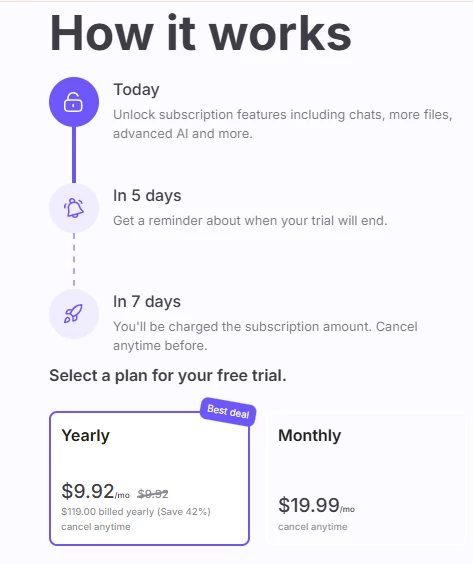
Unstuck AI is free to start, but it is not best understood as a completely free study tool. The iOS App Store listing shows the app as “Free” with in-app purchases, and the listed paid options include monthly and yearly Unstuck Pro plans.
For students who only want to test the workflow, the free access may be enough. For students who want to use it every week for lectures, exam prep, flashcards, quizzes, and document-based study, the paid plan may become relevant.
Question
Short Answer
Is Unstuck AI free?
Free to start, but paid plans exist.
Is it only for students?
It is mainly positioned for students, but lecture and meeting notes can also help professionals.
What does it do best?
Converts study material into notes, transcripts, summaries, flashcards, quizzes, and chat-based help.
Is it better than ChatGPT?
Better for organized study around uploaded class material; less flexible than a general AI chatbot.
Is it worth paying for?
Worth considering for students with heavy reading, lectures, and exam prep. Not necessary for light or occasional use.
Biggest caution
Check privacy, pricing, and accuracy before relying on it for important academic work.
What Unstuck AI Actually Does
Unstuck AI is not just a “type a question and get an answer” tool. Its main strength is that it works around learning materials. According to the official site, students can upload study materials, record lectures, and get personalized study tools from those sources. The site highlights lecture recording, flashcards, quizzes, class organization, and file chat as core features.
The iOS App Store listing describes Unstuck as an AI note-taking assistant that can transcribe lectures, meetings, and presentations while generating summaries. It also says users can transform recordings and YouTube videos into organized notes.
That makes Unstuck most useful in study situations where the source material already exists but feels hard to manage.
For example:
Student Situation
How Unstuck AI Can Help
Long lecture recording
Turns the recording into transcript-style notes and summaries
Dense textbook chapter
Helps explain sections and create study prompts
PowerPoint slides
Converts slide content into notes, questions, or flashcards
YouTube lecture
Helps turn video content into structured study material
Exam revision
Generates quizzes and flashcards from uploaded material
Multiple classes
Organizes study material by course or class
The value is not that Unstuck magically understands every subject better than other AI tools. The value is that the workflow is more study-focused.
Is Unstuck AI Actually Free?
Yes, but with an important condition.
The App Store listing marks Unstuck AI Note Taker as free and shows that it has in-app purchases. The listed purchases include options such as Unstuck Pro, yearly plans, and different price points in Indian rupees, including ₹799, ₹1,299, ₹3,999, ₹5,900, ₹7,900, and ₹9,900.
That means students should not assume every feature is free forever. The better way to describe it is:
Unstuck AI is free to download and start, but its full long-term use may require a paid plan.
This matters because many students install AI study tools during exam season. A tool can feel free at first, but once limits appear around uploads, usage, recordings, or advanced features, the real cost becomes clearer.
Use Case
Free Version May Be Enough?
Paid Plan May Matter?
Testing the app once
Yes
No
Uploading a few notes
Possibly
Not always
Daily lecture notes
Limited
Yes
Full exam preparation
Maybe not
Likely
Flashcards and quizzes every week
Maybe not
Likely
Heavy use across multiple classes
Unlikely
Yes
Students should check the current in-app pricing inside their own App Store or account before subscribing because pricing can vary by region, offer, device, and plan type.
What Makes Unstuck AI Useful for Students
The strongest reason to use Unstuck is the way it keeps study help connected to study material. A general chatbot can explain topics, but students usually have to copy text, paste notes, explain context, and keep correcting the prompt.
Unstuck reduces that friction by making the uploaded material the center of the workflow. When the material is already inside the app, students can ask more focused questions, create flashcards faster, and review content in a more organized way.
1. It reduces study friction
The biggest benefit is not just the AI answer. It is the reduced switching. Students do not need to move between notes, slides, YouTube, a chatbot, and a separate flashcard tool as often. Unstuck brings several of those tasks into one place.
That matters during long study sessions. Even small interruptions can make revision feel heavier.
2. It supports active recall
Flashcards and quizzes are useful because they move students away from passive reading. The official site lists flashcards and quizzes as part of the Unstuck feature set.
This is important because many students think they understand a topic after reading it, but only realize the gaps when they try to answer questions. If Unstuck creates quiz-style practice from class material, it can make revision more active.
3. It helps with lecture-heavy courses
Unstuck is especially relevant for students who sit through long lectures. The App Store listing says the app can transcribe lectures, meetings, and presentations, then generate summaries.
That can be useful for students who struggle to write everything down while also listening. However, students should still check the transcript and summary manually because AI-generated notes can miss context or misread unclear audio.
4. It works best when source material is clean
Unstuck is likely to perform better with clear PDFs, structured lecture slides, readable notes, and clean audio. If the source file is messy, scanned badly, incomplete, or poorly recorded, the AI output may become less reliable.
This is not a weakness unique to Unstuck. It is a common limitation of AI study tools. The better the input, the better the output.
Where Unstuck AI May Feel Limited
Unstuck AI is useful, but it should not be presented as a perfect study replacement.
Students should be careful about four things: accuracy, overreliance, privacy, and cost.
1. AI notes still need checking
Unstuck can summarize, transcribe, and organize study material, but students should not treat every output as automatically correct. AI tools can misunderstand context, simplify too much, or miss important details.
For exam preparation, the best workflow is to use Unstuck as a support tool, then compare the output with lecture slides, textbooks, official course material, and teacher instructions.
2. It may not replace subject understanding
Unstuck can explain, summarize, and quiz. But it cannot attend class for the student or replace the effort needed to understand difficult concepts.
It works best as a study assistant, not as a shortcut.
3. Privacy deserves attention
This is one of the most important points for students. The App Store privacy section says the developer, Quizard AI, Inc., may collect data linked to the user, including contact information, user content, identifiers, usage data, and audio data. It also says identifiers may be used to track users across apps and websites owned by other companies.
That does not mean the app is unsafe, but it does mean students should think carefully before uploading sensitive material. Avoid uploading private documents, confidential research, personal IDs, unpublished work, or anything your school does not allow you to share with third-party tools.
4. Pricing can become a factor
The App Store confirms in-app purchases, including multiple Unstuck Pro and yearly plan options.
For students on a tight budget, this matters. A tool may be worth paying for if it saves time every week, but not if it is used only once or twice a month.
Comparing It to Other AI Study Tools
Aspect
Unstuck AI
General AI Chat Platforms
Primary Focus
Document-based study interaction
Open-ended conversational AI
Workflow Style
Structured and contained within uploaded material
Flexible, prompt-driven interaction
Ease of Use for Students
Designed specifically for academic documents
Requires manual formatting and prompt clarity
Customization Level
Limited to study-focused features
Highly customizable across use cases
Learning Curve
Lower for beginners
Moderate if prompt writing is required
Best For
Students working with dense textbooks and lecture slides
Users who want broader experimentation and flexibility
Feature Ecosystem
Narrow and focused
Wide and multi-purpose
Dependency on Prompt Skills
Minimal
Higher, especially for accurate results
Unstuck AI works well if you prefer a contained study environment where everything revolves around your uploaded material. It reduces the need to think about prompts and formatting, which can be helpful during long study sessions.
On the other hand, general AI platforms offer more freedom. If you enjoy experimenting, refining prompts, and exploring beyond academic material, those tools may feel more adaptable.
Ultimately, the choice depends on whether you prioritize structure and simplicity or flexibility and customization.
Is Unstuck AI Good for Exam Preparation?
Unstuck can be useful for exam preparation, especially when students need to revise a lot of material quickly. Flashcards, quizzes, summaries, and lecture notes can all support revision.
But students should not rely on it alone.
A better exam workflow would look like this:
Step
Best Use of Unstuck
Upload lecture slides
Create short summaries and topic lists
Add textbook chapter
Ask for difficult concepts to be explained
Record lecture
Generate notes and review missed points
Make flashcards
Practice definitions and key facts
Generate quizzes
Test weak areas
Final revision
Compare AI output with official class material
The most useful part is not the summary itself. It is the ability to move from reading to questioning to practice.
Is Unstuck AI Safe for Students?
Unstuck appears to be operated by Quizard AI, Inc. The official sign-up page says Unstuck’s first product was launched from a college dorm room in January 2023, and the company lists contact information, including [email protected] and a New York address.
The related Quizard AI About page also names team members, including Michael Giardino as Co-founder and CEO, Sidhant Bendre as Co-founder and CTO, and Achraf Golli as Co-founder and CPO. It says the team works in person in New York and is backed by investors such as Neo, Cal Henderson, Maria Zhang, Adam Freed, and Russell Kaplan.
That gives the product more transparency than many anonymous AI study tools. Still, students should pay attention to privacy. The App Store privacy section lists data categories that may be collected, including user content and audio data.
The safest approach is:
Student Data
Upload?
Public lecture slides
Usually okay
Personal notes
Use judgment
Recorded lectures
Check school rules first
Private class material
Be careful
Personal ID documents
Do not upload
Confidential research
Avoid
Exam answers or restricted material
Do not upload
Students should also check their school’s AI policy. Some institutions allow AI for study support but restrict uploading copyrighted course material, recorded lectures, or assessment content.
Is It Worth Paying For?
Unstuck AI is worth considering if it becomes part of a regular study routine. If a student uses it daily to record lectures, summarize notes, make flashcards, and prepare quizzes, the paid plan may save enough time to justify the cost.
But if a student only wants a quick explanation once in a while, free AI tools may be enough.
Student Type
Worth It?
Reason
Heavy lecture-based student
Yes, likely
Recording and summaries can save time
Exam-focused student
Possibly
Flashcards and quizzes are useful
Casual user
Maybe not
Free access or general AI tools may be enough
Prompt-savvy AI user
Maybe not
Can recreate many tasks manually
Privacy-conscious student
Use caution
Uploading notes/audio may not feel comfortable
Budget-sensitive student
Compare carefully
Paid plans may feel expensive
The most honest verdict is that Unstuck is not essential for every student, but it can be genuinely useful for students who study from large amounts of material.
Final Verdict
Unstuck AI is a real and useful AI study tool, but it should be described carefully. It is free to start, not completely free for every use case. It is more focused than a general chatbot, but less flexible. It can help students organize lectures, notes, PDFs, videos, flashcards, and quizzes, but it does not replace studying or guarantee better grades.
Its strongest value is workflow. It reduces the friction between reading, listening, summarizing, questioning, and revising. For students with heavy course loads, that can make study sessions easier to manage.
The main cautions are privacy, accuracy, and pricing. The App Store listing confirms in-app purchases and also lists user content and audio data among possible data categories handled by the developer.
So the final answer is:
Unstuck AI is worth trying if you study from lectures, PDFs, slides, and recordings. It is especially useful for students who want a structured study workspace with notes, flashcards, quizzes, and document chat. But it is not a must-have for everyone. Use the free version first, check the current plan limits, avoid uploading sensitive material, and only pay if it becomes part of your regular study routine.