Quick take Unstuck AI is the stronger pick when the first problem is messy material: lectures, PDFs, PowerPoints, YouTube videos, textbooks, and class notes that need to become organized, cited study notes. Gizmo AI is the stronger pick when the material already exists and the real problem is remembering it through flashcards, quizzes, spaced repetition, active recall, and gamified practice. |
A student rarely reaches for an AI study app because a single chapter felt hard. The trigger is usually messier than that. Lecture slides sit in one folder, half of the assigned PDFs are unread, a few YouTube explanations are bookmarked and forgotten, the class notes have gaps where the lecturer moved too fast, and the exam is now close enough to feel uncomfortable. Unstuck AI and Gizmo AI both promise help at that moment, yet they solve different halves of the same problem.
Unstuck AI is built for the first half. Its official site positions the product around transforming PDFs, PowerPoints, YouTube videos, lectures, textbooks, and class notes into trusted study tools, and its App Store listing describes a note-taking assistant that transcribes lectures and turns recordings and videos into organized notes. The job it does best is turning scattered source material into something a student can actually read and question, with answers cited back to the uploaded files.
Gizmo AI is built for the second half. Its official site describes turning what a student is learning into AI flashcards that can be quizzed in a gamified way using spaced repetition and active recall. Its app listings add an AI tutor, homework help, exam-answer teaching, public decks, and the ability to import from Quizlet, Anki, YouTube, PDFs, notes, and PowerPoints, or to scan handwritten notes into cards. The job it does best is converting material into memor.
The rest of this comparison treats the decision the way a student actually faces it: not as a feature checklist, but as a question of which part of the study process is breaking down.
Before the deep comparison, this is the fastest way to match a situation to a tool. Each row reflects the public positioning and feature set of each app, not a promise of results.
| Student situation | Better pick | Reason |
| "My lecture notes are messy." | Unstuck AI | Built around uploads, recordings, summaries, and organized study tools |
| "I need flashcards fast." | Gizmo AI | Stronger flashcard and quiz positioning |
| "I want to record lectures." | Unstuck AI | App listing highlights lecture transcription and summaries |
| "I learn by testing myself." | Gizmo AI | Uses active recall, spaced repetition, quizzes, and gamified practice |
| "I have PDFs and PowerPoints." | Both | Both support study-material imports, but with different end goals |
| "I have handwritten notes." | Gizmo AI | App Store listing mentions scanning handwritten notes into flashcards and quizzes |
| "I need YouTube videos turned into notes." | Unstuck AI | Stronger note-taking and organized-summary angle |
| "I need YouTube videos turned into flashcards." | Gizmo AI | Stronger flashcard and quiz angle |
| "I procrastinate until the exam." | Gizmo AI | Quick quiz loops are often easier to start |
| "I want a study base for the whole semester." | Unstuck AI | Better fit for organizing source material over time |
Tools rarely get used in the abstract. They get used at a specific moment in the week. Mapping each app to a stage of the study cycle shows where one earns its place and where the other takes over.
| Study stage | Student task | Unstuck AI role | Gizmo AI role |
| Before class | Upload syllabus, slides, PDFs | Organize sources into study material | Turn early notes into flashcards |
| During class | Record lecture or capture notes | Transcribe and summarize the lecture | Less central unless notes are scanned later |
| Same day after class | Clean up messy content | Create organized summaries and study guides | Generate flashcards from notes |
| Weekly revision | Review key points | Ask questions from uploaded material | Practice flashcards and quizzes |
| Exam week | Find weak areas | Revisit source-based explanations | Use active recall and spaced repetition |
| Night before exam | Fast recap | Summaries and key concepts | Rapid quizzes and written questions |
| After exam | Store material | Keep files and notes organized | Reuse decks for future classes |
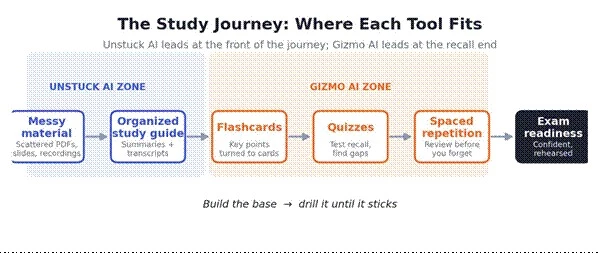
Figure 1. Unstuck AI leads the early, material-organizing stages; Gizmo AI leads the recall stages that follow.
Input type matters less than intended output. The grid below shows how each app handles common study inputs, and which one tends to win once the goal is clear.
| Input type | Unstuck AI fit | Gizmo AI fit | Better choice |
| PDF textbook chapter | Strong for study guides and Q and A | Strong for flashcards | Depends |
| PowerPoint slides | Strong for summaries | Strong for flashcards | Tie |
| YouTube lecture | Strong for notes and summaries | Strong for flashcards and quizzes | Depends |
| Recorded lecture | Stronger | Less central | Unstuck AI |
| Handwritten notes | Not the strongest public signal | Stronger; scan-notes feature listed | Gizmo AI |
| Quizlet or Anki import | Not a core public signal | Stronger; import listed | Gizmo AI |
| Class notes | Strong for organizing | Strong for flashcard practice | Tie |
| Textbook notes | Strong for study tools | Strong for recall practice | Depends |
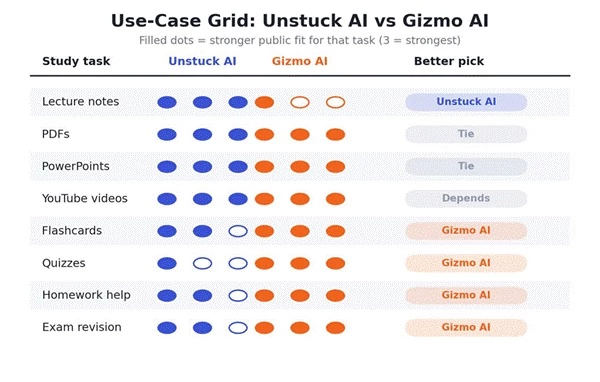
Figure 2. Use-case grid across the eight inputs most students bring to a study app.
Unstuck AI sits closer to a note-taking and study-organization layer. It is most useful when information is scattered across lectures, slides, PDFs, and YouTube explanations and a student needs a cleaner, organized version of the material, with answers tied back to the original files.
Gizmo AI is not mainly a traditional notes app. Its stronger value appears after a note exists, when content is converted into flashcards, quizzes, and repeated practice loops. Both apps can produce flashcards, but they enter the notes problem from opposite ends.
| Notes need | Better pick | Reason |
| Lecture transcription | Unstuck AI | App Store listing highlights transcription |
| Clear summaries | Unstuck AI | Built around organized notes and summaries |
| Source-based study guide | Unstuck AI | Stronger uploaded-material workflow with citations |
| Turning notes into flashcards | Gizmo AI | Core flashcard-maker positioning |
| Scanning handwritten notes | Gizmo AI | App Store listing mentions scanning photos and notes |
| Reviewing notes with quizzes | Gizmo AI | Strong quiz and gamification angle |
Gizmo AI is far more visibly built around flashcards and quizzes. Its official site describes turning learning material into AI flashcards and gamified quizzes, and its app listings mention active recall, spaced repetition, more than one million public decks, multiple-choice questions, written questions, and study games.
Unstuck AI does include flashcards and quizzes, generated from uploaded material, but its strongest public positioning is broader: uploads, recordings, summaries, notes, and study guides. On the recall side specifically, Gizmo is the more focused tool.
| Practice feature | Unstuck AI | Gizmo AI |
| AI flashcards | Yes, study-tool angle | Strong core feature |
| AI quizzes | Study-tool angle | Strong core feature |
| Active recall | Not the main public emphasis | Clearly emphasized |
| Spaced repetition | Not the main public emphasis | Clearly emphasized |
| Gamified learning | Not the main public emphasis | Stronger |
| Public decks | Not central | 1,000,000+ public flashcards listed |
| Written questions | Not central | Listed on App Store |
| Multiple-choice questions | Not central | Listed on App Store |
The two apps also help differently once a student is stuck on an actual problem. Gizmo AI leans into direct help: its Google Play listing mentions an AI tutor that teaches topics, solves homework problems, and teaches students how to answer exam questions. Unstuck AI keeps help grounded in the student's own files: upload the materials, record the lecture, and get tools and explanations built around that content.
| Help needed | Better pick | Reason |
| "Explain this from my lecture." | Unstuck AI | Better source-material workflow |
| "Help me answer exam questions." | Gizmo AI | AI tutor and exam-answer support listed |
| "Turn this chapter into study material." | Unstuck AI | Upload and study-guide fit |
| "Make me practice until I remember." | Gizmo AI | Active recall and quiz design |
| "Solve homework-like questions." | Gizmo AI | Homework problem support listed |
| "Find the exact concept from my notes." | Unstuck AI | Better organized-source fit with citations |
Consider one student with five days before an exam, three PDFs, two PowerPoints, one YouTube lecture, messy class notes, and low confidence. The same starting pile leads to two very different weeks depending on which app does the work.
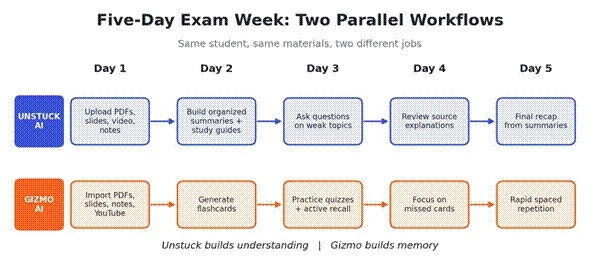
Figure 3. The same five days, run as an understanding workflow and as a memory workflow.
Day one goes to uploading every source into one place: the three PDFs, two slide decks, the YouTube lecture, and the messy class notes. Day two turns that pile into organized summaries and study guides. Day three is spent asking targeted questions about the weakest topics and reading the cited explanations. Day four revisits those source-based answers to close gaps. Day five is a calm recap from the summaries.
Day one imports the same PDFs, slides, notes, and YouTube content. Day two generates flashcards from the key points. Day three runs quizzes and active-recall drills. Day four narrows focus to the cards that keep getting missed. Day five is rapid spaced-repetition review to lock everything in before the exam.
| If the student struggles with | Better path |
| Understanding the material | Unstuck AI |
| Remembering the material | Gizmo AI |
| Messy notes | Unstuck AI |
| Lack of revision discipline | Gizmo AI |
| Exam panic | Gizmo AI for quick practice, Unstuck for concept clarity |
| Long-semester organization | Unstuck AI |
| Study category | Unstuck AI | Gizmo AI | Better pick |
| Lecture notes | 4.6 / 5 | 3.5 / 5 | Unstuck AI |
| PDF and PPT studymaterial | 4.4 / 5 | 4.2 / 5 | Slight Unstuck AI |
| YouTube study workflow | 4.5 / 5 | 4.2 / 5 | Slight Unstuck AI |
| Flashcards | 3.8 / 5 | 4.8 / 5 | Gizmo AI |
| Quizzes | 3.7 / 5 | 4.7 / 5 | Gizmo AI |
| Active recall | 3.5 / 5 | 4.8 / 5 | Gizmo AI |
| Spaced repetition | 3.2 / 5 | 4.7 / 5 | Gizmo AI |
| Homework and exam-answer help | 3.8 / 5 | 4.4 / 5 | Gizmo AI |
| Study organization | 4.6 / 5 | 4.0 / 5 | Unstuck AI |
| Exam cramming | 4.0 / 5 | 4.6 / 5 | Gizmo AI |
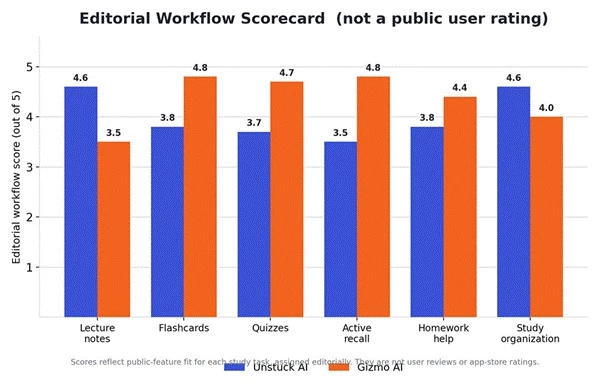
Figure 4. Editorial workflow scores across six core study categories. Not a public user rating.
Beyond feature positioning, it helps to know what independent reviews and everyday users report after living with each app. The summary below reflects recurring themes from third-party reviews and app-store feedback as of June 2026. Sentiment is paraphrased, not scored. No public star rating is reproduced or invented here, and neither app should be read as a promise of better marks.
| Theme | Unstuck AI | Gizmo AI |
| Headline strength | Cited answers pulled from a student's own files, plus lecture recording that captures the professor's explanations | Gamified recall built on spaced repetition and active recall that keeps students coming back |
| Most common praise | Keeps scattered course material organized and explains it in context | Makes daily review feel like a game, which helps consistency |
| Most common complaint | Best features sit behind the paid tier, and it needs an internet connection | Free-tier limits can interrupt long, intensive study sessions |
| Free-tier friction | Limited free access; reviewers suggest testing it on real materials first | Reviewers describe a daily lives system and a cap of roughly ten AI quizzes per day, with a short lockout when lives run out |
| Pricing sentiment | Third-party listings cite a monthly or annual premium; figures disagree, so verify live | Reviewers note weekly pricing can feel steep next to free tools like Anki; a student discount is mentioned |
| Noted limitation | Summaries can simplify dense material, so checking against the source still matters | Some reviews note limited audio and multilingual support, and flashcards can oversimplify |
These perceptions vary by subject, study habit, and how much material a student actually uploads. They are also separate from the marketing testimonials shown on each official site, which are promotional and are not treated as evidence in the editorial scores above.
Both apps can involve uploading study files, class notes, lectures, and personal learning material. A few practical checks keep that safe and within the rules, without turning study into a worry.
| Safety point | Unstuck AI concern | Gizmo AI concern | Safer action |
| Lecture recording | May record class audio | Less central | Ask first or follow school rules |
| Uploading PDFs | Course or textbook copyright | Same issue | Use materials a student is allowed to use |
| Personal notes | May include private information | Same issue | Remove sensitive details before upload |
| Homework solving | Less tutor-focused | Tutor and homework help listed | Do not submit AI answers as one's own |
| Accuracy | Summaries may simplify too much | Flashcards may oversimplify | Verify against the source material |
| Exam integrity | Study support is fine | Direct answer generation can cross lines | Follow the course academic policy |
Many students do not need to choose only one app. The cleanest setup uses Unstuck AI to collect, organize, transcribe, and understand the material, then hands the finished material to Gizmo AI to turn into flashcards, quizzes, and spaced repetition.
| Step | Tool | Reason |
| Upload lecture slides and PDFs | Unstuck AI | Build the study base |
| Record or summarize the lecture | Unstuck AI | Clean up class content |
| Identify weak topics | Unstuck AI | Ask source-based questions |
| Convert key points into flashcards | Gizmo AI | Start active recall |
| Practice quizzes daily | Gizmo AI | Build memory |
| Review missed cards | Gizmo AI | Target weak areas |
| Return to the source explanation | Unstuck AI | Fix any misunderstanding |
Unstuck AI is the better fit when the material is scattered and needs to become clear: lecture recordings, YouTube lessons, PDFs, PowerPoints, class notes, and the study guides built from them. Gizmo AI is the better fit when the material already exists but needs to stick, through flashcards, quizzes, active recall, spaced repetition, and gamified practice.
| Main problem | Recommendation |
| Messy notes and understanding | Choose Unstuck AI |
| Revision and memory | Choose Gizmo AI |
| A full study system, start to finish | Use both: Unstuck to build the base, Gizmo to drill it until it sticks |
Neither app guarantees a better grade, and neither replaces understanding the material. Used for the job each is built for, though, the pair covers the whole distance from a messy folder to a confident exams.
Share your thoughts about this article.
Be the first to post a comment!

The same tool can be a 4.7 on one site and a 3.9 on another. Here is what is rea...
Nitin1 month ago

Here is the number worth pinning above your budget: in Gartner Digital Markets r...
Deepak Mehra1 month ago

What Artlist AI is in 2026Artlist began as a royalty-free music library. By 2026...
Deepak Mehra2 months ago

Most AI tool failures do not announce themselves. There is no crash, no angry em...
Nitin2 months ago

The best AI image generator in 2026 is Nano Banana 2 for speed, FLUX.2 for photo...
Parveen Verma2 months ago

“Useful” is a slippery word for a coding assistant. A tool can be brilliant at o...
Sakshi Dhingra2 months ago