Affinity is a professional-grade creative software suite featuring Affinity Designer, Photo, and Publisher versatile, high-performance tools for design, photo editing, and publishing across Mac, Windows, and iPad. It stands out for one-time payment licensing, fast performance, and precision tools, making it a top choice for freelancers, businesses, and agencies seeking robust alternatives to subscription-based platforms like Adobe.
No Subscription Model
Powerful Features
Fast Performance
Cross-Platform Availability
Frequent Updates
Limited Adobe Compatibility
Lack of Advanced Features
Learning Curve
Missing Automation Tools
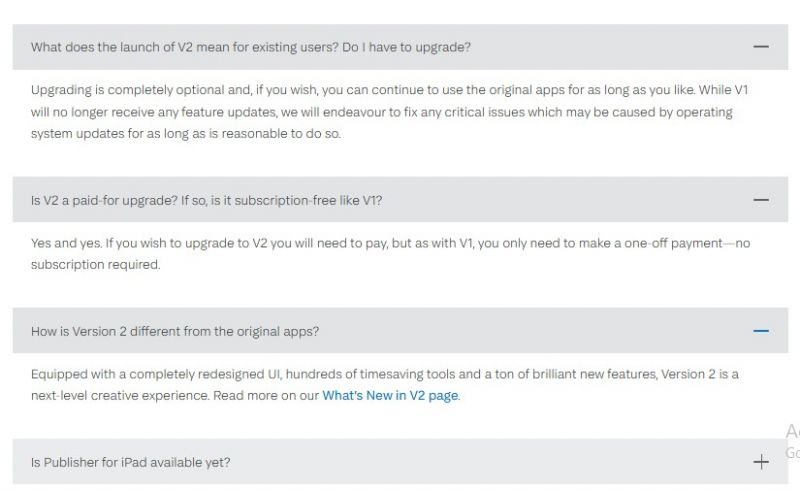
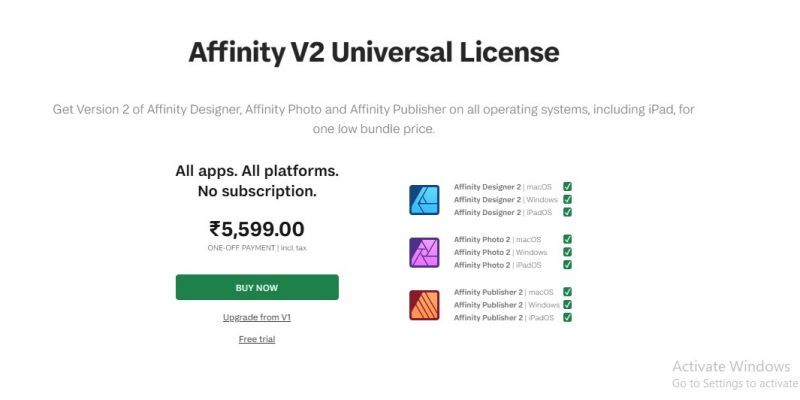
*Price last updated on Nov 15, 2025. Visit affinity.serif.com's pricing page for the latest pricing.

Posted: Aug 31, 2026
Our local charity needed posters, social-media graphics, a banner and an information leaflet for the same campaign. Creating all the materials in Affinity made it easier to maintain the same colours, fonts and visual style throughout. The final campaign looked organised, and the posts received far more shares than expected.
Posted: Aug 27, 2026
My previous portfolio used a generic online template and never really reflected my design style. Building the pages in Affinity allowed me to control the spacing, typography and overall visual flow. The final PDF feels cleaner, more confident and much closer to the way I want potential clients to see my work.
Posted: Aug 26, 2026
I create merchandise artwork from hand-drawn sketches. Affinity handles the final vector editing beautifully, but converting a scanned sketch into editable paths is still more awkward than it should be. I have to trace it elsewhere and bring the result back into Affinity. That extra step frustrates me every single time because the rest of the workflow is so capable.
Posted: Aug 24, 2026
My favourite improvement is being able to arrange the workspace around the type of project I am doing. For illustration, I keep brushes, colour and stroke tools close. For publication work, I switch to typography, pages and text styles. Removing panels I never touch has made the interface feel much less crowded. It sounds like a small feature, but I love not having to fight the workspace every morning.
Posted: Aug 21, 2026
An old picture of my grandparents had scratches, faded colours and several damaged areas. Affinity’s healing tools and adjustment layers helped me restore it without making their faces look unnatural. My mother became emotional when she saw the finished version. That project alone made the time spent learning the software worthwhile.
Posted: Aug 20, 2026
I edited a small wedding shoot in affinity and loved how adjustment layers allowed me to experiment without damaging the original photos. Skin retouching, colour correction and removing distracting background objects all felt smooth once I had arranged the workspace properly.
Posted: Aug 4, 2026
My cousin needed a new menu for her small bakery and asked me because apparently owning a laptop makes me “the design person” in the family. I downloaded Affinity, watched two tutorials and somehow created something that looked genuinely professional. Aligning prices, adjusting photos and preparing the PDF for printing were easier than I expected. I felt happy when the printer said the file was prepared correctly!