Home > Company > Figma AI
Figma AI

Figma AI

Your Creativity, unblocked with Figma AI

Figma AI Overview

Figma AI provides tools to make, edit, and refine images, rename layers automatically, add relevant content, instantly remove backgrounds, and rewrite and translate text. It supports generating and replacing text content directly in design mocks. Users explore ideas through prompts, code, or design within a unified workflow. The tools automate repetitive tasks and generate content to speed up design processes. Figma AI acts as a collaborator for visual work across Figma products.

Figma AI Features

Make, edit, and refine images Rename layers automatically Add relevant content Instantly remove backgrounds Rewrite and translate with AI Generate first drafts from text prompts Visual search across team files Asset search with semantic understanding

How Figma AI works:

  • Users enter prompts describing UI or design needs
  • AI generates layout drafts or design suggestions
  • Designers refine outputs directly in Figma canvas
  • AI handles repetitive tasks like naming layers or filling content
  • Image tools generate or edit visuals inside the design file
  • Outputs integrate directly into Figma’s design system workflow

Unique Features:

  • Fully integrated inside industry-standard design tool (no separate app needed)
  • Speeds up early-stage ideation and prototyping significantly
  • AI deeply connected with design system and components
  • Strong collaboration between designers and developers
  • Dev Mode bridges design and code workflows
  • Reduces repetitive manual tasks (naming, content filling, layout setup)
  • Supports both visual design and workflow automation in one ecosystem

Pros & Cons

Pros:

Instantly creates UI layouts from simple text descriptions

Saves time by automatically renaming layers with smart context

Generates images directly inside the design canvas

Turns FigJam notes into clear, actionable insights quickly

Instantly translates and rewrites UI text for global use

Removes image backgrounds without needing extra tools

Cons:

Generated UI lacks precision needed for production deployment

Key AI features locked behind paid plans limit accessibility

Company

Figma AI

Contact

Email

Headquarter

Figma AI Demo & Screenshots

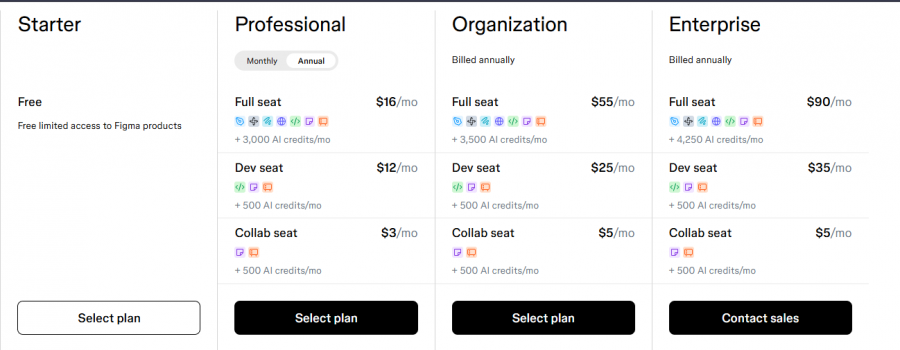
Figma AI Pricing

Figma AI Pricing Screenshot

*Price last updated on May 8, 2026. Visit figma.com's pricing page for the latest pricing.

Figma AI Reviews

Figma AI Category

Figma AI Alternatives