Creating presentations used to be a tedious and time-consuming task for me. Whether I was designing slides from scratch, tweaking templates, or trying to make my presentations stand out, the process often felt more exhausting than rewarding. That’s when I came across SlidesGo and Gamma AI, two tools promising to speed up and simplify the process using AI.
After using both tools extensively for weeks, I’ve compiled a detailed, hands-on comparison based on my own experiences. These tools serve the same purpose, to create impressive presentations faster, but they cater to different needs. In this article, I'll break down each tool’s strengths and weaknesses in terms of design, speed, customization, support, and much more.
After hours of creating presentations using both tools, I’ve arrived at this conclusion:
| Factor | Winner |
| Ease of Use | SlidesGo |
| Design Quality | Gamma AI |
| AI‑Driven Presentation Creation | Gamma AI |
| Speed of Slide Creation | Gamma AI |
| Best for Interactive Decks | Gamma AI |
| Best for Static Template Users | SlidesGo |
| Best Free Tier | Tie |
| Collaboration Features | Gamma AI |
| Feature | SlidesGo | Gamma AI |
| AI‑Generated Slides | Basic generation (needs editing) | Full deck generation (polished) |
| Templates | Thousands of pre‑designed templates | No templates — AI generates everything |
| Design Quality | Customizable with manual tweaks | Highly polished AI‑generated designs |
| Collaboration | No real‑time collaboration | Real‑time collaboration |
| Export Options | Google Slides, PPTX | PPTX, PDF, Google Slides, Live link |
| Free Plan | Limited slides per month | Limited free access, but more generous |
| Paid Plan | Premium subscription unlocks all features | Various tiers with advanced features and branding |
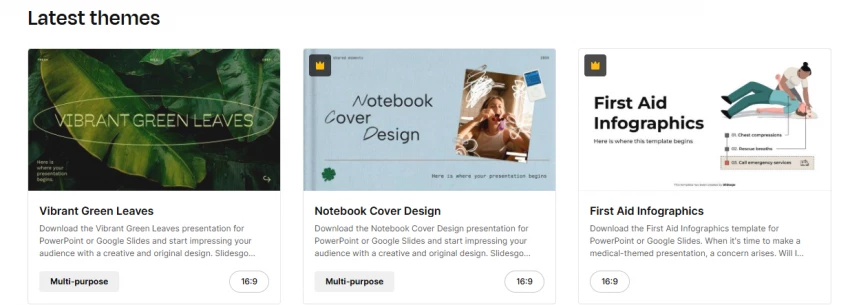
If you're someone who loves beautifully crafted templates to kickstart your presentations, SlidesGo is a great choice. This platform offers a massive library of pre-designed templates tailored for a variety of needs, from minimalist business decks to bright, colorful education templates. The templates look polished right out of the box, but what I love most is the flexibility in how you can customize them.
My Takeaway: I found the design variety offered by SlidesGo to be one of its standout features. You’re never stuck with a generic template. Whether I was working on a professional presentation or a more creative one, there was always something that fit my style perfectly.

On the other hand, Gamma AI approaches presentation design with a modern, clean aesthetic that’s generated automatically based on the content you input. The slides are AI-designed, ensuring that every deck is both visually appealing and cohesive. The best part? The AI suggests layouts, fonts, and visuals that match the tone of your presentation. It's like having a designer behind the scenes, creating polished slides for you within minutes.
My Takeaway: Gamma AI is ideal if you’re looking for a sleek, polished design without spending time tweaking each slide. It provides a futuristic look that makes your presentations stand out with little effort on your part.
When it comes to speed, both SlidesGo and Gamma AI take different approaches.
SlidesGo requires you to select a template and then manually edit each slide. While the templates make things faster, you're still doing a lot of customization yourself, which can take some time if you're working on a larger presentation.
Gamma AI, however, uses its powerful AI engine to generate full presentations in a matter of minutes. You simply input your topic or content, and within a few clicks, it provides you with a complete deck, with polished designs, layouts, and content already in place.
My Takeaway: If you're pressed for time and need a presentation ready quickly, Gamma AI is the winner. It automates the entire process, while SlidesGo requires manual customization. For quick and efficient slide generation, Gamma AI definitely saves time.
Both platforms offer customization options, but the degree of customization differs.
SlidesGo offers a wide range of editable templates that allow for deep customization. You can adjust fonts, colors, images, and even slide animations, giving you a lot of flexibility. However, the process is more manual, so if you want to make a presentation truly unique, you need to invest time.
Gamma AI, on the other hand, generates full slides automatically based on the content you provide. While it’s incredibly fast and efficient, the level of customization is a bit more restricted compared to SlidesGo. However, Gamma’s AI-driven design suggestions do allow for minor adjustments to the slides.
My Takeaway: If you prefer full control over every design aspect, SlidesGo is your tool. But if you need quickly generated, polished slides with minimal effort, Gamma AI is the better choice — just don’t expect as much customization.
Each platform serves different industry needs effectively:
SlidesGo: Best suited for educational content, marketing presentations, and creative portfolios. The wide range of aesthetic templates makes it ideal for people in the education sector who want to make learning materials or presentations look professional yet approachable. It’s also great for freelancers, small businesses, and marketers who need eye-catching templates.
Gamma AI: Best for corporate professionals, consultants, sales teams, and anyone who needs business‑ready, polished pitch decks or client presentations. The speed of Gamma AI’s full deck creation makes it perfect for busy professionals who need to impress clients quickly. It also excels at interactive presentations, making it a great choice for product demos and startup pitches.
My Takeaway: SlidesGo works best for creatives and educators, while Gamma AI is better for corporate users and business professionals who want polished, quick presentations for meetings, pitches, or proposals.
When it comes to customer support, both platforms have their strengths:
SlidesGo: Offers a help center with FAQs and some guides, but it’s not as extensive as other platforms. Email support is available if you run into issues, though response times can vary.
Gamma AI: Provides live chat support and an extensive knowledge base with tutorials and tips to help users navigate the platform. Their customer service is generally quick and responsive, especially if you need help with AI-generated slides or customization features.
My Takeaway: For quick support and guides, Gamma AI stands out with its 24/7 live chat support and more in-depth resources. SlidesGo has some support, but it’s more basic.
| Platform | Trustpilot / Public Ratings | G2 / Professional Review Highlights |
|---|---|---|
| SlidesGo | ~2.4/5 (mixed) | Variety of templates praised; customization limits and premium barriers criticized |
| Gamma AI | Mixed at Trustpilot (some negative time‑use feedback) | Polished AI generation and time savings praised; generic content and customization limits noted |
Positive feedback:
Negative feedback:
Overall: SlidesGo excels at template variety and customization but faces challenges with support and AI limitations.
Positive feedback:
Negative feedback:
Overall: Gamma AI is great for business professionals needing quick, polished presentations, but some customization limitations remain.
After weeks of using both platforms, here's my conclusion:
SlidesGo is ideal for users who want stunning templates and full customization. It’s perfect if you have the time to edit your slides and want total control over your presentation’s design.
Gamma AI is perfect for those who need to generate a polished deck quickly without sacrificing quality. It’s especially suited for corporate professionals, startups, and sales teams who need fast, engaging presentations.
SlidesGo: 8/10 — Excellent for creative projects and educators but requires more manual input.
Gamma AI: 9.5/10 — Great for business professionals who need polished decks quickly.
Ultimately, Gamma AI wins in terms of speed and design quality, while SlidesGo is perfect if you need more manual customization. My pick? If I’m working on a quick corporate pitch, I’ll go with Gamma AI. If I’m designing a creative project or educational deck, SlidesGo will be my tool of choice.
Be the first to post comment!

The rise of AI-driven platforms has made it easier than ever to engage in rolepl...
Sakshi Dhingra8 hours ago

Imagine running a small business, juggling customer queries, product information...
Sakshi Dhingra9 hours ago

Over the past few years, I have experimented with many study platforms, flashcar...
Sakshi Dhingra1 day ago
Just a few years ago, creating a professional video meant cameras, lighting, mic...
Sakshi Dhingra1 day ago

I still remember the excitement when Janitor AI first hit the scene. As a longti...
Sakshi Dhingra4 days ago

Why content writing looks different nowA few years ago, most content writers did...
Sakshi Dhingra1 week ago