
One red warning page can empty your traffic overnight. Here is how blacklists work, who runs them, what triggers a listing, and the exact workflow to get your site cleared.
A website blacklist (increasingly called a blocklist or denylist) is a database of domains, URLs, or IP addresses that a security service believes are dangerous. Browsers, search engines, antivirus tools, and mail servers check these databases in real time and block or warn before anyone reaches you.
The important detail is that you never "join" a blacklist on purpose, and nobody emails you a formal notice first. Your site is added automatically when a scanner, a spam trap, or a user report links it to malware, phishing, spam, or other abuse. In most cases the owner is a victim: attackers break into a legitimate site and use its good reputation to reach visitors.
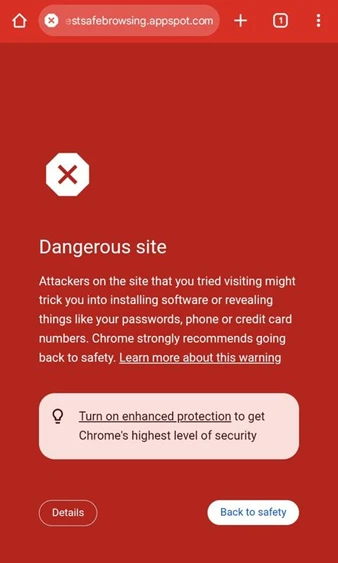
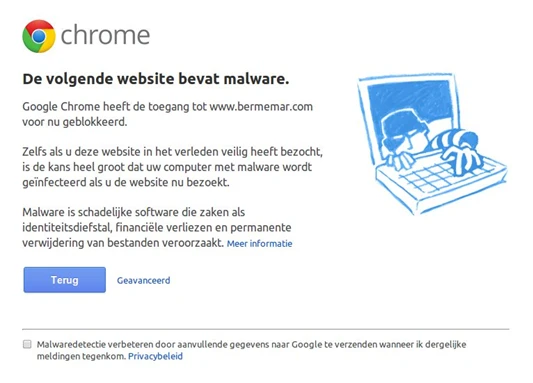
This is what a visitor sees when Chrome's Safe Browsing list includes your address. The page is full screen, red, and the primary button is "Back to safety." The link to continue is hidden behind a "Details" button, which is exactly why a listing is so costly.
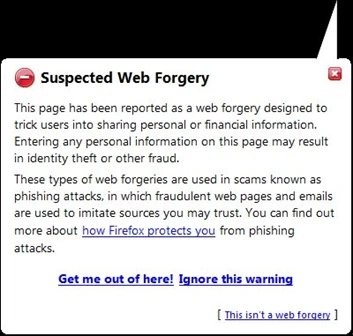
Firefox, Safari, Edge, and many mobile browsers show similar pages because they either use Google Safe Browsing directly or run comparable services such as Microsoft Defender SmartScreen.
There is no single master blacklist. Dozens of organizations run their own, and each one feeds different products. Knowing which list flagged you decides where you file your removal request.
| List or service | What it blocks | Where the warning appears |
| Google Safe Browsing | Malware, phishing and social engineering, unwanted software | Chrome, Firefox, Safari, Google Search, Gmail, Android |
| Microsoft Defender SmartScreen | Phishing and malicious downloads | Edge, Windows, Microsoft 365 |
| Apple (Safari fraud warning) | Deceptive sites, drawing on Google, Tencent, and Apple's own lists | Safari on iPhone, iPad, and Mac |
| Norton Safe Web, McAfee WebAdvisor | Malicious or risky sites rated by the vendor | Antivirus browser extensions and endpoint software |
| PhishTank, OpenPhish, Netcraft | Reported phishing URLs | Fed into browsers, registrars, and hosting abuse teams |
| Spamhaus (SBL, XBL, PBL, DBL) | IPs and domains tied to spam, botnets, and malware | Mail servers worldwide, firewalls, DNS filters |
| Barracuda, SpamCop, SORBS and others | Sending IPs with spam complaints or trap hits | Corporate and ISP mail filters |

Spamhaus is worth singling out. It publishes several separate lists, and its Domain Blocklist covers spam domains plus phishing, virus, and malware sites. [15] Adobe's deliverability team ranks it as the one blacklist with the biggest impact on email delivery, noting that a listing can push bounce rates above 50%.
These figures come from the organizations running the lists and from companies that clean hacked sites for a living. Dates are included because security data ages fast.
| 5 billion+ | devices protected by Google Safe Browsing every day, across Chrome, other browsers, Search, Android, and Gmail. Google Safe Browsing |
| 10 billion+ | URLs and files assessed daily, producing more than 3 million user warnings a day. Google, Chrome real-time protection announcement |
| <10 min | average lifetime of a malicious site, which is why Chrome moved Standard protection to real-time server checks instead of a list refreshed every 30 to 60 minutes. |
| 1 billion+ | Chrome users on Enhanced Protection, which Google says makes them twice as safe from phishing as Standard mode. Google, 2025 |
| 1.66% | infection rate across 70.8 million remote scans in 2024, equal to 1,176,701 infected websites. SEO spam alone hit 422,741 of them. Sucuri SiteCheck 2024 report |
| ~15 to 17% | of infected sites that Sucuri cleaned were actually on a blacklist at the time. The majority of infections went unflagged, so "not blacklisted" never means "clean. Sucuri 2016 Q3 and 2017 reports |
Share of compromised websites Sucuri remediated in 2023 with each finding
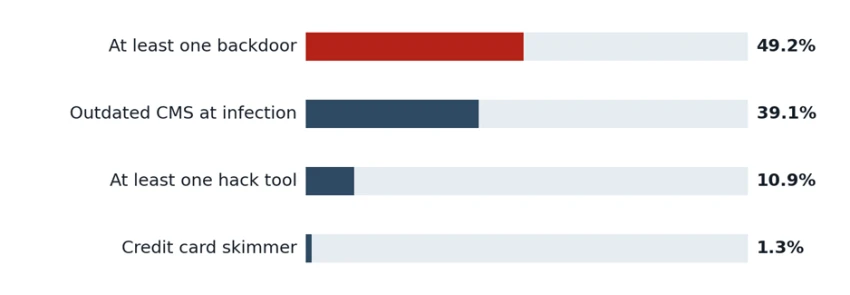
Source: Sucuri 2023 Hacked Website and Malware Threat Report. Sucuri's team removed 21,062 backdoors that year.
Click-through rate, meaning visitors who proceeded anyway. Field study of 25 million+ real warning impressions.
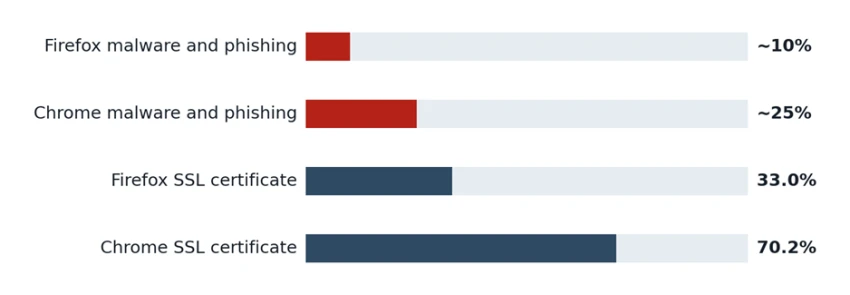
Source: Akhawe and Felt, "Alice in Warningland," USENIX Security 2013. Browsers have redesigned their warnings since, so current rates may differ.
What this means for you: on a malware or phishing warning, roughly three out of every four visitors, and up to nine out of ten, turn around. For a store or a lead generation site, that means losing most of your browser traffic until the flag is removed.
Almost every listing traces back to one of the causes below. The first five are the result of a compromise. The last three can hit sites that were never hacked at all.
Injected malware Malicious JavaScript or PHP that redirects visitors, drops downloads, or shows fake browser update prompts. Usually enters through an outdated plugin, theme, or CMS core. | Phishing pages Attackers upload a fake bank or delivery login into a forgotten folder on your server. The rest of your site can look perfectly normal. |
SEO spam and doorway pages Thousands of auto-generated pages (often Japanese keyword or gambling spam) injected to hijack your rankings. Google labels these as hacked content. | Compromised mailers Scripts that send spam from your server. Sucuri notes these turn a legitimate domain into a spam source and lead to email blacklisting. |
Credit card skimmers Code hidden in checkout templates that copies payment details. The WooCommerce checkout skimmer was the most common one Sucuri found in 2023. | Bad third-party content A compromised ad network, CDN script, chat widget, or embedded iframe can get your pages flagged even when your own files are clean. |
Unwanted software downloads Hosting installers or bundles that change browser settings or hide what they do. Google treats these as a separate "unwanted software" category. | Bad neighbors and false positives A shared IP used by a spammer, a newly registered domain that looks like a brand, or a scanner mistake. Rarer, but painful because you have nothing to clean. |
The damage spreads in a predictable order. Some effects appear within minutes because browsers now check Google's server-side list in real time.
1. Browsers show a full-page warning
Chrome, Firefox, and Safari block the page with a red interstitial. Most visitors leave at this point.
2. Search results get labeled
Google can mark results with notices such as "This site may be hacked" or show a warning when someone clicks through, so the damage starts before the visit.
3. Search Console raises a Security Issue
If you have verified your site, you get a notice with sample URLs. This is often the first time owners learn what happened.
4. Email starts bouncing
If your server or domain lands on Spamhaus or similar lists, mail is refused before it is even accepted. Invoices and password resets fail silently.
5. Ads and links get cut
Google Ads uses Safe Browsing to keep ads from pointing at dangerous pages, and social platforms or chat apps may block your links.
6. Your host or registry may suspend you
Hosting abuse teams and even domain registries act on reports from threat-intel vendors. At this stage the site simply goes offline.
Good news: a security flag is not permanent. Once the cause is fixed and a review is approved, warnings are lifted. Google notes it can take a few days for the change to reach Chrome and Search Console because the systems sync on a delay.
These two worlds are often confused because both are called blacklists. They are checked by different systems, triggered by different behavior, and fixed through different processes.
| Browser and search blacklists | Email blacklists (DNSBL / RBL) | |
| What is listed | URLs, hostnames, or whole domains | Sending IP addresses, and sometimes domains that appear in message links |
| Main examples | Google Safe Browsing, SmartScreen, Norton, McAfee | Spamhaus ZEN and DBL, Barracuda, SpamCop |
| Typical trigger | Malware, phishing pages, hacked spam content | Spam trap hits, complaints, compromised mailbox or open relay |
| Who notices first | Visitors and customers | You, through bounce messages mentioning a list name |
| Does authentication help? | Not relevant | No. SPF, DKIM, and DMARC do not override an IP reputation block [18] |
| How removal works | Clean the site, then request a review with each vendor | Fix the root cause, then submit a delist request per list. Spamhaus reviews can take hours to several days [16] |
| Hidden trap | Several vendors keep separate lists, so clearing Google does not clear Apple or Norton | Microsoft keeps its own reputation lists, so a Spamhaus delisting does not clear Outlook blocks |
Google sorts security issues into categories, and each one has its own warning text, cleanup focus, and review time. Look at the category name in Search Console before you start cleaning.
| Malware | Phishing (social engineering) | Hacked with spam | |
| What Google found | Code that infects or harms visitors' devices | Pages that trick people into giving up passwords or card data | Injected spam pages or links meant to manipulate search |
| Visitor sees | "The site ahead contains malware" | "Deceptive site ahead" | Usually a "This site may be hacked" label in search, not a red page |
| Where to look | JS files, .htaccess redirects, plugin code, database scripts | Unknown folders, fake login pages, uploaded HTML kits | Doorway pages, cloaked content, sitemap and database spam |
| How to request review | Search Console Security Issues | Search Console, or Google's incorrect phishing report form | Search Console Security Issues |
| Typical review time | A few days | About one day | Up to several weeks |
 |  |
After you submit a review request, by issue type
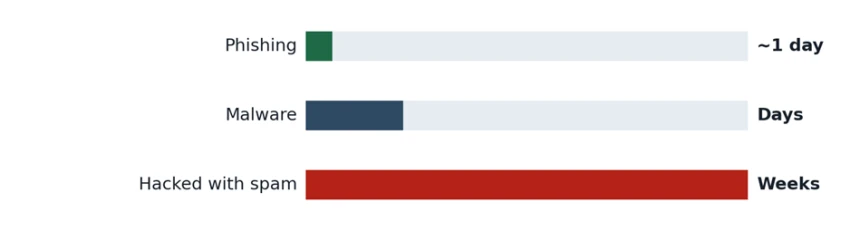
Phishing about one day, malware a few days, hacked spam up to several weeks because it can involve manual investigation. Source: Google, web.dev and Search Console Help.
Site owners often call any Google problem a "blacklist," but a security flag and a search penalty are separate systems with separate reports. Google itself draws the line: manual actions mostly cover attempts to manipulate the search index, while Security Issues cover hacking or behavior that could harm visitors.
| Security blacklist (Security Issues) | Manual action (penalty) | |
| Purpose | Protect visitors from harm | Protect search quality from manipulation |
| Visible to users? | Yes. Red browser pages and search labels | Usually no. Pages rank lower or disappear without any visible warning |
| Affects other products? | Yes. Chrome, Safari, Firefox, Gmail links, Ads | Only Google Search rankings |
| Common causes | Malware, phishing, hacked content, unwanted software | Unnatural links, thin or scraped content, cloaking, spammy structured data |
| Where to check | Search Console: Security Issues report | Search Console: Manual Actions report |
| Fix | Clean, patch, then request a security review | Change the violating practice, then file a reconsideration request |
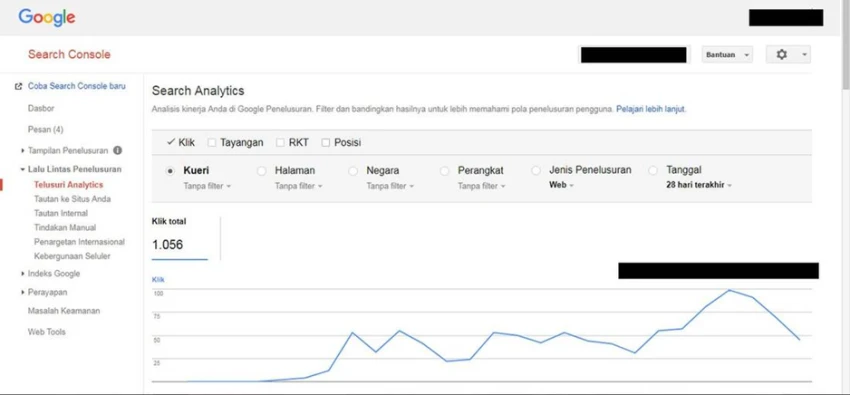
Rule of thumb: if customers are telling you about a scary red page, it is a security flag. If traffic dropped quietly with no warnings anywhere, check Manual Actions and algorithm updates instead.
This is the full process used by incident responders, written for a typical CMS site such as WordPress. Follow the steps in order. Requesting a review before cleanup is finished usually just earns a rejection and a new list of sample URLs to fix.

First hour
• Check Google's Safe Browsing site status for your domain.
• Open Google Search Console and read the Security Issues and Manual Actions reports. Note the category and sample URLs.
• Run a free multi-engine scan to see which security vendors flag you. You can use tools like SiteScano, Sucuri or VirusTotal, since each one checks many lists at once.
• If email is bouncing, copy the exact bounce text. Check your sending IP and domain at Spamhaus and a multi-list checker.
• Test in Safari as well. Apple can keep a flag after Google clears you.
First hour
• Put the site in maintenance mode or restrict it to your IP so visitors stop getting infected.
• Take a full backup of files and database as they are now. You need this evidence to find the entry point.
• Change every password: hosting panel, SFTP/SSH, database, CMS admins, and email accounts. Revoke old API keys.
• Tell your host. Many will help, and it may stop an account suspension.
Hours 1 to 6
• List recently changed files and compare them with a clean copy of your CMS version.
• Inspect .htaccess, wp-config.php, index.php, uploads folders, and any file with obfuscated code such as long base64 strings or eval(.
• Search the database for injected <script> tags, unknown admin users, and spam posts.
• Check cron jobs and scheduled tasks. Attackers use them to reinfect you after cleanup.
• Use the sample URLs from Search Console, and view pages as Googlebot and as a mobile visitor since many infections are cloaked.
# PHP files changed in the last 7 days
find . -type f -name "*.php" -mtime -7 -ls
# Common obfuscation patterns
grep -rlE "eval\(|base64_decode\(|gzinflate\(" --include=*.php .
# PHP files inside uploads (should almost never exist)
find ./wp-content/uploads -type f -name "*.php"
Hours 6 to 24
• Replace CMS core, themes, and plugins with fresh copies from official sources rather than editing infected files one by one.
• Remove every backdoor. Remember Sucuri found at least one on roughly half of hacked sites, so assume there is more than one.
• Delete unused plugins, themes, test folders, and old backups sitting in the web root.
• Update everything to the latest version. Outdated software was present in about four in ten compromises Sucuri analyzed.
• If you restore from backup, pick one from before the infection date and patch it before going live.
Day 1
• Turn on two-factor authentication for every admin and hosting account.
• Add a web application firewall and file-integrity monitoring.
• Set correct file permissions and disable file editing from the CMS dashboard.
• For email: close open relays, secure mailbox passwords, set up SPF, DKIM, and DMARC.
• Rescan the whole site and confirm the sample URLs are clean.
Day 1 to 2
• Google: in Security Issues, tick "I have fixed these issues" and click Request a review. Describe what was wrong, what you changed, and how you prevented it. Google asks for this detail per issue type.
• Google phishing: you can also use the incorrect phishing report form, which also serves as a false positive report.
• Apple Safari: submit at websitereview.apple.com.
• Microsoft, Norton, McAfee and other vendors: use each vendor's site owner dispute or reclassification form. Flags in VirusTotal usually link to the right vendor.
• Spamhaus and email lists: use each list's removal page, quoting the listing reference and the specific fix. Vague requests such as "I cleaned my server" are typically rejected.
Days 2 to 30
• Watch Search Console messages for the review result. If rejected, you get updated sample URLs to clean.
• Recheck the Transparency Report and Safari daily until every vendor shows you as clear.
• For email, restart sending slowly to your most engaged recipients. A sudden volume spike right after delisting looks like the behavior that got you listed.
• Keep monitoring. Sucuri reported that about one in five previously infected Magento sites was reinfected with skimmers, which shows why post-cleanup protection matters.
# Is this IP on Spamhaus ZEN? (reverse the octets of 203.0.113.9)
dig +short 9.113.0.203.zen.spamhaus.org
# No answer = not listed. A 127.0.0.x answer = listed.
How to write a review request that gets approved: state the exact issue, list the steps you took to fix it (for example, "removed the injected redirect in .htaccess and updated the outdated form plugin that let it in"), and describe the result. Short, specific, factual.
One shows how a single vulnerable plugin put thousands of legitimate sites into the kind of behavior that blacklists exist to catch. The other shows that the lists themselves can be wrong, at enormous scale.
Case study 1: Hacked sites
First seen 13 Dec 2023 | Entry point CVE-2023-6000 (CVSS 8.8) | Sites hit in this wave 7,100+ | Campaign total since 2017 1 million+ sites |
WPScan publicly disclosed a cross-site scripting flaw in Popup Builder, a WordPress plugin with more than 200,000 active installs. Sucuri detected attacks exploiting it the very next day, on December 13, 2023. The fix was already out in version 4.2.3, but thousands of sites had not updated.
Attackers used a domain registered that same day to load their script. The injected code was attached to the plugin's popup event, so it ran right before a popup opened, and it sat inside the plugin's own "Custom JS or CSS" settings where few owners would look.
• If the script found a logged-in administrator's cookies, it acted as that admin: it installed a rogue backdoor plugin and loaded a second-stage payload.
• The operators are known to keep control by uploading backdoors, adding malicious plugins, and creating rogue admin accounts.
• The backdoor looked for other WordPress installs up to three directory levels above it and injected them too, so every site on the same hosting account was at risk.
• Visitors were redirected from the legitimate sites to fake support pages and scam websites. That redirect behavior is exactly what browser blacklists and antivirus vendors are built to flag.
Weeks later, a separate campaign abused the same unpatched flaw and infected more than 3,900 additional sites in about three weeks, using domains registered only days earlier and redirecting visitors to phishing and scam pages.
• Updated Popup Builder to 4.2.3 or later, or removed it.
• Deleted the injected code from the plugin's custom JS field and checked wp-blog-header.php in every site on the account.
• Audited administrator accounts and installed plugins, removing anything unknown.
• Rotated all passwords, then followed the review workflow above for any list that had flagged them.
Takeaway: exploitation started one day after disclosure. Automatic plugin updates and a firewall are what stand between you and this kind of wave. Cleaning only the visible redirect is not enough, because the rogue admins and plugins bring the infection back.
Case study 2: False positive
Date 31 Jan 2009 | Window 6:30 to 7:25 a.m. PST | Scope Every search result | Cause One "/" in a list update |
For just under an hour, every Google search result carried the warning "This site may harm your computer," and clicking a result led to a malware interstitial instead of the site. Google traced it to human error: a forward slash was checked into its list of malware URLs, and in Google's words "'/' expands to all URLs". Its on-call site reliability team found the problem and reverted the file.
• The warning page pointed people to StopBadware.org for more information. So many users tried to visit that the nonprofit's own site went down under the load.
• Google's first explanation suggested the list came from StopBadware. The nonprofit publicly corrected this, saying Google generates its own list, and Google revised its post to make clear the mistake was on its side.
• Google apologized to site owners whose pages were wrongly labeled and said it would add more robust file checks.
• Blacklists are run by people and software that can make mistakes. A flag is a claim, not a verdict, and you are entitled to dispute it.
• When the error is on the list's side, removal can be fast. Here it was reverted within the hour.
• Always check the list owner's own tools, such as the Transparency Report and Search Console, before assuming you were hacked. Then look for the cause on your side anyway.
Takeaway: most false positives are far smaller than this, often a single domain, like the stories in the next section. The difference is that a single small business has no newsroom covering its case, so documenting your evidence and using official dispute channels is what gets it fixed.
These are summarized from public posts by real site owners. Quotes are trimmed to a short line, so follow each link for the full account.
False positive, Safari A developer running a personal domain for self-hosted tools found Safari showing a deceptive site warning on every device. Google's Transparency Report showed a "malware links" flag with no URLs listed. After an audit, a Search Console review cleared Google within a day, but Apple's separate review request went unanswered and Safari kept warning. "It's your problem to solve. Nobody's going to help." |
False positive, registry suspension The owner of a local gym's WordPress site says a threat-intel vendor wrongly classified the site as a web shell, and the domain registry suspended it immediately. The owner reports losing potential customers and spending hours on unsuspension forms. "A manual review should happen BEFORE suspension, not after." Trustpilot review of Netcraf |
Email blacklist, recurring An office worker at a small company described outgoing email failing because the office IP kept appearing on Spamhaus. Manually delisting fixed it for a few hours, then the block returned the next day. Forum replies pointed to the likely cause: an infected device or compromised account on the network was still sending spam, so delisting alone could never stick. Singletrack World forum, 2025 |
Vendor rating dispute A UK software review site spent two weeks trying to clear its name after McAfee SiteAdvisor gave it a red rating, claiming it hosted a dangerous download. It is an older case, but the lesson still applies: each antivirus vendor runs its own list and its own dispute process. |
New store in setup A Shopify merchant refreshing a store preview after a few hours of work was suddenly redirected to a "Deceptive site ahead" page. Community support first asked about recent domain and DNS changes, a common trigger for new or recently moved storefronts. Shopify Community |
Pattern across these stories: the technical fix is often fast. The slow part is finding every list you are on and getting each vendor to re-review. That is why step 1 of the workflow matters so much.

Share your thoughts about this article.
Be the first to post a comment!

Relay.app spent five years building AI-powered workflow automation as an alterna...
Sakshi Dhingra3 days ago