Home > Company > Trello
Trello

Trello

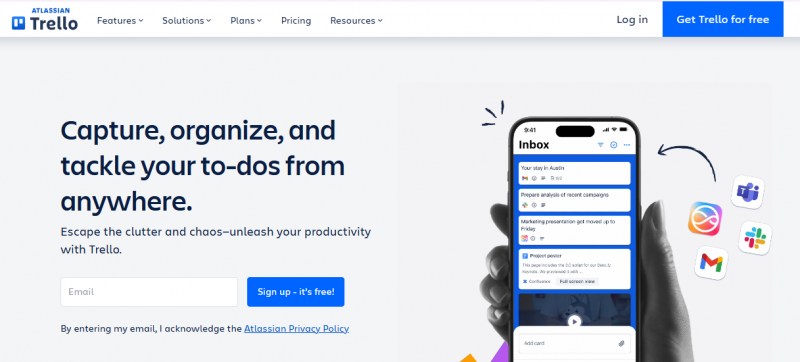
Capture, organize, and tackle your to-dos from anywhere

Trello Overview

Trello organizes to-dos, ideas, and responsibilities using boards, lists, and cards. It simplifies workflows by turning emails and messages from apps like Slack or Microsoft Teams into actionable items via AI-generated summaries. Cards hold due dates, attachments, and checklists to track progress. Built-in automation sets rules for actions, while integrations connect to tools such as Gmail, Confluence, and Jira. Card mirroring displays tasks across multiple boards. AI assists in brainstorming, organizing action items, and condensing text.

Core Strengths:

  • Visualizes work with boards, lists, and cards.
  • Automates repetitive tasks with Butler automation.
  • Supports custom fields and advanced checklists for task details.
  • Offers multiple project views: calendar, timeline, table, dashboard, and map.
  • Includes unlimited Power‑Ups (integrations) to extend functionality.
  • Syncs across desktop, web, iOS, and Android devices.
  • Provides workspace templates and collections for consistency.

Use Cases:

  1. Team project planning and tracking.
  2. Sprint and agile workflows for software development.
  3. Content calendars and editorial planning.
  4. Personal to‑do lists and habit tracking.
  5. Event planning and logistics.
  6. HR tasks like onboarding and candidate tracking

Pros & Cons

Pros:

Automations available even on free tier. 

Setup for a new board in minutes. 

Works for personal & professional workflows. 

Butler rules automate repetitive card actions. 

Visible task status improves team alignment. 

Email‑to‑card creates tasks from inbox.

Cons:

Notifications sometimes flood user inboxes.
Company

Trello

Contact

Email

Headquarter

Follow Us

Trello Demo & Screenshots

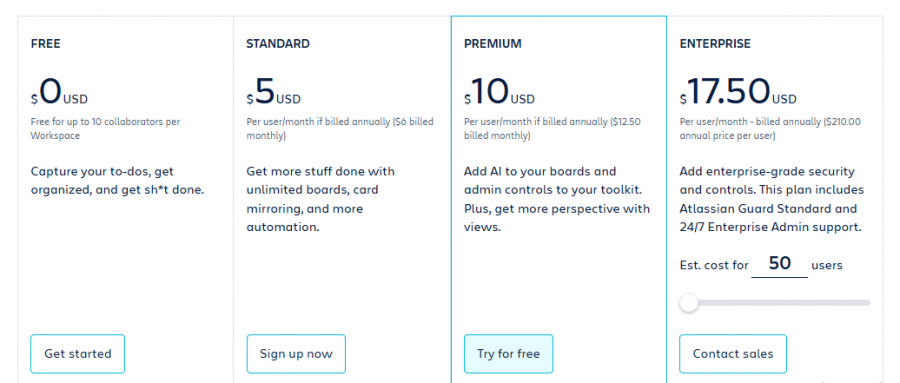
Trello Pricing

Trello Pricing Screenshot

*Price last updated on Apr 23, 2026. Visit trello.com's pricing page for the latest pricing.

Trello Reviews

Trello Category

Trello Alternatives