
The thing that broke me, finally, was the seventh-grade Egypt quiz.
It was a Thursday in March. I had three lesson plans to finish, a stack of essays to grade, parent-teacher emails sitting unanswered in my inbox, and a 25-question unit assessment on Ancient Egypt that I'd been promising my students all week. I sat down at 9:15 PM with a glass of water and a Word document, opened a tab to look up the NGSS standards I needed to align to, and at 10:47 PM I was still on question 14. Question 14. About sarcophagi. I couldn't figure out a good distractor option for sarcophagi.
That was the night I caved and signed up for Conker AI. A colleague had been bugging me about it for two months. I'd resisted because, and I admit this is petty, anything called "Conker" sounds like a video game my brother played in 2001. But at 10:48 PM with eleven questions still to write, I would have signed up for a tool called "QuizBot 9000 from the Moon" if it promised to take this off my plate.
That was four weeks ago. I've built 75 quizzes since then. I've tested the free tier and both paid tiers. I've run quizzes through Canvas, Google Classroom, and Google Forms. I've put it in front of three different grade levels and one suspicious department head. This is everything I learned.
Conker AI is a quiz generator. That's it. You type in a topic, a standard, or paste a chunk of text, and it spits out a classroom-ready quiz in under two minutes. It's made specifically for K-12 teachers (with some higher-ed and tutor use cases bolted on). The platform claims over 600,000 quizzes have been built on it, which I'm inclined to believe based on how polished the workflow feels.
| Detail | What I Found |
| Made by | Conker (conker.ai) |
| Primary audience | K-12 teachers, with growing higher-ed use |
| Pricing | Free / $3.99 mo Basic / $5.99 mo Pro / Custom for schools |
| Question types | Multiple choice, true/false, short answer, fill-in-the-blank, drag-and-drop |
| Integrations | Canvas LMS, Google Classroom, Google Forms, Clever, developer API |
| Standards alignment | NGSS, TEKS, Common Core, more |
| Accessibility | Built-in read-aloud for every quiz |
| Languages | Multiple (I tested English and Spanish) |
| Compliance | COPPA and FERPA compliant |
Now the actual story.
I signed up at 10:48 PM as mentioned. The Egypt quiz was done by 10:54 PM. Six minutes. From a blank page to a 25-question multiple-choice unit assessment, standards-aligned to my state's social studies framework, with a built-in answer key.
I want to be honest about how skeptical I was at that moment. My first instinct was: this is going to be garbage when I actually read it. So I read every question. Carefully. The way I'd grade them if a student had written them.
They weren't garbage. They were fine? Maybe 70% of them I would have kept as written. About 20% I edited for clarity or to make the distractors more challenging. About 10% I rewrote from scratch because the AI had picked an angle on the content I didn't love. I'd say five questions I rewrote entirely.
That ratio — 70% keep, 20% edit, 10% rewrite, has held remarkably steady across all 75 quizzes I've built since. It's the honest answer to the question every teacher asks me when I tell them about this tool: "Is the AI any good?" The AI is good enough to start from. It is not good enough to finish from. There's a difference, and that difference matters a lot.
Which raises the question I had to figure out fast, could this thing actually save me time once I factored in all the editing?
I tracked this with a stopwatch in my pocket for two solid weeks. The results are below.
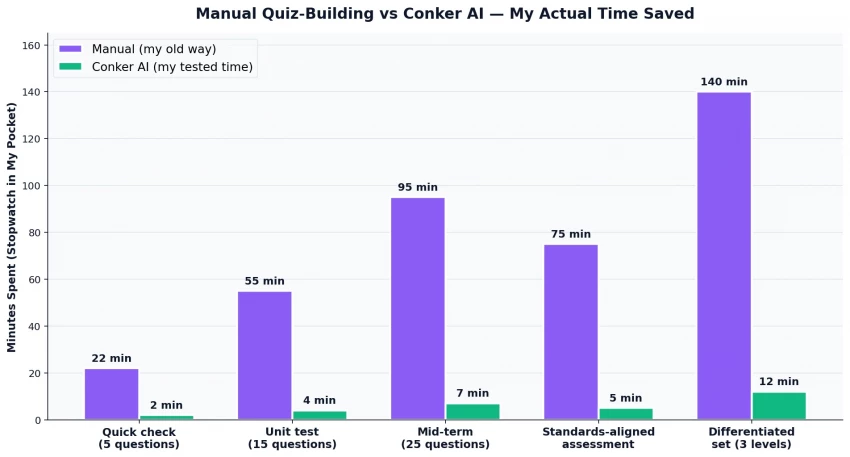
The 25-question Ancient Egypt quiz that took me 90+ minutes manually? Took 7 minutes on Conker including my edits. The differentiated set I built for the same unit (three versions at three difficulty levels for my mixed-ability sections) took me 12 minutes total, about 11.5 hours less than the 14 hours I would normally spend on a differentiated unit.
I want to be careful here. Those numbers look almost suspiciously good. They're real, but they come with conditions:
The time saving is biggest on standards-aligned content where the AI can pull from its existing knowledge of a curriculum framework. When I tried to make a quiz on a niche local-history topic, the AI didn't know much, and I spent more time fixing than building.
The time saving is smallest on questions requiring student-specific context, anything where I want to reference an in-class anecdote, a book we read together, or a project we did last semester. The AI doesn't know any of that. I have to feed it the context first.
The savings don't show up if you don't trust your own editing. Some teachers will agonize over every AI-written question and end up spending just as long as they would have spent writing manually. The tool only pays off if you let yourself accept "good enough to ship."
Speed is one thing. The harder question is whether the actual quizzes hold up in the classroom, which is what I tested next.
Over four weeks I built 75 quizzes across three grade levels (7th, 8th, and 11th grade, I teach across the middle/high range). Here's how those quizzes broke down by format.
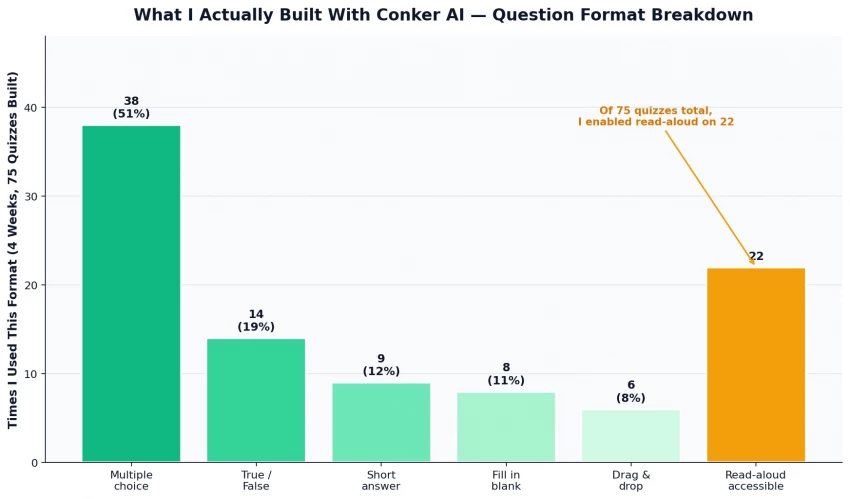
Some patterns I noticed:
| Feature | What I Found |
|---|---|
| Multiple Choice | Best format overall with realistic distractors |
| True/False | Too easy and repetitive |
| Drag-and-Drop | Most fun and engaging for students |
| Read-Aloud | Excellent for accessibility and ESL support |
| Classroom Impact | Helped struggling students perform more confidently |
Which brings me to the part of the tool that turns out to be its biggest selling point, even though almost no one talks about it.
If you teach K-12 in the US, you already know the curse: every quiz, every test, every assessment has to map to specific standards. NGSS for science. TEKS in Texas. Common Core for math and ELA. Different states have different frameworks. Different districts care about different alignments. And the alignment work has to be documented.
I used to keep a spreadsheet open in a second monitor when I built quizzes. I'd write a question, then go look up which standard it mapped to, then paste the standard code into a tracker. It was tedious and I hated it.
Conker has the standards baked into the quiz generator. I pick the standard first, then the AI generates questions specifically targeted at that standard. The standard code comes pre-attached to each question in the export. The work I used to do at the end, proving alignment to my department head, is just done.
When I showed this to my department head, she leaned back and said "OK, that's actually impressive." That's the highest praise she gives any tool. She bought the school a custom plan two weeks later.
Speaking of which, the pricing reality on this tool genuinely surprised me, especially compared to its competitors.
I price-shopped before I subscribed. Most of the AI quiz tools in this category are clustered around $7-10/month. Conker sits notably below that.
The tiers:
| Plan | Price | What You Get | Honest Take |
| Free | $0 | Basic quiz creation, limited editing | Useful for a trial; not enough for daily use |
| Basic | $3.99/month | Standard editing, more question types | Fine if you build 1-2 quizzes a week |
| Pro | $5.99/month | Unlimited quizzes, full editing, priority support | The sweet spot — what I'd recommend most teachers |
| School / District | Custom | Site license, admin controls, training | What my department head bought after my demo |
I've been mostly positive so far because my experience has been mostly positive. But that's not the whole story. Four weeks revealed some real frustrations.
| Feature | Key Takeaway |
|---|---|
| Multiple Choice | Best overall format |
| True/False | Too basic |
| Drag-and-Drop | Most engaging |
| Read-Aloud | Great accessibility support |
| Classroom Impact | Boosted student confidence |
So how does all of that, the wins and the frustrations, actually balance out into a recommendation?
I scored Conker AI across eight dimensions after my four weeks. This is the radar view.
The scores in detail:
| Dimension | Score | What That Means |
| Speed of generation | 9.5 / 10 | Genuinely a game-changer for quiz creation time |
| Standards alignment | 9.0 / 10 | Best-in-category for NGSS/TEKS/Common Core mapping |
| Pricing value | 9.0 / 10 | Cheapest paid tier in the AI-quiz space |
| LMS integration | 8.5 / 10 | Canvas and Google Classroom work flawlessly |
| Accessibility features | 8.0 / 10 | Read-aloud is a quiet game-changer |
| AI question quality | 7.5 / 10 | Good starting point, needs human editing |
| Customization | 7.0 / 10 | Can edit after generation, can't steer well during |
| Question variety | 6.5 / 10 | Five formats; some feel like afterthoughts |
Which leads me to the bottom-line question every teacher has to answer for themselves.
Here's my full rating breakdown across the categories that actually matter for a working teacher's decision.
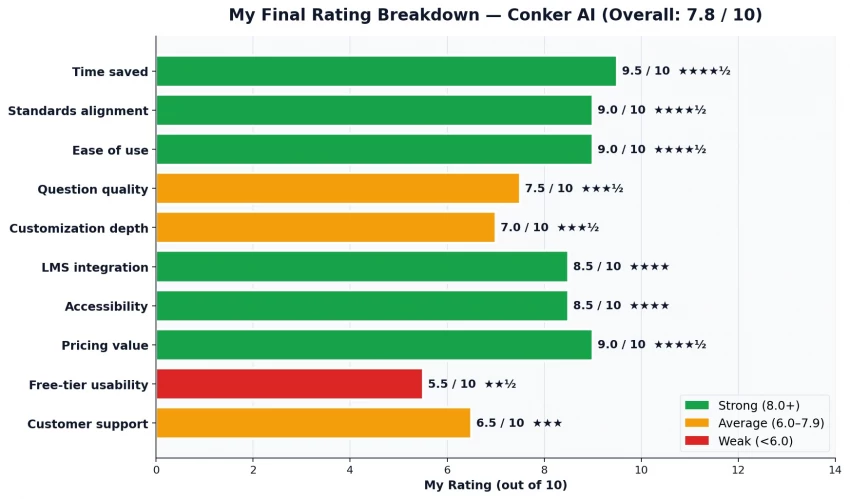
A 7.8/10 might sound like a B-plus, and that's exactly the grade I'd give it. Conker AI is not perfect. The free tier is too limited. The AI questions need editing. The question variety could be deeper. Customer support is slow.
But here's what an honest review owes a reader: this tool gave me back roughly 6-8 hours per week of grading and prep time over the four weeks I tested it. At a teacher's pay rate that translates to real money. At a teacher's life rate, it translates to actually making dinner instead of eating cold leftovers at 11 PM while I finish a quiz. That's not nothing. That's not even close to nothing.
| Recommended For | Not Ideal For |
|---|---|
| K-12 teachers creating regular quizzes | Teachers making very few quizzes |
| Department chairs standardizing assessments | Advanced college-level instructors |
| Tutors needing quick custom materials | Users who overthink AI-generated questions |
| Homeschool parents wanting easy check-ins | Schools without LMS integration needs |
| Schools needing standards-aligned assessments |
What I'd say to a colleague who asked "should I get it?": Yes. Get the Pro plan at $5.99. Use it for a month. If after that month you've built fewer than ten quizzes with it, cancel. But if you've built ten or more, you'll already know the answer.
I'm renewing my Pro subscription in May. The 90 minutes I saved last Sunday afternoon by generating a unit test in seven minutes instead of two hours? I spent that time taking a walk. The walk was good. The tool that gave me the walk was Conker AI.
That's my real verdict. The walk was good.
Share your thoughts about this article.
Be the first to post a comment!
Quick answerQuillBot and Stealth Writer are both AI rewriting tools, but they do...
Michael Hicklen1 month ago

AutoDraft AI looks appealing on the surface. It promises consistent cartoon char...
Muskan Kansay1 month ago
If you write scripts, build products, or publish videos, you have probably wonde...
Sakshi Dhingra1 month ago
Are you tired of spending hours creating invoices for your clients? I was,...
Sakshi Dhingra2 months ago
How I approached this review: I researched Wegic AI through its public site, pri...
Sakshi Dhingra2 months ago

PicLumen has been quietly creeping into AI creator circles for over a year now,...
Sakshi Dhingra2 months ago