Most "AI image generator" reviews you find online have one of two failure modes. Either they breathlessly describe every feature as "revolutionary", or they reduce the entire product to whether or not its outputs beat Midjourney on photorealism. PromeAI deserves better than either approach. It isn't a Midjourney competitor. It isn't trying to be one. It is a specific tool, built for a specific kind of workflow, that quietly built itself into the daily routines of architects, interior designers, real-estate agents, product designers, and a small army of e-commerce sellers, most of whom care less about whether the output is artistically novel and more about whether their client meeting on Thursday goes well.
_1778847058.webp)
This review takes PromeAI seriously on those terms. It walks through what the platform actually does, where the seams show, what the credit system genuinely costs once you're past the free tier, what real users are complaining about on Trustpilot and G2, and where it sits next to three direct competitors. By the end you should have a clear answer to a question most reviews never quite get to: is this the right tool for the actual work in front of you?
The name Prome comes from two roots: Pro as in professional, and Me as in the user. Strung together, the company has been candid that the word is meant to echo Prometheus, the Titan in Greek myth who stole fire from the gods and brought it down to humans, knowing he would be punished for it. The framing is heavy-handed but accurate to the founders' intent: take a capability that used to be the exclusive property of professional rendering studios, and give it to anyone with a sketchbook.
The company behind PromeAI is Team LibAI, a Chinese AI product studio that also built cutout.pro, a background-removal and photo-enhancement tool that quietly accumulated tens of millions of users before PromeAI launched. That lineage matters. The team's experience with high-volume, fast-response image processing is what makes PromeAI feel less like a research demo and more like a production tool. The site quotes a registered user base of over two million across more than 180 countries, with hundreds of small and medium-sized businesses using the platform regularly.
Launched in 2023, PromeAI's flagship pitch was “industry-first AI sketch rendering”, the ability to take a hand-drawn sketch, a CAD line drawing, a 3D wireframe, or a basic photo, and turn it into a finished-looking architectural or product render in under twenty seconds. Three years later, that pitch is still the heart of the product, but the surrounding feature set has grown into something closer to a forty-tool creative studio.
One of the most useful framings for any creative software is "who keeps the tab open all day?" For PromeAI the answer breaks into five clean buckets:
THE FIVE CORE USER PROFILES
If you're not in one of those buckets, this tool will probably underwhelm you. A character illustrator who wants painterly textures is better served by Midjourney or Leonardo. A filmmaker is better served by Runway. A pure photo retoucher is better served by Photoshop's generative fill. PromeAI's strength is the corner where structured input (a sketch, a floor plan, a model) needs to become polished output (a render, a listing photo, a presentation slide). The further you drift from that corner, the less reason there is to be here.
To understand what PromeAI is really doing under the hood, it helps to picture the workflow in three steps.
Step one: a user uploads a base image. This can be a phone photo of a paper sketch, a flat line drawing exported from Illustrator, a screenshot from SketchUp or Rhino, a CAD wireframe, an .obj/.fbx/.stl 3D file, a finished photograph, or even a 2D floor plan. PromeAI accepts an unusually wide range of inputs, the kind of range that becomes obvious the moment you try to push something weird through it and it just works.
Step two: a user describes the desired result. This can be a written text prompt ("modern glass villa at sunset with reflecting pool and forest background"), a preset style selected from a library of more than a hundred ("Modern Scandinavian living room", "Industrial loft", "Minimalist Japanese"), an optional reference image, or any combination of the three. There's also a "Control" slider arguably the most important interface element in the entire product that determines how closely the AI sticks to the original sketch versus how much creative liberty it takes.
Step three: the model generates three variations, typically in eight to fifteen seconds. From there the user can either accept one, regenerate, or push the output through a chain of post-processing tools, HD upscaling, brush-based replacement of small details, outpainting to extend the frame, region rendering to redo just one part of the image, or relighting to swap the mood.
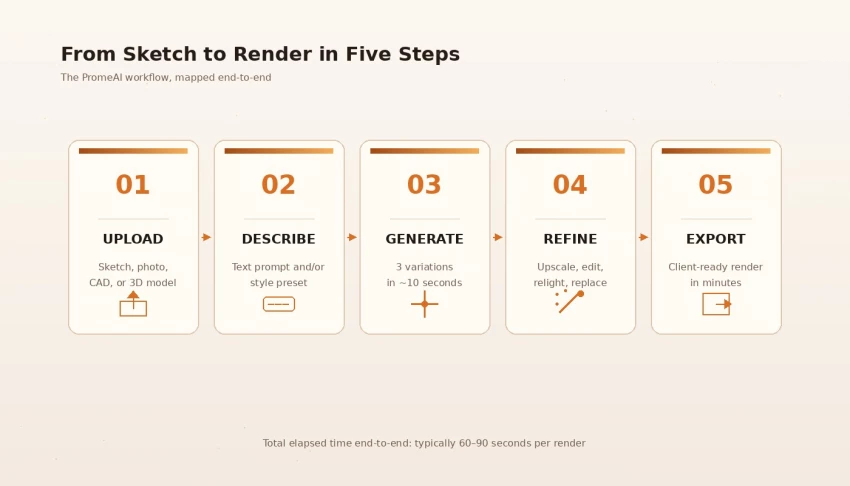
▲ The end-to-end PromeAI workflow boils down to five steps. Upload, describe, generate, refine, export.
The model architecture itself is what PromeAI calls Controllable AIGC (or C-AIGC), essentially a custom pipeline built on top of diffusion-model technology similar to what powers Stable Diffusion, but trained heavily on architectural, interior, product, and design imagery, with a strong emphasis on respecting structural cues from input images. That's why a rough sketch with crooked perspective lines still produces a render whose walls go where the sketch said they should. Most general-purpose models tend to "fix" perspective in ways the user didn't ask for. PromeAI is unusually obedient on this front, and that obedience is the thing architects actually pay for.
Forty-plus tools is too many to cover one at a time without losing the reader. Instead, here is a fast-scan grouped inventory of what's actually in the product, with a one-line honest verdict on each cluster:
| Cluster | Includes | Honest verdict |
| Image generation | Sketch Rendering, AI Image Generator, Consistency Rendering, TextureLock Rendering, Creative Fusion | The product's actual strength. Sketch Rendering and Consistency Rendering are best-in-class for the price. |
| Image editing | HD Upscaler, Erase & Replace, Outpainting, Region Rendering, Mockup Generator, Magic Editor | Replaces 80% of common Photoshop tasks. Not as fine-grained as Photoshop. Good for fast iteration. |
| Video | Image to Video, Text to Video, Video Enhancer | The weakest area. Functional for short social clips. Not competitive with Runway, Veo, or Kling. |
| Architecture-specific | AI Architecture Generator, Scenario Changer, Exterior Renovator, Interior Remodel, Panorama Generator | The most polished domain in the product. Worth the subscription on its own for working architects. |
| E-commerce | AI Background Generator, AI Supermodel, Virtual Try-On, Relight, Background Remover | Surprisingly capable. AI Supermodel especially has become a real workhorse for Shopify-tier sellers. |
| Game & anime | AI Character Design, AI Scene Generator, AI Pixel Art, AI Low Poly | Decent for early concept stage. Not where I'd build a final pipeline. |
| Avatars & branding | AI Headshot, Anime PFP, AI Logo, AI Sticker, AI Caricature, Pattern Generator, Vector Converter | Useful auxiliary tools. Few of them lead the market in their own category. |
The pattern across the inventory is clear. PromeAI excels where structured input meets photorealistic output. It is competent everywhere else. The trap many first-time users fall into is poking the weakest tools first (video, anime), getting unimpressed, and missing the parts that are genuinely strong (architecture, interiors, e-commerce). The recommended approach is the opposite: try Sketch Rendering on day one with a real project, then explore outward from there.
To stress-test PromeAI against the marketing claims, I ran it for seven days on the kinds of tasks the product is designed for. Five sessions of roughly an hour each, across architecture, interior design, e-commerce, product mockup, and short video. Here is the compressed log:
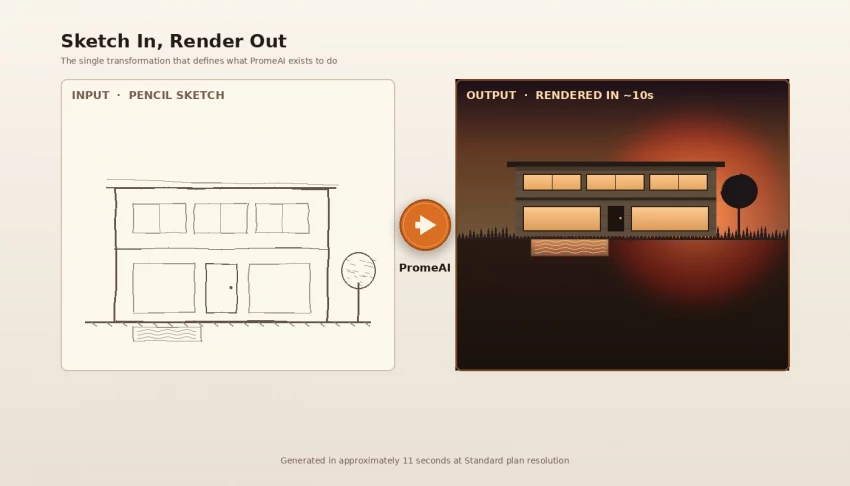
Day 1 — A house from a napkin sketch. Took a pencil-and-paper sketch of a modern two-storey house, photographed it with a phone, uploaded it, picked the "Modern Minimalist" style preset, set the Control slider to 65%, added the prompt "modern glass villa at golden hour, reflecting pool, oak trees, soft cinematic lighting", and clicked Generate. Three variations returned in eleven seconds. Two of the three were genuinely usable. The pool sat where I'd drawn it. The roofline followed my pencil lines. Material textures looked plausible.
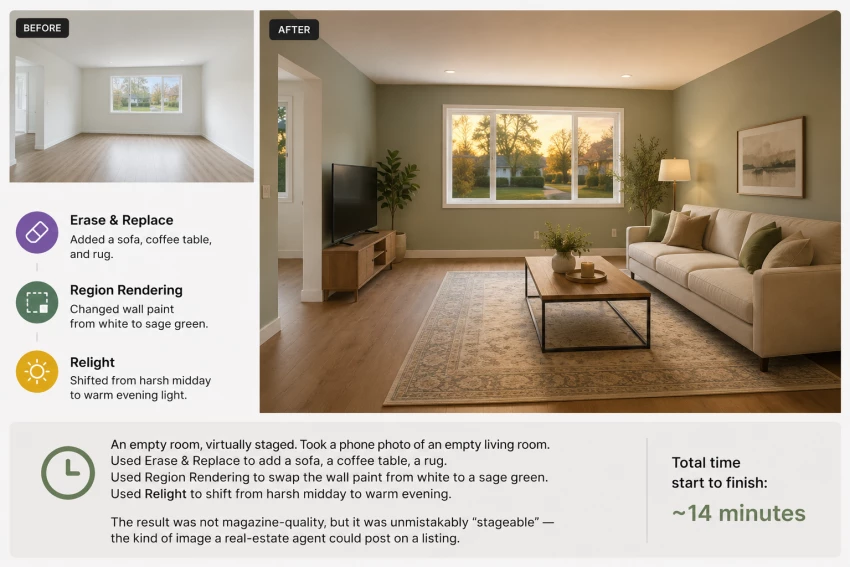
Day 2 — An empty room, virtually staged. Took a phone photo of an empty living room. Used Erase & Replace to add a sofa, a coffee table, a rug. Used Region Rendering to swap the wall paint from white to a sage green. Used Relight to shift from harsh midday to warm evening. Total time start to finish: roughly fourteen minutes. The result was not magazine-quality, but it was unmistakably “stageable” the kind of image a real-estate agent could post on a listing.
Day 3 — Product mockup from a flat sketch. Drew a flat outline of a ceramic mug in Procreate, uploaded it, asked for "matte black ceramic, studio lighting, clean white background, isometric angle". This was the weakest result of the week. The first two attempts produced mugs that were structurally fine but had odd handles. The third attempt landed. Conclusion: simple product sketches work; anything with mechanical complexity hits a wall.
Day 4 — Architecture concept variations. Took the same Day 1 sketch and ran it through eight different style presets, Scandinavian, Industrial, Mediterranean, Japanese, Brutalist, Mid-Century, Tropical, Glasshouse. Each came back in under fifteen seconds. Seven of the eight were usable in a client conversation; the Brutalist one came back oddly bleached. This is, frankly, where PromeAI's value is hardest to argue against. A working architect can generate a full mood-board of stylistic options inside a single lunch break.
Day 5 — A short video animation. Took the Day 1 architecture render and pushed it through Image-to-Video, asking for "slow drone-style flyover, sunset". The output was a four-second clip with smooth-ish motion and some predictable warping artifacts at the edges of the frame. Acceptable for a social post; not acceptable for a polished client presentation.
Day 6 — Consistency Rendering. The most underappreciated feature in the product. Trained a custom "consistency model" on three reference renders of the same house, then generated front, side, rear, and aerial views, all of which kept the same materials, palette, and architectural language. This is the kind of thing that takes a manual renderer half a day. PromeAI did it in under two minutes per view, and the results actually looked like the same building.
Day 7 — Stress test. Uploaded a deliberately bad input: a crooked, half-erased ballpoint sketch on lined notebook paper, with overlapping perspective errors. Prompted for "modern luxury apartment interior". The result was perfectly competent. The model quietly straightened the perspective, ignored the lined paper background, and produced a render whose layout still matched the rough intent of the original drawing. This was the moment that made me understand why architects keep their subscription active even when they complain about everything else.
Architecture is where PromeAI does its most defensible work, and it deserves its own section.
Traditional architectural rendering, V-Ray, Lumion, Enscape, Twinmotion produces beautiful results but requires real expertise. Setting up materials, lighting, camera positions, and post-processing is a multi-hour task per scene, even for someone fluent in the software. For early-stage concept presentations, this is overkill. The client doesn't need a final render; they need to see whether the architect's idea matches what's in their head.
PromeAI sits exactly in that pre-V-Ray gap. It produces images that are not as photorealistic as a polished V-Ray render but are vastly faster, cheaper, and easier to generate. A working architect can take a SketchUp wireframe, push it through PromeAI in three different styles, and walk into a client meeting with a richer visual conversation than they could have prepared the traditional way without working through the weekend.
The weakness in the architecture workflow is the same weakness PromeAI has everywhere: fine control. If the client says "looks great, but make the second-floor windows slightly larger", the path forward is awkward. You can use Region Rendering to repaint that part of the image, but the model may shift other details in the process. For final-tier work, you still need to either accept what the AI gave you or take the output into Photoshop and edit by hand.
Interior design is the second-strongest use case, and arguably the most underrated by people who only think of PromeAI as a "render sketches" tool.
The workflow here usually starts with a phone photo of an existing room, rather than a sketch. From that base photo, the tool offers a remarkable amount of leverage: swap the wall colors with Region Rendering, replace specific pieces of furniture with Erase & Replace, restage the entire space with a different style preset, or generate "what would this room look like in a different aesthetic" variations. Combined with Consistency Rendering, an interior designer can present a client with five distinct stylistic directions for the same physical room, all from the same base photograph, in under thirty minutes.
One important caveat: the model occasionally hallucinates plausible-looking but physically impossible details. Light switches in the wrong place. Outlets behind sofas. Floor planks running in directions that wouldn't actually be built. For mood-board purposes this doesn't matter. For technical drawings or as-built documentation, it absolutely does. Treat the output as a conversation starter, not a construction document.
Outside architecture and interiors, PromeAI's results get more variable.
Product design. Simple consumer products with clean silhouettes, bottles, mugs, basic furniture, packaging mockups render well. Complex mechanical products with specific tolerances or fine details electronics, appliances, anything with realistic screws or seams tend to produce visually appealing but technically wrong outputs. For ideation it is fine. For engineering review it is not.
Fashion and AI Supermodel. The Virtual Try-On and AI Supermodel features have quietly become one of PromeAI's strongest non-architecture surfaces, especially for small Shopify-scale fashion brands that can't afford full studio photography. Upload a flat-lay of a garment and a model reference, and the tool will generate a believable on-model image. The output is not couture-magazine quality, but it is good enough to put a product on a marketplace listing.
Avatars and headshots. AI Headshot and Professional Headshot are crowded categories where PromeAI is competent but not market-leading. Tools like Aragon and Headshot Pro produce noticeably better results in this specific niche. If avatars are your only need, this isn't the tool.
Game and anime tools. Functional for first-pass concept work. Not where I would build a finished game-art pipeline. Specialist tools like Scenario or NovelAI win on output quality in those domains.
PromeAI's pricing has changed several times over the past two years, which is partly why third-party review sites cite wildly different numbers. As of mid-2026, the structure is as follows. (Always cross-check on the live PromeAI pricing page before subscribing, promo discounts and seasonal sales reshape these figures often.)
| Plan | Monthly | Annual (paid yearly) | Credits | Commercial use |
| Free | $0 | — | 100/day | Personal use only |
| Base | $19–$39 | ≈ $294/yr | 500–1,000/mo | Yes |
| Standard | $29–$39 | ≈ $348/yr | 2,000/mo | Yes, full rights |
| Pro | $79–$119 | ≈ $708/yr | 6,000/mo | Yes, priority queue |
| Enterprise / API | Custom | Custom | Custom | Yes, white-label |
No fair review skips this. PromeAI has accumulated a real and growing pattern of user complaints on Trustpilot, Product Hunt, and G2 in 2025–26, and they cluster around four issues. None are deal-breakers, but a prospective subscriber deserves to see them up front.
1. Aggressive content filtering. Multiple users on Trustpilot have flagged that the platform's safety filters now block prompts that were routine a year ago, fantasy pub interiors, women in summer dresses, warrior costumes for game-design work, anything involving alcohol props. Several long-term subscribers report that legitimate professional prompts are increasingly rejected with "content violation" messages, while still charging credits for the attempt. The filtering appears to have tightened sharply during 2025.
2. Engine outsourcing. A repeated complaint is that some recent PromeAI generations are routed to external models (Kling for video, Flux variants for image) rather than the company's proprietary engine. For users who originally signed up because they preferred PromeAI's own model output, this feels like a quiet bait-and-switch. The platform doesn't loudly flag which engine is producing a given output.
3. Credit expiry frustration. Already covered above, but worth restating because it is the single most-mentioned negative across user reviews: monthly credits vanish if unused. For freelancers with lumpy workloads, this is genuinely punishing.
4. Customer support response times. Several users report multi-day waits for support tickets, and at least one Trustpilot review described emails to tech@ and service@ simply bouncing. Other users describe responsive support. Experience appears to be inconsistent.
The counterweight to all of this is that PromeAI still holds genuinely strong scores in domains it cares about. Independent reviewer aggregations cite a 4.5/5 average across G2 and Product Hunt, with architects and interior designers being the most consistent positive cohort. The complaints above are real and worth weighing, they are not, as of this writing, severe enough to disqualify the platform for the use cases it's strongest at.
PromeAI doesn't operate in a vacuum. Three tools are direct competitors depending on which use case matters most to you.
| Tool | Strongest at | Starting price | When to pick it over PromeAI |
| Vizcom | Product / industrial design sketching | $19/mo | If you're a product designer first and an architect second. |
| ArchiVinci | Pure architectural rendering | $24/mo | If you only need sketch-to-architecture, no other tools. |
| Leonardo.AI | General AI image generation, fine control | $10/mo | If you want broader artistic control and full commercial rights on every plan. |
The shortest possible summary: Vizcom wins on product, ArchiVinci wins on pure architecture, Leonardo wins on flexibility and per-dollar value, and PromeAI wins on breadth. If your work spans architecture and interiors and e-commerce all at once, PromeAI consolidates three subscriptions into one. If your work lives entirely in a single specialist domain, you can usually find a deeper-vertical alternative for less money.
Across seven days of testing, here is how PromeAI scored on the seven dimensions that matter most for a sketch-to-render tool. Each is graded out of ten.
| Dimension | Score |
| Sketch-to-render quality | 9.0 |
| Speed of generation | 9.0 |
| Tool breadth | 8.5 |
| Architecture-specific value | 9.5 |
| Fine-grained control | 5.5 |
| Pricing transparency | 6.0 |
| Customer support | 5.5 |
That averages to a weighted overall score of 7.6/10 — and weighting matters here. If you weight architecture-specific value at 40% (because you're an architect), the score climbs to 8.4. If you weight fine-grained control at 40% (because you're a finicky product designer), it drops to 7.0. The product is a sharper tool for some users than others.
VERDICT Overall: 7.6/10 · Recommended for architects, interior designers, real-estate agents, and e-commerce teams. Not recommended for product designers needing engineering precision, general-purpose artists, or anyone who needs a serious video tool.
PromeAI is the right answer if your daily work involves moving from structured input to polished output on a tight clock. It is the wrong answer if you need fine artistic control, technical drawing precision, or cinematic video. The Free tier is a genuine way to test it; the Standard plan at roughly $29–$39 per month annual is the sweet spot for most professionals; Pro pays for itself only if you're producing client deliverables at volume.
The single best piece of advice for a prospective subscriber is the same advice that applied to every AI tool the FirmCritics team has reviewed this year: try the Free plan with a real work project before paying for anything. Don't generate cat memes to test it. Generate the actual thing you're hoping it will help with. Five generations into a real sketch will tell you more than any review — including this one — ever could.
Share your thoughts about this article.
Be the first to post a comment!

The same tool can be a 4.7 on one site and a 3.9 on another. Here is what is rea...
Nitin1 month ago

Here is the number worth pinning above your budget: in Gartner Digital Markets r...
Deepak Mehra1 month ago

What Artlist AI is in 2026Artlist began as a royalty-free music library. By 2026...
Deepak Mehra1 month ago

Most AI tool failures do not announce themselves. There is no crash, no angry em...
Nitin1 month ago

The best AI image generator in 2026 is Nano Banana 2 for speed, FLUX.2 for photo...
Parveen Verma1 month ago

“Useful” is a slippery word for a coding assistant. A tool can be brilliant at o...
Sakshi Dhingra1 month ago