
The question keeps coming up in teacher forums, startup Slack channels, and university group chats: Slidesgo or Canva? Both promise to help people make presentations faster. Both have free tiers. Both claim to be “easy.” But once the deadline is breathing down someone’s neck, only one of them actually delivers what that particular user needed - and the answer is not the same for everyone.
This article does not declare a universal winner. Instead, it maps the actual differences across every dimension that affects how long a presentation takes to complete: finding a template, editing it, polishing it, exporting it, and maintaining it across a team. The goal is to help any reader land on the right tool for their specific situation within the first ten minutes of reading.
Both platforms were tested hands-on. The findings were cross-referenced against independent review sources including G2, Kroma, Fritz.ai, FahimAI, and ReferinAI, with pricing and feature data verified as of early 2026.
Before comparing features, it helps to understand the intent behind each platform - because they were built to solve different problems.
Slidesgo is a product of Freepik Company, launched in 2019 specifically to make professionally designed presentation templates accessible to everyone. The library now contains over 15,000 templates for Google Slides and PowerPoint, organized by topic, industry, color palette, and style. Everything Slidesgo does is in service of one goal: get users from no presentation to a polished-looking starting point as fast as possible.
Slidesgo is not a design tool in the traditional sense. There is no blank canvas. There are no layers. There is no way to build a presentation from scratch inside Slidesgo. The platform’s value is the library and the quality of what is in it. Users pick, download, and then take the template into Google Slides or PowerPoint to finish the work.

Canva launched in 2013 and has grown into a comprehensive design ecosystem covering social media graphics, videos, documents, websites, whiteboards, print materials, and presentations. As of 2026, its template library exceeds 250,000 designs across all content types. For presentations specifically, Canva offers a dedicated editor inside its platform - meaning users design, edit, and in some cases present directly within Canva without ever touching Google Slides or PowerPoint.
This distinction matters more than it sounds. Canva’s strength is creative flexibility and ecosystem breadth. Its weakness for pure presentation use is that the sheer scope of the platform introduces friction when someone just needs a slide deck and nothing else.
Slidesgo’s template library is designed specifically around presentations. Every template is built with 20 or more slide layouts included - title slides, section dividers, content slides, infographic frames, timeline layouts, quote slides, data charts, and icon-heavy list slides. They all match. The color palette is applied consistently, the fonts pair intentionally, and the spacing is tight. A user can download a single template and have everything they need for a complete 30-slide deck without touching the design logic.
The thematic range is particularly strong. There are templates for obscure niches that would take hours to replicate in a design tool: hospital patient safety decks, college admissions presentations, Montessori classroom themes, startup pitch structures, law firm profile decks, and mental health awareness slide sets. Finding a specific theme on Slidesgo rarely takes more than two or three minutes.
Canva’s 250,000+ templates are spread across every content type. Filtering just for presentations narrows the field significantly, and while the selection is still large, many templates are more appropriate for social media slides, Instagram carousels, or event announcements than for structured multi-section decks. Templates that look great as single-image designs can feel thin when extended to a 20-slide informational presentation.
What Canva does better than Slidesgo in the template dimension is visual diversity. The aesthetic range is wider - from brutalist black-and-white layouts to illustrated pastels to corporate blues and everything between. For users with specific brand aesthetics, Canva is more likely to have a starting point that matches their look.
The trade-off is setup time. On Canva, getting a complete presentation ready to fill in often requires more manual matching of elements, checking that font choices are consistent across slides, and verifying that the visual rhythm holds across a full deck. Slidesgo templates arrive pre-resolved on all of those fronts.
This is the core of the comparison. Time savings come from different stages of the process, and each tool has genuine advantages at different points.
Slidesgo wins here - clearly. The search and filter system is built around presentation-specific thinking: search by topic, subject, industry, color, and style. The results are relevant. Typing “science fair” or “quarterly business review” or “biography project” returns templates designed for exactly those contexts.
On Canva, template search is broader but less precise for presentations. Results often mix presentation templates with social media content of similar names, and users frequently spend time filtering out irrelevant results before finding usable slides.
Time advantage: Slidesgo saves 5–10 minutes per session on template discovery, especially for niche or education-specific topics.
Canva takes over at this stage. Opening a template in Canva’s editor is instant. Clicking a text block and typing a replacement is intuitive. Moving elements around, swapping images, and changing colors all happen in one place without switching apps.
Slidesgo’s workflow requires an extra step: the template must be opened in Google Slides (via a direct link) or downloaded as a PPTX and opened in PowerPoint. For users who live in those environments already, this is not a big deal. For users who do not, it adds friction - signing into Google, navigating Drive, finding the file.
Time advantage: Canva saves 3–5 minutes at setup for users who are not already working in Google Slides or PowerPoint. For users already in those tools, the advantage disappears.
Canva wins substantially at this stage for anyone who wants to meaningfully customize the design - changing the color scheme, swapping illustration styles, adjusting layouts, or adding branded elements. The drag-and-drop interface, 100+ million stock assets on Pro, and Magic Design features make creative changes fast and intuitive. Users can adjust nearly every visual element without breaking the design.
Slidesgo templates are harder to deviate from. The templates are built with specific visual relationships between their components, and significant changes often require going into the slide master, editing XML-level formatting, or accepting that parts of the template will look mismatched. For users who want to use the template largely as-is, this is fine. For users who want to build something custom on top of a template foundation, Slidesgo can become a constraint rather than a time-saver.
Time advantage: Canva saves significant time - potentially an hour or more on complex customization tasks. Slidesgo is faster only when the template is being used without meaningful design changes.
Both platforms support the standard export formats: PPTX for PowerPoint, direct Google Slides linking, and PDF. But the experience differs.
Slidesgo templates are built natively for Google Slides and PowerPoint. When a template is opened in either environment, it behaves exactly as expected. Animations work, vector elements are editable, and fonts load correctly. There is no translation layer.
Canva exports to PPTX, but the fidelity varies. Some templates convert cleanly; others shift layouts, substitute fonts, or convert elements to static images. For users who need to hand a PPTX file to a client or colleague to edit, Canva’s export reliability is inconsistent enough to cause real problems. Users who present directly through Canva’s browser-based presenter mode avoid this issue, but that requires the audience to be viewing a shared Canva link rather than a file.
Time advantage: Slidesgo saves time on delivery when cross-platform compatibility matters. Canva saves time when presentations are delivered entirely within Canva’s ecosystem.
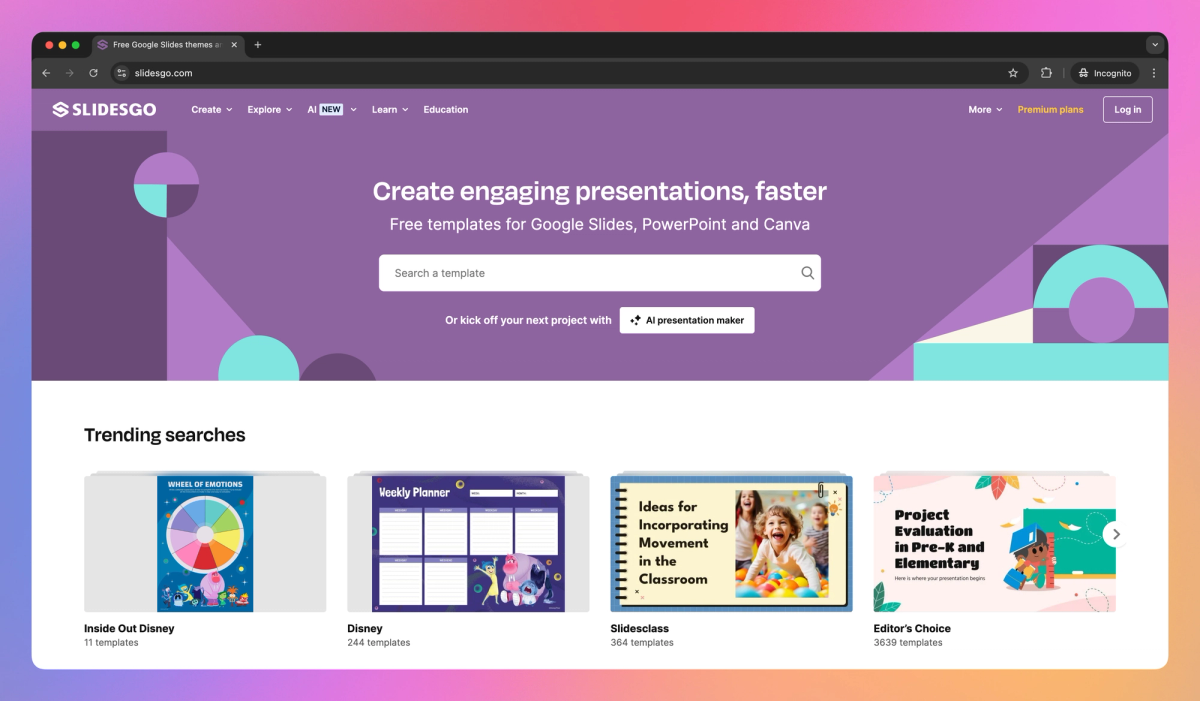
Slidesgo’s AI Presentation Maker takes a topic prompt and produces a complete deck in under a minute. The tool builds the content into Slidesgo’s own professionally designed templates, which is why the visual output tends to look more polished than raw AI-generated slides from tools with less developed design libraries. The December 2025 update added document upload capability - users can now feed a PPTX, PDF, DOCX, or TXT file into the AI and receive a structured presentation based on the document’s content.
The limitation is content depth. The AI produces structured placeholder text and logical slide flow, but it does not write persuasive, detailed, or technically accurate content. For a presentation on “climate change for high school students,” the output is a useful scaffold. For a presentation on “Q3 financial performance with YoY comparisons,” the AI produces an empty framework that still requires everything to be filled in manually.
Slidesgo has also built a suite of education-specific AI tools: an AI Quiz Maker, AI Lesson Plan Generator, AI Icebreaker Generator, and AI Exit Ticket Generator - none of which have direct equivalents on Canva.

Canva’s AI features are significantly broader and more integrated. Magic Design generates full presentation drafts from a text prompt or an uploaded image, applying Canva’s design logic. Magic Write drafts text content directly inside slide text boxes. Magic Media generates images and videos from prompts. Magic Expand fills in background areas around images. Background Remover isolates subjects in photos.
Together, these tools make Canva more capable than Slidesgo as a complete content-creation environment. But the trade-off is consistency. Independent benchmarks, including AIMultiple’s 2025 AI presentation tool evaluation, gave Canva a score of 6 out of 10 for AI presentation generation, noting issues with contextually mismatched images and generic content. Canva’s AI is broad in scope but not specifically optimized for structured multi-slide presentations.
Time advantage: Slidesgo’s AI is faster and more visually consistent for generating presentation-ready decks. Canva’s AI is more powerful for general content creation tasks but requires more editing to reach the same visual standard.
This is one of the clearest differences between the two tools, and it matters more than most comparison articles acknowledge.
Canva supports real-time collaborative editing. Multiple users can be inside the same presentation simultaneously, see each other’s cursors, leave comments, and make edits without sending files back and forth. Brand Kits ensure that team members always have access to the approved fonts, colors, and logos. Permission controls let managers lock certain slides or elements so contributors cannot inadvertently break the design. Teams plans support organizational-level content management.
Slidesgo does not offer collaborative editing at the platform level. The platform’s role ends when the template is downloaded or linked. Any collaboration happens in Google Slides or PowerPoint - which both support real-time editing, so the gap is not as dramatic as it sounds, but it does mean the team’s workflow requires an extra handoff step. Slidesgo has no equivalent to Canva’s Brand Kit, shared asset library, or organizational workspace.
For solo users, this difference means almost nothing. For teams producing presentations regularly - marketing departments, school faculties, agency creative teams - Canva’s native collaboration infrastructure saves meaningful time over a work week.
| Features | Slidesgo | Canva |
| Free templates | Rotating selection, ~3 downloads/month | 250,000+ across all types |
| Free limitation | Attribution slide required | Watermark on some premium elements |
| Premium price | ~$35.99/year (~$3/mo) | ~$15/month or ~$120/year (Pro) |
| Premium templates | 15,000+ presentations | 3M+ across all content types |
| AI features | Presentation maker + edu tools | Magic Studio (write, media, design) |
| Collaboration | Via Google Slides / PowerPoint | Native real-time + Brand Kits |
| Export formats | PPTX, Google Slides, PDF | PPTX, PDF, PNG, video, MP4 |
| Offline mode | No (uses external editors) | No (browser-based) |
| Best for | Presentation-focused users | Multi-purpose design teams |
The cost difference is significant and worth thinking about clearly. Slidesgo Premium at $36 per year is approximately one-quarter the price of Canva Pro at $120 per year. For users who only need presentation templates, Slidesgo represents considerably better value. For users who would otherwise be paying for a separate stock photo subscription, a video editing tool, or a social media design platform, Canva Pro can consolidate several tools into one.
The real cost calculation is not just the subscription price - it is the time cost of each platform. A tool that charges less but takes twice as long to produce an equivalent result is not actually cheaper. Based on the workflow analysis above, Slidesgo saves time on template selection and delivery; Canva saves time on customization and team coordination.
Slidesgo wins. The Education Hub, curriculum-aligned templates, and dedicated AI tools for lesson plans, quizzes, and exit tickets are purpose-built for this workflow. A teacher making three or four slide decks per week will find the template library more relevant and the AI tools more immediately useful. At $36 per year, it is significantly cheaper than Canva Pro.
Canva wins. Brand Kits, real-time collaboration, locked elements, and the ability to manage a shared design workspace make Canva the only sensible choice for teams maintaining consistent visual identity across dozens of presentations per month. No equivalent infrastructure exists in Slidesgo.
Either works on the free tier, but Slidesgo’s free templates are more immediately useful for academic presentation contexts. Canva’s free tier is more generous in volume but requires more curation to find presentation-appropriate templates. Slidesgo’s three free downloads per month are enough for semester-level use if managed carefully.
This depends on what stage the founder is at. For a rough draft or internal validation deck, Slidesgo’s AI Presentation Maker and pitch deck templates get to a presentable result faster. For a client-ready or investor-grade deck, Canva’s design flexibility and asset library produce more differentiated, polished output. The risk with Slidesgo at this stage is template recognition - investors who review many decks will occasionally recognize widely used free templates.
Canva wins, with a caveat. The design flexibility and brand customization tools in Canva are better suited for client-facing work. However, Canva’s PPTX export inconsistency is a real problem if clients need editable files. Freelancers who deliver in Canva’s native format or as PDF are generally fine; freelancers who hand over PPTX files for clients to edit themselves will encounter formatting issues that damage professional credibility.
Canva wins slightly. The presentation volume, team access, and Brand Kit features justify Canva’s higher price for this use case. That said, if the organization already uses Google Workspace heavily and the decks follow a consistent internal template, Slidesgo’s templates used as Google Slides starting points are a workable and cheaper alternative.
This is worth addressing directly because it comes up consistently in verified user reviews. Multiple Trustpilot reviewers across different countries report being charged after cancelling subscriptions, receiving ongoing invoices with no clear resolution path, and finding customer support difficult to reach. This does not mean the platform is fraudulent - it means the billing infrastructure and cancellation experience need real improvement. Anyone trying Slidesgo Premium is advised to start with a monthly rather than annual subscription, screenshot the cancellation confirmation, and monitor payment statements.
This is underacknowledged in most Canva reviews. When a Canva presentation is exported as PPTX, the results vary significantly by template. Simple layouts transfer cleanly. Complex layouts with custom fonts, overlapping elements, or vector graphics often break. Fonts substitute to system defaults. Spacing shifts. Some elements convert to static images that cannot be edited in PowerPoint. For anyone whose workflow ends with handing over a PPTX, Canva’s export limitations are a genuine problem, not a minor inconvenience.
Both platforms suffer from the overuse problem. Slidesgo’s free templates are widely used and recognizable enough that audiences occasionally identify them mid-presentation. Canva’s templates have the same problem at a larger scale - Canva’s market penetration is so high that many visual styles have become visually associated with “the Canva look.” For brand-sensitive work, both platforms present a ceiling that requires either premium templates, significant customization, or moving to a more specialized design tool.
Both Slidesgo and Canva produce AI-generated presentations that are structural scaffolds, not finished documents. Neither tool produces research-backed, accurate, detailed content on technical topics. The AI output on both platforms is a starting point that still requires substantial manual editing before a professional would be comfortable presenting it. Users expecting to enter a prompt and present the output without reviewing it will be disappointed on both platforms.
There is no universal answer, which is why the question has persisted for years without a clean resolution. But here is a breakdown by user type that holds up after thorough testing and review analysis:
• Slidesgo saves more time for solo users, educators, and students who need polished presentation decks quickly and have no use for Canva’s broader feature set.
• Canva saves more time for teams, creative professionals, and organizations that produce diverse content types and need a single platform to manage all of it consistently.
• Slidesgo is faster at the template-to-presentation stage - the first 20 minutes of building a deck.
• Canva is faster at the customization and collaboration stage - the middle and final stages of refining and distributing a deck.
• Slidesgo is meaningfully cheaper. For pure presentation use, the value gap at $36 versus $120 per year is hard to justify in Canva’s favor.
• Canva is worth the extra cost for teams, multi-platform content creators, and anyone who uses design tools beyond presentations regularly.
Perhaps the most practical observation from extended use of both platforms is this: many users who think they need to choose between them are actually better served by using both. Slidesgo for finding the right template structure and thematic framework, then Canva or Google Slides for building and customizing. The two tools are not zero-sum, and treating them as complementary - rather than competing - removes the pressure of picking a single winner.
That said, if the budget only allows one, the question is simpler: Do presentations make up the primary design work, or are they one component of a broader creative output? If presentations are the main deliverable, Slidesgo’s focus and price make it the stronger choice. If presentations are one of many content types a team produces, Canva’s ecosystem justifies the cost.
| Category | Slidesgo Wins | Canva Wins |
| Presentation template depth | ✔ Yes - purpose-built library | Broad but less focused |
| Speed to first usable deck | ✔ Yes - topic-specific search | More search curation needed |
| Design customization freedom | Limited to template structure | ✔ Yes - full drag-and-drop control |
| Team collaboration tools | Via external editors only | ✔ Yes - native real-time editing |
| AI presentation generation | ✔ Faster, more consistent output | Broader AI but less presentation-focused |
| Education-specific tools | ✔ Dedicated edu AI suite | General tools only |
| PPTX/Google Slides integration | ✔ Native, no translation layer | Export fidelity varies |
| Price for presentation-only use | ✔ ~$36/year vs $120/year | Worth it for multi-tool users |
| Cross-content design work | Not applicable | ✔ One platform for all content types |
| Brand kit management | Not available | ✔ Full Brand Kit + locked elements |
Share your thoughts about this article.
Be the first to post a comment!

Meta’s artificial intelligence business may be accelerating, but the company is...
Suraj Malik5 months ago

QUICK ANSWER - Why AI Chatbots Break After 10 MessagesMost AI chatbots brea...
Suraj Malik5 months ago

Abhyas AI vs. Gauth AI: which is better?Abhyas AI is better for Indian students...
Suraj Malik5 months ago

Civitai vs. Midjourney: which is better?Midjourney is better for beginners and f...
Suraj Malik5 months ago

If you have spent even an hour searching for an online study tool in 2026, you h...
Suraj Malik5 months ago
Cohere’s decision to merge with Germany-based Aleph Alpha is not just another AI...
Suraj Malik5 months ago