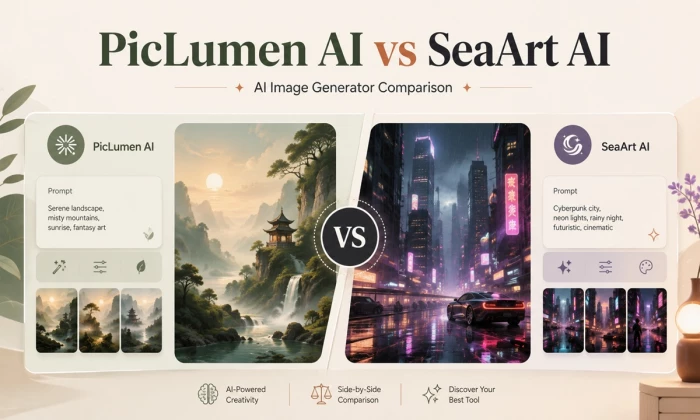
PicLumen AI and SeaArt AI look similar at first because both offer AI image generation, reference-based creation, editing tools, video-related features, and community discovery. The real question is not only which tool can create a good-looking image. The better question is which tool gives more usable results with fewer retries, clearer controls, better free value, and stronger trust signals.
That distinction matters because most creators do not judge a generator by one perfect sample; they judge it by how often the output is ready to publish. This article compares both tools using official features, user-review patterns, workflow depth, free limits, editing tools, and practical creator use cases.
PicLumen AI is the better starting point for beginners who want a simple free AI image generator, clean prompt-to-image results, basic image editing, and a smoother first-time workflow.
SeaArt AI is the better fit for advanced creators who want more model choices, stronger reference-image control, character workflows, image-to-image options, and deeper creative settings.
Best practical answer: PicLumen is easier to recommend for casual users and beginners, while SeaArt is stronger for users who want control and are comfortable checking credits, settings, and subscription terms carefully.
The rating evidence supports this split. At the time of checking, PicLumen held a 4.8 out of 5 TrustScore on Trustpilot across more than 4,300 reviews, with 88 percent of reviewers giving five stars. SeaArt held a 4.4 out of 5 TrustScore across roughly 899 reviews, with 72 percent five-star reviews but also a visibly larger share of one-star reviews concentrated on billing and subscription complaints. The full ratings breakdown, including app-store scores, appears later in this article.
| Comparison area | PicLumen AI | SeaArt AI | Practical takeaway |
| Best for | Beginners, casual creators, bloggers, simple image generation | Advanced creators, anime users, reference-based workflows | PicLumen is simpler; SeaArt is deeper |
| Text-to-image | Yes, prompt-based image generation | Yes, prompt-based image generation with many options | Both cover the core use case |
| Image-to-image | Upload and reference-based image transformation | Image-to-image, reference images, style transfer, variations | SeaArt appears stronger for advanced reference work |
| AI editing tools | Upscale, edit, inpaint, outpaint, colorize, effects, background- | Upscaler, eraser, filters, background remover, image editing tools | Both are more than simple generators |
| AI video tools | Supports image and video generation and video-related models | Supports image, video, and character workflows | Both overlap beyond still images |
| Character consistency | Possible through reference and model workflow, but consistency should be verified | Officially promotes character consistency from image and reference workflows | SeaArt has stronger positioning here, but output should be checked |
| Free usage | Daily free Lumens and plan-based limits | Free and credit-based access depending on workflow | Always check current limits before relying on either |
| Trust signals | 4.8/5 on Trustpilot across 4,300+ reviews at time of checking, with strongly positive themes | 4.4/5 on Trustpilot across roughly 899 reviews, with a visible cluster of billing and refund complaints | PicLumen currently looks cleaner from public review evidence |
| Learning curve | Easier for new users | More advanced and feature-heavy | SeaArt may take longer to understand |
The comparison is based on five practical criteria that reflect how creators actually use free AI image generators, rather than which tool produces the most impressive marketing gallery:
1. Feature overlap, meaning how directly the two tools compete for the same creator tasks
2. Output-use cases, meaning how well each tool fits real jobs like blog images, anime art, product visuals, and social media content
3. Editing and reference workflow, covering image-to-image, inpainting, upscaling, and reference-based control
4. Free plan and value transparency, including daily credits, limits, and commercial-use terms
5. Public trust signals from review platforms and community discussion
“This comparison does not judge only the prettiest gallery image. Gallery examples can be handpicked. A useful comparison must look at the full creator workflow: prompt input, control, editing, free limits, consistency, export options, and trust signals.
Feature claims in this article come from official product pages on piclumen.com and seaart.ai. Rating figures come from the public Trustpilot pages of both companies and from app-store listings, checked at the time of writing.
Review evidence is treated as user sentiment, not as verified fact, and complaint patterns are paraphrased rather than repeated as accusations. Pricing and credit details are treated as changeable and should be confirmed on the official pricing pages before any purchase.
PicLumen's official site describes a straightforward creation loop: users choose an image or video model, enter a prompt, optionally upload a reference image or video, generate the result, and then download the output or share it in the creator community.
The homepage positions the platform as an all-in-one hub with professional-grade control for experts and one-click tools for beginners, and it promotes a Canvas feature that orchestrates text, image, and video generation in one flow.
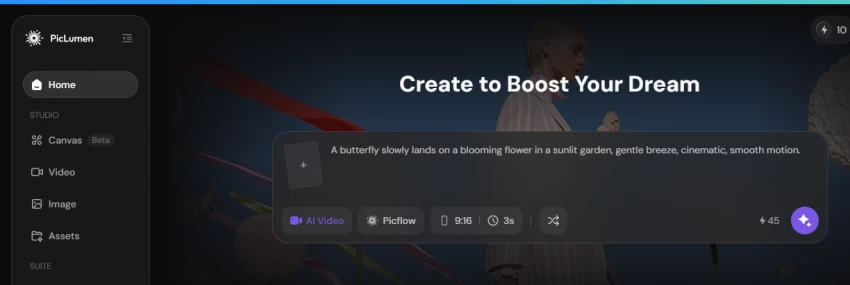
PicLumen's image-to-image page describes three reference modes covering content, style, and character, so users can keep key elements of an uploaded image while changing others, and states that uploads are processed with data protection and are not used for training.
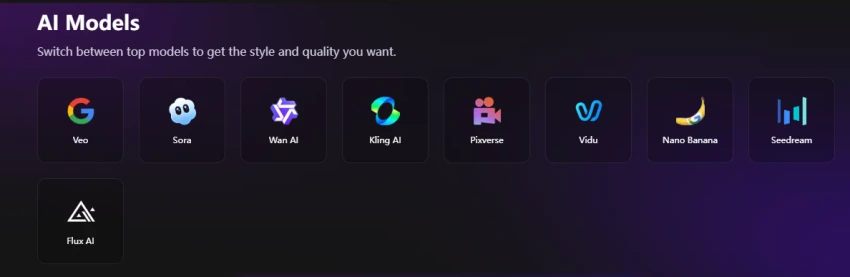
SeaArt's official homepage positions the product as an all-in-one AI creativity community for images, videos, characters, audio, remixing, and sharing, and advertises switching between top external models including Veo, Sora, Wan, Kling, Pixverse, Vidu, Nano Banana, Seedream, and Flux.
SeaArt's image generator page claims access to more than 300,000 models and AI filters. Its image-to-image page highlights reference-image generation with uploads of up to six reference images for advanced editing or multi-image merging, image variations, style transformation, background replacement, character consistency claims, daily free creation stamina, and watermark-free downloads on that workflow.
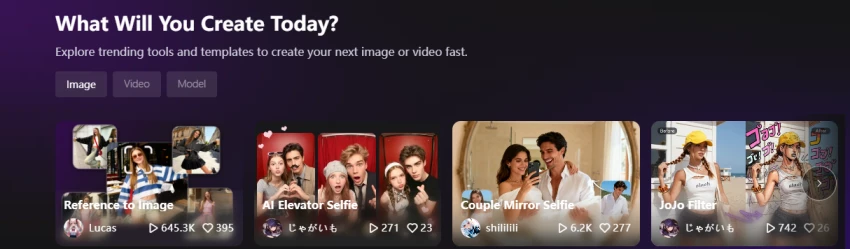
The platform also promotes advanced tools such as LoRA training, ControlNet, partial repainting, sketch-to-image, face swap, AI characters, and node-based ComfyUI workflows for users who want granular control.
| Evidence point | Why it matters in comparison |
| Both support image generation | They compete for the same basic user need |
| Both support reference and image workflows | This makes the comparison stronger than a simple text-to-image review |
| Both include video-related tools | They are expanding into broader AI creation, not only still images |
The model layer is where the two platforms diverge most clearly, and it explains almost every other difference between them.
| Model factor | PicLumen AI | SeaArt AI |
| Library style | Small, curated, purpose-labeled | Massive, community-driven, searchable |
| In-house models | Art, Realistic, Anime, Lineart series | Platform models plus community checkpoints |
| Third-party engines | Flux.1, Nano Banana, Seedream, and others promoted on site | Veo, Sora, Kling, Wan, Pixverse, Vidu, Nano Banana, Seedream, Flux listed on homepage |
| Custom model training | Not a core advertised feature | LoRA training advertised, with priority queues on higher plans |
| Advanced pipelines | Canvas flow for text, image, and video | ComfyUI node workflows, ControlNet, sketch-to-image |
| Practical effect | Faster decisions, fewer settings | Higher ceiling, steeper learning curve |
Feature pages tell readers what a tool promises. Public ratings tell readers how the promise holds up across thousands of real accounts. The figures below were checked directly against the Trustpilot pages of both companies and against app-store listings at the time of writing. All of these numbers change over time, so they should be read as a snapshot, not a permanent score.
On Trustpilot, PicLumen holds a 4.8 out of 5 TrustScore with an Excellent label across 4,341 reviews. The profile has been claimed since August 2024, more than 2,200 of the reviews were posted within the last twelve months, and Trustpilot notes that the company has not been sending review invitations, which matters because uninvited reviews tend to reflect organic sentiment. The star breakdown is heavily positive: 88 percent five-star, 9 percent four-star, 2 percent three-star, and under 1 percent each for two-star and one-star ratings.
SeaArt holds a 4.4 out of 5 TrustScore across roughly 899 reviews on Trustpilot. The distribution is more polarized: 72 percent five-star and 12 percent four-star, but around 12 percent one-star, and Trustpilot's profile notes that the company has not been replying to negative reviews. The one-star cluster is not random; it concentrates on trial auto-renewal, annual charges, refund refusals, and support responsiveness, which is why this article treats billing as SeaArt's main risk area rather than its image quality.
App-store ratings add a second angle. SeaArt's mobile apps are rated around 3.3 on Google Play and around 4.1 on the Apple App Store according to third-party review roundups, a noticeably weaker showing than its web reputation, with app reviews mentioning upload handling, moderation strictness, and subscription friction.
PicLumen's Android app is newer and smaller, rated roughly 3.7 from a few hundred ratings according to app-analytics data, with praise for generation quality and complaints from long-time users about the shift from a fully free model to subscriptions. For both tools, the web platform is the primary product and carries far more review volume than the apps.
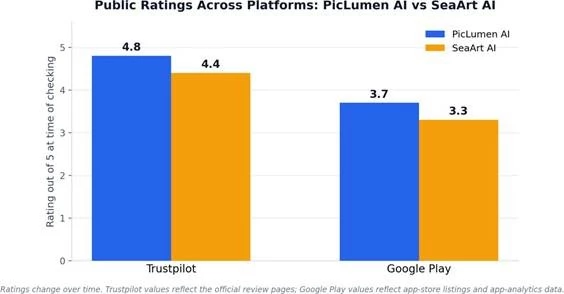
Figure 1. Public ratings across platforms at the time of checking. PicLumen leads on both surfaces: 4.8 vs 4.4 on Trustpilot and roughly 3.7 vs 3.3 on Google Play. SeaArt's iOS app rates higher at around 4.1, but its Android listing trails both tools. Ratings shift constantly, so readers should verify current values before deciding.
| Rating source | PicLumen AI | SeaArt AI | Reading |
| Trustpilot TrustScore | 4.8 / 5, Excellent | 4.4 / 5 | Both are rated well; PicLumen rates higher |
| Trustpilot review count | 4,341 reviews | Roughly 899 reviews | PicLumen has almost five times the visible volume |
| Five-star share | 88% | 72% | PicLumen sentiment is more uniformly positive |
| One-star share | Under 1% | Around 12% | SeaArt's negative cluster is much larger |
| Company review behavior | Profile claimed since August 2024; no review invitations sent per Trustpilot | Trustpilot notes the company has not replied to negative reviews | Responsiveness differs visibly |
| Google Play rating | Roughly 3.7 (small rating base) | Roughly 3.3 | Both apps trail their web reputations |
| Apple App Store rating | iOS presence listed under a companion app at time of checking | Roughly 4.1 | SeaArt's iOS app performs better than its Android app |
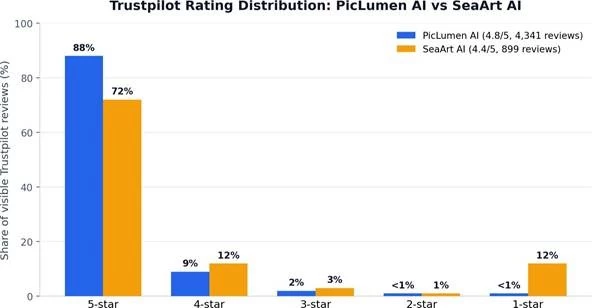
Figure 2. Trustpilot star-rating distribution at the time of checking. PicLumen's reviews are almost uniformly positive, with 97 percent at four or five stars and under 1 percent at one star. SeaArt is also majority-positive at 84 percent four or five stars, but its one-star share of roughly 12 percent is an order of magnitude larger than PicLumen's, and those one-star reviews cluster around billing, trials, refunds, and support rather than image quality.
The distribution shape matters more than the headline score. A 4.4 average built from a polarized base behaves differently from a 4.8 built from a uniform base. For SeaArt, the polarization means most users are happy with the creative product while a significant minority reports payment friction.
For a reader, that translates into a simple rule: SeaArt's creative features are broadly well liked, but its payment flow deserves the same caution as any subscription that has drawn repeated complaints.
Ratings compress thousands of experiences into one number. The review text explains the number. This section paraphrases the recurring themes on both Trustpilot pages rather than quoting individual reviews, because patterns are more reliable than any single account.
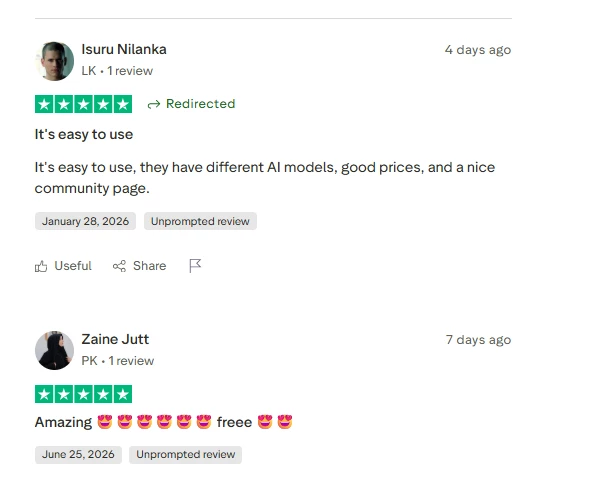
The dominant themes are consistent across hundreds of reviews:
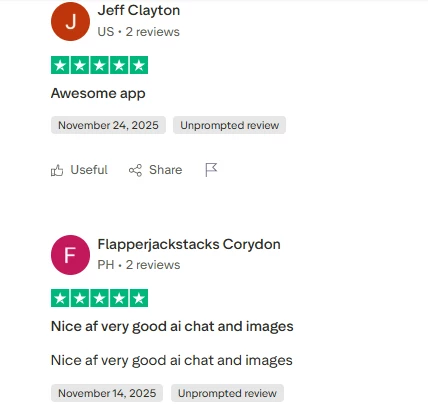
SeaArt's positive reviews describe a genuinely deep creative platform, and they come from both beginners and long-term loyal users:
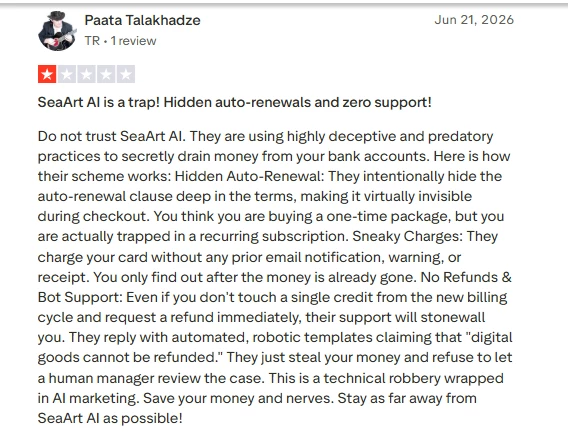
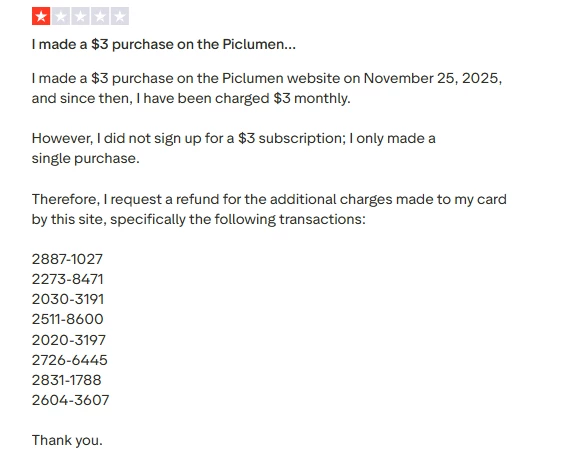
The negative cluster on SeaArt's Trustpilot page is specific and repetitive, which is exactly what makes it informative:
| Review evidence area | PicLumen AI | SeaArt AI | What readers should learn |
| Ease of use comments | Many users praise simple use and a friendly workflow | Some users like the interface, but it may feel heavier | PicLumen may suit beginners better |
| Image quality comments | Users often praise image generation quality | Mixed comments: some praise options, some complain about prompt mismatch | Both need prompt-based comparison |
| Free value comments | Daily rewards and free access are praised by some users | Daily credits are praised by some users | Free limits still need checking before serious use |
| Billing and support concerns | Fewer visible billing concerns in the reviewed snippets | More visible complaints around refunds, subscriptions, credits, and support | SeaArt needs stronger caution before payment |
| Community and tools | Community page and model variety are mentioned positively | Events, models, and creative options are mentioned positively | Both have creator-community appeal |
Output quality claims are easy to exaggerate, so this section stays with a testable framework instead of declaring a universal winner. A fair output comparison between PicLumen AI and SeaArt AI should judge the following points on the same prompts:
The practical assessment based on official positioning and review patterns is this: PicLumen appears better suited for users who want clean, quick, ready-to-use results without managing too many advanced settings. Its Trustpilot summary specifically records users describing images as realistic, clear, and vibrant, and reviewers frequently note that detailed prompts come out close to intent on the first attempt.
SeaArt appears stronger for creators who want more control over model choice, style direction, reference images, and character variation, because its platform exposes hundreds of thousands of models and deep parameters.
SeaArt's control comes with a cost that review evidence makes visible. Independent testing repeatedly finds that SeaArt's default models produce more generic results than carefully chosen community models, which means the platform's quality ceiling is high but its quality floor depends on the user's model knowledge.
Some reviewers also report prompt mismatches, such as requested colors coming out wrong, or outputs that ignore uploaded references. PicLumen's weakness sits elsewhere: reviewers note that regenerating the same prompt can produce noticeably different compositions, which complicates batch workflows for branded content. Neither tool should be declared an absolute output winner without side-by-side generations from identical prompts.
This is where SeaArt has the strongest reason to be compared with PicLumen, because both tools go well beyond plain text-to-image generation.
PicLumen supports prompt and reference-based generation and image-to-image style changes through three clearly separated reference modes. Content mode preserves the main content while the AI adjusts colors, styles, or adds new elements from the prompt. Style mode retains the original style while modifying specific elements inside it, which helps unify posters or brand materials while swapping details.
Character mode keeps a subject's facial features while changing outfit, expression, hairstyle, pose, or background, which the official page positions for character sheets, story development, and comics. The workflow stays approachable because the user picks a mode rather than tuning technical parameters, and the site states uploads are protected and never used for training.
SeaArt puts more emphasis on reference images, image variations, style transfer, and character consistency. Its image-to-image page describes uploads of up to six reference images for advanced editing or multi-image merging, promises character consistency across variations, and offers background removal and replacement through the same flow. On top of that sit LoRA models for locking a specific aesthetic, ControlNet for pose and composition control, partial repainting for local edits, and sketch-to-image for turning rough drawings into finished art. That stack makes SeaArt more attractive for users who want to keep a similar character, pose, or visual identity across many generations, or who want to blend several references into one output.
The practical verdict: PicLumen is better for simple image-to-image edits. SeaArt is better for advanced reference-based workflows. Both should be checked with the same source image before choosing one for serious character or brand work, because consistency claims on feature pages are marketing statements until the user verifies them with their own images, and review evidence for both tools includes users who struggled to keep characters consistent.
Use-case fit is often more decisive than raw feature counts. The table below splits the comparison by the jobs creators actually need done, and the paragraphs after it explain the reasoning for the closest calls:
| Use case | Better fit | Reason |
| Beginner AI art | PicLumen | Easier workflow and cleaner first-time experience |
| Anime character creation | SeaArt | More model and control-heavy environment |
| Realistic portraits | PicLumen or SeaArt | Needs side-by-side output check |
| Product images | PicLumen | Simpler workflow may be better for marketers and bloggers |
| Character variations | SeaArt | Stronger reference and consistency positioning |
Anime is the clearest split. PicLumen ships a dedicated anime model that produces clean 2D output from simple prompts, which serves casual anime fans well. SeaArt, however, is widely recognized for anime and stylized work, with a community library full of anime-tuned checkpoints and LoRA models covering specific character styles, and third-party reviews consistently name anime as its strongest genre.
Dedicated anime creators will find more range in SeaArt; anime beginners may still prefer PicLumen's simpler path.
Realistic portraits are the closest call. PicLumen's realistic model draws frequent praise for lifelike, vibrant results, while SeaArt can match or exceed that quality with the right photorealism-tuned community model but produces more generic output on defaults. This is exactly the category where the same prompt should be run on both tools before committing.
For product images, blog visuals, and social media content, speed and predictability usually beat maximal control, which favors PicLumen. Its background remover, upscaler, and outpainting cover the typical marketer's fix-up loop, and its commercial licensing on generated images is stated plainly.
Advanced experiments, character universes, and style research favor SeaArt, where LoRA training and ComfyUI workflows enable things PicLumen simply does not attempt.
PicLumen and SeaArt should not be judged only as image generators, because both platforms now bundle editing tools that determine how much correction is possible after generation. This matters in daily use: an image that is 90 percent right is only useful if the tool can fix the remaining 10 percent.
PicLumen's editing set includes:
SeaArt's editing set includes:
The practical verdict: PicLumen feels more straightforward for quick edits, because each tool handles one focused task like removing a background or extending a border, and everything lives in the created-image page.
SeaArt feels stronger for users who want more control and are comfortable exploring many tool options, including workflows most casual users will never open.
One caution from independent testing: some reviewers describe SeaArt's editing tools as rougher around the edges than its generation tools, so heavy editing users should test the specific tools they need before paying.
Both platforms treat community as a core feature rather than an add-on, and for beginners this is a real learning accelerator, because browsing another creator's image usually reveals the exact prompt, model, and parameters behind it.
PicLumen runs a creator community where users share generations, join challenges with Lumen prizes, and follow beginner tutorials. Its Remix feature lets any user copy a public image's model, prompt, and parameters as a starting point, and its referral program awards bonus Lumens to both parties.
Reviewers frequently mention the daily reward system as the reason they could practice seriously before spending money.
SeaArt's community is larger and more structured. Users browse trending creations, clone and try other creators' workflows with one tap, join events that pay out extra credits, and publish their own models, LoRA files, and AI characters, which the platform lets them monetize. Reviewers describe the events and daily credits as generous, and several long-term users cite the community as the main reason for their loyalty. The trade-off is density: the amount of content on screen contributes to the heavier feel that new users report
Pricing transparency is a trust issue, not just a budgeting issue, so this section deserves careful reading before any payment. Everything below reflects official pages and widely corroborated third-party reporting at the time of writing, and every number can change.
PicLumen runs on Lumens, its credit currency, where each image or video generation and each editing action consumes Lumens depending on the model used. The free Basic plan includes 10 free Lumens every day, and the official FAQ states that after they run out, users can keep generating on PicLumen models in the slower Relax Mode, with non-members able to create up to 20 images per day that way. The Basic plan also includes a commercial license, cloud storage for roughly 500 images, and a 30-day creation history. Failed generations do not consume Lumens.
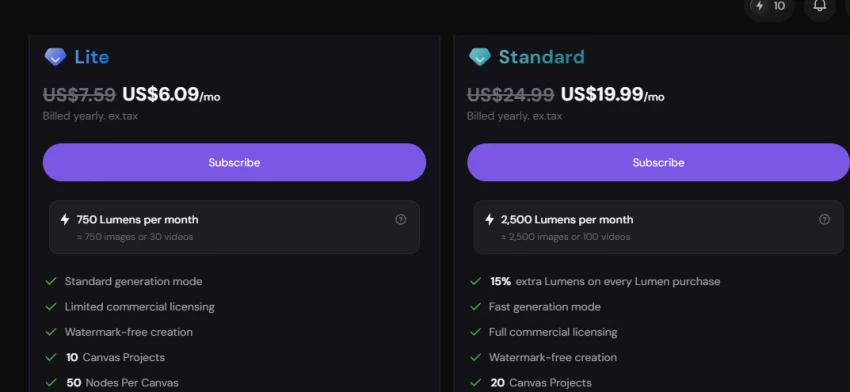
SeaArt separates two currencies. Stamina is the daily free allowance that resets every day, and Credits are purchased separately and never expire; the platform spends daily stamina first and only then pulls from credits. Third-party reviews commonly report the free tier providing roughly 130 to 150 stamina per day, enough for about 20 standard images, with watermarked output and a lower-priority queue on the free plan. Different models and resolutions consume very different amounts, and reviewers note that a single high-resolution video can cost more than dozens of basic images, so the burn rate is worth learning on the free tier before paying.
| Pricing and trust point | What to check before paying |
| Daily credits or Lumens | How many useful images can be generated daily? |
| Monthly credits | Are credits enough for regular content creation? |
| Relax, fast, or turbo modes | Does speed depend on plan? |
| Commercial rights | Are generated images allowed for business use? |
| Watermarks | Are exports watermark-free? |
| Cancellation | Is cancellation simple and visible? |
| Refund policy | Are digital credits refundable? |
| Support | Is there real support for billing issues? |
| Trust factor | PicLumen AI | SeaArt AI |
| Official feature clarity | Strong | Strong |
| Trustpilot score at check | 4.8 / 5 across 4,341 reviews | 4.4 / 5 across roughly 899 reviews |
| One-star share | Under 1% | Around 12%, concentrated on billing |
| Public review tone | More positive in visible snippets | More mixed in visible snippets |
| Company responsiveness | Support widely praised; profile claimed | Trustpilot notes no replies to negative reviews |
| Billing caution | Standard caution needed | Extra caution needed, especially on trials and annual billing |
| Free-use clarity | Daily Lumens visible on pricing page | Credit terms should be checked before serious use |
| Commercial-use clarity | Plan-based commercial licensing visible | Terms should be checked before use |
| Best trust fit | Beginners and casual users | Careful advanced users |
Both platforms moderate content, and both approaches have consequences readers should understand before choosing.
PicLumen blocks unsafe content by design, and some professional reviewers cite that strictness as a benefit for client work where anything borderline is unacceptable. Its official pages state that uploads and generations are protected, are not used for training, and can be deleted on request under its privacy policy.
SeaArt's moderation history is more complicated. Reviewers report the moderation system becoming stricter over time, with legitimate prompts sometimes blocked without explanation and credits consumed on blocked generations, which is one of the most repeated complaints on its review pages. Separately, some third-party reviews raise privacy questions about analytics trackers in the product and advise against uploading sensitive personal photos. None of this is unique to SeaArt in the AI art space, but it reinforces the same practical advice: treat any AI platform as a public-facing service, avoid uploading private or sensitive images, and read the current terms before commercial use.
The scorecard below defines how a full head-to-head test should be weighted. Output-dependent scores are intentionally left open because honest scores require side-by-side generations on identical prompts, and this article does not fabricate results it has not verified. Trust signals are the one category already scoreable from public evidence, and there PicLumen leads clearly:
| Category | Weight | PicLumen AI | SeaArt AI | Why this matters |
| Output quality | 25% | To be scored after output comparison | To be scored after output comparison | Final image quality matters most |
| Prompt accuracy | 20% | To be scored after output comparison | To be scored after output comparison | The tool must follow instructions |
| Image-to-image and reference control | 20% | To be scored after workflow check | To be scored after workflow check | Important for serious creators |
| Editing tools | 15% | To be scored after tool check | To be scored after tool check | Determines how much correction is possible |
| Free value | 10% | To be scored after credit check | To be scored after credit check | Free users need enough useful attempts |
| Trust signals | 10% | Leads on current public evidence: 4.8 Trustpilot, under 1% one-star | Trails on current public evidence: 4.4 Trustpilot, around 12% one-star | Reduces payment and workflow risk |
This weighting keeps the comparison practical. A free AI image generator should not be judged only by its best-looking sample image. Prompt accuracy, reference control, editing tools, free limits, and trust signals can matter just as much in daily use.
Both tools cost nothing to try, so the strongest decision method is a structured personal test that takes under an hour on the free tiers. A useful protocol looks like this:
1. Write three fixed prompts before opening either tool: one realistic portrait with specific lighting, one anime character with defined colors and outfit, and one product or scene shot with a described background
2. Run each prompt once on each platform's default recommended model, without retries, and save every output
3. Score each image against the checklist from the output quality section: subject accuracy, style accuracy, faces and hands, background fidelity, and usability without editing
4. Upload the same reference image to both image-to-image tools and request the same change, then compare how much of the original was preserved
5. Try one edit on each platform, such as a background removal or an upscale, and check the result at full zoom
6. Note how many free credits each step consumed, and estimate how far a full day's free allowance would go for the intended workload
7. Only then look at paid plans, and read the renewal, cancellation, and refund terms on the official pages before entering any payment details
This protocol removes the two biggest sources of bias in tool comparisons: handpicked gallery examples and unequal retry counts. Whichever tool produces more usable images per credit for the specific prompts that match real work is the right choice for that workload, regardless of what any review concludes.
PicLumen AI is the better starting point for beginners, bloggers, marketers, and casual creators who want a simple free AI image generator with clean results, basic editing tools, and a smoother workflow. Its public trust evidence is unusually strong for a free-first tool: a 4.8 Trustpilot score across thousands of organic reviews, near-zero one-star share, and support that users consistently describe as responsive.
SeaArt AI is the stronger fit for advanced creators who want more control over reference images, character workflows, anime-style generation, and model-heavy experimentation. Its creative depth is real and its majority sentiment is positive, but its billing and support complaint cluster is equally real and should shape how anyone approaches its paid plans.
The safest practical recommendation is this: start with PicLumen if ease of use and trust signals matter most. Try SeaArt if deeper reference control and advanced creative settings matter more, but check subscription, credit, refund, and commercial-use terms before paying, prefer monthly billing at first, and keep records of the plan selected.
Share your thoughts about this article.
Be the first to post a comment!

The same tool can be a 4.7 on one site and a 3.9 on another. Here is what is rea...
Nitin1 month ago

Here is the number worth pinning above your budget: in Gartner Digital Markets r...
Deepak Mehra1 month ago

What Artlist AI is in 2026Artlist began as a royalty-free music library. By 2026...
Deepak Mehra1 month ago

Most AI tool failures do not announce themselves. There is no crash, no angry em...
Nitin1 month ago

The best AI image generator in 2026 is Nano Banana 2 for speed, FLUX.2 for photo...
Parveen Verma1 month ago

“Useful” is a slippery word for a coding assistant. A tool can be brilliant at o...
Sakshi Dhingra1 month ago