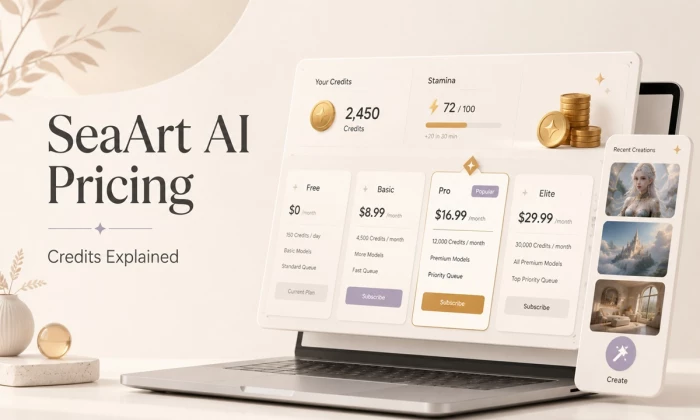
I checked SeaArt AI’s pricing because AI image tools often look free at first, and then credits, daily limits, watermarks, premium models, and paid features quietly change the real cost. SeaArt AI is one of the larger AI art platforms, with a huge community model library and tools for image generation, video creation, character work, and creative editing. So the real question is not only whether SeaArt AI is good, but what you actually pay when you use it regularly.
This article focuses on pricing clarity, not a full feature review. I looked at the official SeaArt Mall, the Stamina and Credits system, the free daily allowance, paid SVIP plans, and the kind of costs users should expect when generating images or videos. Two honest notes before we start: SeaArt pricing can change, so treat every number here as a snapshot, and always confirm the latest figures inside the official SeaArt Mall before buying.
Here is the fast version before the detailed breakdown. SeaArt AI is free to start, but the free experience is limited by daily image creations, watermarks, slower access, and some gated features. Paid plans mainly give you more daily Stamina, higher creation capacity, faster processing, and access to stronger workflow options.
| Pricing question | Short answer |
| Is SeaArt AI free? | Yes, SeaArt AI has a free tier with daily image creation access |
| Does SeaArt AI use credits? | Yes, it uses Stamina and Credits |
| Starting paid price | Beginner SVIP is commonly listed around $5.99/month |
| Free daily limit | Free users are listed with 21 image creations |
| Credit reset system | Stamina resets daily and does not roll over; Credits are separate |
| Paid plan benefits | More daily Stamina, more image creations, faster processing, and premium features |
| Best for beginners | The free plan |
| Best for regular creators | Beginner or Standard SVIP |
| Best for heavy users | Professional, Master, or extra Credits |
SeaArt AI runs on a freemium model. A free account gives limited daily creation access. Paid SVIP subscriptions increase daily Stamina and the number of image creations you can make. You can also buy Credits separately in the Mall when your daily Stamina is finished or when you need extra usage.
The important thing to understand is that SeaArt pricing is not only about the monthly subscription price. The real value depends on how many images, videos, variations, upscales, or premium generations you create.
| SeaArt Plan | Price in USD / Month | Daily Stamina | Approx. Images Per Day |
| Free | $0 | 0 free Stamina | 21 image creations |
| Beginner SVIP | $5.99/month | 300 Stamina/day | 50 image creations |
| Standard SVIP | $29.99/month | 700 Stamina/day | 116 image creations |
| Professional SVIP | $59.99/month | 2,100 Stamina/day | 350 image creations |
| Master SVIP | $149.99/month | 3,500 Stamina/day | 583 image creations |
I checked SeaArt AI’s pricing in June 2026 using the official SeaArt Mall. Treat these details as a pricing snapshot because AI tool pricing, credits, discounts, free usage, and plan limits can change.
This pricing information is based on SeaArt AI’s official pricing source available at the time of writing. Plans, credits, Stamina limits, free usage, discounts, and features may change without notice. Always verify the latest pricing on SeaArt AI’s official website or inside the SeaArt Mall before purchasing.
This is the part many new users misunderstand. SeaArt AI does not work with only one balance. It uses Stamina and Credits, and both affect how much you can create.
Stamina works like daily creation fuel. It is valid only for the current day and does not roll over. If you do not use it before the reset, it is gone. Paid SVIP plans mainly increase this daily Stamina allowance.
Credits work more like a separate wallet balance. You can buy Credits from the SeaArt Mall or receive them through events, rewards, or promotions. Credits are useful when your daily Stamina is depleted or when a feature requires paid tokens.
One important point is that subscription Stamina and purchased Credits are tracked separately. SVIP Stamina also does not stack with free Stamina in the way beginners might expect. Upgrading mainly gives you a larger daily Stamina allowance, better processing capacity, and access to more advanced usage.
SeaArt states that most standard image generations consume around 6 Credits, but the actual cost can change depending on the model, output size, quality settings, video duration, and extra tools used. Features like high-quality generation, upscaling, variations, premium models, LoRA training, and video generation can cost more than a basic image.
There is also a credit-expiry detail worth checking. SeaArt explains that Stamina is daily and non-cumulative, while Credits can be accumulated. However, credit validity can depend on how and when the Credits were obtained, so check the latest credit terms inside your account before buying a large pack.
| Action | Approx. Credit / Stamina Cost | Notes |
| Standard image generation | Around 6 for many standard models | Final cost can vary by model and settings |
| High-quality image generation | Higher than standard | Larger size and quality mode may increase usage |
| Image variation or remix | Varies | Each new variation can spend extra Stamina or Credits |
| Upscaling | Varies | Check the in-app cost before confirming |
| Premium or advanced model | Varies | Some newer or premium models may cost more |
| Standard video generation | Higher than image generation | Video usually drains allowance faster |
| High-resolution video | Higher again | Cost depends on duration, model, and quality |
| Extra Credits | Bought separately | Useful after daily Stamina runs out |
In simple terms, Stamina is your daily fuel, while Credits are your backup wallet. If you only create a few images per day, the free allowance or daily Stamina may be enough. But if you generate heavily, test videos, use premium models, upscale images, or create batches, Credits become important quickly.
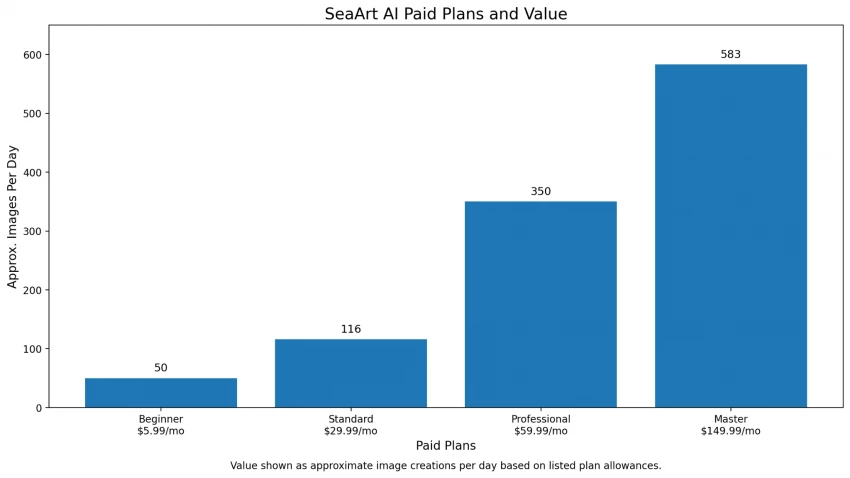
SeaArt AI’s free plan is useful for beginners because it lets you test the platform before paying. Free users are currently listed with 21 image creations, which is enough to explore the interface, try basic prompts, test a few styles, and understand whether SeaArt’s outputs match your needs.
The free version is best for testing. It gives enough room to understand the model library, experiment with anime or character styles, and learn how the platform behaves before committing to a plan. For hobby users or beginners, this can be enough for a while.
The main limitations are watermarks, lower daily capacity, slower access, and restrictions around some premium features. If you want to publish images on a blog, use visuals for client work, create regular social media assets, or experiment heavily with variations, the free plan can start feeling limited quickly.
I would not judge SeaArt AI from one or two generations. The better test is to run several prompts in the exact style you need. Try one anime prompt, one realistic prompt, one character prompt, and one product or social-media-style prompt. Then check how many outputs are actually usable.
SeaArt’s paid plans mainly give you more daily Stamina, more image creations, faster processing, higher workflow limits, and access to stronger features. The biggest difference between tiers is how much daily creation capacity you get.
For most users, the right plan depends on how often they generate, not just the headline price.
| Item | Details |
| Price | About $5.99/month |
| Daily Stamina | 300 Stamina/day |
| Approx. images | 50 image creations/day |
| Best for | Beginners, hobby creators, and light regular users |
| Key benefits | More daily capacity than free, better room for testing, useful for casual creation |
| Main limits | Not ideal for heavy video, large batches, or professional daily workflows |
| My value opinion | This is the safest first upgrade if the free plan feels too limited |
The Beginner plan makes sense if you like SeaArt’s output and want to create regularly without spending much. It is not a heavy-production plan, but it gives enough room for testing styles, generating social visuals, and learning how SeaArt’s models behave.
| Item | Details |
| Price | About $29.99/month |
| Daily Stamina | 700 Stamina/day |
| Approx. images | 116 image creations/day |
| Best for | Regular creators, bloggers, social media users, and small content teams |
| Key benefits | More daily creation room, better workflow capacity, useful for frequent image generation |
| Main limits | Still needs careful usage if you generate many videos or premium outputs |
| My value opinion | This is the most balanced plan for creators who generate almost every day |
The Standard plan is the practical middle option. It is better for users who create content regularly, need more room for multiple prompt attempts, and want a plan that can support ongoing publishing.
| Item | Details |
| Price | About $59.99/month |
| Daily Stamina | 2,100 Stamina/day |
| Approx. images | 350 image creations/day |
| Best for | High-volume creators, marketers, designers, and AI art users |
| Key benefits | Much higher daily capacity, better for testing many prompts and variations |
| Main limits | More expensive than casual users need |
| My value opinion | Worth considering only if SeaArt is part of your daily workflow |
The Professional plan is for serious users. If you create batches of images, test different models, make many variations, and need enough room for daily experimentation, this plan may be useful. Casual users will probably not need this much capacity.
| Item | Details |
| Price | About $149.99/month |
| Daily Stamina | 3,500 Stamina/day |
| Approx. images | 583 image creations/day |
| Best for | Agencies, production teams, and very heavy creators |
| Key benefits | Highest listed daily image creation allowance, suitable for large workflows |
| Main limits | Expensive for most individuals |
| My value opinion | Only choose this if you create at serious scale |
The Master plan is not for most beginners or casual creators. It is mainly for users who generate heavily every day or use SeaArt as part of a production workflow.
Overall, Beginner is best for light use beyond the free plan, Standard is the better value for regular creators, Professional is for serious daily users, and Master is mainly for high-volume workflows.
A rough cost-per-image estimate can help, but it should not be treated as exact. The formula is simple:
Monthly plan price ÷ estimated monthly image creations = rough cost per image
This is only a basic estimate because real usage changes quickly. If you use premium models, high-quality mode, upscaling, video generation, or many variations, your effective cost goes up.
| Plan | Monthly price | Approx. daily image creations | Approx. monthly image creations | Rough value note |
| Free | $0 | 21 | Around 630/month | Free, but limited and may include restrictions |
| Beginner SVIP | $5.99 | 50 | Around 1,500/month | Low-cost option for light creators |
| Standard SVIP | $29.99 | 116 | Around 3,480/month | Better for regular creators |
| Professional SVIP | $59.99 | 350 | Around 10,500/month | Better for heavy image users |
| Master SVIP | $149.99 | 583 | Around 17,490/month | Best only for high-volume users |
This table is useful for comparison, but your real cost depends on usable output, not just generated output. If you generate 100 images but only 20 are good enough to publish, the real cost per usable image is much higher.
That is why the smartest test is simple: generate the exact kind of images you need for a few days, track how many are usable, and then decide whether the plan price makes sense.
SeaArt AI competes with tools like Leonardo AI, Midjourney, Fotor AI, NightCafe, OpenArt, and similar AI image platforms. Its strongest pricing appeal is that it offers a usable free experience, low entry pricing, and a large model library.
| Tool | Free option | Starting price | Credit system | Best for | Pricing value |
| SeaArt AI | Yes | About $5.99/month | Stamina + Credits | AI image, anime, character, video experiments | Strong for budget and variety |
| Leonardo AI | Yes | About $12/month | Credits/tokens | Art, game assets, creative images | Strong creative control |
| Midjourney | No standard free plan | About $10/month | Subscription-based usage | High-quality visuals | Strong quality, less beginner-free |
| Fotor AI | Yes, limited | About $8.99/month | Credits | Simple generation and editing | Easy for general users |
| NightCafe | Yes | About $5.99/month | Credits | AI art community | Cheap for experimenting |
| OpenArt | Yes, limited | About $7/month | Credits | Prompt-based image creation | Solid middle-ground option |
SeaArt AI is worth comparing most closely with NightCafe and OpenArt if your priority is budget and variety. It may be better for anime, character styles, and model exploration. Midjourney is usually better if pure image quality matters more than price. Leonardo AI may suit users who want more creative control and production-style asset workflows.
The most disappointing part of SeaArt AI pricing is not the monthly price itself. It is the difficulty of knowing your real cost before you actually generate.
A plan can look affordable, but the value depends on your usable output rate. If you need many retries, variations, upscales, or video tests, your allowance can drain faster than expected. New users may think one image equals one simple cost, but AI generation rarely works that cleanly.
Billing also deserves careful attention. SeaArt says users can cancel subscriptions through the Subscription Management section of the Mall page, but it also states that trial charges may happen after the 3-day trial and may even process a few hours earlier due to regional differences or network latency. It recommends canceling at least one day in advance if you do not want to continue. SeaArt also says refunds are not provided if the trial is not canceled in time.
That does not make SeaArt AI unsafe by itself, but it does mean users should read the checkout screen carefully. I would avoid annual billing until I knew the tool fit my workflow.
What surprised me most is that SeaArt’s real cost is not about one image. The real cost comes from the creative process around that image.
You may generate one image, then make four variations, upscale the best version, test a different model, adjust the prompt, and then try a short video version. That is where Stamina and Credits start moving quickly.
The two-token system also takes time to understand. Stamina refreshes daily, so it rewards regular use. Credits are separate, so they matter when you go beyond the daily allowance or use features that need extra tokens.
For occasional users, this can feel confusing. For regular creators, it can actually work well because daily Stamina gives you a predictable creation rhythm.
| User type | Suggested option | Reason |
| First-time users | Free plan | Good for testing before paying |
| Casual creators | Beginner SVIP | Low-cost upgrade with more daily room |
| Anime or character creators | Beginner or Standard | Variations and model testing need extra allowance |
| Social media creators | Standard SVIP | Better for regular content creation |
| Bloggers | Beginner or Standard | Useful for frequent blog visuals |
| Heavy AI art users | Professional SVIP | More room for testing many prompts daily |
| Agencies or production teams | Master SVIP | Only makes sense at high volume |
| Budget-conscious users | Free or Beginner | Lowest-risk way to use SeaArt |
| Commercial users | Paid plan after checking terms | Better for serious publishing and regular use |
Upgrading tends to make sense if you are:
• Generating images regularly rather than occasionally
• Creating many variations of the same idea
• Using premium or newer models
• Needing more daily creation capacity
• Creating anime, character, or social content often
• Publishing visuals without wanting watermarks
• A blogger, marketer, or creator needing frequent visuals
• Testing video, motion, or advanced generation tools
• Comfortable checking costs before each generation
Stay on the free plan if you are:
• A beginner still testing AI image tools
• Someone who only needs a few images occasionally
• Unsure whether SeaArt’s image style fits your needs
• Still learning how Stamina and Credits work
• Comparing SeaArt with other AI image tools
• Not ready to publish SeaArt outputs professionally
• Cautious about billing and subscriptions
• Testing prompts before deciding on a paid plan
A paid plan may be the wrong fit if you:
• Need predictable, truly unlimited image generation
• Do not want credit-based or Stamina-based pricing
• Need enterprise-level legal and commercial clarity
• Expect perfect, pixel-accurate image precision
• Need full professional design control
• Only need one or two images per month
• Are uncomfortable with trial renewals or subscription billing
• Have not checked the latest license and commercial-use terms
• Do not want to track usage before generating
For most people, SeaArt AI is worth using for free first. The free plan gives enough room to test the platform, explore its model library, and understand whether the outputs fit your style. Paid plans are worth considering only after two things are clear: you have outgrown the free usage limits, and the watermark or feature limits are blocking your work.
SeaArt AI’s biggest pricing advantage is the combination of a usable free tier, affordable entry pricing, and a large creative model library. Its biggest drawback is the Stamina and Credits system, which can feel confusing at first and makes the real cost harder to judge until you generate.
My recommendation is to start with the free plan, run a few real prompts in the exact style you need, and track how many outputs are actually usable. If you generate often and the usable-output rate is good, Beginner or Standard SVIP can make sense. If you create at high volume, Professional may be worth considering. Master is only for serious production workflows.
Do not buy the highest plan just because the cost per image looks low. Buy based on your real workflow, your usable results, and how often you actually create.
Share your thoughts about this article.
Be the first to post a comment!

The same tool can be a 4.7 on one site and a 3.9 on another. Here is what is rea...
Nitin1 month ago

Here is the number worth pinning above your budget: in Gartner Digital Markets r...
Deepak Mehra1 month ago

What Artlist AI is in 2026Artlist began as a royalty-free music library. By 2026...
Deepak Mehra1 month ago

Most AI tool failures do not announce themselves. There is no crash, no angry em...
Nitin1 month ago

The best AI image generator in 2026 is Nano Banana 2 for speed, FLUX.2 for photo...
Parveen Verma1 month ago

“Useful” is a slippery word for a coding assistant. A tool can be brilliant at o...
Sakshi Dhingra1 month ago