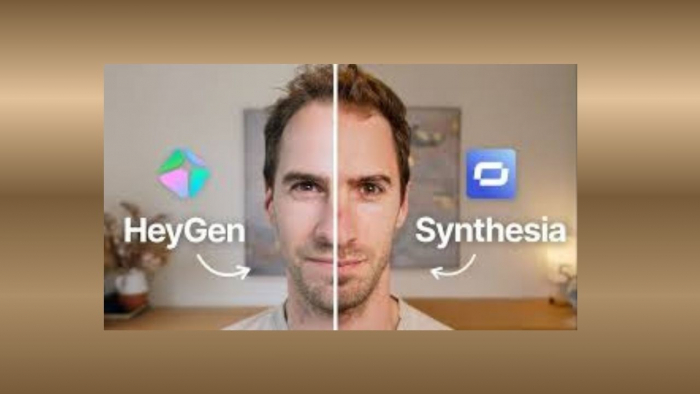
Let me start with the truth: I didn't want to write this.
I'm a corporate trainer. I run learning and development for a 1,200-person company with offices in five countries. For years, my team and I produced training videos the old way, book a studio, hire a presenter, schedule everyone's calendars, film, edit, re-shoot when someone got fired or rebranded, and pray the LMS didn't break in the meantime. A single 5-minute compliance video used to cost us about $4,000 and three weeks. Multiply that across 40 training modules, eight languages, and three regulatory updates a year, and you'll understand why I started looking at AI video tools.
I tested both Synthesia and HeyGen, the two biggest names in this space for 90 days. I built 195 videos. I burned through both subscriptions. I made my team watch every single output and rate them honestly. And I'm going to share everything I learned, including the embarrassing mistakes and the moments where one tool genuinely surprised me.
If you're reading this, you're probably where I was six months ago frustrated with traditional video production, curious about AI avatars, and worried about picking the wrong tool. I'll save you the 90 days. Here's what actually happened.
MY VERDICT IF YOU'RE IN A HURRY I ended up keeping both. Synthesia became my workhorse for compliance, onboarding, and anything that needs to go through our LMS. HeyGen handles sales prospecting videos, executive comms, and any time I need an avatar that looks like a real human being. Combined cost is about $250/month, and we replaced roughly $180,000 in annual external video production. I'll explain the why below. |
To be fair to both tools, I bought real plans rather than relying on free trials. I subscribed to Synthesia's Enterprise tier through our procurement team and HeyGen's Creator plan with my own card. Then I split my training calendar in half for 90 days, every video that came across my desk got built in one tool, then rebuilt in the other. Same script. Same brand assets. Same review process with the same stakeholders.
That meant my team and I built 195 videos total: 120 in Synthesia and 75 in HeyGen (the imbalance shows up because Synthesia handled more of the bulk training work, which I'll get to). Every video went through our normal review cycle, SME approval, compliance check, and learner testing with a sample of 30 employees per video.
ABOUT MY SETUP I'm not affiliated with either company. I paid for both subscriptions out of my training budget. The opinions below are based purely on what worked and what frustrated me when I had real deadlines, real stakeholders breathing down my neck, and real consequences for getting it wrong. |
Looking back at my 90-day usage data, the split between the two tools wasn't even close to 50/50. Each one naturally pulled different categories of work, and I think this chart explains the entire "which tool to choose" question better than any feature comparison could.
My actual usage breakdown across 90 days. Synthesia gravitated toward bulky, compliance-heavy training; HeyGen pulled the customer-facing and personalized work.
I didn't plan it this way it just happened naturally. Whenever I had a long, structured training video to build (compliance, onboarding, product training), I instinctively reached for Synthesia. Whenever I needed something that had to look like a real human delivering a personal message, I reached for HeyGen. The tools sorted themselves into the right buckets, and after a few weeks I stopped fighting it.
DAY 01 | First impressions, first frustrations, first wins. |
Signing up was the easiest part of my entire week. I dropped a PowerPoint deck into Synthesia's AI Video Assistant, a 28-slide compliance presentation our legal team had been refusing to update for two years, and 14 minutes later, I had a 7-minute video with an AI avatar reading the script, slide visuals timed to the narration, and captions in three languages.
Was it perfect? No. The avatar I picked first looked a bit too polished, almost too corporate, like a stock photo come to life. The pacing was slightly off in two places. But I'd gotten further in 14 minutes than my team had gotten with that legal deck in 24 months. That mattered.
WHAT SURPRISED ME The PowerPoint-to-video pipeline is Synthesia's secret weapon for corporate training. I had a stack of decks gathering dust on our SharePoint, and Synthesia turned them into actual training assets in an afternoon. None of my SMEs had to learn a new tool. They just sent me decks like they always had, and I shipped videos. The learning curve was effectively zero. |
DAY 08 | Same script, very different feel. |
A week into Synthesia, I opened HeyGen and pasted the same compliance script just to see what would happen. The first thing I noticed was the avatars. HeyGen's Avatar IV technology produces output that genuinely looks like a real person on camera. My CEO walked past my screen, glanced at my monitor, and said "Who is that?" That's how convincing it was.
But the workflow was different. HeyGen doesn't have a PowerPoint import as polished as Synthesia's, and the editor felt more like a video creation tool than a training authoring tool. The script had to be cleaner. The pacing required more manual tweaking. And the credit system caught me off guard — Avatar IV videos burn 20 credits per minute, so my 200 monthly Creator-plan credits covered maybe 10 minutes of premium output.
WHAT SURPRISED ME HeyGen's avatars cleared the uncanny valley for me. I sent a side-by-side test to 15 employees, same script, same length, one in Synthesia and one in HeyGen, and asked which presenter felt more trustworthy. HeyGen won 12 to 3. For executive announcements and customer-facing content, that gap matters a lot. For internal compliance training, less so. |
Both platforms publish clean pricing pages that look transparent. After 90 days, I can tell you neither price is what it seems. Here's the headline comparison, and then I'll explain what got me unexpectedly.
The published prices. The Starter/Creator gap looks small, but the total cost of ownership at scale tells a different story.
Synthesia's pricing looked simple — $18/month Starter, $64/month Creator, custom Enterprise, but the catch is the per-month video minutes limit. Starter only includes 10 minutes of generated video per month. For a training team producing real volume, that runs out by the second week. I burned through Starter limits in 11 days the first month and ended up requesting Enterprise pricing through procurement, which started at around $1,000/seat/year for our team.
On the upside: once we were on Enterprise, video minutes became effectively unlimited and we got SCORM export, SOC 2 compliance documentation, SSO, and custom avatars. For an enterprise L&D team, those features are non-negotiable.
HeyGen's $24/month Creator plan looks like a steal until you realize the credit system charges 20 credits per minute for Avatar IV (the realistic avatars that justify the platform's existence). The 200 monthly credits cover roughly 10 minutes of premium video. After that, you're either downgrading to less-realistic avatars or paying for credit overages — which adds up fast.
To get SCORM export, custom avatars beyond the basic level, and team collaboration, I had to budget for the Business plan at $149/month. Realistic total monthly cost for a small training team using HeyGen properly: $200–$300 once credit overages and add-on seats are included.
WHAT I ACTUALLY ENDED UP PAYING Synthesia Enterprise: ~$140/month per seat (2 seats = $280/mo) HeyGen Business: $149/month + occasional credit overages (~$180/mo total) Combined, around $460/month. Sounds like a lot until you compare it to one traditional video production at $4,000+ per asset. We're producing 30–40 videos a month now. The math isn't even close. |
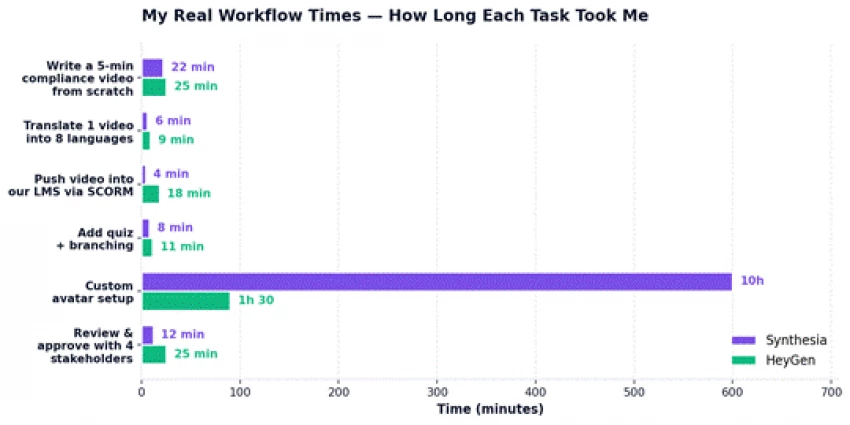
I tracked my time on every single video for 90 days. Here are six common training-team tasks and how long each took me on each platform. These aren't marketing numbers — these are stopwatch-real timings from someone who had to ship the work.
Real workflow times from my own production logs. The custom avatar gap is the most dramatic — Synthesia's enterprise process is more polished but takes 10 hours and a recording session; HeyGen's is 90 minutes from start to usable output.
For drafting a 5-minute compliance video, the two were basically tied, Synthesia's PowerPoint pipeline gives it a slight edge, but the gap is small (3 minutes). The bigger differences showed up everywhere else.
Translation: Synthesia clearly wins. One-click translation across 8 languages took me 6 minutes total, including review. HeyGen took 9 minutes per language and required more manual cleanup on lip-sync for non-English output.
LMS export via SCORM was the showstopper. Synthesia's SCORM export is one click, takes 4 minutes including download. HeyGen's SCORM is gated behind the Business plan, and even on that plan it took 18 minutes due to a clunkier export workflow. For a training team, this gap is huge, we're pushing dozens of videos into our LMS every month.
Custom avatar setup was the surprise reverse. Synthesia's enterprise process produces a higher-quality avatar but takes 10+ hours over a 10-day window (including a professional recording session). HeyGen lets me create a usable digital twin from a 5-minute phone recording in about 90 minutes. For executives who want a quick digital presence, HeyGen wins. For boardroom-grade brand presenters, Synthesia wins.
After scoring everything, I mapped where each tool actually beat the other across my workflow. The donut chart below shows the distribution. Synthesia took the larger share of training-specific wins; HeyGen owned the realism and creative-flexibility wins.
Compliance training — SCORM export, audit logs, SOC 2 documentation, and consistent quality across languages.
Onboarding programs — PowerPoint import, brand kit consistency, and easy text-edit updates as policies change.
Multilingual rollouts — one-click translation across 160+ languages with lip-sync preservation.
Team workflows — comments, approvals, shared workspaces, and reviewer roles work smoothly.
Predictable budgets — Enterprise pricing is fixed annual, not credit-based.
Sales prospecting videos — personalized outreach where the avatar needs to look like a real human.
Executive communications — digital twin technology lets executives "deliver" updates without filming.
Marketing-adjacent training — product launches, customer education, anything that needs creative range.
Quick custom avatars — 5-minute phone recording to usable digital twin in under two hours.
Voice cloning — the Instant Voice Clone is genuinely impressive and useful for personalized content.
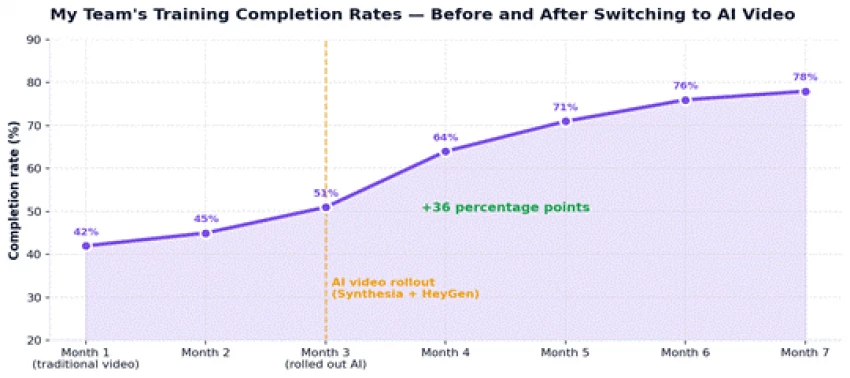
Three months into the rollout, my CFO asked me to put together a slide on impact. I dug into our LMS analytics and found a number that even surprised me: training completion rates had jumped from 42% to 78% over four months. I'm not going to pretend the AI video tools were the only reason we also tightened our LMS user experience and added microlearning structure but the videos were the centerpiece of the change.
My team's completion rates before and after the AI video rollout. The +36-point lift was the moment my CFO started asking different questions about our L&D budget.
Here's the honest version of why I think completion rates jumped:
THE FINANCIAL IMPACT (ROUGH NUMBERS) Annual cost before: About $180,000 in external video production fees, studio bookings, and freelance editor time across our 40 training modules. Annual cost after: Around $5,500 (Synthesia Enterprise + HeyGen Business + occasional voice talent for very specific cases). Net savings: ~$174,500/year. ROI of about 31x on the AI video subscription cost. The completion-rate lift is harder to value but probably worth more than the dollar savings. |
| Tool | What I Loved | What Frustrated Me |
| Synthesia | PowerPoint pipeline, SCORM export, brand consistency, team workflows, predictable Enterprise pricing, 90% Fortune 100 use it for a reason | Avatars feel slightly stiff; custom avatar process is slow ($1K/yr + 10 days); paid plans hide some features behind Enterprise tier |
| HeyGen | Avatar realism is genuinely a generation ahead; voice cloning is fast and accurate; digital twins changed how my CEO communicates; faster custom avatar setup | Credit system creates budget anxiety; SCORM gated behind Business plan; PowerPoint import is weaker; collaboration features paywalled higher |
Here's the part where most comparison articles cop out and say "it depends." I'm going to be more direct because I've actually used both.
Six months ago, I would have been skeptical of an AI-generated training video. Today, my team and I have shipped 195 of them. The completion rates are higher than ever. My budget is healthier than ever. And weirdly, my job got more interesting, I'm spending less time coordinating studios and more time actually thinking about what makes great learning content.
Are these tools perfect? No. The avatars still occasionally fumble industry jargon. Translation quality varies by language pair. Both platforms have rough edges where the underlying AI shows. But they've crossed the threshold from "experimental" to "production-ready" in a way that I didn't think was possible at the start of 2026.
If I had to summarize the two tools in one line each:
Synthesia is the workhorse, the one I trust to ship 100 compliance videos in three weeks without anything breaking.
HeyGen is the showpiece — the one I reach for when someone needs to look at a screen and feel like they're being addressed by a real human.
Together, they replaced about 90% of what my training team used to outsource. I'm not going back.
IF YOU'RE STILL ON THE FENCE Both platforms have free tiers. Spend a Saturday afternoon making the same script in both. You'll know within an hour which one fits your style and your team's needs. The decision really is that intuitive once you see the output. Don't overthink it. |
Share your thoughts about this article.
Be the first to post a comment!

The same tool can be a 4.7 on one site and a 3.9 on another. Here is what is rea...
Nitin1 month ago

Here is the number worth pinning above your budget: in Gartner Digital Markets r...
Deepak Mehra1 month ago

What Artlist AI is in 2026Artlist began as a royalty-free music library. By 2026...
Deepak Mehra1 month ago

Most AI tool failures do not announce themselves. There is no crash, no angry em...
Nitin1 month ago

The best AI image generator in 2026 is Nano Banana 2 for speed, FLUX.2 for photo...
Parveen Verma1 month ago

“Useful” is a slippery word for a coding assistant. A tool can be brilliant at o...
Sakshi Dhingra1 month ago