
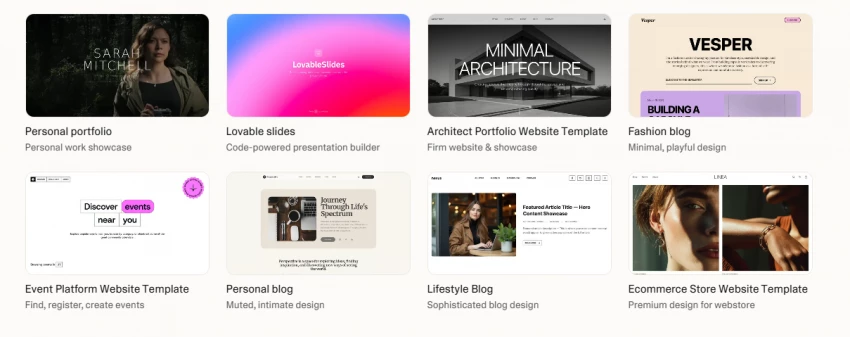
The first time Lovable shipped me a working app from a paragraph of plain English, I sat staring at my browser for a solid minute. I'd asked for a basic SaaS dashboard with login, a project list, and a settings page. Twelve minutes later it was live on the internet. No boilerplate, no npm install, no Stack Overflow rabbit hole at 2 a.m. Just a URL, a working signup flow, and an unsettling feeling that something fundamental had shifted.
Two weeks later I was watching that same magic burn through 40 credits trying to fix a single misaligned button. The shift, it turns out, has edges.
I've spent the last 90 days building real projects with Lovable AI, four apps, a few hundred prompts, more than a few small disasters. This isn't a "look how cool AI is" piece. It's what I actually learned about when Lovable shines, when it bites, and whether the price tag holds up once you stop reading the marketing page and start hitting your monthly credit cap.
Here's the honest version.
If you're a non-technical founder, PM, or solo builder with a clear product idea you can describe in detail, Lovable is probably the fastest way to ship something usable on the internet right now. I genuinely mean that.
If you're an experienced developer looking to skip boilerplate, Lovable is useful — but you'll occasionally fight it.
If you're trying to build a complex, production-grade application with messy edge cases, Lovable will get you 70% there fast and then make you pay for the last 30% in frustrating debugging loops that eat credits.
The tool is real, the magic is real, and so are the limits.
Before any of this means anything, here's the boring-but-important context.
I'm not a developer. I've shipped two SaaS products as a solo founder using outsourced engineering, and I can read JavaScript well enough to know when something is broken but not always why. That makes me roughly the target user Lovable is built for.
Over 90 days I built:
I started on the Free plan, moved to Pro within four days, hit my credit cap twice, bought top-ups, and ended the test on the Business plan. I tracked time, cost, and frustration level on every project. I'll get to the numbers in a minute.
The onboarding is genuinely the cleanest I've used in the AI app-builder space. You land on a chat-like prompt box, type what you want, and an app starts assembling in real time on the right side of your screen. There's no template gallery to wade through, no ten-step wizard, no "let's set up your environment" friction.
The first prompt I gave it was deliberately vague: "Build me a clean dashboard for tracking subscription metrics, MRR, churn, customer count. Modern UI."
About 90 seconds later I had a React app with sample data, three KPI cards, a chart, and a sidebar. It wasn't connected to anything real, the data was fake, and the design was generic — but it worked. I could click around, the routing functioned, the responsive design held up on mobile.
For someone who has spent years describing "this is what I want it to look like" to engineering teams and getting back something that didn't quite hit, the directness of "describe → see it" is a small but genuine shock.
The second prompt was the one that converted me: "Connect this to a real database. I need to be able to log in and the data should persist."
Lovable spun up a Supabase backend, generated authentication, wired up the schema, and updated the frontend to use real data. I added a row, refreshed the page, and the row was still there. Total elapsed time: about six minutes. Total credits burned: roughly three.
That's the moment most people I've talked to also remember. It's the hook.
Lovable's structure makes more sense once you understand it has three distinct working modes, and using the wrong one is the fastest way to burn through credits.
| Mode | What It Does | When I Use It | Credit Cost |
| Agent Mode | Autonomous AI building — plans, codes, debugs, deploys | Big features, initial generation, complex changes | High (multi-credit per task) |
| Visual Edits | Click an element, change it directly (text, color, layout) | Copy tweaks, color changes, small style fixes | Free (no credits) |
| Plan Mode | AI plans out the steps before writing code | New features, changes that touch multiple files | Moderate |
The first week, I did everything in Agent Mode because I didn't realize Visual Edits existed. I was paying credits to change a heading from "Dashboard" to "My Dashboard." That alone cost me probably 15 credits I didn't need to spend.
Hard-earned tip: anything that's just a visual or text change goes through Visual Edits. Agent Mode is for actual code changes. Plan Mode is the one most people skip but it's the most underrated when I started routing complex features through Plan Mode first, my credit-per-feature cost dropped by something like 30%.
Marketing pages are full of "I built an app in an hour" claims. Here's what those four projects actually cost me, time and credits both.
| Project | Final State | Time Invested | Credits Used | Approx. Cost |
| Subscription dashboard | Production, live | ~14 hours | 240 credits | ~$50 (Pro + 1 top-up) |
| Client booking system | Production, live | ~22 hours | 380 credits | ~$80 (Pro + 3 top-ups) |
| Community forum | Live, ~80 users | ~9 hours | 145 credits | $25 (Pro plan only) |
| Internal CRM | Live, just for me | ~6 hours | 95 credits | $0 (covered by base plan) |
A few things to call out:
The booking system was the most expensive because real-world payment integration (Stripe), email confirmations, and recurring availability rules involved a lot of debugging cycles. The forum was the cheapest because the requirements were simple and well-defined when I started. The pattern repeats: clarity of spec is the single biggest predictor of cost.
I learned that the hard way.
The "I built an app in 30 minutes" tweets aren't lies, exactly. They're just measuring the wrong thing. Here's how the speed actually broke down across my projects:
WHAT TAKES 30 MINUTES IN LOVABLE
WHAT TAKES MUCH LONGER
The honest framing: Lovable compresses the first 70% of building from weeks to hours. The last 30% polish, edge cases, debugging still takes real time. Sometimes more time than expected, because the AI is fast at writing code and slower at remembering what it wrote three prompts ago.
After 90 days, my actual workflow looks nothing like the "just describe what you want" pitch. It's more disciplined than that.
MY LOVABLE WORKFLOW (After 90 Days of Pain)
 (1)_1778145935.webp)
The two steps people skip are 1 and 6. Skipping step 1 is what causes the dreaded debugging spiral where you're paying credits to fix a problem the AI doesn't fully understand. Skipping step 6 is how you lose work. I lost a half-day's progress in week three because a bad Agent Mode change cascaded and I couldn't easily roll back.
GitHub sync isn't optional. Treat it like saving your file in Word.
Lovable's pricing looks reasonable on the page. The reality is more nuanced.
| Plan | Monthly Cost | Credits Included | Top-Ups | Best For |
| Free | $0 | 5 daily (30/mo cap) | None | Testing the platform |
| Pro | $25/mo | 100 + 5 daily (up to 150) | $15 / 50 credits | Solo builders, MVPs |
| Business | $50/mo | 100 monthly + power features | $30 / 50 credits | Teams, SSO needed |
| Enterprise | Custom | Volume-based | Custom | Large orgs |
Per Lovable's own documentation, here's the rough cost of common actions:
| Action | Approx. Credits |
| Simple UI change (color, padding) | 0.50 |
| Adding a new component | 0.90 |
| New page generation | 1.00 |
| Authentication setup | 1.20 |
| Complex multi-file feature | 1.50–2.00 |
| Visual Edits (text/style) | 0 |
| Bug fix that loops | Unpredictable (this is the dangerous one) |
The published numbers are honest. The catch — and this is the catch nobody tells you — is the debugging loop tax. When the AI introduces a bug while building a feature, fixing it costs more credits. If the fix introduces another bug, that's more credits. On the booking system, I watched 12 credits evaporate trying to get a date picker to handle timezones correctly. The feature itself probably should have cost 4.
If you skip everything else, read this part.
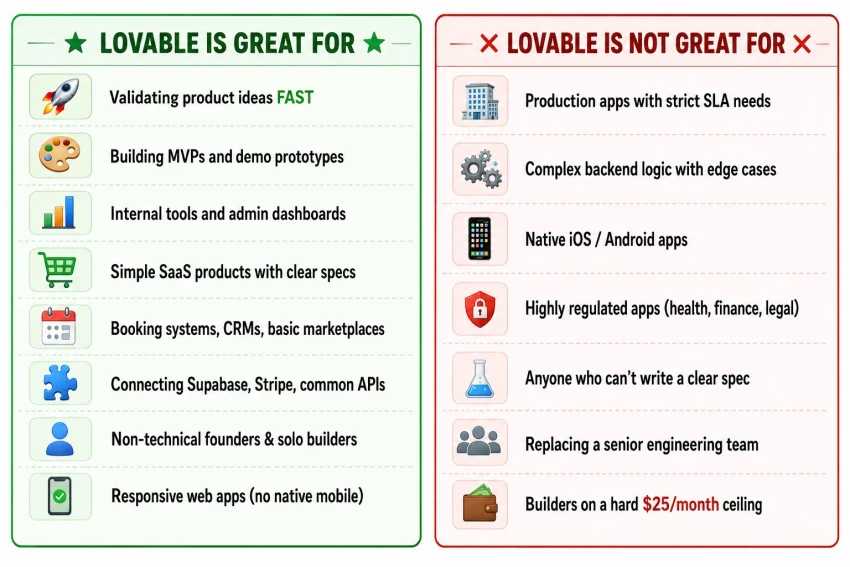
The biggest mistake I see people make and that I made is treating Lovable like a developer replacement instead of a builder amplifier. It's a power tool. Power tools demand judgment.
This was the question I cared most about going in, because the difference between "demo code" and "code I'd actually ship" is enormous.
The honest answer: it's better than I expected, but it's not what a senior engineer would write.
The good:
The not-so-good:
For an MVP, the code quality is genuinely fine. For a product that needs to scale to 100K users, you'll eventually want a real engineer to clean it up. That's not a flaw — that's just the honest scope of the tool.
| Category | Rating | Notes |
| Initial UI design | ★★★★ | Modern, generic, easily customized |
| Code structure | ★★★★ | Clean, readable, occasionally repetitive |
| Database design | ★★★★ | Sensible schemas via Supabase |
| Authentication | ★★★★½ | Works correctly out of the box |
| Edge case handling | ★★★ | Handles common cases, misses some |
| Bug introduction rate | ★★★ | Bugs creep in on multi-file changes |
| Production-readiness | ★★★½ | MVP-ready, not enterprise-ready |
| Long-term maintainability | ★★★½ | Fine if you stay engaged with the code |
| User Type | Lovable Fit | Recommended Plan |
| Non-technical founder building MVP | Excellent | Pro ($25) |
| Solo indie hacker | Very good | Pro + top-ups |
| Designer prototyping interactive concepts | Strong | Free or Pro |
| Product manager building internal tools | Excellent | Pro |
| Junior developer skipping boilerplate | Good | Free → Pro |
| Senior developer with complex needs | Limited | Free (test only) |
| Startup needing client portal | Excellent | Pro or Business |
| Small agency building for clients | Good | Business |
| Enterprise team | Possible | Business or Enterprise |
| Native mobile app builder | Wrong tool | Use Bolt or Expo |
| Builder with no clear product spec | Bad fit | Don't buy yet |
This is the section I would have wanted to read before subscribing.
I noticed something around week three that surprised me: I started censoring my prompts. Instead of asking what I actually wanted, I'd ask the simplest version of it because I didn't want to "waste credits." That's a bad design pattern in any tool. Pricing tools should encourage exploration, not discourage it. Lovable's credit system, despite being transparent, makes you risk-averse in a way that subtly hurts the work.
The single most expensive failure mode is when the AI breaks something while fixing something else. You ask it to fix the broken thing, it introduces a different broken thing. Each round costs credits. I had one session where I burned 18 credits trying to fix a feature that should have cost 3. The "Try to fix" button is helpful but not infallible.
Top-ups are $15 for 50 extra credits on the Pro plan ($30 on Business, double the rate). And, this caught me off guard, increasing your monthly cap doesn't refresh your credits, it just raises the ceiling. If you've used 95 of your 100 credits and bump to 200, you get the additional 100, not a fresh 200. Logical once you understand it. Confusing in the moment.
In long sessions, the AI sometimes loses track of decisions made earlier. I'd specify a design system on prompt 4, and by prompt 30 it would forget and use a different button style. This is fixable by re-stating context, but it's a tax on attention you don't expect.
If you're hoping to ship a native iOS/Android app, Lovable won't do it. Responsive web works fine, but PWA-via-mobile doesn't replace native for everyone. This isn't a flaw, it's a clear scope decision, but the marketing doesn't always make it obvious.
The basic docs are good. The advanced docs, especially around debugging strategies, model selection for Lovable AI integrations, and credit-saving patterns, are scattered. Most of what I learned about minimizing credit burn came from community Discord threads, not official docs.
GitHub sync from day one is the most underrated feature. Your code is always exportable. There's no lock-in. If Lovable disappeared tomorrow, my projects would still be runnable.
Supabase integration is excellent. Real auth, real database, real edge functions, no extra setup.
The live preview updates as the AI works, which makes iteration feel surprisingly conversational.
Visual Edits being free of credit cost is a quietly brilliant decision. It's the right thing for users.
Project rollback has saved me at least three times.
The community is active. The Discord and forums actually help you solve problems faster than waiting for support.
| Criterion | Rating |
| Speed of initial build | 9.5/10 |
| Output code quality | 8/10 |
| UI/UX of the builder | 9/10 |
| Ease of use for non-devs | 9.5/10 |
| Backend integration (Supabase) | 9/10 |
| Debugging experience | 6.5/10 |
| Pricing transparency | 7.5/10 |
| Real value for money | 7.5/10 |
| Long-term maintainability | 7.5/10 |
| Customer support | 7.5/10 |
| Community | 8.5/10 |
| Lock-in risk (GitHub sync wins) | 9.5/10 |
| Overall | 8.2/10 |
I'd buy it again. With caveats.
Lovable is the most genuinely useful AI builder I've used in 2026, and the gap between intent and shipped product has never been smaller for non-technical founders. If you have a product idea you can describe specifically, you can have a working version live within a week. That's not marketing language, that's what I did, four times.
But Lovable rewards discipline, not just enthusiasm. The builders I see succeed with it have clear specs, treat GitHub commits like saves, use Plan Mode before Agent Mode, and don't expect a senior engineer in a chatbox. The builders I see frustrated with it tend to expect magic and discover that "vibe coding" still requires thinking.
If you're a non-technical founder, PM, or solo builder, buy the Pro plan. Budget $40–$60/month, not $25. Plan one project, ship it, then evaluate whether you want a second.
If you're an engineer, use the Free plan first to see how it fits your workflow. Some engineers love it, some find it slower than just writing the code themselves.
If you're trying to build an enterprise SaaS with regulatory complexity, this is not the right tool yet. Maybe in a year.
A short, honest list of what else is in this space and when to consider each:
Bolt.new — Closer to Lovable than any other tool. Stronger on speed of initial generation, weaker on backend integration. If you tried Lovable and found it too "guided," try Bolt.
Cursor — Not a competitor exactly. It's an AI-powered code editor, not an app builder. Use it if you write code and want AI assistance. Don't use it if you want "describe app, get app."
Replit Agent — Better for technically curious builders who want to see and understand the generated code. More transparent about what's happening under the hood. Steeper learning curve.
v0 by Vercel — Excellent for generating UI components and frontend layouts. Not full-stack. Pair it with a backend tool, not a Lovable replacement.
Softr — Different model entirely, no per-seat pricing, built on Airtable/Sheets data sources. Better for service businesses with client portals than for SaaS MVPs.
Webflow / Framer — Visual web builders, not AI app builders. Different category. Use them if you want a marketing site, not an app with auth and a database.
For most non-technical founders building a real product MVP, the realistic shortlist is Lovable, Bolt, or Replit. The others serve adjacent needs.
There's a familiar pattern with new categories of software. The first wave is hype. The second wave is backlash. The third wave is when the tool finds its actual place in the workflow.
Lovable, in May 2026, is somewhere in the middle of wave two. The hype was huge, the backlash is starting (the credit complaints, the "vibe coding is fake coding" arguments), and the actual answer — that it's a powerful, real tool with a clear shape and clear limits — is becoming visible to people who've used it long enough to know.
I've used it long enough to know. It's not magic. It's not a developer replacement. It's not the cheapest option per month if you're actively building.
What it is: the fastest way to take an idea from "I wish this existed" to "people are using it" that has ever existed for non-technical founders. That's worth a lot. Including, sometimes, $40 to $60 a month.
If your idea is clear and your patience for credit math is reasonable, you'll get more value out of Lovable in 90 days than I got out of three months of meetings with engineering teams in my previous startups. That's not a small thing to say. But I've said it.
Share your thoughts about this article.
Be the first to post a comment!
How this comparison was builtEvery price, limit, credit rule and feature stateme...
Sakshi Dhingra2 hours ago
Gening AI is free, needs no login, and forgets everything the moment you close t...
Nitin2 days ago

My Quick Answer: If you want the single best free collage maker right now, I rec...
Sakshi Dhingra2 days ago
Transparency note before you read further. I have not performed hands on testing...
Deepak Mehra3 days ago
OpenFuture AI is not an app that edits photos or writes copy. It is a directory:...
Harpreet Singh3 days ago

Meta has released Muse Glimmer, a 30-billion-parameter open-weight AI model desi...
Nitin3 days ago