Most CRM tools do not fail because they lack features. They fail because teams stop using them.
In practice, CRM becomes a place where data is stored but not used. Sales teams forget to update records. Marketing teams struggle to track lead journeys. Managers rely on incomplete dashboards. Over time, the system turns into a passive database instead of an active decision tool.
The real gap is not storage. It is usage.
This is where AI is starting to change CRM workflows. Instead of requiring constant manual updates, AI-driven CRMs can automatically log activities, score leads based on behavior, and surface insights that would otherwise be missed. This reduces friction and turns CRM into something teams actually interact with daily.
For startups and mid-sized businesses, this shift is important. The goal is not to manage contacts better. The goal is to close deals faster, understand customer behavior, and reduce manual work.
How We Evaluated These AI CRM Tools
This article does not claim that each platform was operated inside a large sales organisation for several months. That type of experience cannot be reproduced through a short software review.
Instead, the products were evaluated using the same sample sales workflow:
A pipeline containing 30 leads at different stages
Missing information in several contact records
Five deals with no recent activity
Three prospects showing stronger buying intent
A requirement to prioritise the next ten sales actions
A requirement to draft personalised follow-ups
A manager requesting a revenue forecast
A marketing team needing to automate lead nurturing
A sales representative needing to identify deals at risk
Official feature documentation and current pricing pages were reviewed alongside this workflow. The comparison focuses on how clearly each platform connects stored data to prioritisation, follow-up, forecasting, automation, or customer engagement.
Actual results will depend on data quality, subscription level, integrations, configuration, sales volume, and how consistently employees use the CRM.
Quick Verdict: Which AI CRM Makes Sense for Which Business?
HubSpot is the safest starting point for teams that want CRM, sales tools, marketing, and AI features in one familiar system. Its free CRM and Sales Hub entry point make adoption easier, but the real cost rises when teams need advanced automation, forecasting, and AI scoring.
Zoho CRM is better for teams that want customization and lower pricing, especially if they already use Zoho apps. The trade-off is setup time. It can do a lot, but non-technical teams may need more time to configure views, workflows, fields, and reports properly.
Salesforce is the strongest option for larger companies with complex sales processes, but it is not the easiest or cheapest CRM to run. The tool becomes powerful when a company has structured sales operations, clean data, trained users, and budget for implementation.
Freshsales is useful for teams that want a simpler CRM with built-in sales features and Freddy AI support. It is easier to adopt than Salesforce but may not offer the same depth for enterprise-level customization.
Pipedrive is best for sales-led teams that mainly care about pipeline visibility, follow-ups, activity tracking, and deal movement. It is not the strongest choice if your main need is deep marketing automation or full customer-lifecycle management.
ActiveCampaign is not a traditional sales-first CRM. Its strength is marketing automation, email journeys, segmentation, and customer engagement. It works best when revenue comes from nurturing contacts over time rather than only managing sales deals.
First-Hand Testing Status
We did not complete a full paid-plan test of every CRM in this list. That means this guide does not claim to measure every dashboard, onboarding flow, support response, automation builder, AI prompt result, or reporting screen through direct use.
To make the article more transparent, each CRM was reviewed using official product and pricing information, visible AI feature claims, current plan structures, public documentation, and business-use fit.
Best AI CRM Tools
HubSpot CRM
HubSpot remains one of the most widely adopted CRM platforms, largely because of its accessible starting point and gradual scalability.
It offers a free plan that includes basic CRM features, with paid plans typically starting around 20 dollars per month and scaling beyond 100 dollars depending on marketing, sales, and automation needs. Ratings across platforms like G2 and Capterra usually sit between 4.4 and 4.5.
Its AI capabilities are now organised around Breeze, HubSpot’s collection of assistants, intelligence tools, and agents. These tools can support activities such as prospect research, content generation, record summarisation, customer-service responses, and sales preparation. Exact availability depends on the HubSpot product, subscription level, and credits attached to the account.
The biggest advantage is not one individual AI feature. It is the shared customer context.
A lead may first download a guide, open several emails, revisit a pricing page, book a meeting, and enter the sales pipeline. When these activities are captured within the same ecosystem, the sales representative receives a clearer view of the journey than they would get from disconnected marketing and CRM tools.
Original Observation
HubSpot is most valuable when the business wants to reduce the handoff problem between marketing and sales.
A marketing team may consider a lead qualified because the person downloaded content. A salesperson may consider the same lead weak because there is no buying conversation. HubSpot can bring both forms of activity into one record, helping the team define qualification with more context.
However, its ease of entry can hide its long-term cost.
Businesses may begin with free CRM functionality but later require more advanced automation, reporting, permissions, lead scoring, sales sequences, AI capacity, or marketing contacts. Costs can increase as additional hubs, seats, contacts, and advanced features are added.
Best suited to: Startups and growing businesses that want marketing, sales, and service activity connected around the same customer record.
Less suitable when: The company needs extensive enterprise customisation but does not want several paid HubSpot products.
Verdict: HubSpot is not the cheapest route to advanced CRM automation, but it offers one of the clearest paths from lead generation to sales follow-up.
Zoho CRM
Zoho CRM is positioned as a cost-effective alternative with strong customization options.
Pricing typically ranges from around 14 to 65 dollars per user per month. It holds ratings around 4.2 across review platforms. Zoho’s AI assistant, Zia, provides features such as lead scoring, sales predictions, and anomaly detection.
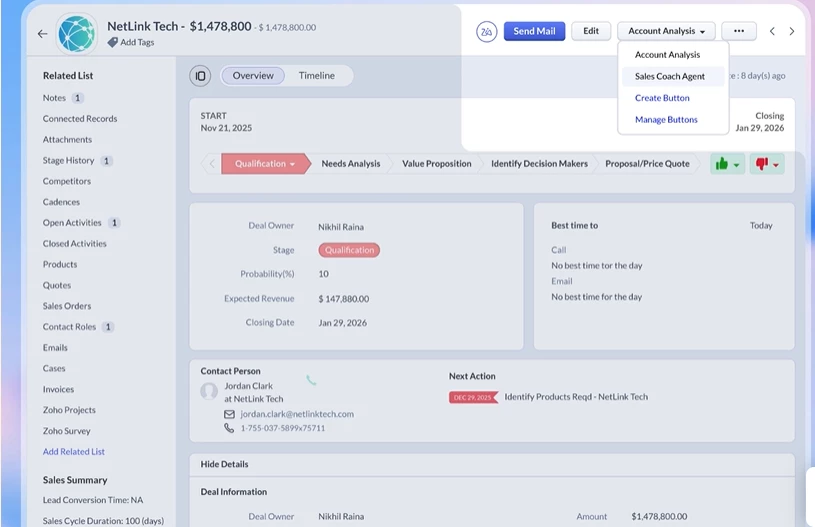
Its AI assistant, Zia, covers a broad set of functions. Zoho lists sales predictions, recommendations, forecasting, anomaly detection, data enrichment, email intelligence, call intelligence, workflow suggestions, voice-of-the-customer analysis, and agentic capabilities among Zia’s tools. Many of its more advanced capabilities are tied to higher CRM editions rather than the free or entry plans.
Zoho CRM also provides a free edition for up to three users. Its published pricing structure moves through Standard, Professional, Enterprise, and Ultimate editions, with feature availability changing across those tiers.
Original Observation
Zia is especially useful when the problem is not only “Which lead should I call?” but “Where is our sales process behaving unusually?”
Anomaly detection can highlight an unexpected change in conversions, targets, or pipeline behaviour. That is different from a simple lead score because it helps managers identify process-level problems rather than ranking individual contacts.
Zoho’s weakness is presentation and setup.
The platform contains many modules, settings, customisation options, and connected Zoho products. That flexibility is valuable for an experienced administrator, but a small non-technical team may find it harder to create a clean initial system.
Best suited to: Small and midsized companies that need custom processes, forecasting, and AI support at a more controlled licensing cost.
Less suitable when: Employees need an exceptionally simple interface with minimal configuration.
Verdict: Zoho CRM provides one of the broadest AI toolsets for its price range, but the value appears only after the company invests time in configuration and data discipline.
Salesforce
Salesforce is often considered the benchmark in CRM, particularly for larger teams with complex processes.
Pricing starts around 25 dollars per user per month and can scale up to 500 dollars or more depending on features and add-ons. Ratings are generally around 4.3.
Its AI strategy now extends beyond the original Einstein branding into Agentforce, which allows businesses to create and deploy AI agents across sales, service, and other workflows.
Salesforce offers several pricing structures for Sales Cloud and Agentforce. AI availability and usage can depend on the selected edition, add-ons, credits, and licensing model. Salesforce states that AI can be added to Enterprise editions and above, while some higher packages include broader AI and Agentforce access.
Its most comprehensive Agentforce 1 editions were announced with prices starting at $550 per user per month, showing how quickly the total investment can move beyond basic CRM licensing.
Original Observation
Salesforce becomes commercially valuable when the company needs AI to work across a carefully designed revenue system—not merely generate an email.
For example, an enterprise could combine account history, product usage, support cases, contract information, opportunity data, and approved internal knowledge before recommending the next action. That depth is difficult for a lightweight CRM to reproduce.
However, Salesforce can become an expensive database when the organisation buys it before defining its processes.
The platform usually requires implementation planning, administration, training, data migration, integration work, and continued governance. AI introduces another layer: businesses must decide which data an agent may access, which actions it may perform, and when a human must approve the result.
Salesforce has the highest potential ceiling in this comparison, but it also has the greatest distance between purchasing the software and realising its value.
Best suited to: Larger organisations with complex revenue operations, dedicated administrators, reliable data, and a long-term CRM strategy.
Less suitable when: A small team mainly needs contact management, pipeline visibility, and basic follow-up automation.
Verdict: Salesforce is the most powerful choice for complex organisations, but it is rarely the most efficient first AI CRM.
Freshsales
Freshsales, part of the Freshworks ecosystem, is designed to simplify CRM while still offering AI-driven capabilities.
Pricing ranges from around 15 to 69 dollars per user per month. It maintains strong ratings, often around 4.5. Its AI assistant, Freddy, helps with lead scoring, deal insights, and activity tracking.
The platform focuses on usability. It offers built-in calling, email tracking, and pipeline management without requiring extensive configuration. This makes it appealing for teams that want quick implementation.
Original Observation
Freshsales is most convincing when AI is used as a daily sales assistant rather than a company-wide intelligence system.
A representative opening the CRM wants immediate answers:
Which leads should I contact first?
Which deals have gone quiet?
What happened in the previous conversation?
What should my follow-up say?
Which task is overdue?
Freshsales keeps those actions close to the pipeline. This reduces the risk of AI becoming another separate workspace that employees must remember to open.
Its limitation is depth. Organisations requiring highly specialised data structures, extensive cross-department workflows, or complex enterprise reporting may eventually need more flexibility than Freshsales provides.
Best suited to: Small and midsized sales teams that want useful AI, email, calling, and pipeline tools without a heavy implementation.
Less suitable when: The CRM must coordinate deeply customised enterprise processes across several departments.
Verdict: Freshsales offers the best balance for teams that want AI assistance inside a straightforward sales workflow rather than a complete enterprise transformation.
Pipedrive
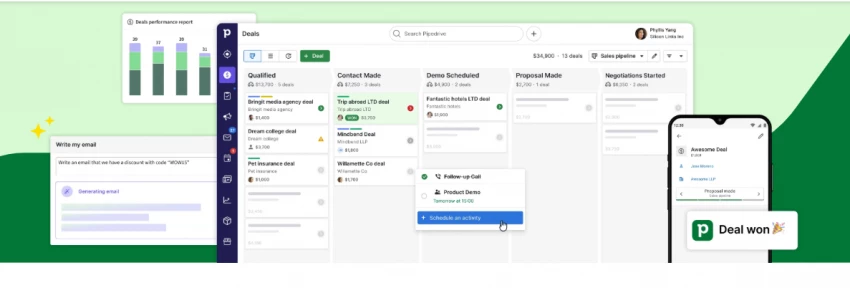
Pipedrive is built around a visual sales pipeline. Its structure encourages representatives to focus on activities, deal movement, and the next action required to advance an opportunity.
That focus is valuable because many CRM failures are not caused by missing predictions. They happen because salespeople have no clear next step.
Pipedrive’s AI and automation features can help summarise information, identify opportunities, support email creation, and guide sales activity. Feature availability varies across plans and add-ons, so businesses should verify the exact AI functions included before choosing a subscription.
Original Observation
Pipedrive’s strength is also its boundary.
It does not try to turn every business department into part of one highly customised platform. For a small sales team, that restraint can improve adoption.
When a deal enters the pipeline, the user can see its stage, value, owner, recent activity, and expected next action. This makes the system easier to maintain than a CRM filled with fields that representatives do not understand.
However, Pipedrive becomes less compelling when marketing automation, customer service, complex account hierarchies, and advanced analytics are central requirements.
Best suited to: Sales-led small businesses that need better pipeline discipline and more consistent follow-up.
Less suitable when: Marketing, service, customer success, and sales must operate through one broad customer platform.
Verdict: Pipedrive may produce more revenue than a more advanced CRM when the real problem is poor sales activity rather than missing intelligence.
ActiveCampaign
ActiveCampaign approaches customer data from an automation and lifecycle-marketing perspective.
Its key strength is the ability to use behaviour, engagement, segmentation, and customer attributes to trigger personalised communication. This makes it valuable for businesses where revenue is generated through repeated email interactions rather than a salesperson manually managing every opportunity.
AI can support content creation, automation development, segmentation, and campaign optimisation. However, ActiveCampaign’s pricing and product packaging depend on factors such as product selection, contacts, users, and the required automation functionality.
Original Observation
ActiveCampaign is better at answering “What communication should happen next?” than “How should a complex sales organisation manage its territories and forecasts?”
A business could use customer behaviour to separate a highly engaged prospect from someone who has stopped opening emails. Each contact can then enter a different automation path rather than receiving the same follow-up.
That is a direct revenue use case because it changes the customer experience, not merely the internal dashboard.
Its CRM and deal features are useful, but they remain less suitable for deeply structured sales operations than platforms built primarily around sales management.
Best suited to: Online businesses, service providers, course creators, SaaS companies, and ecommerce teams using email automation to nurture demand.
Less suitable when: A large sales team requires sophisticated account planning, forecasting, territories, and enterprise pipeline governance.
Verdict: ActiveCampaign is the strongest option in this group when customer nurturing produces more revenue than traditional opportunity management.
Comparison Table
CRM Tool
Verified evidence
Best use
Caution
HubSpot
Official plans include CRM, sales tools, automation, forecasting, and AI features.
Best for teams needing sales + marketing in one place.
Advanced features can become costly.
Zoho CRM
Official product pages confirm sales, marketing, automation, and Zia AI features.
Best for budget-conscious teams needing customization.
Setup may take time.
Salesforce
Official pricing confirms advanced sales, AI, automation, and enterprise features.
Best for large teams with complex sales processes.
Expensive and implementation-heavy.
Freshsales
Official pages confirm Freddy AI, deal insights, forecasting, and sales automation.
Best for simple sales teams wanting built-in AI.
Less flexible for complex enterprise needs.
Pipedrive
Official plans include pipeline tools, AI email/reporting features, and integrations.
Best for pipeline-focused sales teams.
Add-ons can increase cost.
ActiveCampaign
Official pages confirm automation, email marketing, CRM add-ons, and AI features.
Best for lead nurturing and customer journeys.
Not a full sales-first CRM by default.
Which AI CRM Should You Choose?
Choose HubSpot when marketing and sales need to work from the same customer journey and the business values ease of adoption.
Choose Zoho CRM when you need custom workflows, forecasting, and a broad AI feature set without immediately accepting enterprise-level costs.
Choose Salesforce when your organisation has complex processes, dependable data, dedicated administrators, and enough scale to justify implementation and AI governance.
Choose Freshsales when sales representatives need lead prioritisation, email assistance, communication tools, and pipeline management in a relatively approachable system.
Choose Pipedrive when the immediate revenue problem is weak follow-through, unclear next actions, and inconsistent pipeline management.
Choose ActiveCampaign when automated nurturing, segmentation, and customer lifecycle communication create more value than formal sales forecasting.
A Revenue Test to Run Before Buying
Before committing to an AI CRM, test one complete workflow rather than watching a general product demonstration.
Import a small group of realistic records and check whether the platform can:
Identify incomplete or duplicate data.
Surface inactive deals.
Prioritise the strongest opportunities.
Explain the reason behind a score or recommendation.
Draft a usable follow-up based on actual customer context.
Trigger an approved workflow.
Show which opportunities are at risk.
Produce a forecast a manager can understand.
Record the action without creating more administrative work.
Measure whether the action affected response, conversion, or sales-cycle time.
Do not judge the tool only by the quality of a generated email. Email writing is one of the easiest AI functions to reproduce outside a CRM.
The real value comes from using trusted customer context to recommend or complete the right action at the right moment.
Final Recommendation
Do not choose an AI CRM only because it promises automation, forecasting, or revenue growth. Choose it based on how your team sells, how clean your customer data is, and how much setup effort you can realistically manage.
HubSpot is the best starting point for teams that want a friendly CRM with strong sales and marketing alignment. Zoho CRM is better for budget-conscious teams that want customization and do not mind setup work. Salesforce is best for larger businesses with complex sales processes and the budget to manage implementation properly. Freshsales works well for teams that want a simple sales CRM with useful AI features. Pipedrive is the clearest option for small sales teams focused on pipeline movement. ActiveCampaign is strongest when email automation, segmentation, and customer journeys matter more than traditional deal management.
The most practical advice is simple: before paying for any CRM, test it with your real sales process. Add a few leads, create a pipeline, assign tasks, build one automation, check the reporting, and calculate the cost after all required add-ons. The right CRM should reduce daily work, not create another system your team avoids.