Picture the most common reason someone types Artguru into a search bar. It is rarely a plan to master Photoshop or a full professional design suite. More often it is a blurry holiday photo that deserves to look sharper, a selfie that might make a fun avatar, a social profile picture that feels a little too plain, or a quick AI art idea worth testing before sinking hours into learning prompt syntax. Artguru is built for exactly that kind of moment.
The cleanest way to understand Artguru is as a collection of small, focused AI visual tools rather than one single feature. The lineup covers AI art generation, text-to-image creation, photo-to-art conversion, avatar creation, profile pictures, headshots, photo enhancement, background removal, upscaling toward 4K, and basic video enhancement, with a newer PDF clarity option appearing inside the app menu. It runs in the browser and through iPhone and Android apps, and the company behind it is Cygnus Space.
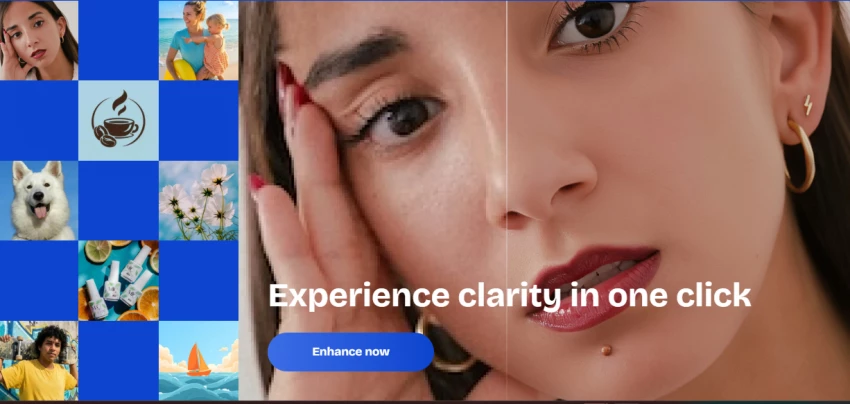
None of that makes Artguru a replacement for a studio toolchain, and this guide does not treat it as one. It sits in the casual-to-creator space: quick to start, friendly to people without editing skills, and most rewarding when the task is small and clearly visual.
The table below maps a real goal to the right Artguru tool and the kind of output to expect.
| User Goal | Artguru Tool Type | Best Output |
| Create image from text | AI image generator | AI art, concept visuals, social graphics |
| Turn photo into art | AI art generator from photo | Stylized portraits and creative edits |
| Make a profile picture | AI profile picture generator | Social media profile images |
| Create avatar | AI avatar, art, and face tools | Creative avatars and identity visuals |
| Fix blurry photo | Photo enhancer | Sharper portraits, old photos, headshots |
| Improve video clarity | Video enhancer | Cleaner short clips |
| Remove background | Background remover | Product images and profile cutouts |
| Prepare for print or social | 4K upscaling | Higher-resolution visuals |
| Improve old family photo | Photo restoration and enhancement | Cleaner memory photos |
| Improve logo or AI art | Upscaler and enhancer | Sharper design exports |
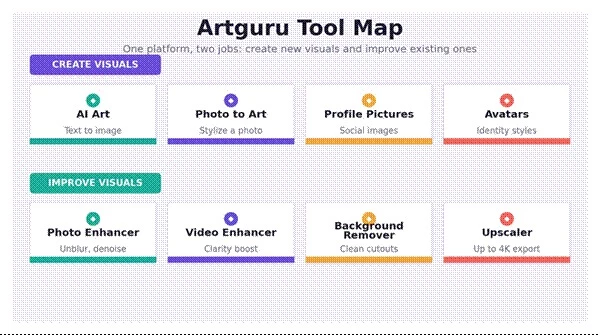
Visual 1: Artguru tool map, grouped into tools that create new visuals and tools that improve existing ones.
Across every tool, one pattern holds: Artguru rewards a clear visual instruction far more than a vague creative wish. A request like make something cool gives the model nothing to anchor to, so the output drifts. A request that names the subject, the style, the lighting, and the background gives it a target to hit. The same logic applies to enhancement and cleanup tasks, where naming what to fix and what to protect produces a more natural result than a blanket fix this.
The comparison below turns weak requests into tasks Artguru can actually act on.
| Weak Request | Better Artguru Task |
| “Make something cool.” | “Create a cyberpunk profile picture with neon lighting and a dark city background.” |
| “Fix this image.” | “Unblur this portrait, sharpen the face, reduce noise, and keep skin natural.” |
| “Make art from my photo.” | “Turn this selfie into a watercolor portrait with soft pastel tones.” |
| “Create a logo.” | “Generate a minimal logo concept for a coffee brand using a bean and sunrise shape.” |
| “Make it high quality.” | “Upscale this image to 4K, reduce blur, and preserve facial detail.” |
Treating Artguru as a small production line, rather than a one-click magic button, tends to produce better results. The loop below works for almost every tool, from AI art to avatars to photo cleanup.
| Stage | User Action | Artguru Role | Quality Check |
| Idea | Decide the output type | Offer the image, avatar, enhancer, or profile tool | Is the task clear? |
| Input | Add a prompt or upload a photo | Use the text or image as the starting point | Is the photo clear enough? |
| Style | Pick a style or describe the look | Set the visual direction | Does the style match the use case? |
| Generate | Produce the first result | Create the AI output | Check face, hands, text, background |
| Refine | Adjust the prompt or apply enhancement | Improve clarity or direction | Remove artifacts |
| Export | Download the final image or video | Ready it for social, profile, print, or design | Check watermark and resolution limits |
Artguru works best when treated as a quick visual workshop, not a full professional design department.
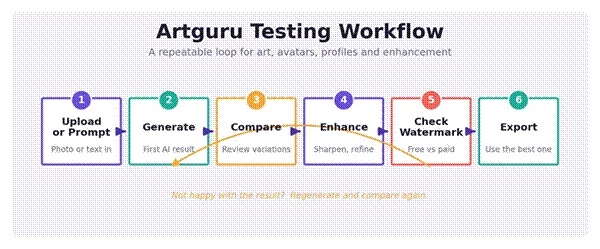
Visual 2: A repeatable testing loop, from prompt or upload through generate, compare, enhance, watermark check, and export.
I went into Artguru as a creator would, not as a developer poking at an API. The goal was simple: find out how it feels for someone who wants a usable visual quickly and does not want to learn complicated software to get there. Across the testing, I worked through the main flows, AI image generation, photo-to-art, profile picture generation, avatar creation, photo enhancement, background removal, upscaling, and video enhancement.
The clearest takeaway is that Artguru feels strongest when the task is small and visual. Improving a blurry photo, creating a stylized avatar, trying out a profile picture look, or generating a quick piece of AI art from a prompt all landed well. The moment the ask became broad or open-ended, the results got less predictable.
Input quality mattered more than anything else. A clear, well-lit selfie or a clean product shot gave noticeably better results than a dark, blurry, or tightly cropped photo. For AI art and avatars, I would never settle for the first output. The better approach was to generate several versions, compare them side by side, then enhance or lightly edit the strongest one.
For anything heading toward professional use, a corporate headshot, a real logo, or a commercial product visual, I would treat Artguru as a starting point and not the final production tool. The enhancer is genuinely handy for sharpening and noise reduction, but I kept checking whether faces still looked natural afterward, because pushing enhancement too far can leave skin looking plastic. The video enhancer is best understood as a basic clarity boost on short clips rather than a stand-in for real video editing. And for profile pictures, it suited casual and social use far better than strict corporate headshots.
None of this is a knock on the tool. It is just where the line sits: fast and fun for everyday visuals, less suited to work that needs tight control or guaranteed commercial polish.
| Feature I Tried or Evaluated | My Experience | Best Use |
| AI image generator | Useful for quick creative ideas, though prompt detail decides the outcome | Social visuals, AI art, concept images |
| Photo-to-art | Fun and effective when the original photo is clear | Stylized portraits and avatar-like images |
| Profile picture generator | Helpful for casual profile images | Instagram, TikTok, creator profiles |
| Avatar tools | Good for experimenting with different identities and styles | Gaming, creator branding, social profiles |
| Photo enhancer | Useful for blur, noise, and old photos | Portrait cleanup and image sharpening |
| Background remover | Practical for simple cutouts | Product photos and profile images |
| Upscaler | Helpful when the base image is already good | Sharper exports and social visuals |
| Video enhancer | Useful for a basic clarity lift | Short clips, not advanced editing |
Public sentiment is worth checking before trusting any tool, but it only helps if the numbers are real and read in context. The figures below were checked on June 6, 2026, and they come with an important caveat: Artguru does not carry the review volume of the larger creative platforms, so the scores shift easily and should be read as directional signals rather than the final word.
On Trustpilot, Artguru sits at roughly 3.0 out of 5 from about 18 reviews, with the platform noting that the company has not solicited those reviews. On the Google Play side, the Artguru photo enhancer app reads at about 3.4 out of 5 across roughly 140 ratings, with the listing live since late 2025 and published by Cygnus Space. App Store figures circulate through third-party trackers and vary widely, so no single store rating there is treated as authoritative in this guide. The recurring themes in written feedback are consistent: people like the speed and the free daily credits, while the most common complaints involve occasional distorted faces, inconsistent results between generations, and a free experience that pushes toward payment quickly.
Where public ratings are thin or inconsistent, the honest framing is this: Artguru does not appear to have the same volume of verified public reviews as larger creative platforms. For that reason, this guide leans on official feature information, live tool testing, pricing checks, and hands-on workflow evaluation, and it treats the available star ratings as supporting context rather than the basis of the verdict.
The scores below are an editorial read, based on how each tool performed in testing and how well it fits real creator tasks. They are deliberately kept separate from the public ratings above.
| Category | Rating | Reason |
| AI art generation | 4.0 / 5 | Good for quick creative visuals when the prompt is specific |
| Photo-to-art conversion | 4.2 / 5 | Strong for stylized portraits and creative profile images |
| Profile picture creation | 4.1 / 5 | Useful for casual and creator profile images |
| Avatar generation | 4.0 / 5 | Good for experimenting with social and gaming-style avatars |
| Photo enhancement | 4.0 / 5 | Helpful for sharpening, blur reduction, and old photos |
| Background removal | 3.8 / 5 | Useful for simple cutouts, though complex edges need checking |
| Video enhancement | 3.5 / 5 | Good for basic clarity, not pro-level editing |
| Logo concept generation | 3.2 / 5 | Useful for ideas, but not final brand identity work |
| Pricing clarity | 3.0 / 5 | Free and paid limits need careful checking |
| Overall creative usefulness | 4.0 / 5 | Best as a quick visual tool for creators and casual users |
These ratings are based on editorial workflow testing and feature fit. They are not official Artguru ratings or public user review scores.
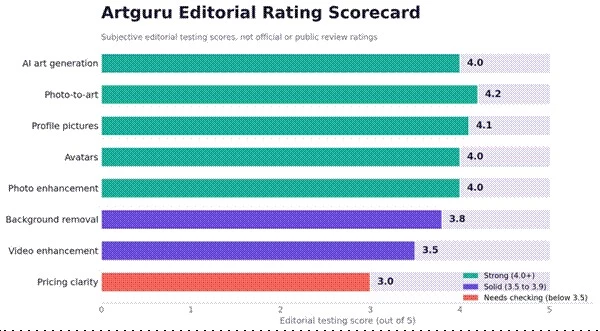
Visual 3: Editorial rating scorecard. These are subjective testing scores, not official or public review ratings.
Better prompts are the single biggest lever on output quality inside Artguru. The formulas below are simple templates, each followed by a worked example that can be adapted in seconds.
Formula: Subject + style + mood + background + lighting + detail level + negative details
Example: “Create a cinematic fantasy portrait of a young explorer standing near glowing ruins, soft blue moonlight, detailed clothing, dramatic atmosphere, realistic digital painting, no extra fingers, no distorted face.”
Formula: Person or photo style + background + lighting + expression + platform use
Example: “Create a clean social media profile picture with a friendly expression, soft studio lighting, modern gradient background, sharp face details, natural skin texture, suitable for LinkedIn and Instagram.”
Formula: Keep identity + change style + background + mood + details to avoid
Example: “Keep the same face and pose, convert the photo into a soft watercolor portrait, warm background, gentle lighting, artistic but recognizable, avoid cartoon distortion.”
Formula: Product type + scene + surface + lighting + commercial style
Example: “Create a premium product photo of a black ceramic coffee mug on a wooden desk, morning sunlight, minimal background, warm lifestyle aesthetic, clean commercial photography style.”
Formula: Enhancement target + details to preserve + over-editing to avoid
Example: “Sharpen the face, reduce blur and noise, improve lighting, preserve natural skin texture, avoid plastic skin or over-smoothing.”
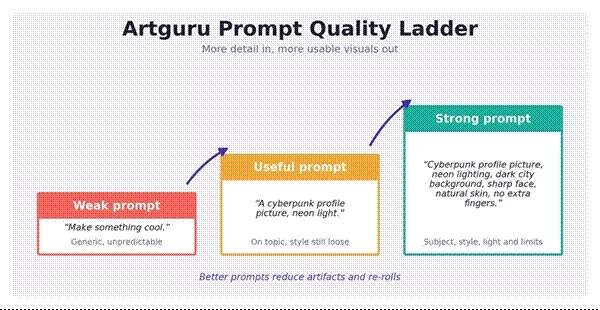
Visual 4: The prompt quality ladder, from a weak one-line prompt up to a specific, detailed one.
| User Type | Best Artguru Use | Main Caution |
| Instagram creator | Profile pictures, stylized portraits, visual posts | Avoid overused avatar styles |
| Blogger | Featured images and article visuals | Check originality and relevance |
| Small business owner | Product cutouts, logo concepts, promo visuals | Do not treat an AI logo as a final trademark-safe design |
| Student | Presentation visuals and simple image enhancement | Verify academic image-use rules |
| Photographer | Quick enhancement and restoration drafts | Professional retouching may still be needed |
| Job seeker | Headshot and profile cleanup | Avoid unnatural AI face edits |
| E-commerce seller | Background removal and product image cleanup | Check marketplace image rules |
| Family user | Old photo enhancement | Keep expectations realistic for damaged photos |
The smartest way to place Artguru is by the job at hand. For some tasks it is a strong pick, and for others a specialist tool will serve better.
| If the Main Need Is | Consider Artguru | Also Compare With |
| Simple AI art | Yes | Leonardo AI, Canva AI, Adobe Firefly |
| High-end AI art | Maybe | Midjourney, Leonardo AI |
| Photo enhancement | Yes | Let’s Enhance, ImgUpscaler, Remini |
| Background removal | Yes | Photoroom, Remove.bg |
| Professional headshots | Maybe | BetterPic, Aragon AI, Supawork AI |
| Social profile pictures | Yes | Picsart, Canva, Fotor |
| Logo design | Concept only | Canva, Looka, Adobe Express |
| Video enhancement | Basic use | CapCut, Topaz Video AI |
| Mistake | Likely Result | Better Approach |
| Using one-word prompts | Generic AI art | Add subject, style, lighting, and background |
| Uploading a very blurry face | Weak avatar or headshot | Use the clearest source photo available |
| Expecting perfect text in images | Misspelled or distorted text | Add text later in Canva or Photoshop |
| Treating an AI logo as final | Branding and legal risk | Use it as a concept, then refine manually |
| Over-enhancing portraits | Plastic skin effect | Ask for natural skin texture |
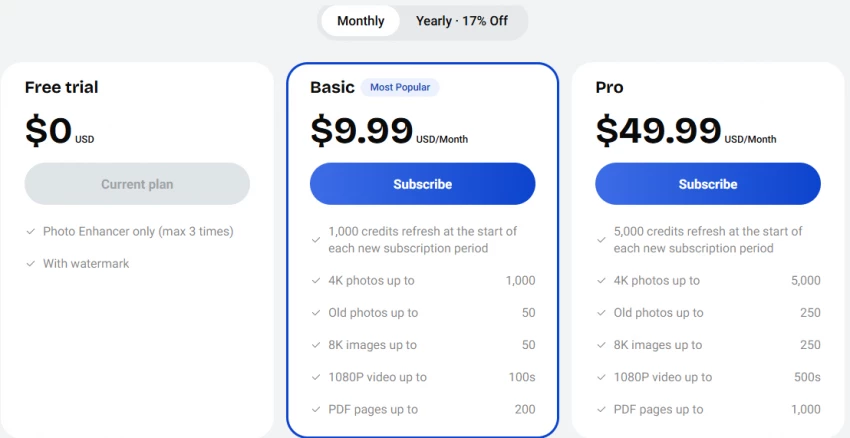
| Ignoring watermark limits | An unusable final export | Check free and paid export rules |
| Uploading someone else’s photo | Consent and privacy issue | Use personal or permission-based images |
Artguru earns its place when the need is a simple way to make AI art, turn a photo into a stylized visual, build a profile picture, sharpen a blurry image, or test a creative idea without learning a complex editor. In testing, it felt strongest the moment the task was concrete: enhance this photo, create this avatar style, remove this background, or generate this specific kind of visual.
It is not a replacement for professional retouching, serious brand design, trademark-safe logo work, or advanced video editing, and pretending otherwise would set the wrong expectations. The reliable way to use it is to generate several options, compare them carefully, enhance the strongest result, and check watermark, resolution, usage rights, and naturalness before anything goes public.
Use Artguru for quick creative output. Reach for specialist tools when the job demands professional control, commercial safety, or polished brand-level results.
Share your thoughts about this article.
Be the first to post a comment!

The same tool can be a 4.7 on one site and a 3.9 on another. Here is what is rea...
Nitin1 month ago

Here is the number worth pinning above your budget: in Gartner Digital Markets r...
Deepak Mehra1 month ago

What Artlist AI is in 2026Artlist began as a royalty-free music library. By 2026...
Deepak Mehra2 months ago

Most AI tool failures do not announce themselves. There is no crash, no angry em...
Nitin2 months ago

The best AI image generator in 2026 is Nano Banana 2 for speed, FLUX.2 for photo...
Parveen Verma2 months ago

“Useful” is a slippery word for a coding assistant. A tool can be brilliant at o...
Sakshi Dhingra2 months ago