
Here is the number worth pinning above your budget: in Gartner Digital Markets research, 60 percent of software buyers said they regretted a purchase, and Capterra put it at 59 percent of businesses regretting at least one software buy in the previous 18 months. AI writing tools sit right in the blast radius. Adoption is close to universal, with roughly 90 percent of marketers now using AI for text work and 97 percent of content marketers planning to lean on it this year. Yet a large share of buyers still switch vendors, cancel contracts, or quietly keep paying for a login no one opens.
The gap is not a quality problem. Most popular tools write competent copy. The gap is a fit problem. A tool that dazzles in a demo can still be wrong for the way you actually work, and that mismatch is what surfaces later as wasted spend and abandoned tabs. This guide hands you a repeatable way to choose for fit, built around a scored method called the Workflow-Fit Test.
Two facts sit awkwardly next to each other. Adoption has gone vertical: 90 percent of marketers use AI for text tasks, daily use jumped from 37 percent in 2024 to 60 percent, and Siege Media found 97 percent of content marketers planned to use AI in 2026. At the same time, the regret numbers stay stubbornly high, and a third of unhappy buyers end up changing vendors entirely.
Part of the trouble is sheer volume. Capterra reported that generative AI software listings nearly doubled in a single year, and the share of buyers who find it hard to assess the value and risk of these tools rose 70 percent over the same period. More options has not made choosing easier. It has made it harder.
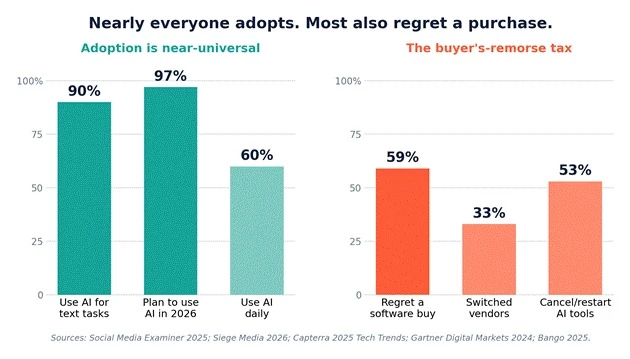
Then the bills stack up. The average AI user now pays for roughly four separate tools, about 66 dollars a month, per Bango research, and 53 percent cancel and restart AI subscriptions as their needs shift. Across the wider software estate, more than half of SaaS licenses go unused. When Capterra asked regretful buyers what they would change, the top answers were not about picking a smarter tool. They were about clarifying goals up front (36 percent) and getting stakeholders aligned (32 percent).
The takeaway: the market rewards you for evaluating fit, not for hunting down the single most powerful model. Power you cannot slot into your day is just a recurring charge.
Fit is not a vibe. It is about where a tool sits in the work you already do: the inputs it needs, the output it hands back, and the handoffs on either side. Before you judge any tool, get honest about three questions.
● What does it need from you before it can produce something usable? Brand voice, context, source material, a good brief.
● How close is its output to publishable, or how much do you end up rewriting?
● Who or what touches the work before and after, and does the tool respect those handoffs?
A tool fits when it lowers total effort across that whole path, not just the drafting step. That distinction matters, because drafting is rarely the bottleneck: only 7 percent of marketers publish AI output without editing it. If a tool writes a fast first draft but the rewrite eats your afternoon, it did not save you anything. It moved the work.
The Workflow-Fit Test scores a tool on seven signals, weighted by how often each one is the thing that quietly kills adoption. The weights below are a starting point. Reweight them for your situation: a solo blogger leans hard on editability, while an enterprise leans on stack fit and controls.
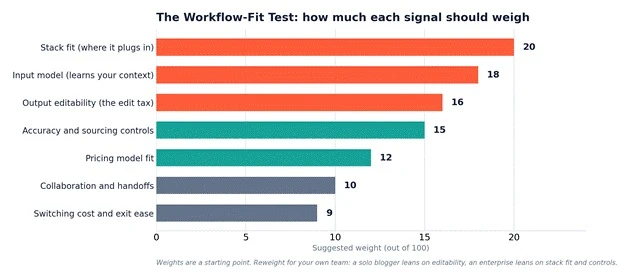
The single biggest predictor of whether you keep using a tool is whether it lives where you already work. A browser extension, a Docs sidebar, or a native CMS block beats a separate app you have to remember. This is not a small effect: research finds nearly one in five workers switch apps more than 100 times a day, and toggling costs about 9 percent of the workday. A tool that adds a context switch can burn more time than it saves.
Generative models default to the average of the internet, which is why blank-prompt output sounds like everyone else. Look for brand voice capture, custom instructions, and the ability to ground the tool in your own approved material. Bain found that structured, grounded workflows cut content time by 30 to 50 percent, while a 2026 Clutch survey found 55 percent of consumers view a brand less favorably when they can tell the content was machine made. Context is not a nice-to-have. It is the difference between publishable and generic.
Since almost nobody publishes raw output, the real cost of any writing tool is rewrite time. Test how close first drafts land to your standard, and how easily you can steer with a follow-up instruction rather than starting over. A slightly weaker writer that lands 90 percent of the way often beats a brilliant one you rewrite from scratch.
43 percent of marketers flag inaccurate information as a top risk of AI content, and confident errors are expensive to catch. Favor tools that cite sources, ground answers in documents you supply, and give you guardrails. Hallucination is not a footnote. It is a workflow cost that lands on whoever fact-checks the draft.
Match the pricing model to how your usage actually behaves. Per-seat plans suit steady team use. Credit and usage models punish spiky months and quietly produce surprise bills: 78 percent of IT leaders reported unexpected charges tied to consumption or AI pricing, and ChatGPT recently became the single most-expensed application by transaction volume. Read the meter before you sign.
If more than one person touches the work, sharing, roles, version history, and approvals stop being optional. A tool that is perfect for a solo writer can fall apart the moment an editor and a legal reviewer join the chain.
Before you commit, know how you leave. Can you export your data, prompts, and templates? How locked in are you if fit breaks in six months? This is the signal buyers skip most and regret most, so score it before money changes hands, not after.
Use this as a scannable reference while you trial:
| Signal | What to pressure-test in a real trial | Weight |
| Stack fit | Does it live where you already work, or is it another tab you must remember to open | 20 |
| Input model | Can it learn your brand voice, context, and source material, or does it start from a blank prompt | 18 |
| Output editability | How close the first draft lands to your standard, and how easily you can steer it | 16 |
| Accuracy and sourcing | Citations, grounding, and guardrails that keep confident errors out of your copy | 15 |
| Pricing model fit | Seats, credits, or flat rate, matched to how your usage actually spikes | 12 |
| Collaboration | Sharing, roles, version history, and approvals if more than one person touches the work | 10 |
| Exit ease | Data export, template portability, and how cheaply you can leave if fit breaks | 9 |
The Workflow-Fit Test lives inside a simple selection process. Seven steps, in order, take you from a vague shortlist to a confident commitment.
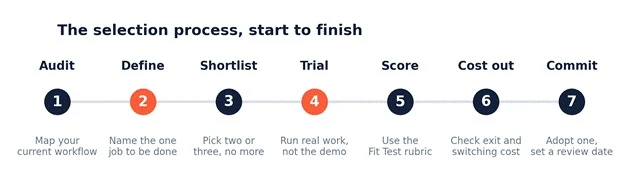
Step 1. Audit your current workflow. Write down each step of how a piece gets made today and where it stalls. You cannot fit a tool to a process you have never mapped.
Step 2. Define the one job. Name the single job you want the tool to own: first drafts, repurposing, editing, or ideation. Regretful buyers overwhelmingly say they wish they had clarified goals at the outset.
Step 3. Shortlist two or three, no more. With listings nearly doubling in a year, more candidates means slower decisions, not better ones. Cap the field before you start.
Step 4. Run a real-work trial. Use your actual briefs and brand material, never the vendor demo prompt. The demo is engineered to shine. Your ordinary Tuesday is what you are actually buying.
Step 5. Score with the Fit Test rubric. Rate each candidate on the seven signals, weighted. Putting a number on the mismatch makes the right choice obvious and defensible to stakeholders.
Step 6. Cost out the exit. Check export, lock-in, and switching cost while walking away is still cheap.
Step 7. Commit and set a review date. Adopt one, then put a calendar reminder to re-check fit in 60 or 90 days. Fit is not permanent, and your workflow will move.
Most buyer regret traces back to a short list of avoidable errors. Watch for these.
● Buying the demo, not your workflow. The demo is a controlled environment. Trial on real work instead.
● Chasing the most powerful model. Raw capability you cannot integrate still gets canceled. Fit beats horsepower.
● Ignoring where it plugs in. The tab you forget to open is the tool you stop paying attention to, then keep paying for.
● Underpricing the edit tax. A tool that drafts fast but needs a full rewrite has not saved time. It has relocated it.
● Skipping the trial to move fast. A week of real use is far cheaper than a year of a contract you regret.
● Buying by committee with no workflow owner. 32 percent of regretful buyers cite stakeholder misalignment. Let someone who does the actual work own the call.
● Letting it auto-renew unwatched. More than half of SaaS licenses go unused. Diarize the renewal and re-justify it.
Before you rip a tool out and start shopping again, know that most fit problems are fixable, and fixing is usually cheaper than re-shopping. Work through these in order.
● Re-scope the job. A tool often fails because you asked it to do too much. Narrow it to the one job it does genuinely well and route the rest elsewhere.
● Invest in grounding and brand voice. Generic output usually means generic input. Feed it your style guide, strong samples, and real context. Structured workflows cut time by 30 to 50 percent for a reason.
● Build reusable prompt templates. Turn your best prompts into saved templates so quality does not depend on how sharp you feel that morning.
● Fix the handoff, not the tool. Sometimes the tool is fine and the process around it is the leak. Check the step before and after before blaming the software.
Know when to cut losses. If, after fair grounding and a real trial, the edit tax is still high, the integration still fights you, or the pricing still surprises you, switch. Around 53 percent of AI users cancel and restart tools as needs change. Handled cleanly, with your data and templates exported, that is a healthy pruning habit, not a failure.
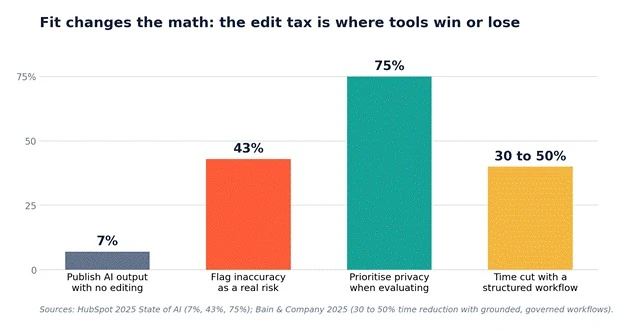
The winning move is not finding the smartest AI writer. It is choosing the one that disappears into how you already work. Run the seven-signal Workflow-Fit Test, trial on real work rather than the demo, weigh the edit tax and the exit cost as seriously as the output, and set a review date so fit stays honest over time.
Do that, and you land on the right side of the numbers: the teams who quietly save hours a week, instead of the majority who regret the buy and go shopping all over again.
Share your thoughts about this article.
Be the first to post a comment!

The same tool can be a 4.7 on one site and a 3.9 on another. Here is what is rea...
Nitin1 month ago

What Artlist AI is in 2026Artlist began as a royalty-free music library. By 2026...
Deepak Mehra1 month ago

Most AI tool failures do not announce themselves. There is no crash, no angry em...
Nitin1 month ago

The best AI image generator in 2026 is Nano Banana 2 for speed, FLUX.2 for photo...
Parveen Verma1 month ago

“Useful” is a slippery word for a coding assistant. A tool can be brilliant at o...
Sakshi Dhingra1 month ago
How this comparison was builtEvery price, limit, credit rule and feature stateme...
Sakshi Dhingra1 month ago