
“Useful” is a slippery word for a coding assistant. A tool can be brilliant at one job and a waste of a subscription for another. So instead of a thumbs up or thumbs down, this guide takes Blackbox AI apart task by task and asks a sharper question: for the specific thing you are trying to do, will it actually save you time, or just add a step? Below you will find where it shines, where it stumbles, who gets the most out of it, and how it stacks up against the tools it competes with.
Quick verdict Yes, Blackbox AI is useful, but conditionally. It is at its best on the everyday 80 percent of coding: boilerplate, routine functions, turning a screenshot into a working UI, explaining unfamiliar code, and writing tests. Its rare trick is giving you 300-plus AI models in one place for a low price. Where it gets shaky is the hard 20 percent, the complex multi-file autonomous builds, where rivals like Cursor and Claude Code are more reliable. Think of it as a fast, versatile assistant, not an autopilot. |
Before the deep dive, here is the summary in one table. Each rating reflects how consistently the tool delivers value for that job with low review overhead, based on 2026 hands-on reviews and reported workflows.
| What you want to do | Useful? | In one line |
| Write boilerplate and routine code | Very | Fast, accurate, and where most of the daily time saving lives |
| Turn a screenshot or Figma into code | Very | Vision AI is a genuine standout for frontend work |
| Understand or learn unfamiliar code | Very | Plain-English explanations make it a strong learning tool |
| Generate tests and documentation | Yes | Handles the tedious parts developers usually skip |
| Pick the best model per task | Yes | Claude, GPT, Gemini and more under one subscription |
| Debug and review code | Mostly | Good second opinion; still needs your judgment |
| Build complex multi-file features solo | Limited | Higher manual-review load than Cursor or Claude Code |
| Work fully offline | No | Cloud-only; needs an internet connection |
At its simplest, you describe what you want in plain English and it returns working code. But by 2026 it has grown well past a single autocomplete box into a multi-surface toolkit. Here is the full capability set and how much each one matters in practice.
| Capability | What it does | Why it matters |
| Code generation | Turns natural-language prompts into working code in 50+ languages | The core value; drafts in seconds what takes minutes by hand |
| Inline completion | Suggests the next lines as you type in your editor | Keeps you in flow on repetitive patterns |
| Code explanation | Breaks down any snippet step by step | Turns the tool into a tutor for new libraries or legacy code |
| Debugging | Reads an error and proposes fixes | A quick second angle when you are stuck |
| Test generation | Writes unit tests covering multiple scenarios | Removes a chore most developers put off |
| Docs & comments | Generates comments and documentation from code | Keeps codebases readable with little effort |
| Vision AI | Converts a screenshot or Figma design into code | Compresses design-to-frontend handoff dramatically |
| Multi-model access | Routes to 300+ models via a 'Chairman' layer that picks the best output | One subscription instead of many separate accounts |
| Agents | CLI, remote, and parallel agents run multi-step tasks | Hands off longer jobs while you work on something else |
| Web search mode | Checks current docs and the live web | Cuts down on outdated or hallucinated library versions |
Ratings are one thing. Here is what each of the high-value jobs looks like in real use, and why it earns its score.
This is the bread and butter, and where the tool is most reliably useful. Standard CRUD functions, API request handlers, data-transformation helpers, config files, regex you would rather not write by hand. You describe the input, output, and behavior, and you get a solid first draft. Reviewers consistently rate it strong on these routine patterns, and reported productivity claims of shipping projects two to three times faster come almost entirely from collapsing this everyday work.
| Example prompt that works well: “Write a Python function that takes a list of dictionaries and returns only the items where the age field is greater than 18.” You get clean, ready-to-adapt code in seconds. |
The Vision AI feature is one of the few places Blackbox AI clearly leads. Paste a screenshot of a UI, or point it at a Figma frame, and it generates the frontend markup and styling to match. For frontend developers and anyone prototyping, this removes one of the slowest handoffs in the job. It is not pixel-perfect every time, but as a starting scaffold it saves real hours.
Ask it to explain any function and it produces a step-by-step logic breakdown in plain language. This makes it quietly excellent as a learning tool. Students and developers picking up an unfamiliar codebase, a new framework, or a tricky recursive function get an on-demand tutor. One education-focused source reported roughly 40 percent faster learning curves on Python and Java when explanation was used alongside writing code. Treat that figure as directional rather than precise, but the underlying use case is real and valuable.
Unit tests and documentation are the tasks developers most love to skip. Blackbox AI generates test cases across different scenarios from a description of the function, and produces comments and docs directly from your code. The usefulness here is less about raw speed and more about actually getting these done at all.
This is the signature feature. Most tools lock you into one model. Blackbox AI gives you access to Claude, GPT, Gemini, DeepSeek, MiniMax, and its own models from a single interface, with a routing layer it calls the Chairman that compares outputs and surfaces the strongest one. In practice you can lean on one model for complex reasoning, another for fast completions, and a third for long-context refactors, without juggling separate subscriptions. In early 2026 it added parallel agents, so you can, for example, have one model refactor authentication logic while another writes tests on the same repository at the same time. The catch is transparency: it is not always clear which model was chosen or why, which can frustrate anyone who wants predictable behavior.
Feed it an error and your code, and it will propose a cause and a fix. This is useful, but it sits a notch below the others because it works best as a second pair of eyes rather than a definitive answer. It shines at surfacing an angle you had not considered; it is less dependable as a final verdict on subtle, system-level bugs.
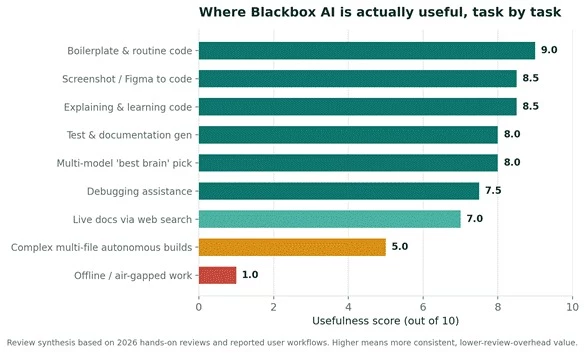
Figure 1. The pattern is clear: Blackbox AI is most useful on the high-frequency everyday tasks and least useful on complex autonomous builds and offline work.
Usefulness depends heavily on who you are and what you build. The same tool that is perfect for one person is redundant for another.
| If you are a | Usefulness | Why |
| Student or new coder | Excellent | Free tier plus explain-code makes it a low-cost tutor and sandbox |
| Frontend / UI developer | Excellent | Screenshot-to-code and Figma-to-code are directly in your wheelhouse |
| Solo builder / indie hacker | Very good | Many models and agents at a low price beat paying for several tools |
| Budget-conscious team | Very good | Undercuts Cursor and matches Copilot while offering more models |
| Backend / systems engineer | Good | Fine for routine work; review load rises on complex logic |
| Enterprise on mission-critical code | Situational | Only via Enterprise on-premise; rivals offer IP indemnity and polish |
| Developer needing offline / air-gapped | Poor | Cloud-only, so it simply does not fit |
A fair usefulness review has to name the ceilings, because knowing them is what keeps the tool useful rather than frustrating.
Complex, multi-file autonomous builds. This is the clearest gap. On involved tasks, reviewers report the autonomous agent needs meaningfully more manual review than Cursor, on the order of 30 to 40 percent cleanup versus under 10 percent. For a large refactor spanning many files, that review overhead can erase the time you saved.
Predictability. The multi-model routing that makes it flexible also makes it less predictable. When you want the same model to behave the same way every time, the hidden Chairman selection can get in the way.
Latency on multi-agent work. Running several models adds a reported couple of seconds per response. Fine for background jobs, noticeable during fast interactive coding.
Offline work. There is no meaningful offline mode. If you code on planes, in secure facilities, or on an unreliable connection, this is a hard limit.
Credit confusion. Plans advertise generous agent access, but frontier-model calls consume credits at different rates, which can make heavy usage less predictable than a flat subscription implies.
The honest way to judge usefulness is against the tools you would otherwise pay for. Here is how it lines up with the two most common comparisons.
| Dimension | Blackbox AI | GitHub Copilot | Cursor |
| Entry paid price | ~$10/mo | ~$10/mo | ~$20/mo |
| Models available | 300+ | Core model + ecosystem | Premium models |
| Best at | Value, variety, vision-to-code | Inline autocomplete, IDE flow | Multi-file refactors, polish |
| Free tier | Generous | Limited | Limited |
| Complex autonomous tasks | Weaker | Reliable | Strongest |
| Platform coverage | Widest (6 surfaces) | In-IDE | Own editor |
| Enterprise safeguards | On-premise tier | IP indemnity | Business plan |
Sources: 2026 head-to-head reviews (AI Unveiled, ToolChase, DevToolDock, VibeCoding). Pricing indicative; verify current rates.
The short read: for the widest capability per dollar, Blackbox AI wins. For the smoothest autocomplete and enterprise guarantees, Copilot leads. For the highest-quality complex refactoring, Cursor is ahead. Many developers happily run Blackbox AI as the flexible, cost-effective daily driver and reach for a specialist tool on the hardest jobs.
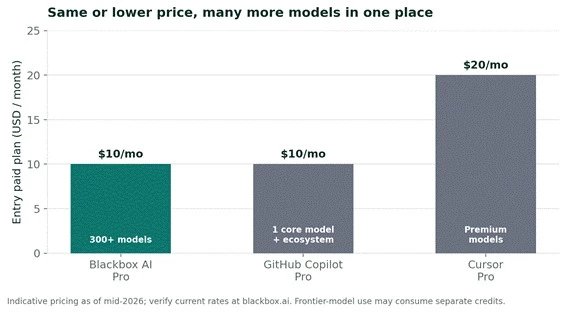
Figure 2. The value case in one picture: comparable or lower entry price, with far more models reachable from a single subscription.
Value is a big part of why people find Blackbox AI useful at all. The tiers, as of mid-2026, look like this. Prices change often, so confirm at blackbox.ai before committing.
| Plan | Price (approx.) | What you get | Useful for |
| Free | $0 | Unlimited chat, basic autocomplete, web search | Learning, evaluating, light use |
| Pro | ~$10/mo | Premium models, image-to-code | Most individual developers |
| Pro Plus | ~$20/mo | App Builder agent, multi-agent execution | Heavier projects, power users |
| Pro Max | ~$40/mo | Unlimited agent requests, SAML SSO, priority support | Teams and admins |
The free tier is unusually capable and is genuinely useful on its own for learners. The Pro plan is the sweet spot: for around ten dollars it undercuts Cursor and matches Copilot while opening up hundreds of models and image-to-code that neither includes at that price. One caveat worth carrying over from the broader reviews: billing and cancellation have drawn frequent complaints, so start monthly and keep an eye on charges rather than committing annually on day one.
The gap between “this is amazing” and “this wastes my time” usually comes down to how you use it. A few habits that consistently raise the payoff:
1. Be specific in prompts. State the inputs, outputs, and expected behavior. Vague asks get vague code; precise asks get usable drafts.
2. Match the model to the job. Use a reasoning-strong model for logic, a fast one for autocomplete, and a long-context one for refactors. This is the whole point of the multi-model access.
3. Turn on web search for anything version-sensitive. It forces the model to check current documentation and cuts down on outdated library calls.
4. Lean on it for the 80 percent, not the 20 percent. Let it handle boilerplate, tests, and explanations. Keep human ownership of complex architecture and security-sensitive logic.
5. Always review before shipping. There is no built-in guarantee against bugs or license conflicts, so treat every output as a strong draft, not a finished product.
6. Use the free tier as your test drive. Confirm it fits your workflow before paying, and prefer a monthly plan until you are sure.
Is Blackbox AI useful? For most developers, yes, provided you aim it at the right work. It is a fast, flexible, low-cost assistant that excels at the high-frequency tasks that fill a normal coding day, and its combination of 300-plus models and screenshot-to-code genuinely stands out. Point it at boilerplate, frontend scaffolding, explanations, and tests, and it earns its keep several times over.
The usefulness drops when you ask it to autonomously build complex, multi-file features, where the review overhead climbs and specialist tools pull ahead. So the smartest way to think about it is not “is this the best tool,” but “is this the most useful tool for this task.” For the everyday 80 percent of coding, for learners, and for anyone who wants many models cheaply in one place, the answer is a confident yes.
How this assessment was made
This usefulness review applies a Task-Value scoring approach: each core job was rated on how consistently the tool delivers a usable result with low review overhead, drawing on multiple independent 2026 hands-on reviews and reported user workflows rather than any single source. Capabilities and pricing were checked against current review coverage and vendor documentation; comparison points were sourced to head-to-head analyses of Blackbox AI against GitHub Copilot and Cursor. Productivity figures such as faster shipping and learning gains are reported by their original sources and are presented as directional, not precise. No statistics were invented, and pricing is noted as approximate because the vendor changes it frequently.
Is Blackbox AI actually useful, or just hype?
It is genuinely useful for everyday coding: generating routine code, converting designs to frontend, explaining code, and writing tests. The hype tends to overstate its reliability on complex autonomous builds, where it trails Cursor and Claude Code. Used for the right jobs, it delivers real time savings.
What is Blackbox AI best used for?
Boilerplate and routine functions, screenshot-to-code and Figma-to-code for frontend, learning and explaining unfamiliar code, and generating tests and documentation. Its multi-model access also makes it useful as a single place to try several AI models on the same problem.
Is Blackbox AI good for beginners?
Very. The free tier plus the explain-code feature makes it an affordable tutor and sandbox. Beginners get working examples they can study and modify, which shortens the learning curve considerably.
Can Blackbox AI replace a developer?
No. It accelerates a developer rather than replacing one. It drafts, explains, and speeds up routine work, but it still needs human review for correctness, architecture, and security. It is a productivity multiplier, not an autopilot.
Share your thoughts about this article.
Be the first to post a comment!

The same tool can be a 4.7 on one site and a 3.9 on another. Here is what is rea...
Nitin1 month ago

Here is the number worth pinning above your budget: in Gartner Digital Markets r...
Deepak Mehra1 month ago

What Artlist AI is in 2026Artlist began as a royalty-free music library. By 2026...
Deepak Mehra1 month ago

Most AI tool failures do not announce themselves. There is no crash, no angry em...
Nitin1 month ago

The best AI image generator in 2026 is Nano Banana 2 for speed, FLUX.2 for photo...
Parveen Verma1 month ago
How this comparison was builtEvery price, limit, credit rule and feature stateme...
Sakshi Dhingra1 month ago