
Artlist began as a royalty-free music library. By 2026 it has become an all-in-one AI creative suite. The Artlist AI Toolkit brings image, video, voiceover, and music generation into one workspace, backed by a catalog of more than two million licensed assets. The platform advertises access to over one hundred models, including options from Google, OpenAI, Flux, Kling, and Hailuo, and it layers a full production environment called Artlist Studio on top. Generations draw from a monthly credit pool, and most output carries a commercial license.
Pricing splits across three families. The AI Suite runs from AI Starter at $11.99 per month on annual billing (16,500 credits) up to AI Professional at $239.99 per month (500,000 credits). A separate Artlist Max plan combines the AI tools with the stock catalog from $39.99 per month. Credits expire at the end of each billing cycle, and stock plans bill annually up front.
That breadth is also the reason many creators shop for a substitute. The sections below set out why, how the five strongest alternatives were assessed, and where each one fits.
Several recurring frictions push creators toward other platforms. None make Artlist a weak product; they simply matter more to some workflows than others.
● Annual commitment and up-front billing. Most Artlist stock plans bill for a full year at signup, which suits steady producers but not occasional users.
● Credit expiry. AI credits do not roll over. Unused capacity is lost at the end of each cycle, which penalizes irregular production schedules.
● First-generation AI video. Independent reviews describe Artlist's own video generation as an early product, with shorter clip lengths and lower resolution than dedicated video engines, though the model picker also exposes third-party models.
● Daily download limits and shifting licence terms. Reviewers note per-day download caps and licence rules that change after a subscription ends.
● Plan restructuring and cost. Artlist reorganized its AI tiers in early 2026, and heavy generation moves quickly into higher-priced plans.
● Single-asset-family needs. A creator who only needs music, only needs stock footage, or only needs one generation model often pays for capabilities that go unused.
Independent scores reflect this mixed picture: Artlist holds about 4.1 out of 5 on G2 across roughly 103 reviews, and near 3.4 out of 5 on Trustpilot, where licensing and support complaints appear most often.
This comparison applies a repeatable structure, the PARITY Evaluation Framework, so each platform is judged on the same six vectors that decide whether a tool can stand in for Artlist AI.
● P, Positioning fit. Whether the platform targets the same job, generative creation plus creative assets, rather than a single narrow feature.
● A, Access and pricing model. Entry cost, credit or subscription mechanics, and whether a free tier exists.
● R, Rights and licensing. Commercial use, and whether the vendor offers intellectual-property indemnification.
● I, Integration and workflow. Editors, ecosystem depth, and the breadth of the model picker.
● T, Toolkit breadth. Coverage across video, image, voice, music, and stock, plus the number of models available.
● Y, Yield signals. Independent ratings and review volume from G2, Trustpilot, Capterra, and Product Hunt, alongside documented complaints.
Every price below was read from the vendor's public pricing page and cross-checked against recent third-party pricing trackers in August 2026. Figures use annual-billing rates unless noted, and exclude local taxes. Ratings are aggregate scores from the named review platforms. No score here comes from hands-on testing.
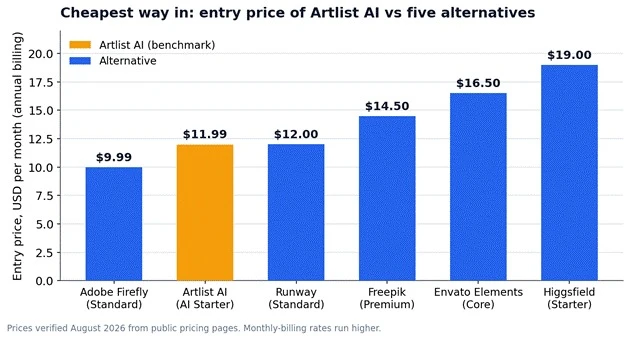
Figure 1. Entry price of Artlist AI compared with the five alternatives, annual billing.
The table sets the headline numbers. The sections that follow explain what each platform does, how its plans are structured, what users report, and how it lines up against Artlist AI.
| Platform | Best for | Entry price (annual) | Top tier | Licensed library | G2 rating (reviews) |
| Artlist AI | All-in-one AI suite plus assets (benchmark) | $11.99/mo (AI Starter) | $239.99/mo (AI Pro) | Yes, 2M+ assets | 4.1 (103) |
| Runway | Dedicated AI video generation | $12/mo (Standard) | $76/mo (Max) | No | 4.4 (78) |
| Adobe Firefly | Commercially safe generation | $9.99/mo (Standard) | $199.99/mo (Premium) | Separate (Adobe Stock) | 4.4 (277) |
| Freepik | Multi-model hub plus assets | $14.50/mo (Premium) | $210/mo (Pro) | Yes, 200M+ assets | 4.7 (162) |
| Envato Elements | Widest asset library | $16.50/mo (Core) | $109/mo (Ultimate) | Yes, 29M+ assets | 4.1 (241) |
| Higgsfield | Cinematic AI video | $19/mo (Starter) | $99/mo (Ultra) | No | 4.5 (79) |
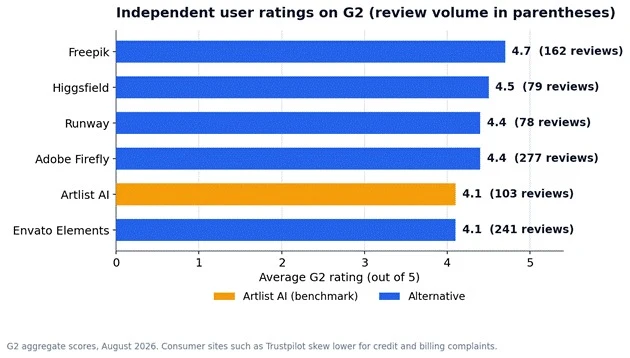
Figure 2. Independent G2 ratings and review volume across the six platforms.
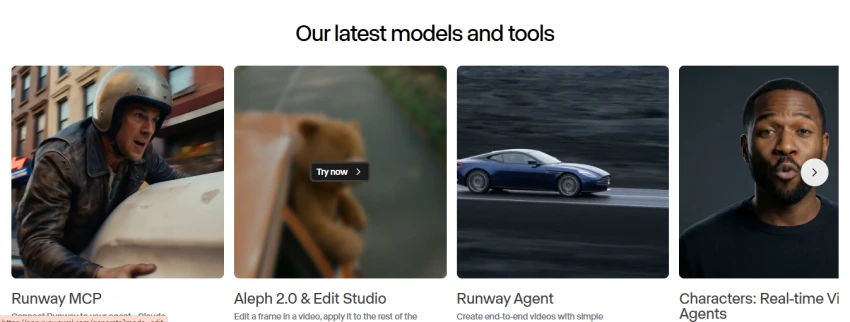
Overview. Runway is the reference point for generative AI video. Rather than bundling a stock library, it concentrates on proprietary video models and the editing tools around them. Its flagship Gen-4.5 and Gen-4 models handle text-to-video and image-to-video, Aleph handles in-context video editing, and Act-Two handles performance capture. Character and style consistency across shots is the capability reviewers cite most.
Key features. Runway pairs generation with a browser-based editor, a Motion Brush for directed motion, text-to-speech and custom voices for lip sync, upscaling, and ProRes export on higher tiers. The workspace keeps generation and finishing in one place, which removes the export step between separate tools.
Pricing. Runway runs on credits that vary by model. One second of Gen-4.5 costs about 25 credits, so plan capacity is best read in seconds of output rather than clip counts. Credits do not roll over except on Max.
| Plan | Price (annual billing) | Key allowance |
| Free | $0 (one-time) | 125 one-time credits, watermark, 720p |
| Standard | $12/mo | 625 credits/mo, core models, watermark removal |
| Pro | $28/mo | 2,250 credits/mo, ProRes export, 500 GB storage |
| Max | $76/mo | 9,500 credits/mo, credit rollover, early model access |
| Enterprise | Custom | Security, compliance, dedicated support |
What users report. Runway holds about 4.4 out of 5 on G2 across roughly 78 reviews, where reviewers praise cinematic output and consistency. Consumer reviews on Trustpilot skew sharply lower, dominated by complaints about credit consumption on failed generations and billing. The gap between the two audiences is wide, so the credit math deserves attention before an annual commitment.
How it compares to Artlist AI. Runway wins on raw video quality and directorial control, and it offers a genuine free tier. It does not provide a licensed music or stock library, so a creator who relies on Artlist for music and footage would pair Runway with a separate source.

Overview. Adobe Firefly is Adobe's generative AI layer for image, vector, video, and audio. Its defining claim is legal safety: Firefly's core models are trained on licensed content, and Adobe extends intellectual-property indemnification to eligible users, which matters for advertising, packaging, and client work. Firefly runs as a standalone web app and inside Photoshop, Express, and Premiere.
Key features. Firefly covers text-to-image, generative fill, vector generation, video generation, and audio translation, and it now exposes selected partner models alongside Adobe's own. Paid plans include unlimited standard image generations; credits are consumed only by premium features such as video and partner-model output. The Pro plan adds web and mobile Photoshop plus Express Premium.
Pricing. At $9.99 per month, Firefly Standard is the lowest entry price in this comparison. Standard image generation is uncapped on paid plans, so credits mainly matter for video and premium media.
| Plan | Price (annual billing) | Key allowance |
| Free | $0 | 25 generative credits/mo, watermark |
| Standard | $9.99/mo | 2,000 credits/mo, unlimited standard images |
| Pro | $19.99/mo | 4,000 credits/mo, Photoshop and Express Premium |
| Pro Plus | $49.99/mo | 10,000 credits/mo, selected unlimited models |
| Premium | $199.99/mo | 50,000 credits/mo, unlimited video generation |
What users report. Firefly holds about 4.4 out of 5 on G2 across roughly 277 reviews, one of the larger review bases in this group. Reviewers highlight the intuitive interface and commercial safety, while noting inconsistency on complex prompts and credit limits on heavier workloads.
How it compares to Artlist AI. Firefly matches Artlist on commercial safety and beats it on editor integration for anyone already inside Adobe's tools. Its stock library, Adobe Stock, is a separate purchase, so the all-in-one asset economics differ from Artlist Max.

Overview. Freepik combines a very large stock catalog with an AI generation suite that aggregates dozens of leading models. It rebranded its AI tools and pricing under the Magnific name in April 2026. The pitch mirrors Artlist's own model picker at a lower entry price: one subscription, many models, plus more than two hundred million stock assets.
Key features. Freepik exposes upward of thirty-nine image models and thirty-six video models, including FLUX.2, Google Imagen 4 Ultra, Nano Banana Pro, Seedream, Kling, Veo, and Runway Gen-4, along with voice, sound-effects, and music generation and Magnific upscaling. A collaborative canvas, Freepik Spaces, adds workflow automation for teams.
Pricing. Premium+ and Pro add explicit commercial indemnification. Unlimited access is selective and covers roughly ten image models; video and premium image generation always consume credits, which do not roll over.
| Plan | Price (annual billing) | Key allowance |
| Free | $0 | 20 AI images/day, 10 stock downloads/day |
| Premium | $14.50/mo | Premium stock plus moderate AI credits |
| Premium+ | $33.75/mo | 600K credits/yr, unlimited on ~10 image models, indemnity |
| Pro | $210/mo | 4M credits/yr, API access, indemnity |
| Business | $55/seat/mo | Multi-seat workspace, shared credits |
What users report. Freepik earns about 4.7 out of 5 on G2 across roughly 162 reviews, the highest score in this group. Reviewers praise the breadth of models and assets and the value at the entry tier. Some long-term subscribers criticized the April 2026 rollback of unlimited access, which reintroduced credits on premium models.
How it compares to Artlist AI. Freepik is the closest match to Artlist's multi-model, asset-plus-AI positioning, and it undercuts Artlist on entry price while offering a broader stock library. The trade-off is a busier interface and a credit system that burns fast on video.
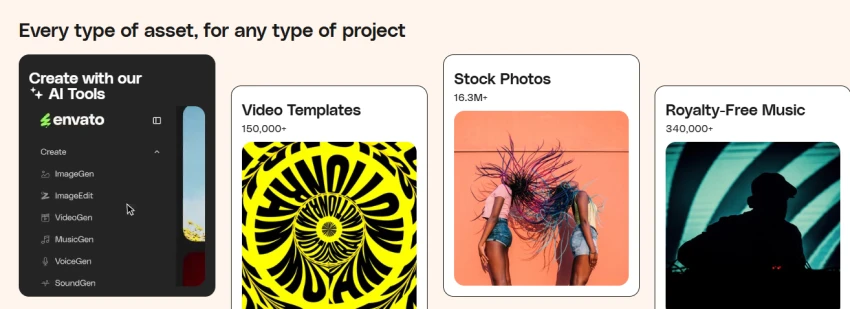
Overview. Envato Elements is a flat-fee subscription for unlimited downloads across the broadest asset range in the market: stock video, photos, music, sound effects, fonts, templates, WordPress themes, and 3D. In 2026 it added an AI suite for image, video, voice, and music generation. Downloads made during an active subscription carry a lifetime commercial license.
Key features. The catalog spans more than twenty-nine million assets, including over 174,000 music tracks. The AI tools sit alongside the library, so a project can mix generated and licensed assets. Asset breadth, including design and code categories Artlist does not cover, is the platform's core advantage.
Pricing. Unlimited stock downloads apply on every tier. The difference between tiers is the monthly AI generation allowance.
| Plan | Price (annual billing) | Key allowance |
| Core | $16.50/mo | Unlimited downloads, 10 AI generations/mo |
| Plus | $39/mo | Unlimited downloads, 100 AI generations/mo |
| Ultimate | $109/mo | Unlimited downloads, unlimited AI generations |
| Student Core | $11.50/mo | Core features at a student rate |
| Teams | From ~$10.75/seat/mo | Shared workspace, per-seat AI allowance |
What users report. Envato's review picture is split. It holds around 4.1 out of 5 on G2, where the annual value draws praise, but only 2.3 out of 5 on Trustpilot across more than nine thousand reviews, driven by complaints about AI caps that replaced former unlimited access, annual renewals, and refused refunds. The large Trustpilot base makes those frictions hard to overlook.
How it compares to Artlist AI. Envato beats Artlist on sheer asset breadth and offers truly unlimited stock downloads, which Artlist's credit model does not. Its AI generation is capped except on the top tier, so heavy generators may still prefer a model-first platform.
Overview. Higgsfield is a multi-model AI video platform built for cinematic production. It aggregates more than fifteen video models, including Sora 2, Veo 3.1, Kling 3.0, WAN 2.6, Seedance 2.0, and Hailuo, and wraps them in a virtual production environment. Its signature feature, Cinema Studio, simulates real camera behavior, letting a creator set camera body, lens, focal length, and stacked movements before generation.
Key features. Beyond the model roster and camera presets, Higgsfield includes a Soul ID system for character consistency, a Lipsync Studio with voice cloning, and a Marketing Studio for ad formats. It is a generation and production tool rather than a full timeline editor.
Pricing. Higgsfield changes prices and promotions often, and some accounts see plan labels of Basic, Pro, and Max. Credit costs vary widely by model and resolution, and credits do not roll over.
| Plan | Price (annual billing) | Key allowance |
| Free | $0 | No included credits, frequent one-day trials |
| Starter | $19/mo | ~270 credits/mo, selected models |
| Plus | $47/mo | ~1,200 credits/mo, all models, unlimited windows |
| Ultra | $99/mo | ~3,000 credits/mo, 4K output, priority |
| Business | Per seat | Team workspace and admin controls |
What users report. Higgsfield holds about 4.5 out of 5 on G2 across roughly 79 reviews and near 4.0 out of 5 on Trustpilot across more than three thousand nine hundred reviews. Reviewers praise the cinematic range and responsive support, while recurring complaints describe fast credit burn and throttling on the unlimited windows during peak demand.
How it compares to Artlist AI. Higgsfield offers deeper cinematic control and access to flagship video models than Artlist's own video generation. Like Runway, it carries no licensed music or stock library, so it substitutes for the generation half of Artlist rather than the whole platform.
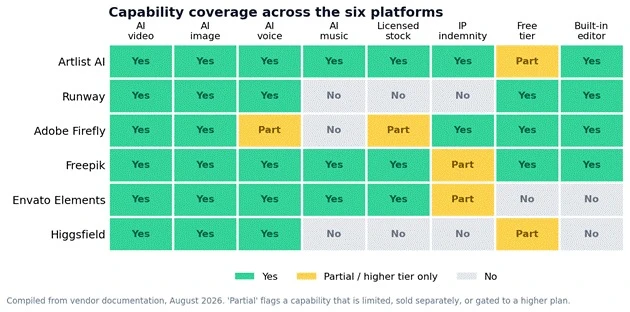
Figure 3. Capability coverage across the six platforms, from vendor documentation.
The six platforms fall into three lanes, and the right pick depends on which Artlist capability matters most.
● Strongest generative video on its own engine: Runway.
● Commercially safe generation inside professional editing tools: Adobe Firefly.
● Broadest model choice plus a large asset library at a low entry price: Freepik.
● Widest asset library with unlimited downloads: Envato Elements.
● Cinematic AI video with camera-level control: Higgsfield.
Cost also scales differently across the group. Entry prices sit within a narrow band, but the top individual tiers diverge sharply, from $76 per month on Runway to $239.99 per month on Artlist AI's own AI Professional plan.
Artlist AI remains a strong option for creators who want generative tools and licensed assets in one subscription. However, its annual commitments, expiring credits, and higher costs for heavy AI use make other platforms a better fit for some workflows.
Freepik is the closest all-round alternative if you want a large stock library alongside access to many AI models. Runway is the better pick for creators focused primarily on high-quality AI video. Adobe Firefly makes the most sense for commercial teams already using Photoshop, Premiere Pro, or Adobe Express. Envato Elements is strongest for broad asset needs and unlimited downloads, while Higgsfield is designed for creators who want more cinematic camera control in AI video.
The best choice depends on whether your priority is stock assets, commercial safety, video quality, model choice, or predictable pricing. Check current credit allowances and licence terms before subscribing, as these plans change frequently.
What is the best Artlist AI alternative in 2026?
Freepik is the closest alternative for creators who want both AI generation and a large licensed asset library. Runway is better for dedicated AI video creation.
Is Artlist AI better than Runway?
Artlist AI is broader because it combines AI tools with music and stock assets. Runway is generally the more specialised choice for advanced AI video generation and editing.
Which Artlist alternative has the best stock library?
Envato Elements offers the broadest asset selection, including templates, video, photos, music, fonts, WordPress themes, and 3D assets. Freepik is also a strong option for stock visuals and AI generation.
Is Adobe Firefly safe for commercial use?
Adobe positions Firefly’s core models as commercially safer because they are trained on licensed content. Eligible Adobe customers may also receive intellectual-property indemnification, but businesses should review the current Adobe terms for their plan and use case.
Does Freepik include AI video generation?
Yes. Freepik provides AI video generation through multiple models, alongside image generation, upscaling, voice, music, and its licensed stock library. Video generations use credits on paid plans.
Share your thoughts about this article.
Be the first to post a comment!

The same tool can be a 4.7 on one site and a 3.9 on another. Here is what is rea...
Nitin1 month ago

Here is the number worth pinning above your budget: in Gartner Digital Markets r...
Deepak Mehra1 month ago

Most AI tool failures do not announce themselves. There is no crash, no angry em...
Nitin1 month ago

The best AI image generator in 2026 is Nano Banana 2 for speed, FLUX.2 for photo...
Parveen Verma1 month ago

“Useful” is a slippery word for a coding assistant. A tool can be brilliant at o...
Sakshi Dhingra1 month ago
How this comparison was builtEvery price, limit, credit rule and feature stateme...
Sakshi Dhingra1 month ago