How this comparison was built Every price, limit, credit rule and feature statement below was taken from the live Slidesgo and Presentations.AI pricing pages, FAQ pages, product pages and enterprise documentation in August 2026, cross checked against public review data on G2, Capterra and Trustpilot. No paid account was purchased and no deck was generated for this article, so nothing here is presented as a hands on test result. Where the two companies publish figures about themselves that cannot be independently verified, those figures are attributed to the company. Where official pages contradict each other, the contradiction is reported rather than resolved. |
The blank first slide is not one problem. It is two, and they belong to two different people.
One person already knows the argument, the running order and the closing ask. What they need is for the thing to look like it came from a design team. The other has a forty page research PDF, a half written client brief and a suspicion that the story is somewhere inside it. Those two are not shopping for the same product, even though a search for the best AI presentation maker will hand them the same dozen names.
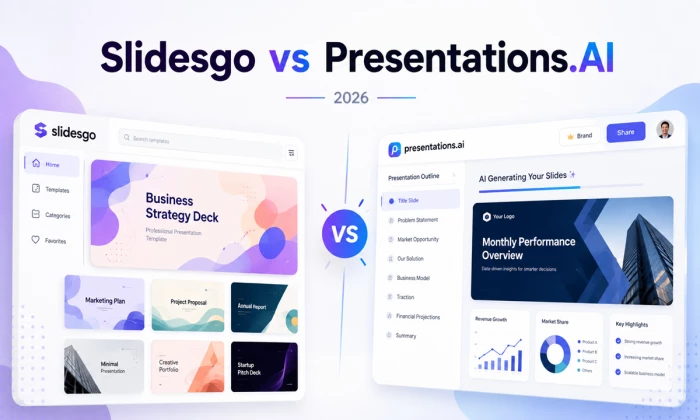
Slidesgo and Presentations.AI sit at opposite ends of that split more cleanly than most of the alternatives. Slidesgo grew out of a designer made template catalogue operated by Freepik Company, which now trades under the Magnific brand, and has been layering AI generation on top of that library. Presentations.AI, founded in 2018 and listing offices in Singapore and Bengaluru, started from the other end: the deck as the output of a pipeline that swallows prompts, documents, URLs and existing PowerPoint files, then structures, writes, designs and brands the result.
The short version, before the evidence: Slidesgo is the better buy for anyone who already knows what they want to say, and it is close to unbeatable in education. Presentations.AI is the stronger system for business teams who need AI to organise the raw material and then hold every deck to a brand standard. Whether the second is worth close to seven times the first comes down to one question that price tags cannot answer on their own.
| Category | Slidesgo | Presentations.AI | Stronger option |
| Template variety | Excellent | Moderate | Slidesgo |
| AI deck generation | Good | Excellent | Presentations.AI |
| Content structuring | Basic | Strong | Presentations.AI |
| Getting started free | Excellent | Limited | Slidesgo |
| PowerPoint workflow | Native PPTX | Export, Pro gated | Slidesgo |
| Google Slides workflow | Native, plus add on | Via PPT conversion | Slidesgo |
| Brand control | Manual, master slides | Brand Sync, plan gated | Presentations.AI |
| Education | Purpose built | No education plan | Slidesgo |
| Business presentations | Good | Excellent | Presentations.AI |
| Charts and data | Editable, Sheets linked | Chart and diagram slides | Contextual |
| Presentation analytics | Not documented | All paid tiers | Presentations.AI |
| Collaboration | Team seats, admin | Multi user licence only | Contextual |
| Refund policy | 30 days, conditional | No refunds | Slidesgo |
| Affordability | $35.99 a year | $240 to $1,200 a year | Slidesgo |
| Overall score | 7.6 out of 10 | 7.2 out of 10 | Slidesgo, narrowly |
Two of those rows deserve a warning label before anyone acts on them. The refund row is the single most consequential difference for a first time buyer, and the overall score is close enough that the category weights matter more than the headline.
A template platform answers the question of which design to start from. An AI first platform answers the question of what the presenter is actually trying to communicate. Those are different questions, and the order in which a tool asks them determines which kind of work it removes.
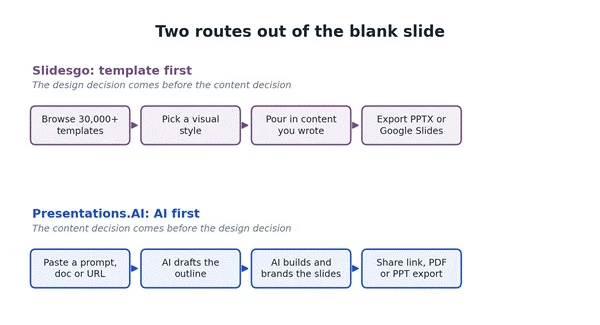
Figure 1. The design decision and the content decision happen in opposite orders on the two platforms.
On Slidesgo, the design decision comes first. A user browses a catalogue the company describes as more than 30,000 templates, picks a look, and pours in content they have already written. The AI Presentation Maker shortcuts the writing step, but the finished file still lands in PowerPoint or Google Slides, where the real editing happens in tools the user already owns.
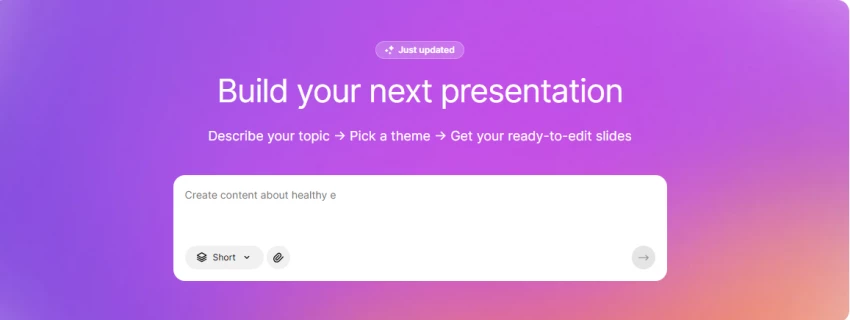
On Presentations.AI the content decision comes first. A prompt, a Word file, a PDF, a URL or an existing deck goes in, the system drafts an outline the user can edit, and only then does it build slides. The platform keeps custody of the file afterwards, which is what makes its analytics, live sharing and brand enforcement possible, and also what makes leaving it more awkward than leaving Slidesgo.
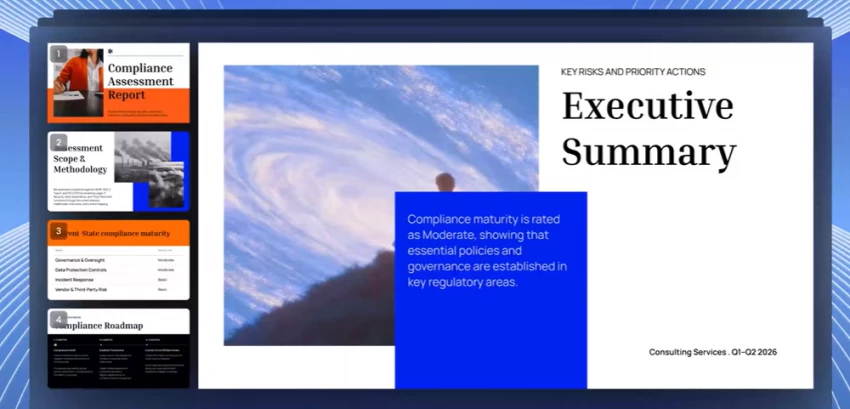
The line that decides most of this comparison A large template library matters most when the presenter already knows the story. AI generation matters most when the story still needs organising. Almost every disagreement about which of these tools is better traces back to which of those two states the buyer is in. |
Nothing below is marked yes unless it appears in official documentation. Where a company's own pages disagree, the row says so.
| Capability | Slidesgo | Presentations.AI |
| Prompt to presentation | Yes | Yes |
| Document to presentation | Yes, via AI PDF to PPT tool | Yes, PDF, DOCX and PPTX |
| URL to presentation | Not documented | Yes |
| Existing deck redesign | Not documented | Yes, PPTX upload |
| Editable AI outline before build | Not documented | Yes |
| AI adds slides to a finished deck | Not documented | No, on roadmap |
| Upload own images into AI output | No, stated as coming | Yes |
| Template library size | 30,000+ claimed on pricing page, 15,000+ claimed in FAQ | 100+ full deck templates plus slide templates |
| AI generation design choices | 800+ designs stated | AI generated layouts |
| PowerPoint export | Yes, native PPTX, no credit cost | Yes, FAQ states Pro licence plus 5 credits per slide |
| Google Slides | Yes, native, plus Workspace add on | Via PPT to Slides conversion |
| PDF export | Yes, through PowerPoint or Slides | Yes, watermarked and low resolution on free tier |
| Keynote | Yes, documented in FAQ | Not documented |
| Online editor | Yes | Yes |
| Brand kit | No, manual master slide edits | Yes, Brand Sync, plan gated |
| Custom fonts | Google Fonts in Slides, any font in PowerPoint | Yes, all tiers |
| Custom brand colours | Manual | Yes, all tiers |
| Custom templates saved | Favourites and folders | Gold only, or $999 built to order |
| Charts and data visuals | Editable charts, Google Sheets linked | Chart, table and diagram slides |
| Pitch deck generation | Templates only | Dedicated AI pitch deck generator |
| Education material | Slidesclass, Teacher Toolkit, quiz and lesson tools | No education plan |
| Presentation analytics | Not documented | Views and slide engagement, all tiers |
| Public share links | Not documented | Yes, unbranded |
| Password protected links | Not documented | Pro and Gold |
| Video or voiceover export | Not documented | No, stated on roadmap |
| Free plan | 3 AI decks and 3 downloads every month | One off credit grant, figures differ by page |
| Team features | Up to 1,000 seats, admin panel | Multi user licences at 5, 10, 25, 50 |
| Enterprise options | Education institution pricing | Custom, SSO, audit logs, API |
Take one brief: a ten slide deck on how generative AI is changing retail marketing. Based on the documented workflows rather than a hands on run, the two paths diverge almost immediately.
The user enters the topic, the system generates content, the user picks from the design set offered for AI output, edits the text inside the Slidesgo editor, and downloads a PPTX. Slidesgo's own step by step description puts style selection third, after topic and personalisation, which tells you where the tool thinks the interesting decisions are. From there the file opens in PowerPoint or Google Slides and the rest of the work happens in familiar software. Manual effort remaining: sourcing the market statistics, replacing the stock imagery, and building any chart that needs real numbers.
The user can skip the writing entirely by feeding in a research PDF or a competitor URL. The system drafts an outline, the user reshapes it, and the deck is generated with brand colours and fonts already applied if the organisation domain has been set. Manual effort remaining: fact checking every generated claim, adding real chart data, and accepting that the deck cannot be extended with further AI generated slides afterwards. The FAQ is explicit that AI cannot currently generate new slides for an existing presentation, so an underlength deck means adding slides by hand from templates or regenerating from a revised outline.
The asymmetry worth internalising Slidesgo saves design time. Presentations.AI attempts to save thinking time, structuring time and design time in one pass. That is a bigger promise, and it is why the price is bigger. It is also why the failure mode is different: a weak Slidesgo deck looks fine and says nothing, while a weak Presentations.AI deck can say something confidently wrong. Neither platform verifies facts, and both outputs need a human editing pass before anything is presented. |
Judged on documented capability rather than output testing, Presentations.AI does more of the work in five of seven areas that matter.
| Dimension | Assessment | Stronger |
| Understanding the prompt | Slidesgo accepts a topic and a tone. Presentations.AI accepts a topic, a document, a URL, an outline or an existing deck. | Presentations.AI |
| Structuring the story | Presentations.AI exposes an editable outline before generation. Slidesgo does not document an equivalent step. | Presentations.AI |
| Content generation | Neither company claims factual verification. Independent testers have reported inconsistent output quality from both. | Tie |
| Slide design | Slidesgo's designs are made by human designers and rate 9.5 on G2 for slide design. Presentations.AI generates layouts algorithmically. | Slidesgo |
| Editing after generation | Slidesgo hands off to PowerPoint and Google Slides. Presentations.AI documents several editing limits inside its own canvas. | Slidesgo |
| Brand consistency | Brand Sync applies colours, fonts and logos automatically. Slidesgo requires manual master slide work. | Presentations.AI |
| Data heavy decks | Presentations.AI ships chart and diagram slide types. Slidesgo charts are editable and can be linked to Google Sheets. | Presentations.AI |
Slidesgo's own reviewers make the same point without being asked. On G2 the platform scores 9.5 for slide design and 9.6 for quality of support, and every AI related sub score sits below both.
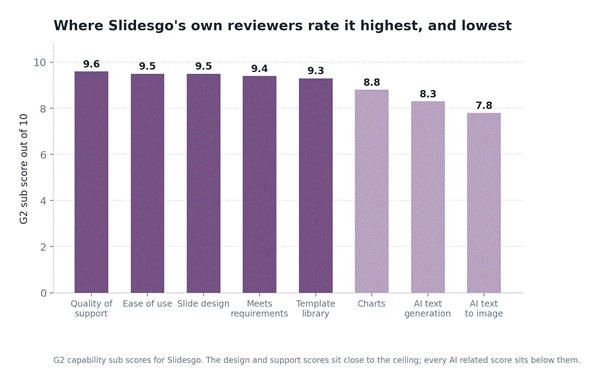
Figure 2. Slidesgo's G2 capability sub scores. The design and support numbers sit near the ceiling; the AI numbers do not.
Read that chart as a description of what Slidesgo is rather than a criticism. Its reviewers value the catalogue and the help desk, and treat the AI as a convenience rather than the reason they subscribed.
Presentations.AI's public template offering is measured in the low hundreds of full deck templates plus individual slide templates. Slidesgo's is measured in tens of thousands. Raw count decides less than it appears to.
Template count matters when a user wants to browse until something feels right, and when the subject is narrow. A biology teacher looking for a cell structure theme, a medical resident preparing a case report, a student with a thesis defence in three days: these people benefit directly from a catalogue organised by subject, school level, style and colour. Slidesgo's navigation is built precisely around that browsing behaviour.
Template count matters less when the layout is being constructed to fit content the AI has just written. In that model a smaller set of well behaved layouts, applied intelligently, beats a huge catalogue the user has to search. Where Presentations.AI is genuinely thinner is bespoke identity: saved custom templates sit on Gold only, and a fully custom template is quoted at $999 as a service, which puts it out of reach for individuals.
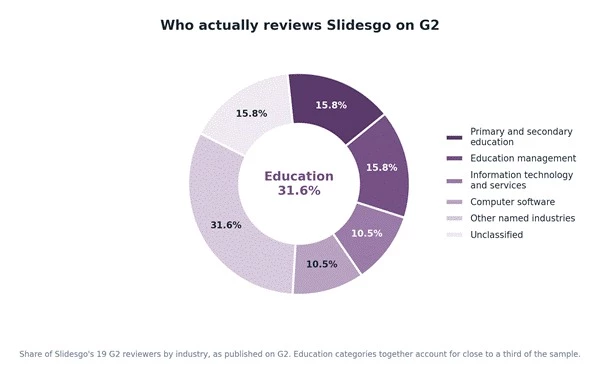
Figure 3. Education categories account for close to a third of Slidesgo's G2 reviewer base.
The reviewer mix is a useful sanity check on positioning. Almost a third of Slidesgo's G2 sample comes from primary, secondary and education management roles. Presentations.AI's published customer list runs the other way entirely: consultants, sales teams, founders, customer success managers and marketing teams, with no education plan offered at all.
This is where the two products separate most sharply, and where the search intent behind best AI tool for PowerPoint gets an unexpected answer.
Slidesgo treats PowerPoint and Google Slides as the destination. Templates download natively into both, the AI Presentation Maker outputs PPTX, and an official add on lets users pull Slidesgo layouts into a Google Slides deck without leaving the browser tab. The known friction is typographic: fonts come from Google Fonts and must be installed locally for PowerPoint to render the design as designed, a point the FAQ covers in detail.
Presentations.AI treats PowerPoint as an export. The pricing comparison grid shows PowerPoint and PDF export ticked on all three tiers, while the FAQ states that PPT export requires a Pro licence and that free users get a low resolution watermarked PDF through Chrome only. Those two official statements do not agree, and anyone budgeting around free export should resolve it with support before paying.
Export fidelity has documented edges even on Pro. Slide transitions are lost in PPT export by design, object level animations survive only through a second download link sent by email, and the troubleshooting section carries dedicated entries for alignment and formatting discrepancies in exported PowerPoint files and for exported files that will not open. Google Slides is reached through a PPT to Slides conversion tool rather than a native path. Being able to export to PowerPoint and exporting well to PowerPoint are different claims, and only the first is documented here.
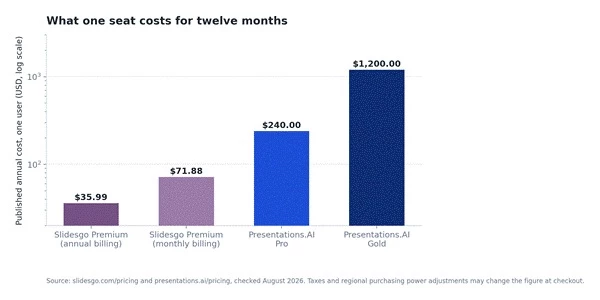
Figure 4. Published annual cost per seat. Note the logarithmic scale: the real distance is larger than it looks.
| Plan | Headline price | Annual cost | Billing | Main constraint |
| Slidesgo Free | $0 | $0 | None | 3 AI decks, 3 downloads a month, attribution required |
| Slidesgo Premium | $3.00 a month | $35.99 | Annual | 150 AI generations and 150 downloads a month |
| Slidesgo Premium | $5.99 a month | $71.88 | Monthly | Same caps, double the cost |
| Presentations.AI Starter | $0 | $0 | None | Credit figures differ across official pages |
| Presentations.AI Pro | $20 a month | $240 | Annual only | 5,000 credits a year, PPT export consumes them |
| Presentations.AI Gold | $100 a month | $1,200 | Annual only | 50,000 credits a year |
Presentations.AI states that it does not offer monthly subscriptions, only annual or quarterly terms. That detail turns a $20 a month price tag into a $240 commitment taken in one payment, which is a materially different proposition and is the root of a recurring complaint discussed further below.
The credit system is where the headline price stops telling the whole story. Slide creation costs five credits per slide. Exporting that same slide to PowerPoint costs a further five. PDF export is free of credits, and manual editing costs nothing.
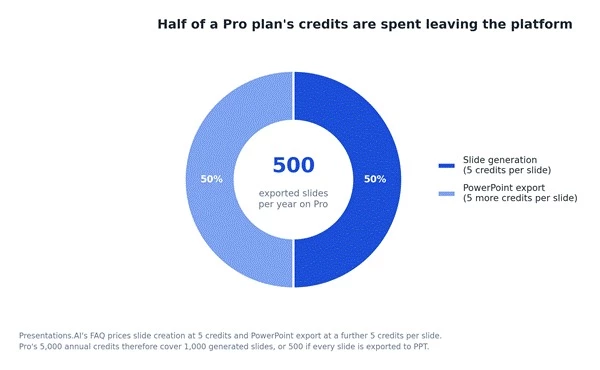
Figure 5. On Pro, exporting a deck to PowerPoint doubles its credit cost.
Run the arithmetic. Pro's 5,000 annual credits generate 1,000 slides if nothing is exported, or 500 slides if every one goes out as a PPT. At $240 that is roughly 48 cents per exported slide, or about $9.60 for a twenty slide deck, before considering that a rejected first draft consumes credits too. Gold's 50,000 credits work out at roughly 24 cents per exported slide, so the higher tier is not only a feature upgrade, it halves the marginal cost of every slide.
| Usage pattern | Slidesgo Premium | Presentations.AI Pro | Annual difference |
| 12 decks a year | $35.99 | $240 | $204.01 |
| 25 decks a year, 20 slides, all exported | $35.99 | $240, at the credit ceiling | $204.01 |
| 50 decks a year | $35.99, within the 150 a month cap | Extra credits must be bought | Widens further |
| Team of five | $179.95 before team discount | $1,200 at Pro list price | About $1,020 |
Stated plainly: Presentations.AI Pro costs about $204 more per year than Slidesgo Premium, and Gold costs roughly 33 times a single Slidesgo Premium subscription. The useful question is not which number is smaller. It is what work the extra money removes. Slidesgo removes design labour. Presentations.AI attempts to remove design labour, structuring labour, brand policing labour and the guesswork about whether anyone read the deck.
The free tiers are built on opposite philosophies, and this is the clearest practical difference in the whole comparison.
| Free plan factor | Slidesgo Free | Presentations.AI Starter |
| Allowance | 3 AI presentations and 3 template downloads every month | A one off credit grant |
| Does it refresh | Yes, monthly | No, credits do not renew on their own |
| Stated credit figure | Not applicable | Pricing card says 100, comparison grid says 1,500 a year, FAQ says 200 at signup |
| Earning more free credits | Not applicable | Referrals grant 200 credits on activation, up to a 5,000 balance |
| Deck size limit | Not stated | Up to 20 slides |
| Export | Full PPTX, no watermark | Watermarked low resolution PDF, Chrome only |
| PowerPoint export | Yes | FAQ states Pro licence required |
| Branding on output | Slidesgo credit slide must be kept | Unbranded public links listed on all tiers |
| Account required | Yes | Yes |
| Ads | Yes, removed on Premium | Not documented |
Slidesgo, decisively. Three unwatermarked decks a month, every month, in a file format any university will accept, beats a one off credit grant whose exports carry a watermark. The attribution slide is a minor cost on coursework.
Presentations.AI, if the goal is evaluating AI capability specifically. Document and URL ingestion, outline editing and analytics are all reachable without paying, and the platform allows a deck of up to twenty slides. The catch is that the watermarked, Chrome only PDF export makes it hard to judge the finished artefact, which is precisely the thing a buyer needs to judge.
Slidesgo's, because what a free user produces is what a paying user produces, minus the credit slide. Presentations.AI's free tier withholds the output quality it is asking to be judged on. That is a defensible commercial choice and a genuine evaluation problem for the buyer, made sharper by the absence of a free trial and a no refunds policy.
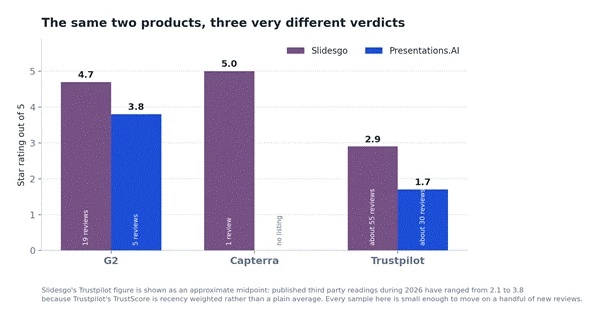
Figure 6. Ratings by platform. Every sample here is small enough to move on a handful of new reviews.
| Platform | Slidesgo | Reviews | Presentations.AI | Reviews |
| G2 | 4.7 out of 5 | 19 | 3.8 out of 5 | 5 |
| Capterra | 5.0 out of 5 | 1 | No listing found | 0 |
| Trustpilot | Polarised, readings from 2.1 to 3.8 | About 55 | About 1.7 out of 5 | About 30 |
| Product Hunt | Insufficient review volume | n/a | Insufficient review volume | n/a |
Read those numbers with the sample sizes attached. Nineteen G2 reviews and five G2 reviews are not statistically meaningful for products claiming millions of users, and several of the visible G2 entries for both platforms are labelled as collected through a G2 invite, with at least one marked incentivised. A Capterra rating of 5.0 drawn from one review carries no information at all.
The likeliest explanation, offered as a hypothesis rather than a proven finding, is that the two platforms capture different moments. G2 reviewers are typically evaluating software at work, and rate features, usability and productivity. Trustpilot attracts consumers who had a transaction go wrong, which loads the sample toward billing, cancellation, refunds and support. A strong G2 score and a weak Trustpilot score can therefore describe the same company honestly, because they are measuring different halves of the customer experience.
A second mechanical point explains why published Slidesgo Trustpilot figures vary so widely. Trustpilot's TrustScore is recency weighted rather than a plain average, so a raw star average calculated from a scraped set of reviews will not match the score displayed on the page. Secondary sources quoting anywhere from 2.1 to 3.8 during 2026 are not necessarily wrong, they are computing different things at different times.
Recurring positives across G2 and Trustpilot are consistent and specific: breadth of template selection, design quality, ease of customisation, classroom usefulness and speed. Support scores unusually well, at 9.6 on G2, and Slidesgo publicly replies to negative Trustpilot reviews with a route back to its support desk.
Recurring negatives cluster in two places. The first is the free tier ceiling: the three download limit arrives quickly and the most distinctive designs sit behind the paywall. The second is subscription handling, with multiple reviewers describing difficulty cancelling and continued billing. Several reviewers also report AI output that missed the prompt. One widely visible one star review alleging the site is a virus does not match any other evidence and should not be treated as a product finding.
Positives are credible and repeat across sources: speed from blank page to polished deck, professional slide layouts, useful data visualisation, easy onboarding and output that stays on brand. One G2 reviewer specifically praised clean PowerPoint export, which sits in interesting tension with the export complaints elsewhere.
Negatives concentrate almost entirely on money rather than product. Trustpilot reviewers report being charged annually after expecting monthly billing, continued charges after disabling auto renewal, and refund requests declined on policy grounds. That last theme is the one case in this comparison where reviewer sentiment is directly corroborated by official documentation: the company's own FAQ states that its policy does not allow refunds, and separately that it does not offer monthly subscriptions. The complaints are not a misunderstanding of the policy, they are the policy meeting expectations set by a price displayed as $20 a month.
Separate the two kinds of criticism Product capability criticism and billing criticism are not the same finding. Presentations.AI's product criticism is mild and mostly about editing constraints. Its billing criticism is severe, repeated, and consistent with published policy. Slidesgo attracts the same category of billing complaint at lower intensity, but its FAQ does allow a refund within 30 days of payment provided no template has been downloaded, and that single clause is the most valuable difference between the two companies for a cautious first time buyer. | ||
| Review theme | Slidesgo | Presentations.AI |
| Ease of use | Strongly positive | Strongly positive |
| Design quality | Strongly positive | Positive |
| AI content generation | Mixed, several prompt misses reported | Positive, some generic output reported |
| Template variety | Strongest recurring praise | Adequate, not a talking point |
| Export experience | Font installation friction noted | Mixed, formatting issues documented |
| Customer support | Positive, 9.6 on G2 | Mixed to negative on Trustpilot |
| Billing and cancellation | Complaints present, refund window exists | Complaints frequent, no refunds by policy |
| Value for money | Consistently seen as strong | Depends heavily on deck volume |
These scores are editorial. They are derived from documented capability, published pricing and public review evidence, not from G2 or Trustpilot numbers, and not from hands on testing.
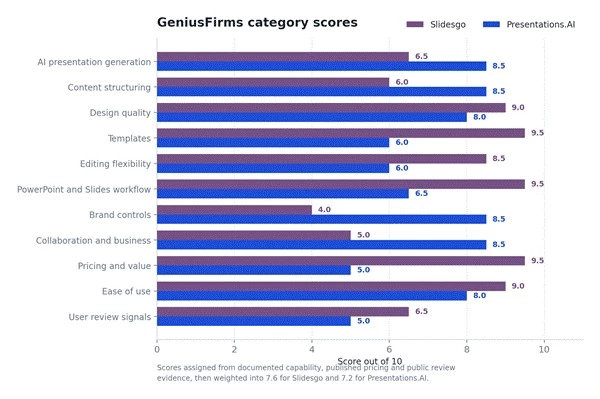
Figure 7. Category scores out of 10, weighted into a single figure.
| Category | Weight | Slidesgo | Presentations.AI | Why |
| AI presentation generation | 15% | 6.5 | 8.5 | More input types, editable outline, tiered models |
| Content structuring | 10% | 6.0 | 8.5 | Only one platform documents outline control |
| Design quality | 10% | 9.0 | 8.0 | Human designed catalogue against generated layouts |
| Templates | 10% | 9.5 | 6.0 | Tens of thousands against low hundreds |
| Editing flexibility | 10% | 8.5 | 6.0 | Native Office editing against documented in app limits |
| PowerPoint and Slides | 10% | 9.5 | 6.5 | Native both ways against credit costed export |
| Brand controls | 10% | 4.0 | 8.5 | No brand kit against Brand Sync |
| Collaboration and business | 5% | 5.0 | 8.5 | Seats and admin against analytics and secure sharing |
| Pricing and value | 10% | 9.5 | 5.0 | $35.99 against $240, annual only, no refunds |
| Ease of use | 5% | 9.0 | 8.0 | 9.5 on G2 against strong onboarding praise |
| User review signals | 5% | 6.5 | 5.0 | Both samples thin, billing complaints heavier on one |
| Weighted total | 100% | 7.6 | 7.2 | Close, and sensitive to which categories matter to the buyer |
Four tenths of a point is not a verdict, it is a tie broken by weighting. Shift brand controls and content structuring up, drop pricing and templates down, and Presentations.AI wins the same table. That sensitivity is the honest finding here, and it is why the profession table below is more useful than the score.
| User | Better choice | Reason |
| School student | Slidesgo | Free tier refreshes monthly and exports without a watermark |
| College student | Slidesgo | Thesis defence and subject templates, plus $35.99 if free runs out |
| Teacher | Slidesgo | Slidesclass, quiz and lesson tools, FERPA and COPPA compliant team accounts |
| Researcher | Contextual | Slidesgo for academic templates, Presentations.AI to turn a paper into slides |
| Freelancer | Slidesgo | Lowest fixed cost, no attribution on Premium, client files stay editable |
| Content marketer | Presentations.AI | URL and document ingestion turns existing assets into decks |
| Sales representative | Presentations.AI | Per slide engagement analytics on shared links |
| Sales team | Presentations.AI | Brand Sync stops fifty reps producing fifty versions of the deck |
| Consultant | Contextual | Analytics and branding favour it, PPT export friction argues against |
| Startup founder | Presentations.AI | Dedicated pitch deck generation and a shareable tracked link |
| Pitch deck creator | Presentations.AI | Narrative structuring is the hard part, and it is the strength |
| Corporate team | Presentations.AI | SSO, audit logging and brand governance have no Slidesgo equivalent |
| Executive | Presentations.AI | Presentation refresh and project knowledge on Gold |
| Agency | Contextual | Slidesgo for visual range, Presentations.AI for client brand enforcement |
| Designer | Slidesgo | Full control of the file in the tools designers already use |
| Non designer | Contextual | Slidesgo if the content exists, Presentations.AI if it does not |
Best option: Slidesgo. Three free AI decks a month, an unwatermarked PPTX, and a subject catalogue that makes the design choice a two minute decision rather than a two hour one.
Best option: Slidesgo, and it is not close. Slidesclass supplies ready to teach lessons, the quiz, exit ticket and icebreaker generators cover the surrounding classroom material, and Presentations.AI has no education plan or education pricing at all.
Best option: Presentations.AI. A pitch deck fails on narrative, not on typography, and structuring the narrative is the thing Slidesgo does not attempt. The tracked share link is a genuine advantage when a deck goes to twenty investors. Every generated number still needs verifying before it reaches a term sheet conversation.
Best option: Presentations.AI. Brand controls, password protected links and per slide engagement data are all documented, and none of them exist on the other side. Budget the credit cost of the PowerPoint export if the client expects a file rather than a link.
Best option: Presentations.AI. This is the workflow it was built for. A PDF or DOCX goes in, an editable outline comes out, and the deck arrives already on brand. Slidesgo's AI PDF to PPT converter covers the same ground more thinly and cannot take uploaded images into AI output.
Best option: Slidesgo. When the words are written, AI structuring is worth nothing and design breadth is worth everything. Paying $240 to have a machine reorganise text that is already organised is the clearest example of buying the wrong tool in this comparison.
Brand governance is effectively absent, which rules it out for any organisation that needs consistency enforced rather than requested. AI capability is shallower: no URL ingestion, no documented outline editing, no image upload into AI output, and no way to add AI generated slides to an existing deck.
There are no presentation analytics. Official pages disagree with each other on template counts, on Premium limits described as unlimited while carrying a 150 a month cap, and on team discounts quoted as 20 percent in the FAQ and 50 percent on the pricing page.
Billing and cancellation complaints appear repeatedly in consumer reviews.
Price is the headline problem for individuals, made harder by annual only billing and a published no refunds policy with no free trial. The credit system meters both creation and export, so a heavy PowerPoint user burns allowance twice.
Documented editing constraints are unusually numerous: no bulk background change, no global font size, irreversible ungrouping, no copying slides between decks, and no AI slide generation after a deck exists.
The traditional template ecosystem is small and custom templates are Gold only or $999. Official pages disagree on free credits across three figures, on whether PPT export is available below Pro, on whether a free trial exists, and on user counts published as 12 million, 10 million and roughly 2 million across the pricing page, the FAQ and the G2 listing.
Value is not price. It is time saved multiplied by frequency of use multiplied by how much the output matters.
A student making two decks a month gets almost nothing from brand governance and audience analytics, and would be paying several hundred dollars a year for capability that never activates. Slidesgo Premium at $35.99, or the free tier, is the rational choice by a wide margin.
A consultant billing at $150 an hour who builds four client decks a month is in a different calculation entirely. Presentations.AI Pro costs $240 a year, which is roughly ninety minutes of billable time. If document ingestion and automatic branding save even thirty minutes per deck, the subscription pays for itself before the end of the first quarter. Gold at $1,200 needs about eight billable hours of savings across the year, which a team producing weekly decks can clear and an individual usually cannot.
The threshold is roughly this: below about one deck a week, or whenever the content already exists, Slidesgo wins on value. Above that, and specifically when raw source material has to be turned into structured narrative on a brand template, the more expensive platform starts earning its price.
| Choose Slidesgo if | Choose Presentations.AI if | Look elsewhere if |
| The content is already written and only the design is missing | Raw material exists as documents, URLs or notes and needs structuring | Real time multi editor collaboration inside the deck is essential |
| The work is teaching, studying or academic | Brand consistency across a team must be enforced automatically | Video export or built in voiceover is a requirement |
| Final files must be fully editable in PowerPoint or Google Slides | Knowing who viewed which slide changes what happens next | Monthly billing with a refund route is non negotiable |
| The budget is under about $50 a year | Deck production is frequent enough to justify $240 or more | The deck must live natively inside Google Slides |
| Browsing many visual styles is part of the process | Pitch decks and client proposals are the main output | A very large bespoke template system is needed |
Neither platform is automatically right. Canva covers wider design work, Gamma competes directly on AI generation at a lower entry price, Beautiful.ai and Plus AI target brand controlled business decks, and PowerPoint Copilot keeps everything inside Microsoft 365. Any of those may fit better than both tools discussed here.
| Best for | Winner | Basis |
| Templates | Slidesgo | Tens of thousands against low hundreds |
| Students | Slidesgo | A free tier that refreshes and exports clean files |
| Educators | Slidesgo | Slidesclass, classroom AI tools, education compliance |
| AI generation | Presentations.AI | More input types, outline control, tiered models |
| Business presentations | Presentations.AI | Analytics, secure sharing, governance |
| Pitch decks | Presentations.AI | Dedicated generator and narrative structuring |
| Branding | Presentations.AI | Brand Sync has no Slidesgo equivalent |
| Value | Slidesgo | $204 a year cheaper than Pro with a refund window |
| Occasional users | Slidesgo | No annual lock in, and the free tier is genuinely usable |
| Heavy professional users | Presentations.AI | Removes structuring work at volume, if credits are budgeted |
| PowerPoint workflow | Slidesgo | Native PPTX with no credit cost or plan gate |
| Google Slides workflow | Slidesgo | Native copy plus an official Workspace add on |
The scoring supports a narrow overall win for Slidesgo at 7.6 against 7.2, but that headline is the least useful sentence in this article. The weighted margin comes almost entirely from price and template breadth, and those two categories are worth very little to a sales director and almost everything to a teacher.
Slidesgo is the better value presentation platform and the better fit for education and for anyone whose content already exists.
Presentations.AI is the more capable AI presentation system and the better fit for business teams who need structuring and brand enforcement done for them.
Buyers should be aware that the more expensive platform sells annual terms only, offers no free trial, and publishes a no refunds policy, so the free tier is the only evaluation window available.
Share your thoughts about this article.
Be the first to post a comment!

The same tool can be a 4.7 on one site and a 3.9 on another. Here is what is rea...
Nitin4 weeks ago

Here is the number worth pinning above your budget: in Gartner Digital Markets r...
Deepak Mehra4 weeks ago

What Artlist AI is in 2026Artlist began as a royalty-free music library. By 2026...
Deepak Mehra1 month ago

Most AI tool failures do not announce themselves. There is no crash, no angry em...
Nitin1 month ago

The best AI image generator in 2026 is Nano Banana 2 for speed, FLUX.2 for photo...
Parveen Verma1 month ago

“Useful” is a slippery word for a coding assistant. A tool can be brilliant at o...
Sakshi Dhingra1 month ago