Short-form video platforms reward speed and consistency. For creators publishing across YouTube Shorts, TikTok, and Instagram Reels while managing longer-form content on their main channels, the manual production process quickly becomes a bottleneck. Uploading, editing, captioning, and reformatting the same content for three or four platforms is time that should be going into the next piece of content.
Wava AI handles automated video generation workflows, but it isn't the only option, and for many creators, it isn't the right fit. Some need stronger visual customization. Others need AI avatars for faceless presentation content. High-volume marketing teams need bulk generation at lower cost. Designers want generative AI quality that purpose-built creative tools deliver at a different level. This comparison covers five alternatives, each solving a different part of the video production challenge, with clear positioning for the creator type each tool actually fits.
QUICK ANSWER The best Wava AI alternatives include Pictory, Runway ML, InVideo AI, Synthesia, and Kapwing. Pictory is strong for turning scripts into short videos, Runway ML focuses on advanced AI video generation, InVideo AI offers template-based marketing videos, Synthesia specializes in AI avatars and corporate videos, and Kapwing is best for simple online editing with AI automation features. Each tool differs in control, automation level, and video style output. |
The table below maps each tool to its video type, AI strength, ease of use, and main limitation, the fastest way to identify which tool fits which workflow.
| Tool | Best For | Video Type | AI Strength | Ease of Use | Limitation |
| Wava AI | AI video automation | Short-form videos | Script-to-video | Medium | Limited creative control |
| Pictory | Script to video | Faceless content | Strong automation | Easy | Limited advanced editing |
| Runway ML | AI video generation | Creative/cinematic | Very advanced AI | Med-Hard | Steep learning curve |
| InVideo AI | Marketing videos | Ads + social content | Template-based AI | Easy | Less unique visuals |
| Synthesia | AI avatar videos | Talking head videos | Avatar generation | Easy | Not cinematic |
| Kapwing | Online editing | Social media clips | AI editing tools | Easy | Limited AI generation |
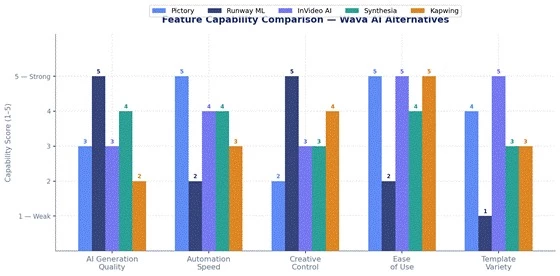
Chart 1: Feature capability comparison across Wava AI alternatives — scored 1 (Weak) to 5 (Strong) across five workflow dimensions. Scores are editorial assessments based on documented product capabilities.
1 | PictoryScript-to-video and content repurposing engine |
▸ Core Workflow Fit
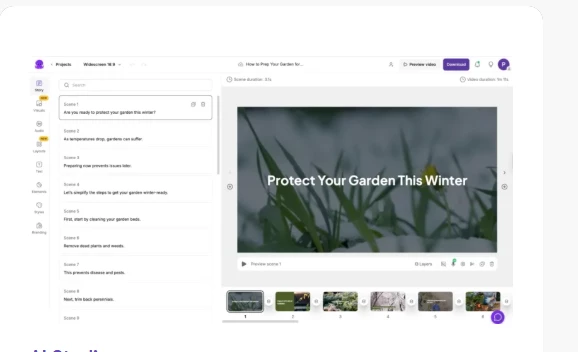
Pictory sits squarely in the content repurposing category. Its primary function is converting scripts, articles, and blog posts into structured video sequences using a library of licensed stock footage. For creators who produce written content regularly and want to extend that into video without rebuilding each piece from scratch, it removes a significant part of the production work. The workflow moves in one direction: you bring the text, Pictory builds the visual layer around it.
▸ Key AI Features
• Text-to-video conversion that automatically matches script lines to relevant stock footage from its integrated library
• Auto caption generation creating subtitled versions for social platforms without manual timing adjustments
• Blog-to-video repurposing pulling content from a URL, extracting key points, and constructing a video sequence
• AI-generated highlight reels and short clips from longer existing video content
▸ Best Use Cases
• YouTube Shorts and longer YouTube content produced from written scripts without on-camera recording
• Educational and how-to content where explanation is the core value and visuals support the script
• Faceless channels where the creator does not appear on screen and the content runs on automation
• Repurposing podcast transcripts or blog archives into shareable video content
▸ Where It Performs Well
For automation speed and structured output, Pictory performs strongly. The pipeline from a finished script to a publishable video is short, and the output is organized and consistent. Creators with established scripts or content libraries will find the conversion process fast enough to support a regular publishing schedule without editing work per piece.
▸ Limitations in Real Use
The visual side is constrained by what's available in the stock library. Creators with a distinct visual aesthetic, specific color grades, custom footage, or branded elements, will find limited control over how a video looks. The AI scene matching isn't always precise: it can select footage that's adjacent to the script topic rather than specifically matched. Advanced editing within Pictory is limited; the platform isn't designed for complex post-production.
▸ Creator Type It Fits Best
Beginners entering faceless video creation, bloggers extending their content strategy into video, and YouTube automators running content-at-scale channels without on-camera presence.
2 | Runway MLAdvanced generative AI video creation for creative productions |
▸ Core Workflow Fit
Runway ML occupies a different category from the other tools on this list. Where most AI video tools automate around stock footage or templates, Runway generates original visual content from text prompts, reference images, and directorial inputs. Its Gen-3 Alpha model and successor iterations produce short generative video sequences usable as standalone clips, cinematic B-roll, or background elements in broader productions. The workflow is more experimental than systematic, you're directing an AI generation process, not filling in a template.
▸ Key AI Features
• Text-to-video and image-to-video generation using Gen-3 Alpha, producing original clips from written prompts
• Motion Brush for selectively animating specific elements within a still image with directional control
• Video inpainting and outpainting for extending or replacing sections of existing footage
• AI-powered background removal, object deletion, and scene reconstruction tools
• Frame interpolation and video upscaling for resolution and motion quality enhancement
▸ Best Use Cases
• Cinematic B-roll and atmospheric visual sequences for YouTube, short film, and branded content
• Music video production where abstract or surreal visuals are an intentional aesthetic choice
• Creative storytelling where the visual concept couldn't be filmed or sourced from stock libraries
• Experimental AI-native content where generative visuals are the product, not a production shortcut
▸ Where It Performs Well
Runway ML produces generative video of a quality that no other tool in this comparison approaches. For creators who need original, non-stock visual sequences, it fills a gap that nothing else addresses at the same level. The motion quality, color coherence, and clip-level realism of its output have advanced significantly across model iterations, and the platform continues to develop faster than the broader category.
▸ Limitations in Real Use
The credit-based pricing model means costs accumulate quickly during experimentation — generating multiple variations to find one that works costs credits even when results aren't usable. The learning curve for achieving consistent output is steeper than template-based tools. Most practically, it generates short individual clips rather than complete edited videos. It sits earlier in a production workflow than a full video editor, requiring additional assembly after generation.
▸ Creator Type It Fits Best
Designers, AI artists, experimental filmmakers, and advanced content creators who understand video production well enough to direct an AI generation process and integrate outputs into a broader editing workflow.
3 | InVideo AITemplate-driven marketing and social video generation at scale |
▸ Core Workflow Fit
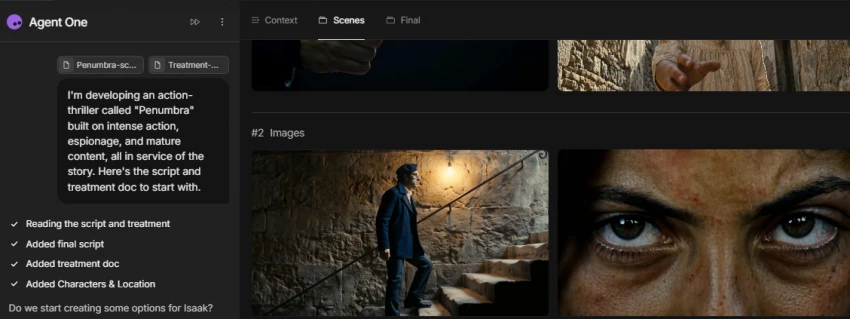
InVideo AI targets the marketing and social media side of video production. The core pipeline converts a text brief, script, or prompt into a complete video with selected stock footage, voiceover, captions, and transitions, ready for social posting or advertising. The workflow is faster than a manual edit and more flexible than a basic slideshow builder, sitting in the middle range between template tools and generative AI. Its strength is volume: producing multiple video variations quickly.
▸ Key AI Features
• Script-to-video automation that assigns stock clips and matched audio to script segments automatically
• AI voiceover generation in multiple languages and voice styles, eliminating recording requirements
• Prompt-based video generation, describe a video in plain language and receive a structured output
• Auto resize and reformat tools for converting one video to multiple social platform dimensions
• Large integrated stock library for scene selection without separate licensing or sourcing
▸ Best Use Cases
• Social media ads and promotional videos for products, services, or brand campaigns
• Business explainers and product overview videos requiring a professional but fast output
• Short video content for marketing agencies producing at volume across multiple clients
• Social media content for brands without in-house video teams or production budgets
▸ Where It Performs Well
For speed and volume, InVideo AI delivers. A marketer producing multiple video variations for an A/B test or campaign can work through iterations faster than in a traditional editing environment. The output looks professionally structured, clean text overlays, matched transitions, appropriate stock selections, which fits brand video requirements without requiring editing expertise or a dedicated production team.
▸ Limitations in Real Use
The stock-based visual layer is its ceiling. Because InVideo AI builds from the same commercial footage libraries that many other tools access, the output can lack visual distinctiveness. Videos produced by different users in the same content category often share a recognizable template feel. For brands with a strong and specific visual identity, this becomes limiting unless custom footage is uploaded to replace the default selections.
▸ Creator Type It Fits Best
Marketers, agencies, and small business owners who need professional-looking video output at scale without a dedicated video production team or per-project editing budget.
4 | SynthesiaAI avatar presenter videos for professional communication |
▸ Core Workflow Fit
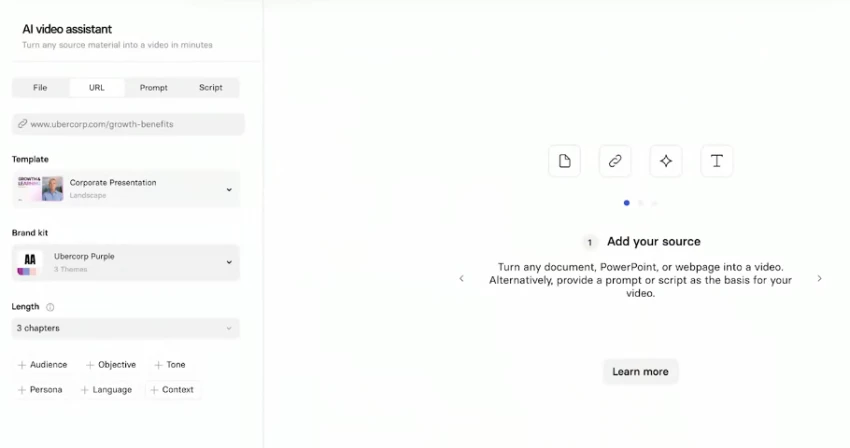
Synthesia operates in a specific category: AI presenter videos. Its core function is generating talking-head videos using digital AI avatars, presenters that deliver a script in a chosen voice and language without requiring a camera, studio, or a human on screen. The output is structured, professional, and designed for communication contexts where clarity and consistency matter more than cinematic production. It's built for organizations, not entertainment creators.
▸ Key AI Features
• Over 140 AI avatars in multiple styles, genders, and presentation formats for varied use cases
• Multilingual text-to-speech with natural-sounding voice generation across dozens of languages
• Brand kit integration for logos, colors, and visual consistency across an entire video content library
• Screen recording overlay and slide integration for technical training or product documentation content
• Custom avatar creation from a recorded video sample at enterprise tier — producing a personalized digital presenter
▸ Best Use Cases
• Corporate training modules, onboarding sequences, and compliance videos at organizational scale
• Product documentation, feature walkthroughs, and customer support explanation videos
• Educational content where a presenter format improves engagement over slides-only delivery
• Multilingual communication for global teams, delivering the same content in multiple languages without re-recording
▸ Where It Performs Well
For professional presentation quality in a controlled format, Synthesia delivers consistency that's difficult to achieve with recorded presenter video. The multilingual delivery is a particular strength: one script can be rendered across multiple languages using the same avatar, which is operationally significant for organizations maintaining large video content libraries. The output looks polished and is reliably on-brand when the brand kit is configured correctly.
▸ Limitations in Real Use
The avatar format is its ceiling and its distinction from the rest of the market. Synthesia videos carry a recognizable presentation-tool aesthetic — clear, professional, but not cinematic and not suited for content requiring authenticity, energy, or visual storytelling. For social media or entertainment-facing content, the avatar output tends to read as corporate. At higher usage volumes, pricing becomes a significant factor for smaller teams without organizational budgets.
▸ Creator Type It Fits Best
Corporate training and L&D teams, educators who need consistent presenter video at scale, HR departments producing onboarding content, and organizations communicating across multiple languages without re-recording requirements.
5 | KapwingBrowser-based AI-assisted editing for social content workflows |
▸ Core Workflow Fit
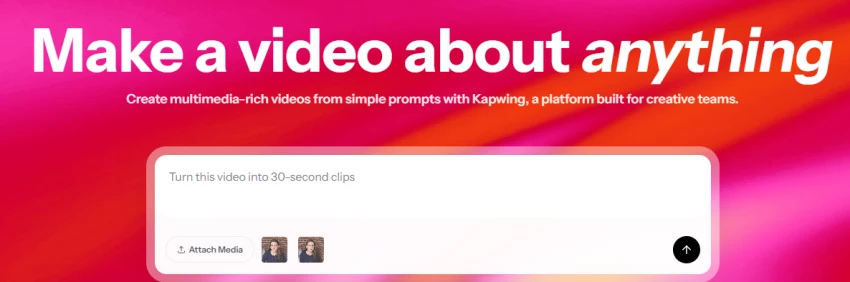
Kapwing is a browser-based video editor with AI-assisted features layered into its toolset. It isn't a generative AI platform, it doesn't create video from prompts, but it applies AI automation to the editing layer: automatic subtitling, smart resize for different platforms, noise removal, and background cleanup. The workflow is accessible without installation, making it practical for social media managers and small teams doing quick edits and repurposing work on a regular basis.
▸ Key AI Features
• Automatic subtitle generation with timing accuracy and word-level sync for accessibility and platform optimization
• Smart crop and resize for converting one video to multiple platform formats, Reels, Shorts, TikTok, and landscape, without re-framing
• AI voice noise removal and audio cleanup for improving recordings made in non-studio environments
• Auto-generated video highlight clips from longer source recordings for quick clip extraction
• Team collaboration with shared workspaces, project access, and comment threading for review workflows
▸ Best Use Cases
• Social media clip editing and repurposing from longer podcast, interview, or event recordings
• Quick subtitle addition for accessibility, engagement, and platform algorithm improvement
• Resizing existing videos for cross-platform distribution without manual re-editing
• Team-based content workflows where multiple people need access to the same project simultaneously
▸ Where It Performs Well
Kapwing's browser-based access means zero friction to start, no download, no setup, no hardware requirement. For the editing tasks it's built for, it works cleanly. Automatic subtitles are accurate and require only minor correction for most standard audio. The smart resize feature handles most platform format conversions without manual re-framing. For social media managers doing routine editing work, the turnaround on core tasks is fast.
▸ Limitations in Real Use
It's not a generative AI tool. If the goal is creating video from a script, prompt, or concept rather than editing existing footage, Kapwing isn't designed for that. The AI features are editing enhancements, not creation engines. For complex multi-layer productions, the browser-based environment becomes a constraint; the editing timeline functions well for short edits but doesn't match desktop software for intricate projects.
▸ Creator Type It Fits Best
Social media managers, casual creators, and small content teams that need fast, accessible editing with AI assistance for subtitles and reformatting, without needing to generate video from scratch.
Each tool in this comparison solves a different problem in the video production workflow. Mapping them clearly prevents choosing the wrong tool for the job.
Wava AI sits between automation and content generation, a general-purpose pipeline for AI video workflows, without the depth of specialization that the alternatives offer. Pictory is a repurposing engine: the best path from written content to a published video for creators without on-camera presence. Runway ML is the creative AI lab, the highest generative quality on the market but requiring the most production knowledge to use effectively. InVideo AI is marketing automation: volume-oriented, template-based, built for organizations producing at campaign pace. Synthesia is avatar communication, not cinematic, not generative in the visual sense, but the clearest professional tool for presenter-format video at scale. Kapwing is editing simplicity: not a generative platform, but the fastest path from existing footage to formatted, subtitled, published social content.
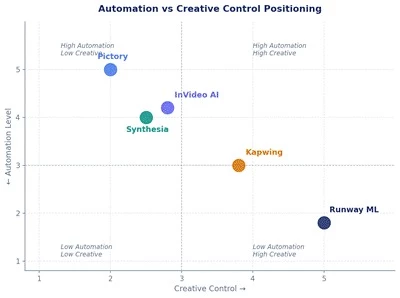
Chart 2: Automation vs Creative Control, each tool positioned by its balance between automated output and degree of creative directorial control. High automation = faster production; high creative control = more manual direction.
The right tool depends on what part of the video creation process is currently the biggest gap in your workflow. Use this reference to identify the direct match.
| Creator Need | Best Tool |
| Faceless YouTube videos | Pictory |
| Advanced AI video creation | Runway ML |
| Marketing & ad campaigns | InVideo AI |
| Corporate training videos | Synthesia |
| Fast social editing workflow | Kapwing |
Wava AI covers core AI video automation workflows, but specific creator needs push beyond what it handles well.
• Creators who need cinematic-quality generative visuals, original footage that couldn't be filmed or sourced from stock require Runway ML's generation engine, which operates at a fundamentally different level of visual quality than standard automation tools.
• Organizations producing presenter-format communication videos at scale, particularly in multiple languages, need Synthesia's avatar system. Wava AI doesn't offer avatar-based delivery at the professional level those workflows require.
• High-volume marketing teams producing dozens of video variations for campaign testing need InVideo AI's template throughput and stock integration at the pace and cost structure Wava AI doesn't match for that specific use case.
• Faceless YouTube channel operators running content-at-scale workflows from text archives need Pictory's established script-to-video and blog-to-video pipeline, which is more mature and specifically built for that output type.
• Creators whose primary need is editing and reformatting existing footage not generating new video need Kapwing's accessible browser-based tools rather than a generation-focused platform.
• Teams with multiple people needing simultaneous access to the same content project require collaboration features that are better supported in tools like Kapwing, which has shared workspace and comment functionality built into the core product.
\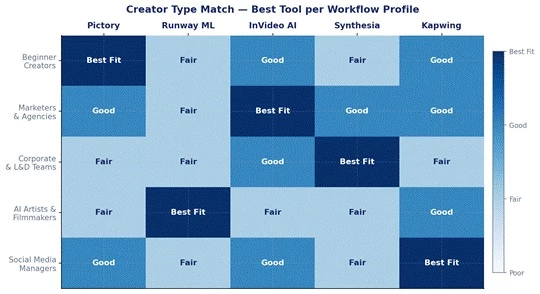
Chart 3: Creator workflow match across tool and creator type pairings, based on documented feature sets and publicly known use case positioning. Best Fit indicates the tool was explicitly designed for that creator type.
No Single Tool Does Everything No single Wava AI alternative covers every video creation need. Each tool in this comparison solves a specific part of the production challenge: Pictory handles repurposing and faceless content, Runway ML handles generative visual quality, InVideo AI handles marketing volume, Synthesia handles professional presenter communication, and Kapwing handles accessible editing and social formatting. The most effective video workflows typically combine tools, using Runway ML for generative B-roll, Pictory or InVideo AI for scripted automation, and Kapwing for final formatting and subtitling before distribution. The automation-versus-creativity balance is the central variable: more automation means less visual control, and more creative control means more production knowledge required. For creators starting out, Pictory or InVideo AI provide the fastest path from idea to published video. For creators who've outgrown those tools and need more visual originality, Runway ML is the next step. The right answer depends on which part of video production currently costs you the most time. |
After comparing these tools, I do not think there is one perfect Wava AI replacement for everyone. Pictory and InVideo AI make the most sense when speed and automation matter, while Runway ML is a better choice when visual originality is the priority. Synthesia fits professional presenter videos, and Kapwing is more practical for editing and repurposing existing content. Personally, I would choose the tool based on the part of the workflow that takes the most time rather than simply selecting the platform with the longest feature list.
Share your thoughts about this article.
Be the first to post a comment!

The same tool can be a 4.7 on one site and a 3.9 on another. Here is what is rea...
Nitin1 month ago

Here is the number worth pinning above your budget: in Gartner Digital Markets r...
Deepak Mehra1 month ago

What Artlist AI is in 2026Artlist began as a royalty-free music library. By 2026...
Deepak Mehra1 month ago

Most AI tool failures do not announce themselves. There is no crash, no angry em...
Nitin1 month ago

The best AI image generator in 2026 is Nano Banana 2 for speed, FLUX.2 for photo...
Parveen Verma1 month ago

“Useful” is a slippery word for a coding assistant. A tool can be brilliant at o...
Sakshi Dhingra1 month ago