The short version A Claude API key is created in the Claude Console at platform.claude.com, under Settings and then API keys. Click Create key, give it a name, optionally scope it to a workspace and set an expiry. The key starts with sk-ant- and the full value is displayed exactly once, at creation. There is no way to view it again later. A lost key is replaced, not recovered. Applications read it from the ANTHROPIC_API_KEY environment variable, which every official SDK picks up automatically. Direct HTTP calls send it in the x-api-key header. Cost depends entirely on which model the key points at. The same workload costs 4.50 dollars per thousand requests on Claude Haiku 4.5 and 45 dollars on Claude Fable 5. Prompt caching and the Batch API together can cut a bill by roughly two thirds, and prompt caching also raises effective throughput because cache reads do not count toward the input rate limit. |
| Where keys live | Claude Console, Settings then API keys, at platform.claude.com/settings/keys |
| Key format | Begins with sk-ant-. The full value is shown only at the moment of creation. |
| Authentication | Environment variable ANTHROPIC_API_KEY for SDKs, or the x-api-key header for direct HTTP. |
| Scoping options | A key can be tied to a specific workspace and given an expiration date at creation time. |
| Current models | Claude Fable 5, Claude Opus 5, Claude Sonnet 5 and Claude Haiku 4.5. Claude Mythos 5 is limited availability under Project Glasswing. |
| Price range | From 1 dollar per million input tokens on Haiku 4.5 to 10 dollars on Fable 5. Output is priced at five times input across every current model. |
| Free usage | New users receive a small amount of free credits to test the API. There is no permanent free production tier. |
| Spend caps | Start tier 500 dollars per month, Build tier 1,000 dollars, Scale tier 200,000 dollars. Custom tier has no cap. |
| Biggest cost lever | Prompt caching. Cache reads cost one tenth of the input rate and do not count toward input rate limits on current models. |
| Most common mistake | Confusing a standard API key with an Admin API key, or shipping a key inside client side code. |
A Claude API key is a secret string that identifies an organisation to the Claude API and authorises billing against that organisation. Every request carries it, every token consumed is charged to it, and anyone who holds a copy of it can spend money on behalf of its owner. That last sentence is the entire reason the security half of this guide exists.
A large share of the questions about Claude API keys come from people who do not actually need one. Anthropic sells access to Claude through several distinct products, and only one of them uses an API key in the way developers mean.
| Product | What it is | Does it use an API key |
| claude.ai | The chat interface, including the web, desktop and mobile apps, on Free, Pro, Max, Team and Enterprise plans. | No. A subscription grants chat access. It does not include API credits and does not produce a key. |
| Claude API | The developer platform for sending messages, tools, images and documents to Claude from an application. | Yes. This is the key created in the Claude Console. |
| Claude Code | The agentic coding tool that runs in the terminal, IDEs and the desktop app. | It can authenticate through a subscription or through an API key, depending on how it is set up. |
The practical implication is worth stating plainly. Paying for a Claude Pro or Max subscription does not provide API credits, and creating an API key does not grant access to the chat products. They are billed separately because they are separate services.
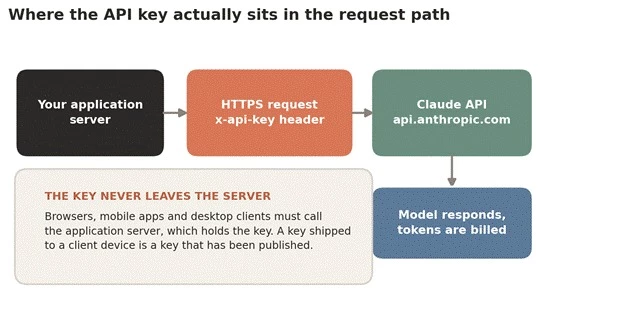
The figure above shows where the key belongs in a normal architecture. The key is held by the application server, which sits between the user and the API. Nothing on a user device should ever hold the key. A key embedded in a web bundle, a mobile binary or a desktop app can be extracted, and a key that can be extracted should be treated as already public.
The process takes under two minutes. The details that matter are in steps three and four.
1. Sign in to the Claude Console at platform.claude.com, or create an account if there is not one already.
2. Open Settings and then API keys. The direct path is platform.claude.com/settings/keys.
3. Click Create key. Give the key a name. At this point there is also the option to scope the key to a specific workspace and to set an expiration date.
4. Copy the key and store it somewhere safe, such as a secrets manager. The Console displays the full value, which begins with sk-ant-, only once. There is no screen that will reveal it again afterwards.
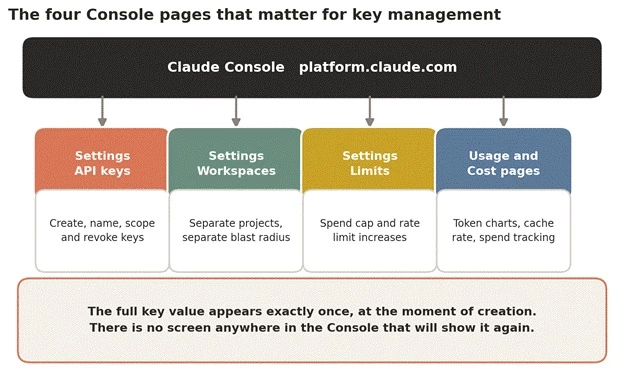
The figure above maps the four Console pages that matter once a key exists. Key creation is only the first of them. The Workspaces page controls how much damage a single key can do, the Limits page sets the monthly spend ceiling, and the Usage and Cost pages are where an unexpected bill gets diagnosed. Most teams visit the first page and never open the other three, which is how surprise invoices happen.
The name is the only thing that distinguishes one key from another later, because the secret value is never visible again. A key named test-key-2 is useless six months later when something needs revoking and nobody can remember which service holds it.
A workable convention is to encode the consumer and the environment together, for example billing-service-production or nightly-etl-staging. The goal is that anyone looking at the key list can revoke the right key without having to guess which system will break.
Setting an expiry at creation converts key rotation from a task somebody has to remember into a deadline the platform enforces. For contractors, proofs of concept, demos and short lived integrations, an expiry is the difference between a credential that goes away on schedule and one that quietly persists for years.
A disabled Create key button means the account lacks permission to create keys in that workspace. The fix is administrative rather than technical: an organisation admin either grants the necessary access or creates the key on that person’s behalf.
There are two ways to present the key to the API, and the choice is mostly about whether an official SDK is in use.
Every official client SDK reads the ANTHROPIC_API_KEY environment variable automatically. Setting it means the key never appears in application source at all.
| export ANTHROPIC_API_KEY="sk-ant-api03-..." |
Setting the key as an environment variable on a Unix like shell.
With that set, the SDK client needs no configuration:
import anthropic client = anthropic.Anthropic() # reads ANTHROPIC_API_KEY message = client.messages.create( model="claude-sonnet-5", max_tokens=1024, messages=[{"role": "user", "content": "Hello, Claude"}], ) print(message.content[0].text) print("Request ID:", message._request_id) |
Python. The request ID is worth logging, because support tickets are resolved far faster with it.
The TypeScript SDK follows the same pattern:
import Anthropic from "@anthropic-ai/sdk"; const client = new Anthropic(); // reads ANTHROPIC_API_KEY const message = await client.messages.create({ model: "claude-sonnet-5", max_tokens: 1024, messages: [{ role: "user", content: "Hello, Claude" }], }); console.log(message.content[0].text); |
TypeScript. Official SDKs also exist for C sharp, Go, Java, PHP and Ruby.
Without an SDK, the key travels in the x-api-key header. Two other headers are effectively mandatory: the API version and the content type.
curl https://api.anthropic.com/v1/messages \ -H "x-api-key: $ANTHROPIC_API_KEY" \ -H "anthropic-version: 2023-06-01" \ -H "content-type: application/json" \ -d '{ "model": "claude-sonnet-5", "max_tokens": 1024, "messages": [{"role": "user", "content": "Hello, Claude"}] }' |
A minimal direct request. Note that the key is referenced from the environment rather than pasted inline.
A small habit that prevents a large problem Referencing the key as $ANTHROPIC_API_KEY rather than pasting the literal value into a terminal keeps it out of shell history files. Shell history is one of the more common places leaked credentials are found, alongside committed configuration files, log output and error reporting payloads. |
There is more than one kind of credential in the Claude platform, and confusing them produces error messages that look inexplicable until the distinction is clear.
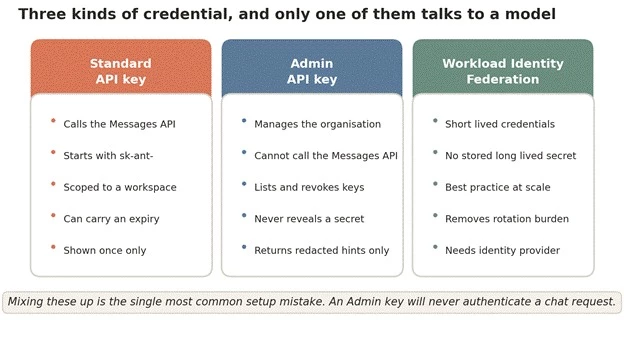
The figure above separates the three credential types. The Admin API exists for organisations automating key management at scale. It can list and retrieve key metadata, but it never returns a key’s secret value, only a partially redacted hint. It also cannot recover a lost key or mint one that will authenticate a Messages API call. Attempting to call the Messages API with an Admin key produces an authentication failure that looks like a broken key rather than a wrong key.
Workload Identity Federation is the third option and the most mature approach for larger deployments. Instead of storing a long lived secret, the application exchanges an identity token from an existing identity provider for short lived credentials. Nothing durable sits on disk, which removes the rotation burden and shrinks the window in which a stolen credential is useful.
Workspaces partition an organisation. A key scoped to a workspace can only operate within it, and each workspace can carry its own spend and rate limits below the organisation ceiling.
The value of this is containment. When a single key serves every service, revoking it after an incident takes down every service at once, and a runaway loop in a minor batch job can consume the entire organisation rate limit while customer facing traffic starts returning 429 errors.
A reasonable default structure separates keys along two axes, environment and consumer, so that revocation and cost attribution both become straightforward.
| Workspace | Typical keys inside it | Limit strategy |
| Production | One key per service, named for that service | Highest allocation. Never shared with development work. |
| Staging | One key per service, mirroring production names | Modest allocation, enough for realistic load testing. |
| Development | Individual keys per engineer, with expiry dates set | Deliberately small, so an accidental loop is cheap. |
| Analytics or batch | Dedicated keys for scheduled jobs | Capped so overnight jobs cannot starve live traffic. |
One constraint to know in advance: limits cannot be set on the default workspace, and workspace limits that are left unset simply inherit the organisation limit. Organisation wide limits always apply, even where individual workspace limits add up to more.
Billing is per token, split between input and output, and the rate depends entirely on which model the key is pointed at. There is no subscription and no seat fee. A key that sits unused costs nothing.
| Model | Input per MTok | Output per MTok | Positioning |
| Claude Fable 5 | $10 | $50 | The most capable widely released model, built for long running agents. Thinking is always on and cannot be disabled. |
| Claude Mythos 5 | $10 | $50 | Shares Fable 5 specifications and pricing. Limited availability through Project Glasswing, invitation only. |
| Claude Opus 5 | $5 | $25 | Complex agentic coding and enterprise work. |
| Claude Sonnet 5 | $2 to 31 Aug | $10 to 31 Aug | Frontier intelligence at scale. Introductory pricing rises to $3 and $15 on 1 September 2026. |
| Claude Haiku 4.5 | $1 | $5 | The fastest model, with near frontier intelligence. The cheapest current option for high volume work. |
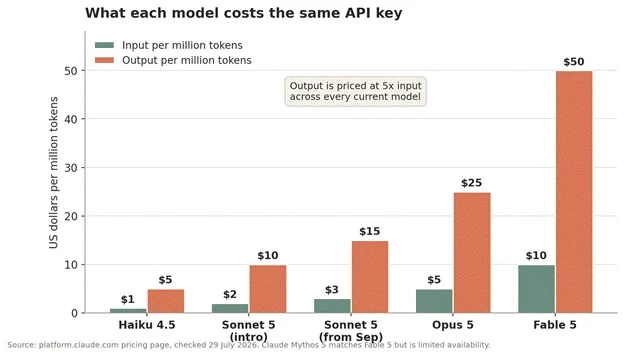
The figure above puts the current model line on one axis. Output tokens cost five times input tokens on every current model, without exception. That single ratio should shape architecture decisions more than it usually does: an assistant that writes long replies will always cost more than a classifier that reads long documents and answers in one word.
Rates per million tokens are hard to reason about. Converting them into the cost of a realistic unit of work makes the decision concrete. The figures below model a request consuming 2,000 input tokens and producing 500 output tokens, repeated one thousand times.
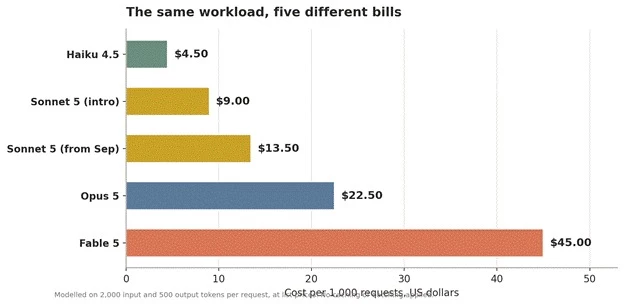
The figure above shows a ten fold spread across the model line for identical work. This is why model selection is the first cost lever, ahead of any optimisation technique. Routing simple classification and extraction to Haiku 4.5 while reserving Opus 5 or Fable 5 for genuinely hard reasoning is worth more than any amount of prompt tuning.
Anyone budgeting on Claude Sonnet 5 needs this date in the calendar. The current rate is introductory pricing, not standing pricing.
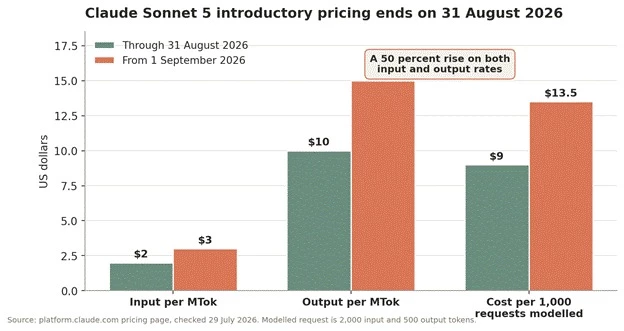
The figure above shows the size of the step. Input rises from 2 to 3 dollars per million tokens and output from 10 to 15, a 50 percent increase on both. Any cost model built on Sonnet 5 during the introductory window will understate real spend from September onward by half. Budgets and unit economics assembled before that date should be rerun at the standard rate.
A tokenizer change that quietly affects cost Claude 4.7 and later models use a newer tokenizer that produces roughly 30 percent more tokens for the same text, with the exact increase depending on the content. Claude Sonnet 4.6 and earlier use the previous tokenizer. The practical consequence is that comparing a per token rate between an older and a newer model understates the newer model’s cost, because the same document becomes more tokens. Cost comparisons should be run on real workloads through the token counting endpoint rather than on rate cards alone. |
Beyond choosing a cheaper model, two features do most of the work. They are independent, they stack, and together they change the economics of a workload substantially.
Prompt caching stores a processed portion of a prompt so it does not have to be reprocessed on every call. The natural candidates are the parts that never change: system instructions, tool definitions, large reference documents and accumulated conversation history.
The pricing works on multipliers applied to the base input rate. A five minute cache write costs 1.25 times the base rate, a one hour cache write costs 2 times, and a cache read costs 0.1 times.
| Cache operation | Multiplier | What it means in practice |
| 5 minute cache write | 1.25x base input | Stores content for five minutes. Pays for itself from the second request onward. |
| 1 hour cache write | 2x base input | Stores content for an hour. Pays for itself from the third request onward. |
| Cache read | 0.1x base input | A 90 percent discount on every subsequent read of that content. |
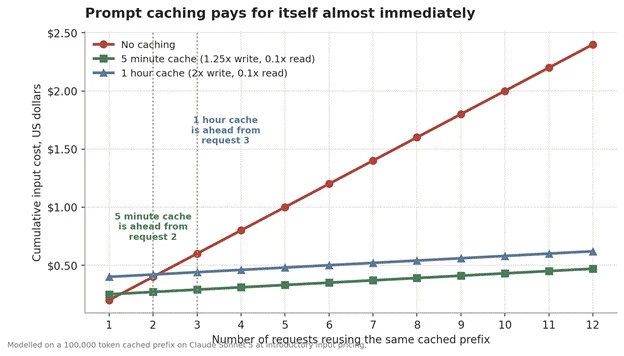
The figure above tracks cumulative input cost for a 100,000 token cached prefix. The red line is what happens without caching, and it climbs forever. Both cached lines flatten almost immediately, because reads cost a tenth of the base rate. By the tenth request the uncached approach costs roughly four times as much. For any workload with a stable system prompt or a large reference document, not caching is simply leaving money on the table.
The Batch API processes requests asynchronously at a flat 50 percent discount on both input and output tokens. The tradeoff is that results are polled for rather than returned immediately, which rules it out for anything interactive.
It suits the large category of work that has no human waiting: overnight enrichment, bulk classification, document processing, evaluation runs, content generation pipelines and backfills. Batch also tolerates network interruption better than long synchronous requests, because results are retrieved by polling rather than requiring an uninterrupted connection.
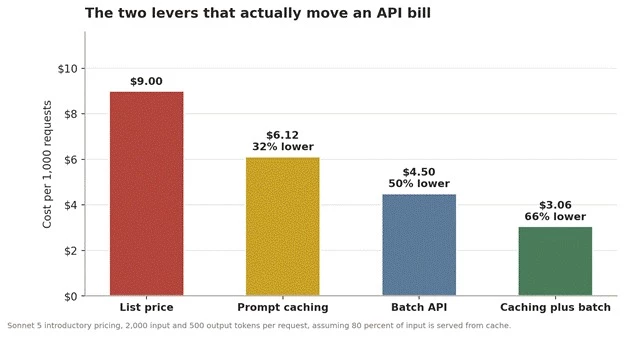
The figure above stacks the two levers on the same workload. Caching alone takes roughly a third off. Batching alone takes exactly half. Applied together on work that suits both, the same thousand requests fall from 9 dollars to just over 3. Nothing about the model or the prompt changed, only how the requests were structured.
Token charges are the bulk of most bills but not the whole of them. These are the additional charges worth knowing about before they appear.
| Item | Charge | Notes |
| Web search tool | $10 per 1,000 searches | Charged on top of tokens. Each search counts once regardless of results returned. Failed searches are not billed. |
| Web fetch tool | No extra charge | Only standard token costs for the fetched content. A research paper PDF can run to roughly 125,000 tokens, so limits are advisable. |
| Code execution tool | 1,550 free hours monthly | Beyond that, $0.05 per hour per container. Free entirely when used alongside web search or web fetch. |
| Fast mode | $10 input, $50 output | Research preview on Opus 5 and Opus 4.8 only. Not available with the Batch API. |
| US only inference | 1.1x multiplier | Applies to all token categories on Claude 4.6 and later when data residency is requested. |
| Managed Agents runtime | $0.08 per session hour | Billed only while a session is actively running, not while idle. |
| Tool definitions | Extra input tokens | The tool use system prompt adds a few hundred tokens per request. Small individually, material across millions of calls. |
Two separate mechanisms constrain what a key can do. Spend limits cap the money. Rate limits cap the throughput. Both are set at organisation level, and both can be tightened per workspace.
Organisations are placed on a usage tier automatically, based on usage history and account standing, and move upward over time. Each tier carries a maximum monthly spend. Once it is reached, API usage pauses until the following month unless an increase is requested.
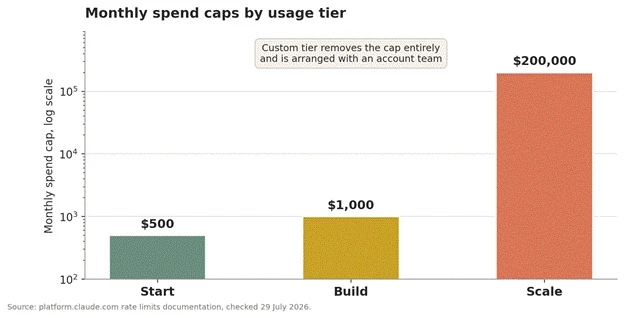
The figure above shows the tier ladder on a logarithmic scale. The jump from Build to Scale is a factor of two hundred, which is why the chart needs a log axis to be readable at all. Worth noting for anyone starting out: a self set spend limit can be placed anywhere below the tier cap, and doing so is the cheapest insurance available against a runaway loop in a development environment.
Rate limits are measured on three axes: requests per minute, input tokens per minute and output tokens per minute. They are applied separately per model, so different models can be driven to their respective limits simultaneously. Exceeding any of them returns a 429 error carrying a retry-after header.
Anthropic’s published standard limits show 1,000 requests per minute across the current model line. Token throughput is where the models diverge. Claude Opus 5, Sonnet 5, Haiku 4.5 and the 4.x families are listed at 2,000,000 input and 400,000 output tokens per minute, while Claude Fable 5 is listed at 500,000 input and 100,000 output, roughly a quarter of the throughput.
Verify before planning capacity. Limits are defined by usage tier, and new organisations may start below the standard published limits while account history is established. The authoritative numbers for any given account are on the Limits page in the Console, and can also be read programmatically through the Rate Limits API.
The genuinely useful detail is how cached tokens are counted. On current models, tokens read from cache are billed at a tenth of the input rate and do not count toward the input token rate limit at all.
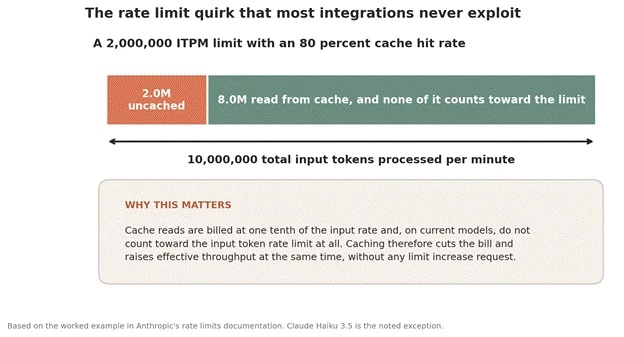
The figure above works through Anthropic’s own example. With a two million token per minute input limit and an eighty percent cache hit rate, an integration can push roughly ten million input tokens per minute. The cached portion is invisible to the limiter. This makes prompt caching the only optimisation that reduces cost and increases throughput at the same time, which is why it belongs in a design before a rate limit increase is ever requested. Claude Haiku 3.5 is the documented exception, since it does count cache reads toward the limit.
Every response carries headers describing the limit in force, current consumption and reset time. Instrumenting on these is considerably more reliable than inferring capacity from failure rates.
| Header | What it reports |
| retry-after | Seconds to wait before retrying. Earlier retries will fail. |
| anthropic-ratelimit-requests-remaining | Requests left before rate limiting begins. |
| anthropic-ratelimit-input-tokens-remaining | Input tokens left, rounded to the nearest thousand. |
| anthropic-ratelimit-output-tokens-remaining | Output tokens left, rounded to the nearest thousand. |
| anthropic-ratelimit-tokens-reset | When the token limit fully replenishes, in RFC 3339 format. |
One behavioural note that catches teams during launches. A sharp increase in traffic can trigger 429 responses from acceleration limits even when headline limits are not exceeded. Ramping gradually and keeping usage patterns consistent avoids this. Capacity is replenished continuously using a token bucket rather than resetting at fixed intervals, so short bursts can trip a limit that average throughput would suggest is comfortable.
An API key is a bearer credential. It carries no identity beyond itself, which means possession is authorisation. The rules below are ordered roughly by how often each one is broken.
1. Never commit a key to source control. This includes configuration files, notebooks, test fixtures, infrastructure templates and the seemingly harmless example file that gets copied later.
2. Never ship a key to a client. Browser JavaScript, mobile binaries and desktop applications can all be inspected. Client applications should call an application server that holds the key.
3. Use a secrets manager rather than a plain environment file. Environment variables are correct at runtime, but the file that populates them should not be the durable store.
4. Issue one key per service and per environment. Shared keys make revocation an outage and make cost attribution guesswork.
5. Set expiration dates wherever the use is temporary, which converts rotation from a memory exercise into an enforced deadline.
6. Set a self imposed spend limit below the tier cap. It is the cheapest available circuit breaker.
7. Keep keys out of logs and error reporting. Request and header logging frequently captures credentials without anyone intending it.
8. Move to Workload Identity Federation once the deployment justifies it, so that no long lived secret exists to steal.
Speed matters, but so does order. Revoking first and thinking second turns a security incident into an outage as well.
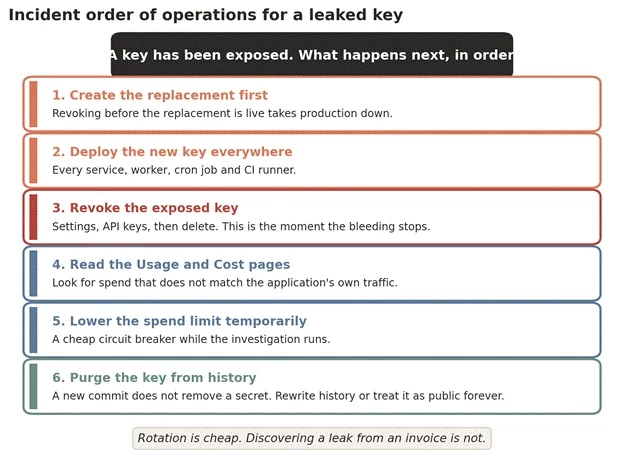
The figure above sets out the sequence. Step six is the one most often skipped. Adding a commit that removes a secret does not remove it from a repository’s history, where it remains readable to anyone who can clone. A key that has ever been pushed to a public repository should be considered compromised permanently, regardless of what happened next, and automated scanners find these within minutes rather than days.
The Claude API uses predictable HTTP status codes. Four of them relate directly to the key or the account behind it, and telling them apart saves considerable debugging time.
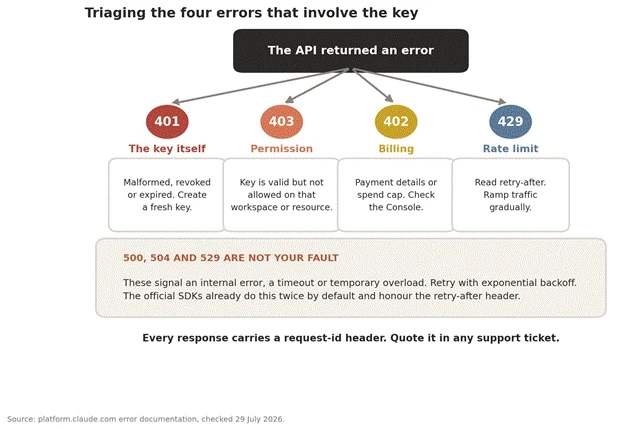
The figure above splits the four key related errors by root cause. The distinction between 401 and 403 is the one that saves the most time. A 401 means the key itself is wrong, whether malformed, revoked or expired. A 403 means the key is perfectly valid but is not permitted to touch that particular resource, which usually points at workspace scoping rather than at the credential.
| Code | Type | What it means and what to do |
| 400 | invalid_request_error | The request format or content is wrong. Common causes on current models include sending a prefilled assistant message, or sending thinking blocks that were modified before being returned. |
| 401 | authentication_error | A problem with the key itself: malformed, revoked or expired. Create a replacement rather than trying to repair it. |
| 402 | billing_error | A billing or payment problem. Check payment details in the Console. |
| 403 | permission_error | The key is valid but lacks permission for that resource. Check organisation access and workspace settings. |
| 404 | not_found_error | The resource was not found. Check the endpoint path and any resource identifiers in the URL. |
| 413 | request_too_large | The request exceeds the byte limit for that endpoint. |
| 429 | rate_limit_error | A rate limit was hit. Read the retry-after header and back off. Can also indicate acceleration limits after a sharp traffic increase. |
| 500 | api_error | An internal error. Retry with exponential backoff and quote the request ID if it persists. |
| 504 | timeout_error | The request timed out during processing. Use streaming or the Batch API for long running work. |
| 529 | overloaded_error | The API is temporarily overloaded across all users. Retry with backoff. |
Two implementation notes make error handling considerably less painful. The official SDKs already retry transient failures with exponential backoff, twice by default, honouring the retry-after header, and each client accepts an option to change or disable that. And the SDKs raise typed exceptions rather than returning raw JSON, so catching the SDK’s exception classes is more robust than matching on error message strings.
| Endpoint | Maximum request size |
| Messages API | 32 MB |
| Token Counting API | 32 MB |
| Batch API | 256 MB |
| Files API | 500 MB |
Exceeding these returns a 413. On the direct Claude API this is returned by the edge network before the request ever reaches the API servers, which is why the error can appear without any corresponding entry in usage data.
• Assuming a Claude Pro or Max subscription includes API access. It does not. The two are billed separately.
• Using an Admin API key to call the Messages API. Admin keys manage the organisation and cannot authenticate model requests.
• Building a cost model on Claude Sonnet 5 introductory pricing without noting that it rises 50 percent on 1 September 2026.
• Comparing per token rates across model generations without accounting for the newer tokenizer, which produces roughly 30 percent more tokens for the same text from Claude 4.7 onward.
• Running interactive pricing on workloads that nobody is waiting for, instead of taking the flat 50 percent Batch API discount.
• Never enabling prompt caching on an application with a large fixed system prompt, which pays both a higher bill and a lower effective rate limit for no reason.
• Setting a very large max_tokens value on a non streaming request, where idle connections may be dropped by intermediate networks before a response arrives.
• Failing to log the request ID, which turns every support conversation into an archaeology exercise.
• Sharing one key across development, staging and production, so that revoking it during an incident takes down everything at once.
Before a key carries real traffic, these ten items cover most of what goes wrong later.
1. The key is stored in a secrets manager, not in source control or a committed environment file.
2. The key is named after the service and environment that uses it.
3. Separate keys exist for development, staging and production.
4. Keys are scoped to workspaces, with limits set per workspace where appropriate.
5. A self imposed spend limit is set below the tier cap.
6. Prompt caching is enabled on any stable system prompt, tool definition set or reference document.
7. Non interactive workloads run through the Batch API.
8. Retry logic honours the retry-after header, and traffic ramps gradually rather than spiking.
9. Request IDs are logged alongside errors.
10. A documented rotation procedure exists, and somebody other than its author has read it.
Share your thoughts about this article.
Be the first to post a comment!

What actually happens in the space between the moment an app builder produces a...
Nitin1 month ago

A marketing team in 2023 that wanted a two-minute product explainer typically bo...
Sakshi Dhingra1 month ago

Two years ago, an AI presenter on screen was a talking point. Today it is a line...
Parveen Verma2 months ago

Quick answer: ChatGPT is owned and operated by OpenAI Group PBC, a for-profit pu...
Sakshi Dhingra2 months ago

Here is the exact moment most people end up asking this question. You have final...
Nitin2 months ago

A stolen password does not always look suspicious to a login system. If the user...
Deepak Mehra2 months ago