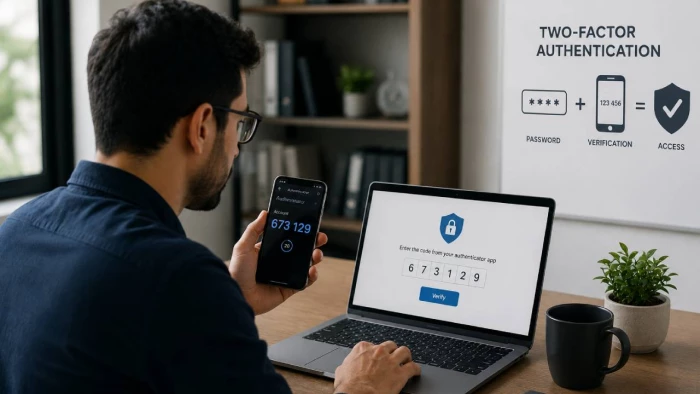
A stolen password does not always look suspicious to a login system. If the username is correct and the password matches, the server may have little reason to reject the request. The person typing those credentials could be the account owner, or an attacker sitting thousands of miles away with a password taken from a phishing page or breach.
Two-factor authentication changes that equation by asking for another form of proof.
Suppose an attacker has your password. An SMS code may stop a basic login attempt because the attacker does not control your phone number. An authenticator app creates another barrier because the code is generated on your device. Neither method, however, reliably stops a sophisticated phishing proxy that tricks you into supplying the code in real time. A properly implemented FIDO security key or passkey can, because the authentication is cryptographically tied to the real website.
That difference is the most important thing to understand about 2FA: not all second factors protect against the same attacks.
The risk is far from theoretical. Verizon reported that compromised credentials were used as an initial access vector in 22% of the breaches examined for its 2025 Data Breach Investigations Report. The 2026 report found vulnerability exploitation had moved ahead as the leading entry point, at 31%, but stolen credentials remain a major part of the attack landscape.
For IT teams, developers, and business leaders, the question is therefore no longer simply whether 2FA should be enabled. The useful questions are which authentication method to use, what attacks it actually stops, how account recovery works, and whether an attacker can bypass the whole control by stealing a session or convincing the help desk to reset it.
Two-factor authentication, usually shortened to 2FA, requires two different forms of evidence before a user is authenticated.
A familiar example is a password followed by a code from an authenticator app. The password proves knowledge of a secret. The app provides evidence that the person signing in also controls an enrolled device.
Two passwords would not provide the same protection. Neither would a password followed by a security question. Both checks depend on information the user knows, so the same kind of attack may compromise them together.
Authentication establishes who, or what, is signing in. Authorization determines what that authenticated identity is allowed to do.
Consider a developer signing into a cloud console. A passkey may provide strong authentication, but access policies still decide whether that person can view logs, restart servers, change billing information, or obtain production credentials.
Strong authentication cannot compensate for excessive permissions. Likewise, carefully designed permissions offer limited protection if attackers can simply authenticate as an administrator.
The conventional model centers on three categories.
Knowledge covers something the user knows, most commonly a password, passphrase, or PIN.
Possession means something the user controls. That might be a smartphone, security key, smart card, or device holding a cryptographic private key.
Inherence refers to a physical characteristic such as a fingerprint, face, or iris.
NIST makes an important distinction around biometrics: a biometric characteristic is not treated as a remote authenticator by itself. In modern implementations, a fingerprint or face scan commonly unlocks a physical or cryptographic authenticator on the device. The website receives the authentication result, not the user's fingerprint.
Location, device reputation, typing patterns, login time, IP reputation, and similar signals are valuable, but they are better understood as risk signals than replacements for strong authentication.
A login from a country an employee has never visited might justify another challenge. A familiar managed laptop on the corporate network might receive a smoother experience.
These signals are useful precisely because they add context. They are not reliable proof of identity by themselves. VPNs alter apparent locations, legitimate employees travel, IP geolocation makes mistakes, and normal behavior changes over time.
This distinction matters when building adaptive or Zero Trust authentication policies: context should determine how much proof to request, not become an excuse to accept weaker proof.
Passwords have one fundamental weakness: they can be copied.
Nothing about a password tells the server whether it was entered from memory by its owner, pasted from a password manager, extracted by malware, bought in a criminal marketplace, or typed by a victim into a fake login page five seconds earlier.
People still reuse passwords. Once credentials from one service are exposed, attackers can automatically test them against email services, cloud platforms, ecommerce sites, social networks, and corporate applications.
Verizon's additional analysis of the 2025 DBIR data found that, in the median case examined using infostealer data, only 49% of a user's passwords across services were distinct. The same analysis found credential stuffing represented a median 19% of daily authentication attempts in the SSO-provider logs studied.
A unique password limits that chain reaction. A second factor makes the stolen password less useful again.
Older phishing pages often collected credentials for attackers to use later. Modern adversary-in-the-middle tools can relay an entire authentication session in real time.
The victim reaches a fake login page and enters a password. The phishing server immediately sends it to the real site. When the real service requests a TOTP code, the fake site asks the victim for that as well. The attacker relays the code before it expires and may capture the authenticated session afterward.
The mathematics behind TOTP did not fail. The user gave a valid code to the wrong party.
This is why an authenticator can be technically strong yet still be phishable.
Instead of trying thousands of passwords against one account, an attacker may try one common password against thousands of accounts. This reduces the likelihood of triggering traditional account-lockout rules.
Login throttling, compromised-password screening, monitoring, and MFA all help. NIST's current guidance also tells verifiers to compare new passwords against lists of commonly used or compromised values and to rate-limit failed authentication attempts.
Responsible services do not store plaintext passwords. They salt and hash them using password-hashing schemes designed to make offline guessing expensive.
That reduces the damage of a database breach; it does not make weak passwords impossible to recover. Attackers working offline are no longer constrained by a website's login rate limits.
NIST now explicitly recommends supporting password managers and warns against arbitrary periodic password changes when there is no evidence of compromise. Unique, strong passwords are more useful than forcing employees to turn Summer2026! into Autumn2026! every few months.
Authentication is only the beginning of a session.
After a successful login, most applications issue a cookie or token that tells the service, in effect, “this user has already authenticated.” If malware steals that token, the attacker may not need the password or second factor at all.
That does not make MFA ineffective. It means the security model must continue after login.
OWASP recommends reauthentication after events such as account recovery, suspicious activity, password changes, or other sensitive operations. Session expiration and rapid revocation matter just as much as the original login challenge.
The simplest way to understand 2FA is to follow a login.
Imagine an employee enters a username and password. The server retrieves the account, checks the submitted password against the stored verifier, and confirms the first factor.
It should not yet create a normal authenticated session.
Instead, the account remains in a limited pre-authentication state while the service requests another factor. If the employee uses an authenticator app, the server validates the submitted one-time code. Only after both checks succeed should the application establish the fully authenticated session and apply the user's permissions.
That basic pattern changes when cryptographic credentials such as security keys or passkeys are used, but the underlying goal remains the same: require evidence that is harder for one attack to steal all at once.
Many authenticator apps use standardized one-time password algorithms.
HOTP, defined by RFC 4226, combines a shared secret with an incrementing counter. Each authentication advances the moving value used to calculate the next code.
TOTP, defined by RFC 6238, replaces the event counter with time. The default time step in the specification is 30 seconds, which is why many authenticator apps display a new six-digit code roughly every half-minute.
Both the server and authenticator know the same underlying secret. Because they independently calculate a code from that secret and the current moving value, the phone does not need an internet connection to generate TOTP codes.
That shared secret deserves more attention than it often receives.
When a website displays the QR code used to enroll an authenticator app, the QR code normally contains enough information to provision the long-term TOTP secret. Anyone who copies that secret may be able to generate future codes.
Enrollment therefore needs the same care as login. Secrets should not leak through logs, analytics tools, screenshots, browser extensions, or insecure backups.
A 30-second code narrows the attack window, but it does not identify the website receiving the code.
If an attacker can persuade a user to enter a TOTP value into a fake site and relay it immediately, expiration provides little protection.
NIST therefore does not classify manually entered OTP authentication as phishing-resistant. The problem is not the length of the code; it is the absence of cryptographic binding between the code and the specific login session or website.
FIDO2 authentication takes a different approach.
When a credential is registered, the authenticator creates a public-private key pair. The service stores the public key. The private key remains with the authenticator or its protected credential system.
At login, the server sends a fresh challenge. The authenticator signs the appropriate data with the private key, and the server verifies the signature using the public key it already knows.
WebAuthn credentials are scoped to the relying party. The specification requires the relying party to validate the origin, while credential scoping prevents an unrelated phishing domain from simply requesting and reusing the legitimate site's credential.
That domain binding is the reason FIDO authentication is materially different from typing an OTP into a box.
Choosing a method becomes easier when authentication technologies are grouped by how they actually prove possession.
SMS is still one of the easiest forms of 2FA to deploy. After the password is accepted, the service sends a short code to the registered telephone number.
For low-risk consumer accounts, that may stop an attacker who has only obtained a password. It is also familiar to users and does not require a separate app.
The weakness is the delivery channel. Phone numbers can be transferred through SIM-swapping attacks, messages may appear on locked screens, malware may read them, and real-time phishing sites can ask users to type the code.
Voice calls share many of the same telephone-network problems and may also expose codes through voicemail or call forwarding.
Email codes are even more difficult to treat as an independent high-assurance factor. If an attacker already controls the user's email account, the same mailbox may provide password resets and authentication codes.
Current NIST guidance is explicit: email must not be used as an out-of-band authenticator, although email confirmation and recovery codes are treated separately.
That does not mean an SMS or email code provides zero value. It means these methods belong near the bottom of the authentication hierarchy, not at the top of a privileged-access strategy.
TOTP apps remove the telephone network from the process. Once enrolled, the app generates codes locally and can work without mobile service.
That makes TOTP a sensible improvement over SMS for many organizations. It is inexpensive, broadly supported, and relatively easy to deploy across heterogeneous systems.
Its principal weakness is phishing. The six digits on the screen are still transferable information.
GitHub's authentication guidance illustrates the practical middle ground. The platform has encouraged TOTP as a primary 2FA method while also supporting passkeys and security keys, and it treats SMS as the weaker option. GitHub reported in 2024 that its mandatory-2FA rollout produced nearly a 95% opt-in rate among code contributors who received the requirement during 2023, alongside a 54% increase in 2FA adoption among active contributors overall.
Push authentication replaces code entry with a prompt on a registered device.
The user sees a login request and taps approve or deny. The convenience is obvious; so is the problem when an attacker already knows the password and can trigger the notification repeatedly.
This behavior became known as MFA fatigue or push bombing. Users faced with enough prompts may approve one accidentally or simply to make them stop.
Number matching improves the design. The login screen displays a number that must be entered or selected on the trusted device, making blind approval much harder.
It should not, however, be mislabeled as phishing-resistant. CISA recommends number matching as an improvement for organizations that cannot yet move to phishing-resistant MFA, while identifying FIDO/WebAuthn as the widely available phishing-resistant target.
A FIDO2 security key may connect over USB, NFC, or another supported interface. Instead of showing the user a transferable code, it performs a cryptographic challenge-response exchange.
This matters most during phishing.
In 2022, Cloudflare described a targeted SMS phishing campaign in which employees were directed to a convincing fake Okta login page. Some employees entered their credentials, but Cloudflare required physical FIDO security keys for access to its applications. The company reported that no Cloudflare systems were compromised.
Cloudflare's experience also shows that deployment is more than buying keys. The company issued employees backup devices, moved applications behind a common access layer, and eventually removed weaker MFA options from its normal authentication path.
For administrators, cloud operators, finance teams, executives, developers with production access, and other high-impact identities, this kind of phishing resistance should be the default target rather than an optional upgrade.
The terminology is easy to blur.
WebAuthn is the W3C web API through which sites and applications create and use public-key credentials. FIDO's Client to Authenticator Protocol, or CTAP, covers communication between clients and authenticators such as external security keys. Together, the technologies underpin what is commonly called FIDO2.
The critical property is not the brand name. It is that the credential is cryptographically associated with the legitimate relying party instead of being a shared secret that a user can accidentally hand to a phishing site.
Passkeys bring FIDO credentials into a form designed to replace passwords.
The private credential may be bound to one device or synchronized through an approved passkey provider so that it is available across a user's devices. The user normally activates it with a device PIN, fingerprint, face scan, or similar local verification.
The biometric is not sent to the website. W3C's WebAuthn specification states that authenticator-local biometric data is used locally and is not revealed to the relying party.
Passkeys are phishing-resistant because credentials are scoped to the service for which they were created. They also remove the reusable server-side password secret that drives credential stuffing.
Device-bound and synced passkeys should not be treated as operationally identical, though. Synchronization improves availability and recovery, but it means key material is exportable through a protected sync mechanism. NIST allows syncable authenticators in appropriate lower-assurance contexts but does not permit them at AAL3, where a non-exportable private key is required.
Microsoft's current Entra guidance reflects this distinction: synced passkeys are positioned as a practical option for many users, while device-bound FIDO credentials remain attractive for elevated or highly regulated environments.
Apple likewise describes passkeys as WebAuthn-based public-key credentials in which the server stores the public key rather than a shared password secret.
Face and fingerprint recognition are often the part users notice, but in strong implementations they usually unlock another authenticator rather than travel across the internet as authentication secrets.
Smart cards follow a more traditional enterprise model. The card holds a cryptographic credential, often protected by a PIN, and may support workstation login, VPN access, signing, or access to regulated environments.
Certificate-based authentication can also provide high assurance, especially when private keys are held in secure hardware. The trade-off is operational complexity: issuance, revocation, renewal, certificate authorities, device lifecycle, and recovery all need to work correctly.
Microsoft currently includes certificate-based authentication alongside passkeys and Windows Hello among its phishing-resistant Entra authentication methods.
The most useful comparison is not an unexplained “security score.” It is what an attacker can actually do against each method.
| Method | Phishing-resistant? | Can work without cellular service? | Main weakness | Good choice for privileged accounts? |
| SMS code | No | No | SIM swapping, interception, phishing | No, when stronger methods are available |
| Voice code | No | No | Call forwarding, voicemail, phishing | No |
| Email code | No | No | Depends heavily on email-account security | No |
| TOTP authenticator | No | Yes | Real-time phishing, seed theft | Transitional option |
| Basic push approval | No | Usually no | MFA fatigue and social engineering | Not preferred |
| Push with number matching | No | Usually no | Can still be socially engineered or proxied | Better interim choice |
| FIDO2 security key | Yes | Yes | Device loss, enrollment and recovery failures | Excellent |
| Device-bound passkey | Yes | Yes | Device lifecycle and recovery | Excellent |
| Synced passkey | Yes | Provider-dependent | Sync-provider and recovery model | Strong for most users; assess high-assurance needs |
| Smart card / strong certificate authentication | Can be | Yes | PKI complexity and private-key protection | Excellent when correctly managed |
The last column assumes the enrollment and recovery systems are at least as strong as the normal login. A security key protecting the front door is of limited value if a five-minute help-desk call can replace it with an attacker's phone number.
The clearest benefit appears when a password has already failed.
If a credential-stuffing bot obtains the correct password but cannot produce the second factor, the attack stops. The same applies to many password-spraying, basic phishing, and leaked-credential attacks.
Stronger methods go further. FIDO credentials can defend against the phishing step itself because the fake site cannot obtain an authentication response that works for the genuine service.
That is an important distinction for remote work and cloud services. An employee may reach email, SaaS applications, source-code repositories, VPNs, and cloud consoles from outside a traditional corporate perimeter. Strong identity becomes one of the controls that travels with the person.
GitHub's decision to require 2FA for code contributors is a useful example of the supply-chain angle: a compromised developer account can affect far more than one individual.
The same principle applies to administrators. Strong authentication for a privileged identity protects whatever that identity can reach, which may include thousands of users, production data, access policies, backups, and security tooling.
2FA also supports Zero Trust architectures, but it should not be confused with Zero Trust itself. A user who completed MFA at 8 a.m. should not automatically be trusted indefinitely. Device posture, resource sensitivity, session age, behavior, and transaction risk can still justify reauthentication or step-up authentication later.
There can even be a usability gain when organizations move past traditional OTPs. Google reported in 2024 that passkeys had already been used for more than one billion authentications across more than 400 million Google Accounts and said they were 50% faster than passwords. Amazon reported later that year that more than 175 million customers had enabled passkeys and that passkey sign-in was six times faster in its experience. These are company-reported figures rather than independent benchmarks, but they show why stronger authentication does not necessarily have to mean more friction.
The phrase “2FA enabled” can create false confidence when nobody asks how the factor can fail.
| Attack or failure | Most affected methods | Practical mitigation |
| SIM swapping | SMS and voice | Move important accounts to TOTP or FIDO; protect carrier account changes |
| MFA fatigue | Push approval | Number matching, prompt limits, fraud reporting, FIDO |
| Real-time phishing proxy | SMS, TOTP, email, push | FIDO/WebAuthn or another properly phishing-resistant method |
| Recovery abuse | Every method | Strong recovery, independent notifications, delays for risky changes |
| Session-cookie theft | Every login method | Shorter sensitive sessions, reauthentication, token revocation, endpoint security |
| Lost authenticator | Device-based methods | Backup authenticator, secure recovery, rapid revocation |
| Endpoint malware | Most methods | Patch management, endpoint protection, device posture, session controls |
| User accessibility problems | Method-dependent | Offer several strong accessible options without defaulting everyone to the weakest one |
Dropbox provided a particularly useful case study in 2022.
Employees were targeted with phishing emails impersonating CircleCI. The fake page collected GitHub credentials and asked victims to use a hardware authentication device to produce an OTP that could be supplied to the malicious site. The attackers eventually gained access to a GitHub organization and copied 130 code repositories.
The lesson is subtle but important: owning hardware does not automatically make an authentication method phishing-resistant.
A hardware token used to generate a transferable OTP still produces a secret the user can enter into the wrong site. FIDO/WebAuthn mode behaves differently because the cryptographic response is tied to the relying party.
Compare that with Cloudflare's 2022 incident. Employees were also fooled by convincing phishing messages, but the required FIDO keys would not authenticate the fraudulent domain.
The security property came from the protocol, not simply from having a physical object on the employee's keyring.
Lost phones and keys are normal operational events, so every real authentication system needs recovery.
That recovery path is also an authentication path.
If the normal account requires a security key but the help desk can remove it after checking a birthday and employee ID, attackers will attack the help desk rather than the key.
OWASP recommends treating MFA-factor changes as high-risk operations, requiring existing authentication where possible, notifying users when factors are changed, and avoiding reliance on an already active session alone because that session may have been hijacked.
Authentication determines who can access an account. It does not decide what the application is allowed to see through the browser, what information appears on a profile, or whether another user records a call.
Someone using a browser-based communication platform, for example, still needs to review profile visibility, camera and microphone access, logged-in devices, and their privacy settings before starting a video chat. Two-factor authentication protects the account boundary; privacy and permission controls address a different set of risks.
A sensible 2FA program should be prioritized by risk rather than rolled out as one identical policy for every person and application.
1. Move privileged users to phishing-resistant authentication first. Administrators, identity teams, cloud operators, executives, finance personnel, developers with production access, and help-desk staff can cause disproportionate damage if compromised. FIDO security keys, device-bound passkeys, or properly managed certificate-based authentication deserve priority here. CISA recommends planning toward phishing-resistant MFA, while Microsoft now describes phishing-resistant MFA as a baseline security objective.
2. Use TOTP when FIDO is not yet practical, and avoid presenting SMS as an equal alternative. An authenticator app removes several telecommunications risks and works offline. TOTP is still phishable, so it should be viewed as a useful control and migration step rather than the strongest available end state.
3. Fix enrollment and recovery before celebrating the rollout. Adding a new authenticator creates a new way into the account. Require recent authentication, alert users when factors change, record the event, and apply additional checks to unusual device changes or high-value identities. Users should have a secure backup method, but that backup should not be dramatically weaker than the primary credential.
4. Protect sessions after authentication. Review token lifetimes, terminate sessions after major recovery events, make “sign out everywhere” available, and require fresh authentication before actions such as changing recovery information, adding credentials, exporting sensitive data, or altering payment destinations. OWASP specifically recommends reauthentication around high-risk events.
5. Keep passwords unique while they still exist. A password manager is preferable to memorizing variations of the same password. Screen new credentials against compromised-password lists and change passwords when compromise is suspected, not simply because another 90 days have passed. These practices align with current NIST password guidance.
6. Use adaptive authentication to add assurance, not to disguise weak authentication. A new device, unusual location, high-risk IP address, sensitive transaction, or administrative action can justify a stronger challenge. Familiar context can reduce unnecessary friction, but risk scoring should not quietly downgrade a privileged account to a weak factor.
7. Measure the weakest path, not just the enrollment rate. Knowing that 98% of employees have MFA is less useful than knowing which methods they actually use. Track SMS dependence, accounts with only one authenticator, factor resets, unusual push denials, legacy protocols, recovery events, session revocations, and policy exemptions. An authentication program is only as strong as the routes attackers can still take around it.
2FA and MFA are related terms, but they are not perfect synonyms.
Two-factor authentication requires two different categories of evidence. Multifactor authentication means more than one factor and can include two or more.
A password plus TOTP therefore qualifies as both 2FA and MFA. A password followed by a PIN does not suddenly become MFA simply because the user completed two screens; both are knowledge-based secrets.
Passkeys describe a credential technology rather than a fixed number of prompts.
| Question | Traditional 2FA | MFA | Passkey |
| What does the term describe? | Authentication using two factor categories | Authentication using multiple factor categories | A FIDO public-key credential |
| Password required? | Often | Not necessarily | No when used passwordlessly |
| Phishing-resistant? | Depends on method | Depends on method | Yes when correctly implemented |
| Shared password secret on server? | Usually | Depends on implementation | No |
| Can one local gesture satisfy strong authentication? | Usually not | Sometimes | Yes, depending on authenticator and user verification |
| Typical example | Password + TOTP | Password + security key, or multi-factor cryptographic authenticator | Device credential unlocked by PIN or biometric |
A passkey protected by local user verification can combine possession of the authenticator with a PIN or biometric activation step. The website validates the resulting cryptographic response rather than receiving the PIN or biometric.
Assurance still depends on implementation.
Synced passkeys improve portability and recovery. Device-bound credentials offer tighter control over where the private key resides. NIST's AAL3 requirements call for a non-exportable cryptographic private key, which excludes syncable authenticators at that assurance level.
This is why “passkeys are secure” and “all passkey deployments provide identical assurance” are not the same statement.
It is not.
SMS may stop someone who merely knows your password. TOTP removes telephone-network dependence. FIDO adds phishing resistance. The correct method depends on the attacks you expect and the value of the account being protected.
They can.
A TOTP code is short-lived, but it can still be entered into a fake page and relayed immediately. NIST specifically excludes manually entered OTP outputs from its definition of phishing-resistant authentication.
Only if the protocol is strong.
A hardware device producing an OTP creates a transferable code. A FIDO security key performs origin-bound cryptographic authentication. Dropbox's 2022 incident demonstrates why the difference matters.
They normally do not.
With authenticator-local biometric recognition under WebAuthn, the biometric is checked locally. The relying party receives evidence that user verification occurred, not the biometric template itself.
That goes too far.
SMS can stop attackers who possess only a password, which is better than password-only authentication. The problem comes when SMS is treated as equivalent to phishing-resistant methods for administrators or other high-risk accounts.
Authentication protects the login event. Stolen sessions, malware, insecure recovery, excessive privileges, and malicious applications remain possible afterward.
Two-factor authentication asks for two different kinds of proof before granting access. A password plus an authenticator app is one example. A password plus a FIDO security key is another.
The important part is independence. Two passwords are not two-factor authentication because both are knowledge factors.
For broadly available web authentication, properly implemented FIDO/WebAuthn credentials offer some of the strongest phishing resistance. These include FIDO2 security keys and passkeys.
High-assurance enterprise environments may also use smart cards or certificate-based authentication with protected private keys.
Usually.
TOTP apps do not rely on SMS delivery and are not directly vulnerable to SIM-swapping attacks. They also work without cellular connectivity.
They are still vulnerable to phishing because the user can type the temporary code into a fraudulent website.
2FA can be bypassed or undermined depending on the method.
Attackers may use real-time phishing, SIM swapping, push bombing, malware, stolen session cookies, social engineering, or insecure account recovery. Stronger authentication reduces these opportunities but does not remove the need for endpoint, session, and identity controls.
Yes. TOTP codes are based on time intervals, with RFC 6238 defining a default 30-second time step.
Services may account for a small amount of clock drift, but implementations should avoid unnecessarily large acceptance windows and should rate-limit incorrect attempts.
TOTP can.
The app and server calculate the expected value independently from the shared secret and current time. The phone therefore does not need internet access to display the code, although the service being accessed will normally need connectivity to receive and verify it.
The authenticator should be revoked as soon as possible.
A well-designed account will already have another approved authenticator or secure recovery method. For higher-risk accounts, issuing a backup security key is often safer than relying on an emergency downgrade to SMS.
NIST says compromised authenticators, including those assumed lost or stolen, should be promptly suspended, invalidated, or destroyed from the account's authentication set.
No.
The passkey is the cryptographic credential. A fingerprint, face scan, or device PIN may unlock that credential locally.
This distinction also explains why a service can use Face ID or a fingerprint during login without storing that biometric information on its own server.
Not necessarily.
Removing SMS before users have stronger alternatives can create lockouts and support problems. A better migration is to enroll stronger authenticators first, require them for privileged and high-risk accounts, then restrict or retire SMS according to the organization's risk model.
SMS should be regarded as a lower-assurance option rather than placed beside FIDO as though the two provide equivalent protection.
For many business environments, yes.
A strong primary credential plus a secure backup reduces emergency account-recovery requests when a device is lost. Microsoft recommends users have at least two authentication methods registered in its phishing-resistant deployment guidance.
The backup must still be governed carefully. Five weak recovery choices do not produce stronger security than one well-controlled backup.
Not always.
An existing authenticated session may remain valid unless the service explicitly revokes it. After suspected compromise, users and administrators should review active sessions and invalidate suspicious or unnecessary ones in addition to changing credentials.
No.
Strong authentication is one part of Zero Trust. Device health, least privilege, resource sensitivity, session age, user risk, monitoring, and reauthentication also influence access decisions.
Simply asking for a code every morning does not turn a traditional network into a Zero Trust architecture.
The useful question is not “Do we have 2FA?”
Ask instead: What happens after the password is stolen?
SMS will stop some attacks and remains better than relying on a password alone. TOTP removes several weaknesses of telephone-based authentication and is still a practical choice for many users. Neither provides strong protection against a well-run real-time phishing proxy.
FIDO2 security keys and passkeys address that problem more directly because authentication is based on public-key cryptography and tied to the legitimate service.
For privileged identities, phishing-resistant authentication should now be the target. For the wider workforce, organizations can migrate according to device support, usability, recovery requirements, and risk rather than waiting for a perfect one-step transition.
The final piece is easy to overlook: protect enrollment, recovery, and sessions with the same care as the login screen. A passkey does little good when attackers can replace it through a weak help-desk process, and the strongest MFA cannot revoke a session token the application allows to live indefinitely.
Authentication strength is therefore best judged across the full lifecycle: enrollment, login, recovery, replacement, reauthentication, and revocation. That is a much more useful measure of account security than the presence of a “2FA enabled” badge.
Share your thoughts about this article.
Be the first to post a comment!

What actually happens in the space between the moment an app builder produces a...
Nitin1 month ago
A marketing team in 2023 that wanted a two-minute product explainer typically bo...
Sakshi Dhingra2 months ago
Two years ago, an AI presenter on screen was a talking point. Today it is a line...
Parveen Verma2 months ago

Quick answer: ChatGPT is owned and operated by OpenAI Group PBC, a for-profit pu...
Sakshi Dhingra2 months ago

Here is the exact moment most people end up asking this question. You have final...
Nitin2 months ago
The short versionA Claude API key is created in the Claude Console at platform.c...
Harpreet Singh3 months ago