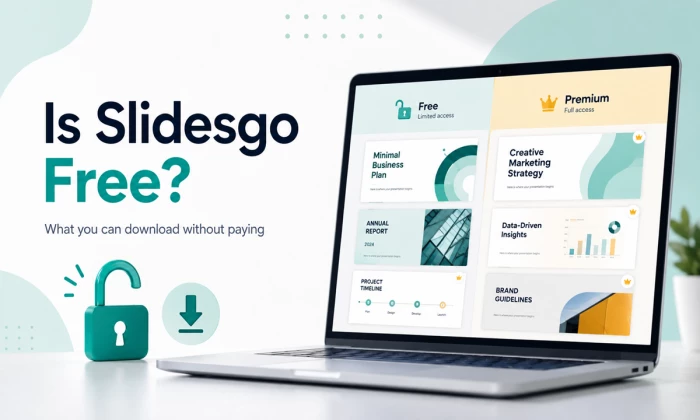
Here is the exact moment most people end up asking this question. You have finally found a template that looks good, you click download, and Slidesgo asks you to sign in. You sign in, feeling clever, and then it quietly tells you that you have already used up your downloads for the month. I have hit that wall myself, usually around 11pm the night before something was due, so I get why the word free starts to feel a little slippery.
So let me save you the trial and error. I spent a good stretch of time actually downloading, editing, and presenting Slidesgo decks on a free account before I ever paid for anything. This is the plain version of what you get without handing over a card, where the invisible fences are, and when it genuinely makes sense to keep your money.
Yes, there is a real free tier. This is not one of those free plans that turns out to be a seven day trial in disguise. You can create an account, browse thousands of templates, open them in the editor, and download real, working files without paying. That part is honest.
The honesty comes with a number, though, and the number is small. A registered free account gets you three template downloads per month. If you never sign up at all, you get zero, because unregistered visitors cannot download anything. So the free plan is real, but think of it as a small monthly allowance rather than an open buffet.
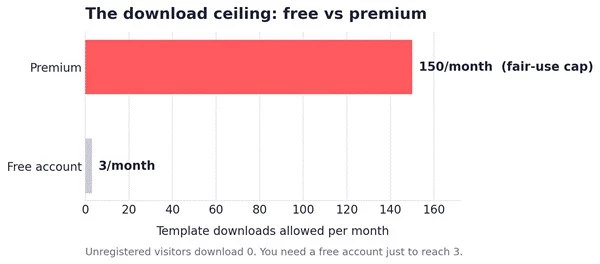
Figure 1. The gap between the free allowance and the premium ceiling. Three downloads a month on the free account, up to 150 on premium under fair use. Unregistered visitors sit at zero.
When you do spend one of those three downloads, you are not getting a crippled preview. You get the actual thing, and that surprised me the first time. Here is what shows up:
● A fully editable file. You choose Google Slides or a PowerPoint (.pptx) download, and once it is a .pptx it works offline in PowerPoint just fine.
● Real design assets baked into the deck. Editable charts and graphs, device mockups, timelines and process flows, plus icon libraries sitting right inside the slides as vectors you can recolor.
● Access to a large chunk of the library. A big portion of the catalog is browsable and downloadable on the free tier, not just a handful of leftovers.
● A first look at the AI tools. You can try the AI features on the free plan, with limits, before deciding whether they are worth paying for.
In other words, the quality of a single free download is genuinely good. The friction is not the quality, it is the quantity and one small cosmetic string attached, which brings me to the part nobody puts in the headline.
Two things caught me off guard as a free user, and I would rather you know them before you build a whole deck around a template.
The attribution slide. Every deck you make on the free tier has to keep a small Slidesgo credit. It is fine for a class project or an internal team update. It is a lot less fine when you are pitching a client and a competitor's brand name is sitting on your closing slide.
The other catch is the one you already met: the three downloads reset monthly, and they vanish fast. Two finished decks and a throwaway experiment, and you are staring at a wall until the calendar flips. There are ads on the free experience too, and the most distinctive templates are often the ones sitting behind the paywall. Because the free library is popular and finite, the same handful of free designs get reused a lot, so do not be shocked if a classmate or a colleague turns up with the same slides you did.
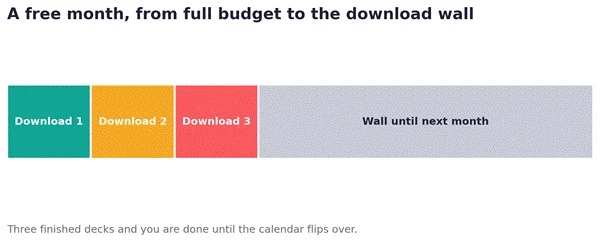
Figure 2. How a free month tends to go. Three downloads spent, then a hard stop until the next monthly reset.
This is the part I did not expect to like, and it is arguably the best reason to keep a free account around even if you rarely download templates. As of early 2026 there are six AI tools, and you can experiment with them without paying:
One honest caveat from actually using it: the AI is doing template selection and population, not original design. It matches your outline to an existing template rather than drafting something truly custom. For a quick first draft that is genuinely useful. For a polished, on-brand client deck, expect to roll up your sleeves afterward.
Once I understood the free tier, the premium pitch made a lot more sense. You are not paying for better templates so much as paying to remove the fences. Premium hands you unlimited downloads (a generous fair-use cap of around 150 a month), drops the attribution requirement entirely, strips out the ads, opens the full library of tens of thousands of templates, unlocks all the AI tools without the free-tier limits, and adds the Slidesclass educational lessons on top.
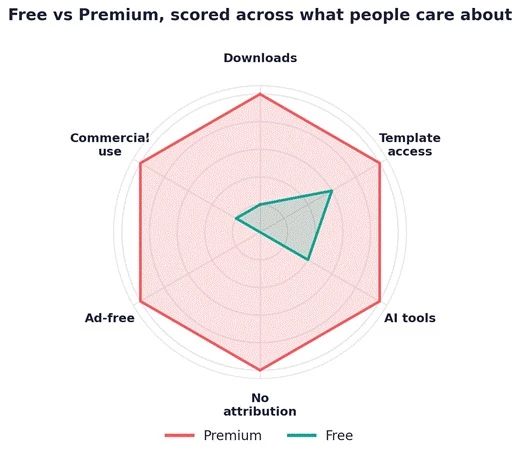
Figure 3. The same account, scored on the six things people actually care about. Free covers the basics of access. Premium is really about removing limits and the attribution mark.
If three downloads a month is not cutting it, premium is cheap by the standards of this category. Month to month it runs about $5.99, and paying annually brings it down to roughly $3 a month (in the neighborhood of $36 a year). There is also a discounted education plan around $3.50 a month. To put that in context, Canva Pro sits near $15 a month and Adobe Express around $10, so for someone whose main job is presentation templates, Slidesgo is the budget option by a wide margin.
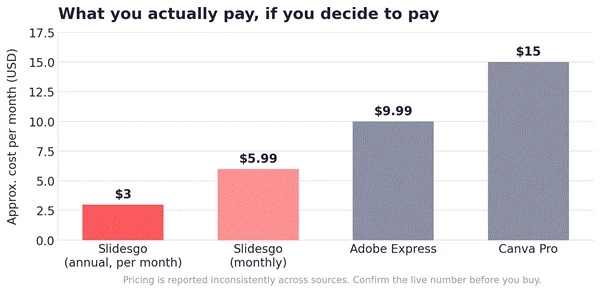
Figure 4. Rough monthly cost against two common alternatives. Slidesgo is the cheapest of the group, especially on the annual plan.
A couple of things are worth saying out loud before you reach for a card. Pricing has been reported inconsistently across third-party sites this year, so confirm the live number on the official pricing page rather than trusting any single review, including this one. Individual premium plans generally allow a refund within 30 days if you have not downloaded a template yet, but a fair number of users have flagged friction around cancellation, so starting on the monthly plan before locking into annual is the cautious move.
If you want the fuller picture first, I’ve also put together a detailed Slidesgo overview covering the usage process and plan breakdown, including the plan structure, sign-up flow, and how the editor behaves in practice. It goes deeper into the mechanics than I have room to cover here.
After living on the free plan and then the paid one, my rule of thumb is pretty simple, and it comes down to how often you actually present.
If you want to stretch the free plan honestly, plan your three downloads instead of spending them on impulse, lean on the AI Presentation Maker and the online editor (which do not eat into your download count the same way), and reuse one strong template across a few related decks. What I would not do is strip the attribution off a free download, because that is exactly the thing the free license asks you to keep.
So, is Slidesgo free?
Yes, genuinely, with limits you can live with once you know them. You get real, editable, well-built templates and a set of AI tools without paying a rupee or a dollar. The trade is three downloads a month and a small credit slide on your work. For casual and academic use, that free tier is plenty and I would happily recommend starting there. The moment presenting becomes a weekly habit or the work goes in front of clients, the roughly $3 a month annual plan stops being a splurge and starts being obvious. Try it free first, hit the wall a couple of times, and let your own calendar tell you whether it is time to upgrade.
Share your thoughts about this article.
Be the first to post a comment!

What actually happens in the space between the moment an app builder produces a...
Nitin3 days ago
A marketing team in 2023 that wanted a two-minute product explainer typically bo...
Sakshi Dhingra4 weeks ago

Two years ago, an AI presenter on screen was a talking point. Today it is a line...
Parveen Verma1 month ago
Quick answer: ChatGPT is owned and operated by OpenAI Group PBC, a for-profit pu...
Sakshi Dhingra1 month ago

A stolen password does not always look suspicious to a login system. If the user...
Deepak Mehra1 month ago
The short versionA Claude API key is created in the Claude Console at platform.c...
Harpreet Singh1 month ago