Most AI image generators look the same on the landing page. A prompt box, a few sample images, a button. So the useful question is not whether Frosting AI can make a picture. It clearly can. The question this Frosting AI review tries to answer is whether the outputs are actually usable, whether prompt results stay consistent, whether you get enough control, and whether it offers enough value next to better-known platforms.
Frosting AI is a browser-based image generator built on Stable Diffusion, with a generous free tier and a lean in-browser workflow. That combination is its main appeal. The rest of this review tests that appeal against the things creators actually care about: image quality, prompt accuracy, control, pricing, privacy, and content safety. No marketing language, just a practical read on where it helps and where it falls short.
The short version, for anyone who does not want to read the whole review.
Best for: casual creators, AI art beginners, and anime or fantasy artists who want quick, low-cost prompt-based visuals in the browser.
Not ideal for: anyone needing accurate in-image text, consistent characters across many images, professional product shots, or guaranteed commercial rights without reading the terms.
Biggest strength: a genuinely generous free tier and a simple, install-free workflow with a wide range of art styles.
Biggest weakness: output quality is inconsistent, and faces, hands, and text often need a human pass before publishing.
Learning curve: low for basic prompts, a little steeper if you want the advanced settings like negative prompts and ControlNet.
Output quality: good but not great, and very prompt-dependent.
Pricing value: strong at the free and entry tiers, though credit rules and commercial terms need verifying.
Final rating: 6.8 out of 10 as an editorial assessment, based on documented features and reviewer consensus rather than a fresh in-house test.
The scores below weigh image quality, prompt accuracy, usability, pricing clarity, output control, privacy clarity, and creative flexibility. Treat them as a starting reference and confirm the details that matter to you on the official site.
| Review Area | Score | Reviewer Notes |
| Ease of use | 8.0 / 10 | Browser-based, no install, simple prompt-to-image flow |
| Prompt accuracy | 7.0 / 10 | Follows clear prompts well, but uneven on complex or text prompts |
| Image quality | 6.5 / 10 | Good but not great, and noticeably prompt-dependent |
| Style variety | 8.0 / 10 | Anime, photoreal, painterly, and more across several models |
| Editing control | 7.0 / 10 | Negative prompts, image-to-image, ControlNet, upscaling, inpainting |
| Speed | 7.5 / 10 | Roughly 10 to 20 seconds per image, slower at peak hours |
| Pricing clarity | 6.0 / 10 | Cheap entry, but daily versus monthly credits and rights need checking |
| Privacy clarity | 5.5 / 10 | Claims encryption and auto-deletion, but retention details are thin |
| Beginner value | 7.5 / 10 | Free tier makes it easy to try before paying |
| Overall rating | 6.8 / 10 | Capable and affordable, with real quality and clarity caveats |
Here is the same assessment as a scorecard.
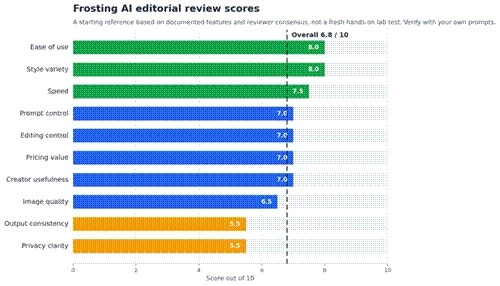
Figure 1. Editorial review scores, a starting reference rather than a hands-on lab result. Verify with your own prompts.
A quick word on how this review was put together, because it shapes how much weight to give the scores. This assessment draws on Frosting AI's official information, its documented features, and the consistent patterns reported by independent reviewers and users who have tested it across many generations. It is not a fresh in-house lab test of brand-new prompts, so the scores are editorial judgments meant as a starting reference. Output on any Stable Diffusion tool depends heavily on the prompt, the model picked, and the settings, so your results will vary.
The framework below is the one to use if you test it yourself, and it is the lens applied throughout this review.
| Test Area | Review Question | Reason It Matters |
| Simple prompts | Does it produce something usable from one line | Most casual users start with short prompts |
| Detailed prompts | Does it respect style, mood, and composition | Shows whether the control is real or cosmetic |
| Style range | Do realistic, anime, fantasy, and product styles hold up | Different creators need different looks |
| Prompt accuracy | Does the image match what was asked | A pretty image that ignores the prompt is not useful |
| Detail quality | Are faces, hands, objects, text, and backgrounds clean | These are the usual AI failure points |
| Consistency | Do repeated generations stay on target | Matters for series, characters, and brand work |
| Export options | What resolution and formats can you download | Decides whether outputs are publish-ready |
| Pricing and credits | What do credits, limits, and rights actually allow | Affects cost for anyone generating regularly |
| Privacy and content | What do the policy and content rules say | Affects safety, uploads, and commercial use |
| Comparison | Does it hold up against known tools | Context is the difference between good and good enough |
Visually, the review flow runs from generating, to inspecting the weak points, to verifying the practical details.
A product snapshot. Anything that shifts often, especially pricing, credits, rights, and policies, is marked as something to confirm on the official site.
| Area | Review Notes |
| Tool type | Browser-based AI image generator built on Stable Diffusion |
| Main use case | Text-to-image for art, social, blog, and concept visuals |
| Account requirement | Free account reported, with email sign-up and age confirmation |
| Free access | Generous free tier, reported around 100 credits, currently watermark-free |
| Prompt-based generation | Positive and negative prompts, weighting, model and ratio choice |
| Style options | Anime, photorealistic, painterly, and more via multiple models |
| Export and download | Standard downloads, with upscaling on paid tiers |
| Commercial usage | Not clearly documented in public sources |
| Content rules | Supports 18+ content, bans CSAM and non-consensual deepfakes |
| Privacy policy | Claims encryption and image auto-deletion after a period |
Image quality is the heart of any AI art tool review, and it should be judged on real generations, not the curated examples on a marketing page. Across the styles Frosting AI supports, the honest summary is good but not great, and very dependent on the prompt and model you choose.
Sharpness and color are generally solid, and stylized work, especially anime and fantasy, tends to look the best. Lighting and color handling are usually pleasant. The familiar weak points remain: faces can drift on group or distant shots, hands still distort, fine background detail can get mushy on complex scenes, and any text inside an image is unreliable. For social posts, blog headers, mood boards, and concept art, the output is often usable with light cleanup. For anything where small errors are obvious, plan to edit or regenerate.
| Image Type | Expected Quality Check | Reviewer Observation |
| Portraits | Clean face, eyes, and skin detail | Good on close single subjects, weaker on groups or distance |
| Anime-style art | Style fidelity and clean lines | A clear strength, among the most consistent output |
| Fantasy scenes | Mood, lighting, and rich detail | Strong and atmospheric, a good fit for the engine |
| Product-style visuals | Accurate shapes, labels, and realism | Often falls short of true product photography |
| Blog images | Clear, on-topic, lightly stylized | Usually usable with minor cleanup |
| Social media graphics | Eye-catching, correct aspect ratio | Good for concepts, but check any text overlays |
| Abstract visuals | Creative, varied, visually interesting | Reliable and easy, a low-risk use case |
Frosting AI follows clear, well-structured prompts reasonably well, and the support for negative prompts and tag weighting gives you real influence over the result. Detailed prompts that name style, mood, and composition generally land closer than vague one-liners. The weak spots are predictable: complex multi-element scenes drift, very short prompts can wander, in-image text rarely comes out clean, and consistency across repeated generations is not guaranteed, so expect a few retries for anything specific.
| Prompt Type | Test Prompt Idea | Quality Signal | Possible Issue |
| Simple prompt | A red fox in a forest | Fast, clean, on-topic result | Generic, may need detail to stand out |
| Detailed prompt | Cinematic portrait, soft rim light, 85mm look | Style and mood respected | Minor element drift on long prompts |
| Character prompt | Same character, three poses | Recognizable style | Consistency slips across generations |
| Product prompt | Glass bottle on marble, studio light | Decent shape and lighting | Labels and realism often off |
| Background prompt | Misty mountain valley at dawn | Strong, atmospheric scenes | Fine detail can blur when busy |
| Text-based image prompt | Poster with the word Sale | Layout may look right | Text is frequently garbled |
| Negative prompt | Exclude extra fingers, blur | Noticeably cleaner results | Not a guaranteed fix every time |
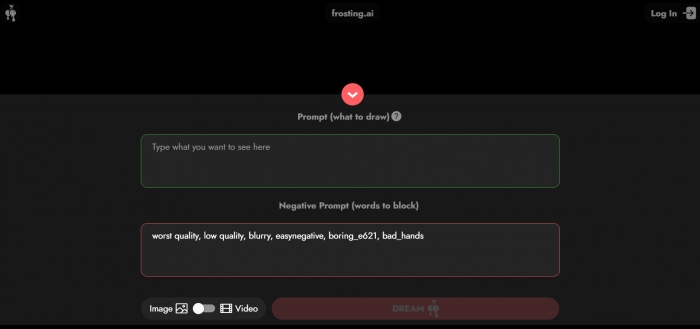
The interface is one of Frosting AI's quieter strengths. The dashboard is uncluttered, the prompt box is front and center, and picking a style or aspect ratio is straightforward. Because it runs entirely in the browser with no install, you can be generating within a minute of signing up, and generation usually takes about 10 to 20 seconds, though it can slow down at peak hours unless you are on the top tier with priority access.
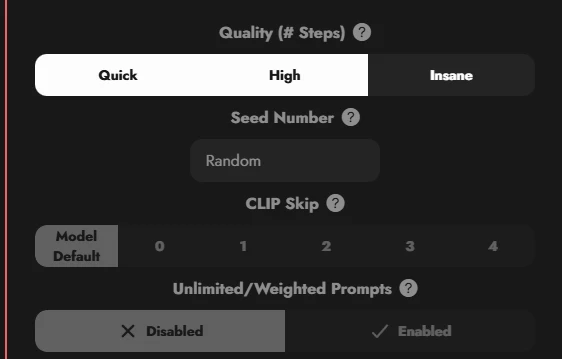
Previews are clear, downloading is simple, and credit usage is visible enough to track. The advanced controls, negative prompts, weighting, ControlNet, and reference images, are powerful but are tucked into advanced settings, so newcomers may not find them right away. Error handling is fine rather than polished.
Reviewer commentary: Frosting AI feels easy enough for casual users to enjoy out of the box, since basic text-to-image is genuinely simple here. To get the most from it, though, you will want some familiarity with AI image prompts, because the difference between a throwaway result and a good one comes down to prompt craft and the advanced settings. It sits comfortably between a true beginner toy and a power-user studio, closer to the friendly end.
Frosting AI carries a fairly deep feature stack for its price. The question for a review is which features earn their keep and which are filler. Verify availability per tier, since the better tools sit on paid plans.
| Feature | Practical Value | Review Judgment |
| Text-to-image | The core of the tool | Useful, and the main reason to use it |
| Style presets | Faster than prompt-only styling | Useful for quick, consistent looks |
| Aspect ratio and size | Fits posts, headers, and prints | Useful and expected |
| Negative prompts | Removes common artifacts | Useful, a real quality lever |
| Image-to-image and reference | Guides toward a target look | Useful for direction and iteration |
| Upscaling and enhancement | Bigger, cleaner exports | Useful for print or large formats |
| Batch generation | Many variations at once | Useful for picking the best of several |
| Download and export | Gets images out cleanly | Useful and necessary |
| History or gallery | Find and reuse past work | Nice to have, not essential |
| DreamChat and video beta | Character chat and video | Mostly nice to have, still rough |
| Plan | Price | Generations per Month | Feature Access | Watermark | Support | Extra Benefits |
| Free Plan | $0/month | 100 | Access to all features | Yes | Standard | Good for basic testing |
| Hobbyist Plan | $10/month | 1,000 | Access to all features | No | Standard | Suitable for casual creators |
| Pro Plan | $50/month | 10,000 | Access to all features | No | Priority support | Best for regular creators and professionals |
| Business Plan | $200/month | 50,000 | Access to all features | No | Priority support | Includes additional business-specific tools |
Discounts and payment options
| Offer / Payment Option | Details |
| Annual Discount | 20% off on annual plans |
| Non-Profit Discount | 50% off |
| Educational Discount | 50% off |
| Payment Methods | Major credit cards and PayPal |
| Pros | Cons |
Useful for quick AI image experiments without any install Suits creators who want fast prompt-based visuals Helpful for generating creative concepts and ideas Beginner-friendly, since the core interface is simple Good for social and blog image ideas, and strong on anime and fantasy Generous, currently watermark-free free tier | Output quality varies a lot by prompt and model Faces, hands, text, and fine details often need review Commercial usage terms must be checked before selling Character consistency across many images is weak Not a replacement for advanced design or photo-editing tools |
Frosting AI rewards the right jobs and frustrates the wrong ones. The table maps where it fits, the prompt style that works, and how much human editing to expect before publishing.
| Use Case | Fit Level | Best Prompt Style | Human Editing Needed |
| AI art experiments | Strong | Playful, descriptive, varied | Light |
| Social media visuals | Moderate | Clear subject, set aspect ratio | Some, check any text |
| Blog concept images | Moderate | Topic plus mood and style | Some cleanup |
| Character concepts | Moderate | Detailed, tag-weighted prompts | Some, watch consistency |
| Fantasy or anime art | Strong | Rich style and scene detail | Light |
| Mood boards | Strong | Loose, evocative prompts | Light |
| Background visuals | Strong | Scene and lighting focused | Light |
| Thumbnail inspiration | Moderate | Bold, simple, high contrast | Some, add text yourself |
| Product photography | Limited | Detailed studio descriptions | Heavy, verify accuracy |
The same fit, ranked, with the editing each use case tends to need.
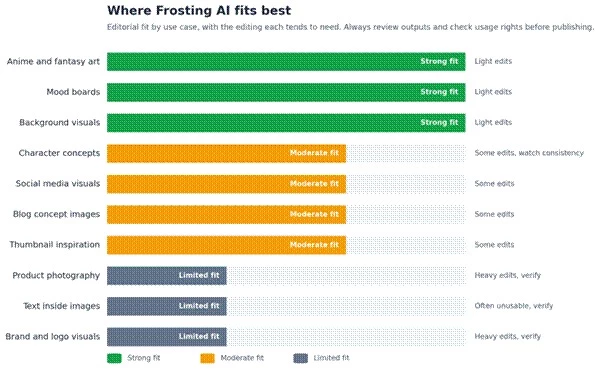
Figure 3. Editorial fit by use case. Always review outputs and check usage rights before publishing.
A short, review-focused comparison rather than a full alternatives roundup, to place Frosting AI in context. Each of these tools does something Frosting AI does not, and the reverse is true too.
| Tool | Stronger Area | Weaker Area | Better For |
| Frosting AI | Free tier, anime styles, low friction | Consistency, text, fine detail | Casual and stylized image experiments |
| Midjourney | Top-tier aesthetic quality | Cost, no real free tier | Polished, art-led visuals |
| Leonardo AI | Control, models, game-art assets | Steeper learning curve | Creators wanting fine control |
| Ideogram | Readable text inside images | Narrower all-round styling | Posters, logos, and text visuals |
| Canva AI Image Generator | Built into a full design suite | Less raw generation depth | Quick social and marketing design |
| Adobe Firefly | Commercial-safe training, integration | Less edgy or niche styling | Brand-safe commercial work |
A practical summary after working through its documented behavior and the consensus from hands-on reviewers.
Best prompt types: stylized, descriptive prompts for anime, fantasy, backgrounds, and mood pieces, especially with negative prompts to clean up artifacts.
Weak prompt types: in-image text, precise product or brand visuals, and anything needing the exact same character repeated.
Output consistency: uneven. Expect to generate a few options and pick the best, rather than nailing it first try.
Editing required: usually light for stylized art, heavier for realism, faces in groups, and anything with text.
Time saved: real for concepting and ideation, less so when you need a single exact result.
Value for beginners: high, thanks to the free tier and simple core workflow.
Value for serious creators: situational. Useful as an idea and draft engine, but compare consistency, rights, and control before depending on it.
Main thing to verify before paying: the credit system, export quality, and commercial usage terms on the official site.
The final scorecard in detail. These are editorial judgments based on documented features and reviewer consensus, not a fresh hands-on test, so verify the points that matter to you.
| Category | Rating Out of 10 | Reason |
| Ease of use | 8.0 | Clean, install-free, simple to start generating |
| Image quality | 6.5 | Good but not great, and prompt-dependent |
| Prompt control | 7.0 | Negative prompts and weighting help, text is weak |
| Style variety | 8.0 | Wide range, strongest on anime and fantasy |
| Output consistency | 5.5 | Varies run to run, character consistency is weak |
| Pricing value | 7.0 | Generous free tier and cheap entry, details to verify |
| Privacy clarity | 5.5 | Encryption and deletion claimed, retention unclear |
| Creator usefulness | 7.0 | Strong for casual and stylized work, limited for pro precision |
| Overall rating | 6.8 | Capable, affordable, with real quality and clarity caveats |
For casual creators, AI art beginners, bloggers, and social media users, Frosting AI is worth trying. The free tier removes the risk, the browser workflow is painless, and for stylized work like anime, fantasy, backgrounds, and mood boards it produces genuinely usable results. If you mainly want quick prompt-based image ideas, it earns its place in the toolkit, which is the honest answer to whether Frosting AI is worth it for that audience.
Serious creators should be more cautious. Before depending on it, compare output consistency, commercial rights, pricing, and editing control against what you actually publish, because faces, hands, in-image text, and character consistency are real weak points, and the commercial and privacy terms need verifying. My recommendation is simple: try it first with a few practical prompts in the styles you actually use, inspect the results closely, and only upgrade once the outputs match your real publishing needs.
Is Frosting AI free to use?
Yes, there is a free tier, reported at around 100 credits and currently watermark-free, which is generous for testing and casual use. Confirm the exact limit and whether credits reset daily or monthly on the official site, since this is easy to misread.
Is Frosting AI good for AI art?
For stylized art, especially anime, fantasy, backgrounds, and concepts, it is a capable and affordable option. It is less suited to work that needs precise realism, accurate text, or consistent characters across many images.
Can Frosting AI create realistic images?
It can produce reasonable photoreal results, but quality is inconsistent and faces, hands, and fine detail often need cleanup. For professional realism or product photography, expect heavy editing or a different tool.
Does Frosting AI add a watermark?
Recent reports describe current outputs as watermark-free, though some older reviews mention watermarks that were later removed. Confirm the watermark and export rules for your specific plan on the official site.
Is Frosting AI safe to use?
It is web-based with claimed encryption and image auto-deletion, and public sources say it bans child sexual abuse material and non-consensual deepfakes. It does host 18+ content behind age verification, so it is not safe-for-work by default. Verify the privacy and content policies, avoid uploading sensitive images, and review outputs before publishing.
Share your thoughts about this article.
Be the first to post a comment!

The same tool can be a 4.7 on one site and a 3.9 on another. Here is what is rea...
Nitin2 months ago

Here is the number worth pinning above your budget: in Gartner Digital Markets r...
Deepak Mehra2 months ago

What Artlist AI is in 2026Artlist began as a royalty-free music library. By 2026...
Deepak Mehra2 months ago

Most AI tool failures do not announce themselves. There is no crash, no angry em...
Nitin2 months ago

The best AI image generator in 2026 is Nano Banana 2 for speed, FLUX.2 for photo...
Parveen Verma2 months ago

“Useful” is a slippery word for a coding assistant. A tool can be brilliant at o...
Sakshi Dhingra2 months ago