The first AI image I ever generated looked like a melted sandwich. One hand had 6 fingers, the face was smeared across the frame, and the caption spelled nothing at all. The tool was not broken. My prompt was the problem.
That is the part most beginner guides skip. Leonardo AI looks powerful, and it is: you type a prompt, choose a model or style, adjust a few settings, and generate. But the distance between a clean, usable image and a strange one almost always comes down to the words you choose, the style or model you select, the image size you pick, and how carefully you review the result before downloading it.
So this guide is not really about pressing the generate button. It is about getting cleaner, more useful AI images with fewer wasted attempts. By the end, you should be able to write a prompt that holds together, choose the right settings for a blog cover versus an Instagram post, avoid the mistakes that ruin most first images, and judge whether Leonardo AI fits into your creative workflow.
Here is the short version before the detailed walkthrough.
| Feature | Purpose | Best For | Beginner Tip |
| Text-to-image prompt box | Turns your written description into an image | Every generation you make | Describe one clear scene, not five ideas at once |
| Model selection | Controls the base style and generation behavior | Realistic images, anime, concept art, game assets | Pick the model before writing the final prompt |
| Style presets | Helps shape the final visual look | Matching the image to your brand or use case | Use styles to guide the mood, not replace a clear prompt |
| Aspect ratio | Controls the shape of the image | Blog headers, Instagram posts, thumbnails, banners | Set this before generating, not after |
| Image quality settings | Adjusts detail, sharpness, and output quality | Final assets meant for publishing | Use higher quality for hero images and lower settings for quick tests |
| Image guidance or reference image | Uses an uploaded image to guide the result | Consistent looks, character direction, product ideas | Use a clean reference image, not a busy one |
| Negative prompt | Tells the AI what to avoid | Removing text, logos, blur, extra fingers, clutter | Add “no text, no logo, no watermark” to most prompts |
| Download and export | Saves the finished image | Publishing, editing, and reuse | Save the highest quality version available in your plan |
| History or saved generations | Stores previous outputs and prompts | Reusing successful prompt formulas | Copy a winning prompt and adjust it instead of starting again |
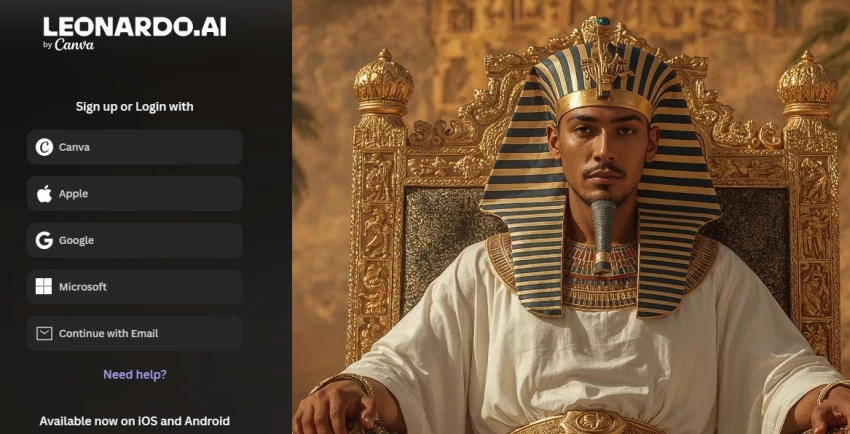
Getting started takes only a few minutes. Here is the basic layout before you generate your first image.
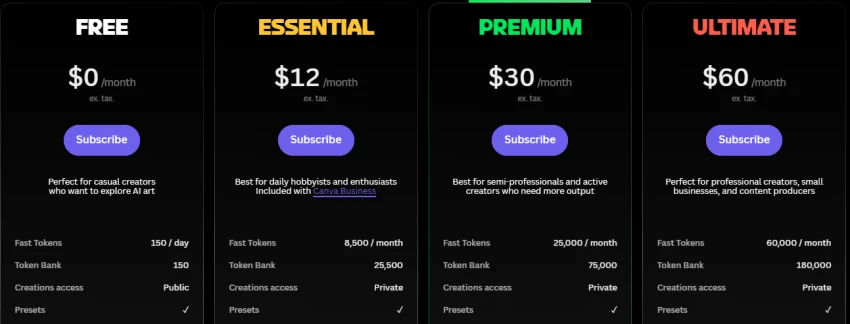
I am deliberately not quoting fixed plan names, prices, or credit counts here because those details can change. The official Leonardo AI pricing and help pages are the only reliable source for what is true today.
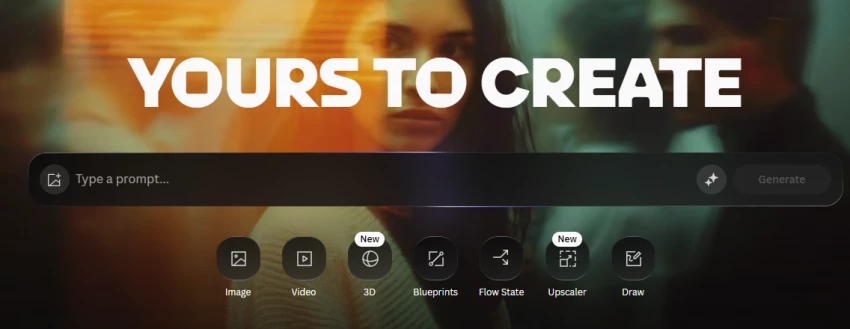
Walk through it once and the rest becomes easier. The flow below is the full loop, including the review and refinement steps most beginners skip.
“Create a clean editorial-style image of a modern workspace with a laptop, soft natural light, organized notes, minimal desk setup, realistic photography style, calm professional mood, no text, no logo.”
Clear subject: a modern workspace with a laptop gives the AI one main thing to build.
Defined setting: organized notes and a minimal desk describe the scene.
Visual style: editorial and realistic photography point to a specific look.
Lighting direction: soft natural light shapes the mood and shadows.
Mood: calm and professional keeps the tone consistent.
Negative instructions: no text and no logo remove two common AI mistakes.
Practical use case: this type of image works as a blog header, website visual, or LinkedIn post.
Most weak results come from vague prompts. A simple formula fixes that by giving Leonardo AI enough detail to understand what you want.
The formula:
Subject + Setting + Style + Composition + Lighting + Mood + Color Direction + Quality Details + Negative Instructions
You will not need all 9 parts every time. A quick social graphic may need only 4 or 5. A polished website hero image may need all of them. The point is that each part removes guesswork.
| Use Case | Prompt to Try |
| Blog hero image | Wide cinematic header of a sunlit reading nook with a stack of books and a warm blanket, soft natural light, cozy calm mood, realistic style, no text, no logo |
| AI tool review cover | Clean modern desk scene with a laptop showing an abstract dashboard, soft daylight, organized minimal setup, realistic editorial style, no readable text, no logo |
| Fitness Instagram visual | Square shot of a yoga mat, water bottle, and towel by a bright window, fresh morning light, motivating calm mood, realistic style, no text |
| Minimal tech workspace | Top-down view of a tidy workspace with a tablet, pen, and plant on a light wood desk, soft even light, modern minimal mood, no text, no logo |
| Product mockup concept | Centered studio shot of a plain cosmetic jar on a marble surface, soft premium light, clean elegant mood, realistic style, blank label, no logo |
| Anime-style character | Anime illustration of a cheerful young traveler with a backpack in a sunny town square, bright colors, warm afternoon light, friendly upbeat mood |
| Professional avatar | Portrait of a confident professional in soft business attire, clean studio light, plain neutral background, realistic style, calm approachable expression |
| Abstract SaaS dashboard visual | Abstract glowing data dashboard with soft floating charts on a dark gradient, cool blue and violet light, sleek modern mood, no readable text, no logo |
| Fashion editorial image | Editorial fashion shot of a model in a tailored neutral outfit against a concrete wall, soft directional light, calm confident mood, realistic style |
| Food photography concept | Close-up of a fresh salad bowl on a rustic table, natural window light, vibrant fresh colors, appetizing calm mood, shallow depth of field, no text |
| Travel-style social post | Vertical shot of a quiet coastal village at golden hour, warm soft light, relaxed wanderlust mood, realistic style, room for text at the top, no logo |
| Futuristic AI background | Futuristic abstract background of soft flowing light trails on a deep indigo gradient, cool glow, calm high-tech mood, no text, no logo |
| Image Type | Aspect Ratio | Prompt Style | Detail Level | Best Use |
| Blog cover image | 16:9 | Editorial, realistic | Medium to high | Article headers and featured images |
| Instagram post | 4:5 or 1:1 | Lifestyle, vivid | Medium | Feed posts and carousels |
| YouTube thumbnail | 16:9 | Bold, high contrast | High | Video click-through visuals |
| Product concept visual | 1:1 or 4:5 | Studio, clean | High | Mockups and product concepts |
| AI avatar | 1:1 | Portrait, clean | High | Profiles and bylines |
| Digital art | 3:2 or 16:9 | Painterly, cinematic | High | Prints and creative pieces |
| Website hero image | 16:9 | Editorial, modern | High | Landing pages and banners |
| Social media background | 9:16 or 1:1 | Abstract, soft | Low to medium | Story backdrops and overlays |
For bloggers and SEO teams, Leonardo AI is a fast way to create visuals that stock photo sites often cannot provide. It works well for article cover images, in-section visuals, concept illustrations, comparison-article graphics, tool review thumbnails, social sharing images, and featured images for WordPress or another CMS.
The visuals only help if they are handled carefully. A few quality habits:
On social media, Leonardo AI can save hours of searching for visuals that almost fit. Common uses include:
One honest caveat: an AI image can support your message, but it cannot carry a weak post on its own. Strong copy, a clear offer, and good design judgment still matter. Treat the image as the supporting cast, not the lead.
| Pros | Cons |
|---|---|
| Creates sharp, realistic images with strong detail quality, especially for art, thumbnails, characters, and social media visuals. | Some users complain about limited credits/tokens, meaning heavy users may run out quickly or need a paid plan. |
| Fast image generation is frequently praised by reviewers, especially compared with slower AI image tools. | G2 reviewers mention prompt issues, where Leonardo AI may not always follow complex prompts exactly. |
| Free plan is useful for testing image generation before paying. | Some users report inconsistent output, especially when trying to recreate the same face, character, or visual style. |
| Good for creators who need many styles, models, and customization options in one place. | Reddit users have complained about support being weak or slow when issues happen, even for paid users. |
| Users like the Elements and customization tools for improving image style and creative control. | Review feedback also mentions poor results in some generations, meaning users may need several attempts before getting a usable image. |
| Platform | Rating / Review Count | Review Takeaway |
|---|---|---|
| G2 | 4.5/5 from 32 verified reviews | Strong feedback for fast image generation, realistic styles, and prompt handling. Common complaints include prompt issues, inconsistent output, learning difficulty, and poor results in some generations. |
| Trustpilot | 4.5/5 from 1K+ reviews | Users often praise customer support, different AI models, and creative inspiration from community prompts. |
| Capterra | 5.0/5 in listed review snapshot | Reviewers like the image quality and easy prompting, but one complaint is that users can lose full credits even when the tool ignores parts of the prompt. |
| Apple App Store | Positive user review sentiment | Mobile users praise crisp, high-quality images, including outputs made on the free plan. |
| Mixed user discussion | Users say Leonardo AI can produce impressive images, but results depend heavily on prompts, settings, and repeated attempts. |
| Tool | Better For | Main Strength | Main Limitation Compared With Leonardo AI |
| Midjourney | Highly stylized artistic images | Very polished aesthetics | Less beginner-friendly for casual dashboard users |
| SeaArt AI | Anime, character art, creative images | Strong creative and character-focused outputs | May feel more casual depending on use case |
| Ideogram | Images that need readable text | Better text rendering inside images | Less broad if your main goal is general visual creation |
| Canva AI Image Generator | Quick visuals inside a design suite | Generate and design in one place | Less advanced as a pure AI image generator |
| Adobe Firefly | Commercial-safe design workflows | Strong Adobe ecosystem integration | Best value mostly for Adobe users |
These notes reflect general tool positioning. Every AI image platform updates often, so verify the latest details before choosing one for serious work.
Run through this list before the image goes public.
✓ The image matches the prompt.
✓ No distorted face, hand, or object appears on close inspection.
✓ No unwanted or gibberish text is visible.
✓ No fake logo or misleading brand element appears.
✓ The aspect ratio is correct.
✓ The image suits the platform.
✓ Commercial usage rights are checked.
✓ Watermark and export rules are understood.
✓ The file name is descriptive.
✓ Alt text is written naturally.
✓ The image looks good on desktop and mobile.
After putting Leonardo AI into the same beginner workflow I would use for any AI image generator, the honest read is simple: it is one of the stronger options for creators, bloggers, marketers, and small teams that want better control over AI visuals.
It works well for blog covers, social media visuals, avatars, product-style mockups, creative concepts, digital art, and campaign images. The tool gives you more room to shape the result than a basic prompt-and-generate image tool, especially when you learn how to use models, prompt details, negative prompts, and aspect ratios properly.
But the tool is only half the equation. The best results do not come from Leonardo AI alone. They come from a clear prompt, the right model choice, careful review, and a light editing pass afterward. Skip those steps, and even a strong AI generator can still give you strange hands, messy text, or generic visuals.
So treat Leonardo AI as a creative assistant, not a replacement for taste, brand judgment, or a final human eye. Learn the prompt formula, keep the checklist nearby, verify the current rules on the official site, and it can easily become part of your everyday visual workflow.
Share your thoughts about this article.
Be the first to post a comment!

The same tool can be a 4.7 on one site and a 3.9 on another. Here is what is rea...
Nitin1 month ago

Here is the number worth pinning above your budget: in Gartner Digital Markets r...
Deepak Mehra1 month ago

What Artlist AI is in 2026Artlist began as a royalty-free music library. By 2026...
Deepak Mehra2 months ago

Most AI tool failures do not announce themselves. There is no crash, no angry em...
Nitin2 months ago

The best AI image generator in 2026 is Nano Banana 2 for speed, FLUX.2 for photo...
Parveen Verma2 months ago

“Useful” is a slippery word for a coding assistant. A tool can be brilliant at o...
Sakshi Dhingra2 months ago