Monica AI is a browser-native AI assistant that performs well across PDF analysis, webpage and YouTube summaries, translation, writing assistance and multi-model chat. It works best for productivity-focused users who spend most of their working day inside a browser.
It still does not automatically replace ChatGPT, Claude or other official AI platforms for every task. Its broad feature set can feel crowded, premium-model usage remains limited by plan allowances, and public feedback about billing, customer support and account restrictions is sharply divided.
In this detailed review, I looked at Monica’s current product pages, Chrome extension listing, pricing information, privacy policy, mobile listings and recent reviews from G2, Trustpilot and Product Hunt.
Review transparency: The features, prices and usage restrictions in this update were checked against Monica’s public documentation on July 13, 2026. I did not purchase a new Ultra subscription or complete a controlled test of every listed AI model. User complaints are therefore described as individual reports rather than independently proven facts.
Monica AI Toolset: What You Actually Get
Monica has expanded significantly beyond its original browser-writing tools. Its current Chrome listing presents it as an all-in-one assistant for chat, research, writing, translation, image creation, video generation, browser automation and document analysis.
Category
Tool or feature
Main purpose
Writing and editing
Rewrite, Compose, Text Humanizer and email replies
Draft, shorten, improve or personalise text
Research and documents
ChatPDF, document analysis and Deep Research
Ask questions about files and collect information
Summarisation
YouTube, webpage, article and video summaries
Turn longer content into shorter takeaways
Translation
Webpage, selected-text and PDF translation
Read or compare content in different languages
Image creation
Text-to-image, image editor, background tools and upscaling
Generate and edit visual content
Video creation
Text-to-video and image-to-video models
Produce short AI-generated videos
Browser automation
Monica Agent and Browser Operator
Automate multi-step browser activities
Presentation tools
Slides Generation
Turn ideas and research into presentation drafts
Developer tools
Monica Code
Provide coding assistance inside supported editors
Mobile and desktop
iOS, Android, Windows and macOS apps
Continue Monica workflows across devices
The biggest change is that Monica no longer tries to be only a shortcut for ChatGPT. It now brings several model providers and specialist tools into one interface.
That breadth is useful, but it also creates a new issue: finding the right tool is not always as immediate as it was when Monica had fewer features. One detailed Trustpilot review praised the number of available models and tools but described the interface across Monica’s web, desktop and mobile versions as confusing and inconsistent. That is one user’s experience, but it highlights the trade-off between feature breadth and interface simplicity.
Key takeaway: Monica AI does not necessarily try to be smarter than every individual model. It tries to make those models and AI utilities available wherever the user is already working.
Where You Can Use Monica AI
Chrome and Edge extensions: Sidebar, selected-text actions and webpage-aware assistance
Mac and Windows apps: Desktop access, document tools and AI chat
iOS and Android apps: Mobile chat, writing, search and creative tools
Web application: Access to Monica’s larger collection of AI features
VS Code and JetBrains environments: Coding assistance through Monica Code
Search pages and websites: AI answers, summaries and writing support alongside the page being viewed
Monica’s official website currently describes the product as available through browser extensions, desktop software and mobile apps. Its sidebar can be opened with Command + M or Ctrl + M, allowing users to ask questions without opening a separate AI tab.
Unlike a traditional chatbot that expects the user to bring information into a separate conversation, Monica’s main advantage is that it can work beside the webpage, video, email or document already open.
That makes it especially convenient for short tasks such as:
Summarising the article currently being read
Explaining selected text
Translating a paragraph
Preparing a short email reply
Extracting takeaways from a YouTube transcript
Asking questions about a PDF
Comparing responses from different AI models
The benefit becomes less significant when a task already requires a dedicated research workspace, long-term project memory or precise control over one model provider’s complete feature set.
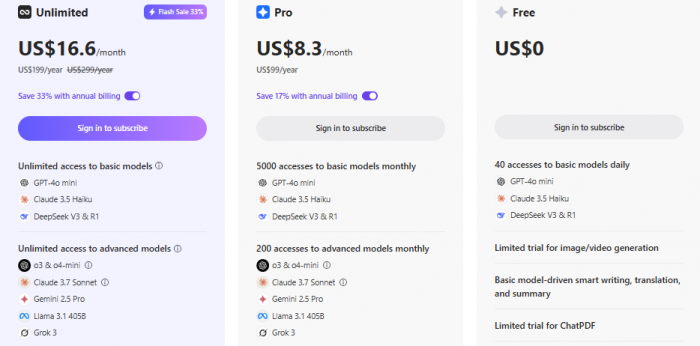
Monica AI Pricing Plans
Plan
Price (Monthly, billed annually)
Features Summary
Free
$0
40 daily tasks, basic tools, and trial access to ChatPDF
Pro
$8.3
5,000 base model calls + 200 GPT-4/Claude uses, image tools, all features
Unlimited
$16.6
Unlimited usage, priority access to GPT-4.1, Claude 3.7, PixVerse, Kling AI
Team
Custom
Admin dashboard, API access, shared prompts, and SLA onboarding
Student Discount: Up to 50% off with verification All plans support iOS, Android, Chrome, VS Code, and desktop
Usually requires a transcript, link or shared content
Available through browser tools
Built in
PDF and document chat
Yes
Yes
Yes
Yes
Multi-provider model access
Yes
No, primarily OpenAI models
Limited model selection
Yes
Image generation
Yes
Yes
Limited by plan and product
Yes
Video generation
Yes
Available on supported plans
Not a core feature
Available through selected tools
Browser automation
Monica Agent and Browser Operator
Agent features vary by plan
Comet Assistant
Browser agent tools
Free plan
Yes
Yes
Yes
Yes
Best suited for
All-in-one browser productivity
Deep conversations, content creation and OpenAI workflows
Citation-based research and AI browsing
Browser sidebar and page-aware assistance
Clear positioning:
Monica AI = productivity & documents
ChatGPT = long-form creative reasoning
Perplexity = search-first answers
My Personal Rating for Monica AI
After testing Monica AI across Chrome, desktop, mobile, and VS Code, I would personally rate it:
4.3 / 5
Reasoning:
Excellent browser-native integration
Strong summarization + document tools
Great privacy controls
Occasional PDF lag + formatting loss prevent a perfect score
Final Verdict
Monica AI really does almost everything, and that “almost” still matters.
It combines browser chat, writing, summarisation, translation, PDFs, image generation, video generation, research and automation in one place. That makes it useful for people who do not want to open a separate application every time they need AI assistance.
Its strongest moments are still the simple ones: summarising a YouTube video while watching it, asking questions about the webpage already open, rewriting text inside a form, comparing model responses or translating a document without rebuilding the entire workflow elsewhere.
Monica becomes harder to evaluate when the user moves into heavy advanced-model usage, long research tasks or expensive creative generation. The plan names and marketing language can make access sound broader than the documented monthly allowances. Public feedback also shows a significant divide between satisfied browser and mobile users and a smaller group reporting serious billing, account or support problems.
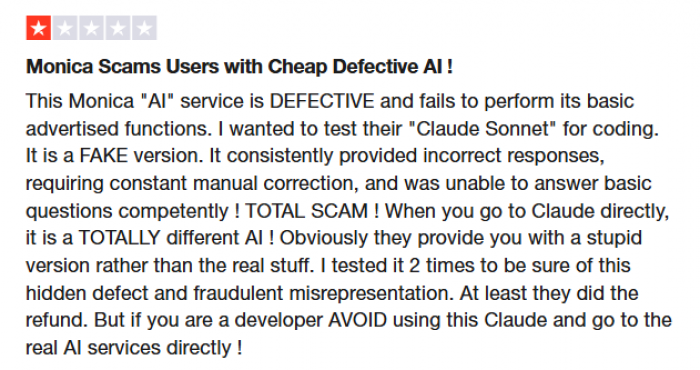
Those complaints should be taken seriously, but they should not be converted into unsupported statements that Monica “scams people.” The available evidence shows a functioning, widely used AI product with both strong ratings and notable customer complaints, not proof of fraud.
For users whose work lives inside a browser, Monica can feel less like a chatbot and more like a productivity layer. It is particularly useful for summarisation, translation, lightweight research and quick writing assistance.
It is not automatically the best replacement for direct access to ChatGPT, Claude, Gemini or Perplexity. Users who depend heavily on one particular model may still prefer that provider’s official interface, where features, context handling and account limits are more direct.
FAQs
1. Does Monica AI store my PDF or document data?
No. Monica supports local processing, and documents can be deleted permanently from your history. For sensitive files, privacy mode is recommended.
2. Can Monica AI summarize videos longer than 1 hour?
Yes, but processing time increases with length. For very long videos (2–3 hours), summarization may require a Pro or Unlimited plan.
3. Does Monica AI work offline?
Only partially. Some local-browser features work, but summarization, rewriting, and ChatPDF require an internet connection.
4. Is Monica AI free to use?
Yes. Monica AI offers a free plan with around 40 daily tasks, allowing users to test summarization, rewriting, and basic document tools. For heavier or professional use, paid plans unlock higher limits and premium models.
5. Is Monica AI better than ChatGPT?
Not exactly, they’re built for different purposes. ChatGPT is stronger for long-form writing, deep reasoning, and creative tasks. Monica AI is better for browser-based productivity, like summarizing PDFs, YouTube videos, webpages, and translating content instantly.
6. How reliable is Monica AI?
Overall, Monica AI is reliable for everyday tasks. Summaries and document tools work consistently, though very large PDFs or complex formatting can occasionally lag. Privacy controls and compliance add to its credibility for regular professional use.
I really love Monica – it’s packed with amazing resources! I used to have the paid plan, but the 200 prompt limit with the best models was way too restrictive. I’d hit that in a week. To get more, you have to upgrade to a much more expensive plan, and even then there’s still a cap. Unlimited access is super pricey, so I eventually just stuck with the free version. That’s the only downside for me – not enough flexible plan options. Now I mainly use ChatGPT with unlimited prompts and pop into Monica's free mode when needed.