Technology
13 min read
Overview of Blackbox AI: Features, Capabilities, and Unique Advantages

Blackbox AI is an AI-powered coding assistant and agent platform built for developers, students, software teams, and people who regularly work with code. It helps users generate code, understand existing code, debug errors, rewrite functions, explore documentation, and speed up repetitive development tasks.
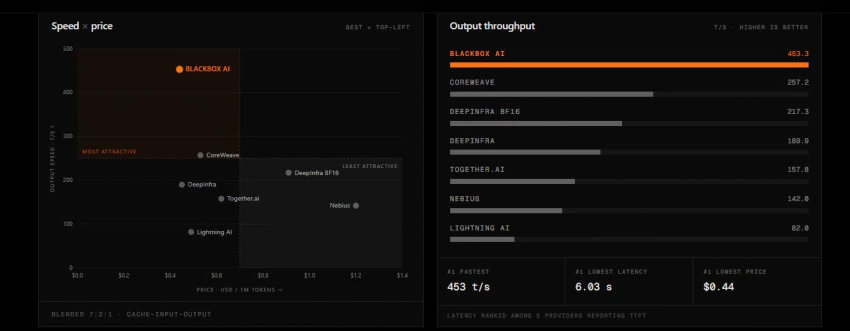
Earlier, Blackbox AI was mostly known as a browser-based coding assistant. That is still part of its value, especially through the Chrome extension. However, the product has now moved beyond only browser support. It now works across different developer environments, including VS Code, web, terminal workflows, APIs, and agent-based coding tasks.
One small point is also important here. “Blackbox AI” as a product should not be confused with the general term “black box AI.” In artificial intelligence, black box AI usually means an AI system where users can see the input and output, but they cannot clearly see how the system made its decision. In this article, we are talking about BLACKBOX.AI, the coding assistant and developer platform.
| Category | Details |
|---|---|
| Tool name | BLACKBOX.AI / Blackbox AI |
| Tool type | AI coding assistant and multi-agent coding platform |
| Best for | Developers, students, engineering teams, and coding learners |
| Main use cases | Code generation, debugging, code explanation, refactoring, AI agent workflows |
| Supported workflows | Web, Chrome extension, VS Code, IDE, CLI, API |
| Paid plans | Pro, Pro Plus, Pro Max, Enterprise |
| Key strength | Combines coding chat, code assistance, browser support, and agent execution |
| Main competitors | GitHub Copilot, Cursor, Claude Code, ChatGPT, Tabnine, Windsurf, Replit AI |
It enables developers to extract code snippets, receive suggestions, and solve coding challenges without switching environments.
Blackbox AI is useful because it does not focus on only one part of coding. It gives developers multiple ways to work faster, depending on where they are writing, reading, testing, or fixing code.
Blackbox AI can help generate code from simple natural language prompts. A developer can describe what they want to build, and the tool can suggest functions, scripts, components, APIs, or logic based on the request.
For example, a user may ask it to:
This is helpful for beginners who need guidance and for experienced developers who want to save time on repetitive coding tasks.
One of the most practical uses of Blackbox AI is code explanation. Developers often work with unfamiliar code, old projects, open-source repositories, or large files written by someone else. Blackbox AI can help explain what the code is doing in simple language.
This can be useful when:
Instead of reading every line manually, users can ask Blackbox AI to summarize the logic, explain errors, or highlight what a function is responsible for.
Blackbox AI can also help with debugging. Users can paste an error message, broken function, or code snippet and ask the tool to identify the possible issue.
It can suggest:
However, like all AI coding assistants, Blackbox AI should not be trusted blindly. Developers should still test the output, check edge cases, and review the code before using it in production.
The Chrome extension remains an important part of Blackbox AI. It allows users to use Blackbox AI while browsing coding websites, reading documentation, checking GitHub repositories, or learning from online tutorials.
The extension can help users interact with code directly inside the browser. For example, while viewing code on GitHub, users can use Code Chat to ask questions about the code and get suggestions in real time.
The Chrome extension also includes an image-to-text/OCR feature. This can be useful when code appears inside screenshots, videos, or images and the user wants to extract it without typing everything manually.
Blackbox AI also has a VS Code extension, which makes it more useful for developers who spend most of their time inside an editor.
Inside VS Code, Blackbox AI can support:
This is an important improvement because many developers prefer AI tools that work directly inside their coding environment. Instead of switching between a browser, chat app, and code editor, they can ask for help where they are already working.
One of the newer and more advanced parts of Blackbox AI is multi-agent execution. This means the same coding task can be sent to multiple AI agents or models, and the system can compare the results.
In simple words, instead of asking only one AI model for one answer, the tool can run multiple agents and help decide which output is better.
This can be helpful for complex development tasks such as:
This feature is more relevant for serious developers and teams than casual users, but it also shows how Blackbox AI is moving from a basic coding assistant to a more agent-driven development platform.
Blackbox AI also supports more technical workflows through CLI and API access. This is useful for teams and developers who want to bring AI coding assistance into their own systems, terminals, or internal workflows.
For example, teams may want to connect agent execution with their development pipeline, automate code review tasks, or use API-based coding assistance inside custom tools.
This is not something every beginner will need, but it matters for engineering teams and advanced users.
Blackbox AI offers a free tier that allows users to test its primary functionalities with limited daily usage. This includes a set number of code queries and basic access to the browser extension. While the free plan is functional, it is designed to give users a preview rather than serve as a long-term solution for professional developers. Advanced use cases often require transitioning to the paid plan for more extensive capabilities.
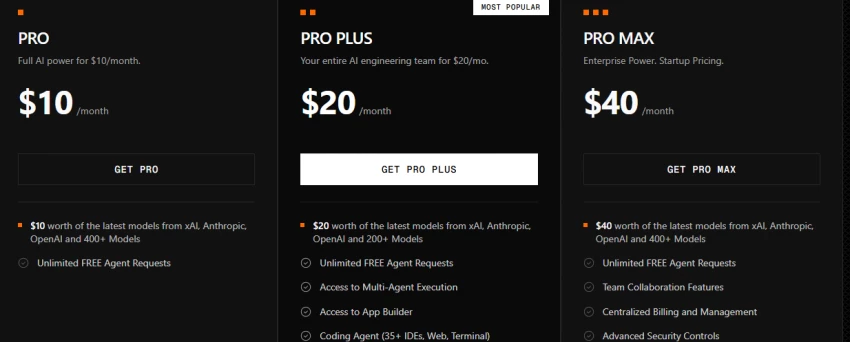
Blackbox AI offers paid plans for different types of users. Pricing can change over time, so users should always check the official Blackbox AI pricing page before buying a plan. The pricing below was checked in July 2026.
| Plan | Price | Best For | Key Highlights |
| Pro | $10/month | Individual developers | Access to chat models, voice agent, and model credits |
| Pro Plus | $20/month | Developers who need agent workflows | Includes app builder, multi-agent execution, coding agent support, remote agent for data analysis, Slack integration, and E2E chat encryption |
| Pro Max | $40/month | Teams and power users | Includes higher credits, unlimited agent requests, Figma to Code, team collaboration, centralized billing, advanced security controls, SAML SSO, priority support, and usage analytics |
| Enterprise | Custom pricing | Large organizations | Includes training opt-out, SAML SSO, custom SLAs, dedicated support, advanced controls, and on-premise deployment options |
Blackbox AI also offers free access in some workflows, especially for users who want to test the platform before upgrading. However, advanced features, higher usage, multi-agent capabilities, better security controls, and team-level features are usually tied to paid plans.
Tip: Once installed, you can highlight code snippets on websites like GitHub or YouTube, and Blackbox will provide AI assistance right inside your browser.
The VS Code extension is one of the most important parts of Blackbox AI for developers. It brings the tool directly into the editor, where users can write, edit, explain, and review code.
To use Blackbox AI in VS Code:
The Visual Studio Marketplace listing shows more than 5.2 million installs, which gives the VS Code extension strong visibility among developers. The extension is also listed as free, which makes it easy for users to test before deciding whether they need a paid plan.
Many AI coding tools are trying to solve the same problem, but Blackbox AI stands out because it combines several developer workflows in one platform.
Its main differences include:
Earlier, Blackbox AI’s main advantage was browser flexibility. Now, its bigger advantage is that it is becoming a multi-surface AI coding platform. This means users can work with it in different places instead of depending only on one editor or one chat window.
| Tool | Best For | Main Strength | Where Blackbox AI Can Help |
| Blackbox AI | Multi-agent coding, browser support, VS Code workflows | Combines coding chat, agents, browser extension, and editor support | Useful for developers who want multiple coding workflows in one platform |
| GitHub Copilot | IDE-based code completion | Strong autocomplete and GitHub integration | Blackbox AI may be better for users who also want browser, OCR, and multi-agent support |
| Cursor | AI-native coding environment | Full editor built around AI coding | Blackbox AI may suit users who do not want to fully move to a new editor |
| Tabnine | Privacy-focused code completion | Team and enterprise autocomplete | Blackbox AI has broader chat, agent, and browser-based features |
| ChatGPT / Claude | General coding help and reasoning | Strong explanations and planning | Blackbox AI is more focused on coding workflows and developer environments |
Blackbox AI is not necessarily better than every competitor. The best tool depends on how the user works. If someone wants deep IDE autocomplete, GitHub Copilot may still be a strong option. If someone wants an AI-first coding editor, Cursor may feel more natural. If someone wants browser support, VS Code help, code chat, and multi-agent features in one place, Blackbox AI becomes more interesting.
Blackbox AI can be useful, but users should treat it like any other AI coding assistant. It may process code context to provide suggestions, explanations, or edits, so developers should be careful with sensitive information.
Avoid pasting:
For individual users, the safest approach is to use Blackbox AI for learning, debugging, code explanation, and non-sensitive development work. For companies, it is better to review the privacy policy, security options, enterprise settings, training opt-out options, SSO support, and on-premise deployment availability before using it with private codebases.
Blackbox AI also mentions enterprise security controls such as SAML SSO, training opt-out, advanced security controls, E2E chat encryption on higher plans, and on-premise deployment options for organizations that need stronger data control.
| Pros | Cons |
| Helps generate, explain, and debug code quickly | Output still needs manual review |
| Works in browser and VS Code workflows | Chrome extension rating is not very strong |
| Supports multi-agent execution | Some advanced features may confuse beginners |
| Useful for students, developers, and teams | Pricing and limits can change |
| Can reduce switching between tools | Not ideal for sensitive code without proper security review |
| Includes Chrome extension, VS Code extension, CLI, API, and agent support | Results may vary depending on language, prompt, and task complexity |
Blackbox AI has mixed user feedback across different platforms, so it is important to look at reviews carefully before depending on it for serious coding work. The tool has a strong presence among developers, especially through its VS Code extension, but user reviews also show that the experience is not perfect for everyone.
On the positive side, many users like Blackbox AI because it can generate code quickly, explain difficult snippets, help with debugging, and reduce the time spent switching between search engines, documentation, and code editors. Developers who use it for everyday coding tasks often find it helpful for writing functions, understanding errors, creating quick scripts, and getting coding suggestions inside their workflow.
The VS Code extension has also gained strong visibility, with the Visual Studio Marketplace listing showing Blackbox AI as a coding assistant for real-time code completion, documentation, and debugging suggestions. This makes it especially useful for users who prefer working directly inside their editor instead of opening a separate AI chat tool.
However, the reviews are not completely positive. The Chrome Web Store listing shows a 2.7 out of 5 rating from around 1.2K ratings, with about 400,000 users. This suggests that while many people have installed the extension, some users may have faced issues with reliability, login experience, browser performance, or feature consistency.
Trustpilot feedback is also mixed, with the Blackbox.ai profile showing a low TrustScore and many recent negative reviews. Some complaints appear to be related to billing, subscription cancellation, and customer support. Because of this, users should check the latest reviews and pricing terms before upgrading to a paid plan.
Overall, Blackbox AI reviews show that the tool can be useful for coding support, but it should be tested personally before buying a plan. If you only need simple code suggestions, the free version or VS Code extension may be enough to start. If you are planning to use it for professional work, team workflows, or paid agent features, it is better to test the tool, review billing terms, and check whether the output quality fits your coding style.
| Review Area | What Users Commonly Like | What Users May Dislike |
|---|---|---|
| Code generation | Quick suggestions and useful code snippets | Output may still need manual correction |
| VS Code extension | Convenient for editor-based coding | Some features may depend on account or plan access |
| Chrome extension | Helpful for browser-based coding and GitHub workflows | Lower rating suggests inconsistent user experience |
| Pricing and plans | Paid plans unlock more advanced features | Users should review billing and cancellation terms carefully |
| Overall value | Good for students, freelancers, and developers testing AI coding help | Not something to rely on blindly for production code |
Blackbox AI has evolved from a simple coding assistant into a broader AI development platform. It now supports browser-based coding help, Chrome extension features, VS Code workflows, multi-agent execution, CLI/API access, and team-focused plans.
For casual users, it can help with quick code generation, explanations, and debugging. For developers, it can reduce time spent switching between tools. For teams, its value depends on how useful the agent workflows, security options, and enterprise controls are in real development work.
The best way to judge Blackbox AI is to test it with your own coding workflow. If you need fast coding help across browser, editor, and agent-based tasks, it is a strong tool to consider. If you only need simple autocomplete, a dedicated IDE assistant may be enough.
Share your thoughts about this article.
Be the first to post a comment!

What actually happens in the space between the moment an app builder produces a...
Nitin5 days ago
A marketing team in 2023 that wanted a two-minute product explainer typically bo...
Sakshi Dhingra1 month ago

Two years ago, an AI presenter on screen was a talking point. Today it is a line...
Parveen Verma1 month ago
Quick answer: ChatGPT is owned and operated by OpenAI Group PBC, a for-profit pu...
Sakshi Dhingra1 month ago

Here is the exact moment most people end up asking this question. You have final...
Nitin1 month ago

A stolen password does not always look suspicious to a login system. If the user...
Deepak Mehra1 month ago