What actually happens in the space between the moment an app builder produces a working screen and the moment that same screen has to serve paying customers?
That space is where most projects fall apart. Modern build tools have become very good at the first minute of an idea. A prompt goes in, a full interface comes out, the flows click through, and the demo lands. The difficulty begins when the same output has to hold a real database, guard real user accounts, absorb real traffic, and stay maintainable across months of edits.
A 2026 survey by Hackceleration found that more than 60 percent of AI-generated prototypes never reach production, and it named database configuration, authentication flows, and deployment infrastructure as the three most common failure points. Developers now have a name for the moment this becomes visible: the technical cliff.
The cliff is structural, not accidental. Build tools optimize the generation loop for reaching a demo quickly. Correctness, ownership, and the ability to run the app under load are left as someone else's problem. This article sets out the specific reasons the break happens, each backed by the data available as of September 2026, and then sets out what crossing the cliff actually requires. Every section carries its own subheadings so a reader can move to the reason that matters to them.
A prototype has one job
A prototype exists to show that an idea can exist. It has to look right and click through once. Nothing about it has to survive a second user, a page refresh, or a hostile input. That narrow job is exactly what build tools are tuned for, and it is why the demo is so convincing.
A production application carries a longer list
A production application has to keep data safe when many people write to and read from it at the same time. It has to prove who a user is and control what that user can see. It has to stay available when traffic climbs past a handful of test sessions. It has to be handed to another engineer without a rewrite. And it has to run at a cost that does not climb faster than the revenue it supports. Each of those obligations is a place where a demo-grade build tends to fail.
The table below contrasts the two stages across the dimensions that decide whether an app can carry a business.
| Dimension | Prototype stage | Production stage |
|---|---|---|
| Data storage | Local or in-memory state, often lost on refresh | Persistent database with a schema built for concurrent writes |
| Authentication | A login screen that looks correct | Server-side session validation, expiry, and access control |
| Traffic | One user clicking through a demo | Concurrent users, connection pooling, and background jobs |
| Ownership | Code locked to the builder's platform | Exportable source a second engineer can read and maintain |
| Cost model | A free tier or a handful of credits | Infrastructure and inference costs that scale with usage |
| Definition of done | The agent stopped generating | Behaviour verified against a specification and tests |
Table 1. The obligations a prototype defers and a production application cannot.
How storage gets faked
This is the failure that affects the most serious applications. Build tools tend to handle persistent storage in one of three ways, and all three break at the production stage. Some skip persistent storage entirely and rely on local state that disappears when the page refreshes. Some bolt on a managed database that works in a demo but carries a schema that was never designed for production use. Some generate authentication that looks correct on screen while hiding subtle defects, such as missing session expiration or checks that trust the browser instead of the server.
What the 2026 audits found
The consequences are measurable. A Q1 2026 audit of 5,600 AI-generated applications by Escape.tech found that 91.5 percent contained at least one critical vulnerability. Separate analysis from OX Security put the share of AI-built applications shipping with critical security flaws at 62 percent. Peer-reviewed testing referenced by Cycode found that roughly four in ten AI-generated programs carry an exploitable flaw. The samples and definitions differ across the three studies, so the figures are not a single like-for-like number, but the direction is consistent.
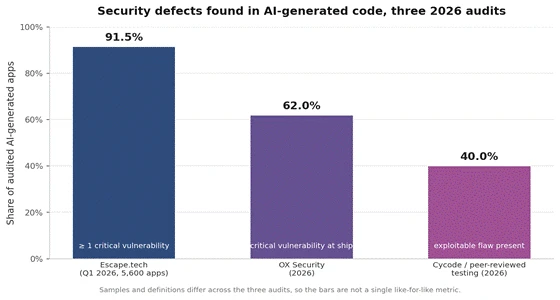
Figure 1. Security defects found in AI-generated code across three separate 2026 audits. Each bar measures a related but distinct failure rate.
The vulnerability classes are the same every time
Across the reports, the same defects appear again and again. The table below lists the classes most often found in AI-built applications and the severity assigned to each by published vibe-coding security checklists.
| Vulnerability class | What goes wrong | Severity |
|---|---|---|
| Misconfigured database (no row-level security) | Any user can read or write another user's data | Critical |
| Unprotected API routes | Endpoints run with no authentication middleware | Critical |
| Committed secrets | API keys and .env files pushed to source control | Critical |
| Broken access control (IDOR) | Changing an ID in a request exposes another record | Critical |
| Secret keys in frontend code | Service keys shipped to the browser, readable by anyone | Critical |
| Missing rate limiting | No protection against abuse or credential stuffing | Medium |
Table 2. The defect classes most commonly found in AI-generated applications, with severity from published security checklists.
The incidents behind the numbers
These are not edge cases. The Lovable row-level-security vulnerability tracked as CVE-2025-48757 exposed data across more than 170 production applications. In February 2026, one AI-built application leaked roughly 1.5 million user tokens. Neither required a sophisticated attack. Both followed from database rules left off by default and authentication accepted without review.
The three layers you never see
When an app is built inside a hosted platform, the builder manages three layers the user never sees: the database tier, the connection pooling layer, and the API gateway. During iteration this is a convenience, because none of it needs attention. The abstraction is the reason the tool feels effortless.
When abstractions turn into constraints
The moment the app goes live with real users, those same abstractions become constraints. The database sits on the builder's infrastructure with pooling limited to its defaults, and the API gateway is throttled for sandbox use rather than production load. Traffic spikes then surface as connection timeouts, and because the database is locked to the platform's servers, moving off it means starting over. Problems that stayed invisible during the prototype stage become the operating reality of production: slow response times, deployment failures, database bottlenecks, and infrastructure costs that were never modelled. Connection pooling for serverless environments, recursive row-level-security performance, background jobs, and error tracking are none of them a single-prompt feature.
Why done means the agent stopped typing
In the standard build loop, done means the agent stopped generating. No specification defines what the code is checked against, no tests are required, and nothing exercises the running app the way a real user would. Because the tool works primarily from the current conversation context, it loses track of earlier decisions as the project grows, and it will regenerate one component in a way that conflicts with how another already works.
The five-to-thirty prompt pattern
The result is a well-documented pattern: an application that is strong at five prompts and fragile at thirty, a fix-one-thing-break-ten loop, and code duplication that piles up until a second engineer cannot read the codebase. The build accelerates shipping without adding the accountability that keeps a growing application coherent. Speed at the start becomes drag later, and the drag arrives exactly when the stakes are highest.
Where the seams show
The seams appear the moment a team tries to do something the builder did not anticipate: add single sign-on, migrate the database, wire a custom domain with working email, or hand the codebase to a contractor. What looked like a finished product turns out to be a scaffold, and whether it can leave the platform depends entirely on the tool.
Export is the dividing line
Platforms differ sharply on this point. Some provide a full repository the team controls and can move anywhere. Others offer no complete source export, which means the app cannot leave the surface that generated it. Export capability is the difference between a prototype a team can graduate and one it has to rebuild from scratch. The table below compares widely used 2026 build tools on the axes that decide production readiness. Pricing and metering change frequently, so the figures reflect what was publicly reported through mid-2026.
| Platform | Source export | Backend | Metering | Reported entry price |
|---|---|---|---|---|
| Lovable | GitHub repository sync | Supabase (database, auth, storage) | By action complexity | ~$25 / month (Pro) |
| Bolt | Code you control; Bolt Cloud adds DB and auth | Bolt Cloud or Netlify | By tokens (scales with codebase size) | ~$20 to $50 / month |
| v0 (Vercel) | Optimized to live inside Vercel | Frontend-first, wire your own | By credits | ~$20 / month |
| Replit | Full code access in the workspace | Integrated hosting and database | Subscription plus usage credits | Usage-based |
| Base44 | No full source export reported | Managed platform backend | Plan-based | Plan-based |
Table 3. How widely used 2026 build tools compare on ownership and metering. Figures reflect publicly reported information through mid-2026 and change often; confirm current terms with each vendor.
What each platform meters
Credit and token metering is inexpensive during prototyping and behaves differently once an app is live. Platforms meter different things. One bills by the complexity of each action, so cost tracks how much a team edits and iterates. Another bills by tokens, which scale with codebase size, so the same small change costs more on a large project than a small one. The metering model a team chooses at the start quietly decides how the bill behaves at scale.
The shared-pool problem
Hosting, database, storage, and any AI features running inside the deployed app often draw from the same credit pool used for building. A busier live application then consumes the budget a team expected to spend on further development. Industry commentary through 2026 lists cost surprises, where inference and operational spend scale faster than planned, among the most common production failure points. The cost is not only money. Debugging deployment issues and configuring external services can consume hours or days that never appear on the invoice.
The failures above reduce to a short set of recurring points. The table below names each one, the symptom that reveals it, and the control that addresses it before an app carries real users.
| Failure point | How it shows up in production | What closing it requires |
|---|---|---|
| Database configuration | Data loss on refresh, no concurrency safety | Persistent database with a production schema and row-level security on every table |
| Authentication | Bypasses, no session expiry, browser-trusted auth | A managed auth provider with server-side validation on every protected route |
| Exposed secrets | API keys in frontend code or committed .env files | Secrets in a manager with rotation, never in client code |
| Deployment infrastructure | Build failures and timeouts under load | Connection pooling, environment separation, and error tracking |
| Maintainability | Fix-one-break-ten, an unreadable codebase | A specification, tests, and exportable source |
| Cost control | Credits consumed faster than revenue | A usage model measured before launch, not after |
Table 4. The recurring production failure points and the controls that address them.
Build tools are the right call for validating an idea. The mistake is treating the demo as the finished product. A more reliable sequence keeps the speed of the builder and adds the controls the production stage demands.
Write the specification first. State the outcome the app must deliver and how it will be measured before the build begins, so there is something concrete to check the output against.
Prototype to prove demand, then harden. Use the builder to confirm the idea works end to end, then rebuild the validated workflow on infrastructure the team owns once it needs real data, permissions, and scale.
Run a pre-ship security gate. Confirm row-level security on every table, server-side authentication on every protected route, no secrets in client code, and no internal or debug endpoints reachable in production.
Choose for ownership. Prefer a platform that exports source a second engineer can read and maintain, so the app is not locked to the surface that generated it.
Model cost before launch. Understand what the platform meters and how hosting, database, and inference draw down the same budget once the app is live.
None of this means the builders are the wrong choice. It means the production stage is a separate stage with its own requirements, and the break happens when a team assumes the first minute of an idea and the long life of an application are the same piece of work. They are not. Treat the demo as proof that the idea is worth building properly, put the controls above between the demo and the launch, and the cliff becomes a step rather than a wall.
Share your thoughts about this article.
Be the first to post a comment!
A marketing team in 2023 that wanted a two-minute product explainer typically bo...
Sakshi Dhingra3 weeks ago

Two years ago, an AI presenter on screen was a talking point. Today it is a line...
Parveen Verma1 month ago

Quick answer: ChatGPT is owned and operated by OpenAI Group PBC, a for-profit pu...
Sakshi Dhingra1 month ago

Here is the exact moment most people end up asking this question. You have final...
Nitin1 month ago

A stolen password does not always look suspicious to a login system. If the user...
Deepak Mehra1 month ago

The short versionA Claude API key is created in the Claude Console at platform.c...
Harpreet Singh1 month ago