PopPop AI is an online AI audio platform that brings several creator tools into one place. You can use it for text-to-speech, AI voice generation, vocal removal, AI song covers, sound effects, karaoke tracks, acapella extraction, and instrumental creation.
That sounds useful, especially for YouTubers, podcasters, editors, students, singers, and small creators who do not want to pay for heavy audio software. But the real question is simple: is PopPop AI actually good enough to use, or is it just another free AI tool with limits?
This PopPop AI review looks at its main features, pricing, free limits, output expectations, safety concerns, copyright issues, and alternatives. The goal is to help you decide whether PopPop AI is useful for your type of audio work.
Transparency Note
GeniusFirms has not conducted a controlled hands-on audio benchmark of PopPop AI against competing platforms for this review. The assessment below is based on PopPop AI's current official feature pages, pricing information, help documentation, privacy policy, terms, and publicly available user feedback.
That distinction matters because claims such as “studio quality” or “perfect vocal separation” should not be treated as independently verified performance results unless the output has actually been tested under controlled conditions.
How I Evaluated PopPop AI
For this review, we checked PopPop AI from the angles that matter most to real users: features, free access, pricing, output use cases, legal safety, public feedback, and alternatives.
Evaluation Area
What We Checked
Why It Matters
Free access
Free plan, daily limits, signup requirements, and paid plans
Many users search for PopPop AI because they want a free AI audio tool.
Vocal remover
Upload support, file limits, song separation, karaoke use, and audio formats
Vocal removal is one of PopPop AI’s strongest search-intent features.
Text-to-speech
Voice options, language support, pitch, speed, and tone control
Creators need natural narration, not robotic audio.
AI voice tools
AI voice generator, voice cloning, AI covers, and sound effects
PopPop AI is not just a TTS tool; it is a broader AI audio toolbox.
Pricing
Free plan and paid audio tool plans
Users need to know what is free and where the limits start.
Safety and legal use
Copyright, voice cloning consent, commercial use, and terms
AI audio tools can create legal problems if used carelessly.
User feedback
Trustpilot and public review signals
Public sentiment helps identify reliability issues and common complaints.
Alternatives
ElevenLabs, Murf, LALAL.AI, and other audio tools
Users need to know when PopPop AI is enough and when a specialist tool is better.
This review should be read as a practical tool review, not as a guarantee that every output will sound studio-ready. AI audio quality depends heavily on the input file, the selected voice, the language, the audio mix, and the purpose of use.
PopPop AI at a Glance
Detail
PopPop AI
Main purpose
AI audio creation and processing
Text-to-speech
Yes
AI voice generator
Yes
Vocal remover
Yes
AI song covers
Yes
Sound-effect generation
Yes
Voice cloning
Available/restricted depending on workflow
Browser-based
Yes
Free option
Yes
Paid plan
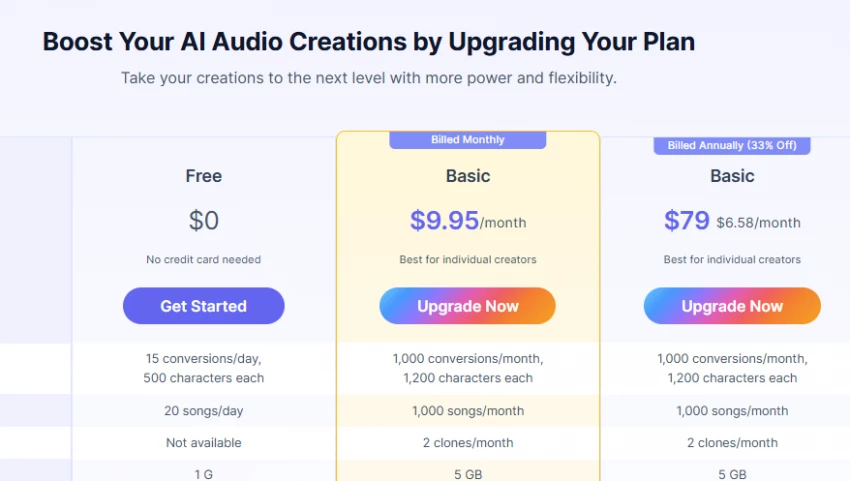
From $9.95/month
Best suited for
Creators, students, singers, hobbyists and simple audio projects
Main limitation
Specialist platforms may offer deeper controls for individual audio tasks
PopPop AI's browser tools currently include Text to Speech, Vocal Remover, Song Cover Generator, and AI Sound Effect Generator. The company has also expanded its TTS offering with a separate desktop application called TTSFree AI.
Key Features
Feature
What It Does
Best For
AI Vocal Remover
Separates vocals and instrumentals from songs or videos
Karaoke, remixing, acapella extraction, practice tracks
Creates voice audio in different languages and styles
Character voices, voiceovers, creative clips
AI Cover Generator
Creates AI song covers using different voice models
Music experiments and fan-style covers
AI Sound Effect Generator
Generates sound effects from text prompts
Games, videos, podcasts, short films
AI Voice Cloning
Clones voices for authorized use
Personalized voice projects, where consent is available
Online Workflow
Works in the browser
Users who do not want software installation
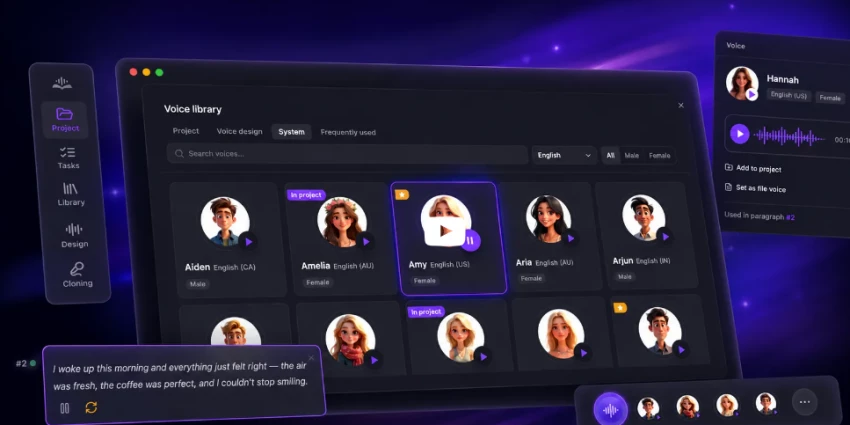
PopPop AI’s official homepage highlights audio tools such as Vocal Remover, Text to Speech, Song Cover Generator, and SFX Generator. It also shows multilingual voice options, including English, Hindi, Chinese, French, German, Italian, Japanese, Korean, Polish, and Portuguese voices.
Pricing and Free Limits
PopPop AI should not be described as unlimited free without explanation. It does have a free plan, but the official pricing page also lists paid plans.
The free plan is useful for testing and casual work, but serious creators may hit limits if they need longer scripts, more conversions, priority processing, or voice cloning access.
Pricing note: Pricing and limits can change. Check PopPop AI’s official pricing page before upgrading.
Vocal Remover Review
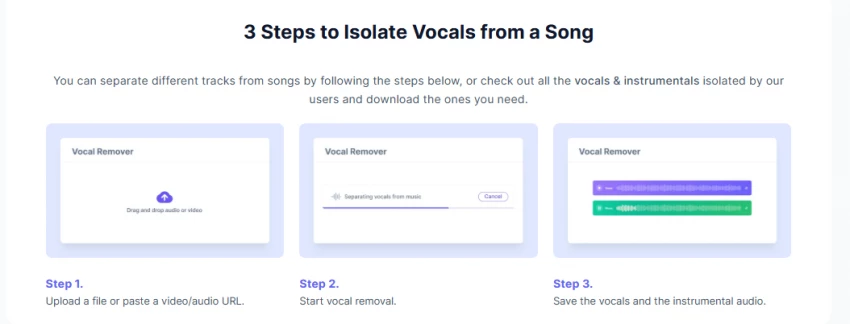
The vocal remover is one of PopPop AI’s most useful tools. It lets users upload audio or video files, or paste a URL, then separates the track into vocals and instrumentals.
The current tool accepts common audio formats such as MP3, WAV and FLAC and video formats including MP4, MKV and MOV.
PopPop currently sets the maximum file duration at 20 minutes and the maximum file size at 400 MB.
That makes it useful for things such as:
Use
What You Get
Karaoke
Instrumental version of a song
Acapella extraction
Isolated vocal track
Remix preparation
Separate vocals and backing music
Singing practice
Music without the original singer
Music analysis
Easier access to individual song elements
One thing worth clarifying is that PopPop currently describes this tool specifically as 100% free and says there are no hidden fees during the vocal-isolation process.
That is different from some of its other AI audio tools, which operate under free and paid usage limits.
Text-to-Speech Review
PopPop AI’s text-to-speech tool converts written text into voice audio. The official TTS page says users can adjust speed and pitch, and also choose tones such as cheerful, hopeful, excited, and friendly.
This is helpful because a good AI voiceover should not only read words correctly. It should match the mood of the content.
PopPop AI text-to-speech can be useful for:
User Type
Possible Use
YouTubers
Voiceovers for shorts, tutorials, and explainer videos
Educators
Lesson narration and multilingual learning clips
Podcasters
Intros, transitions, and short narrated segments
Marketers
Product videos, social media ads, and demos
Students
Presentation narration or study audio
Small businesses
Simple voice content without hiring voice actors
The biggest strength is ease of use. Users can enter text, choose a voice, adjust basic settings, and generate audio directly online.
The limitation is that free use has character and conversion limits. If you need long-form narration, audiobook-style output, or bulk conversion, the paid plan or a dedicated TTS tool may be more suitable.
Voice Generator, Covers, and Sound Effects
PopPop AI is broader than a normal vocal remover. Its website also promotes AI cover generation, sound effect generation, voice models, and voice cloning.
This makes it more like an experimental AI audio playground than a single-purpose editing tool.
AI Voice Generator
The AI voice generator is useful when you want a quick voice style for narration, character dialogue, or short content. It is not always a full replacement for premium voice platforms, but it gives beginners a fast way to create audio without a microphone.
AI Cover Generator
The AI cover generator lets users create song covers using different voice models. This can be fun for personal experiments, but users should be careful with copyright. PopPop AI itself notes that AI-generated covers may still involve the original melody, lyrics, and other copyrighted material, so users should obtain permission before public or commercial use.
AI Sound Effect Generator
The sound effect generator is useful for short-form video creators, game developers, podcasters, and storytellers. Instead of searching through sound libraries, users can describe a sound and generate an effect.
Examples:
Prompt Type
Possible Output
“Heavy rain on a metal roof”
Weather ambience
“Sci-fi laser blast”
Game or video SFX
“Door creaking in an empty hallway”
Horror scene sound
“Crowd cheering in a stadium”
Sports or event background
This is useful for quick creative projects, but creators should still check whether the output quality fits their final publishing standard.
What Is TTSFree AI?
PopPop has also launched a separate desktop application called TTSFree AI.
This should not be confused with the normal browser-based text-to-speech tool.
The desktop app runs on Windows and macOS and is designed for people who need longer text-to-speech workflows.
It supports file imports such as TXT, DOCX and PDF and can process text locally instead of requiring uploads to an online service.
This is a meaningful expansion for PopPop because it changes the product from being purely a browser-based AI audio toolbox.
The desktop app is aimed more at long documents, bulk conversion and users who want offline processing.
TTSFree AI Pricing
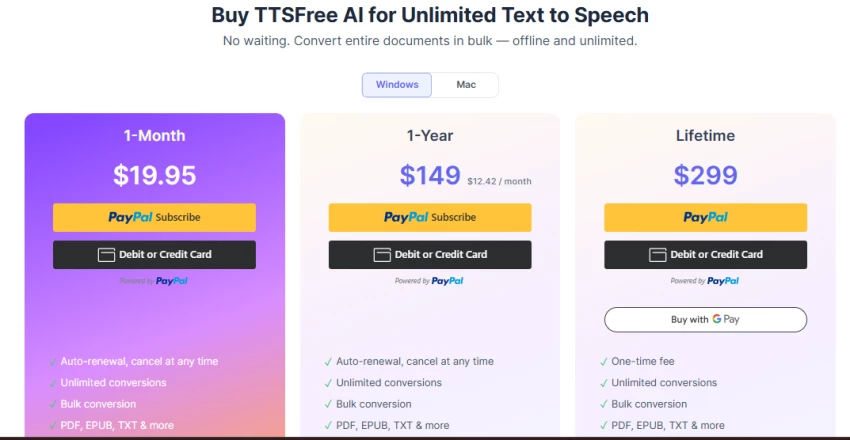
The desktop app has its own pricing structure.
Current listed prices are:
Plan
Price
14-day trial
Free
1 month
$19.95
1 year
$149
Lifetime
$299
PopPop says paid TTSFree AI plans allow unlimited conversions and bulk document processing.
This pricing is separate from the $9.95/month online AI Audio Tools plan.
That difference is important when comparing PopPop with other text-to-speech services.
Who Should Use PopPop AI?
PopPop AI is best for users who want a free or low-cost way to create audio quickly.
Best For
Why It Fits
YouTubers
Quick voiceovers, sound effects, and background audio
Singers
Karaoke tracks and vocal practice
Podcasters
Intros, short voice clips, and experimental SFX
Students
Free voice generation for projects and presentations
Indie game creators
Fast sound effects and character audio
Social media creators
Short voice clips and audio effects
Hobby musicians
Acapella and instrumental extraction
PopPop AI may not be the best choice for professional studios, large teams, audiobook production, enterprise dubbing, or users needing strict licensing control.
Pros and Cons
Pros
Cons
Free plan available
Free plan has daily and character limits
Browser-based, no software installation needed
Requires internet connection
Includes multiple audio tools in one place
Output quality can vary by input
Vocal remover supports audio and video uploads
Complex songs may not separate perfectly
Useful for TTS, covers, karaoke, SFX, and voice experiments
Legal caution needed for covers, cloning, and copyrighted music
Simple enough for beginners
Not as advanced as specialist studio tools
Paid plan is affordable for casual creators
Trustpilot review base is still very small
Is PopPop AI Safe and Legal to Use?
PopPop AI can be safe to use for normal creator tasks, but users should understand the legal limits of AI audio.
There are three important areas to consider.
1. Copyright
If you remove vocals from a copyrighted song or generate an AI cover of a copyrighted track, that does not automatically give you permission to publish or monetize it. PopPop AI’s own vocal remover page says the legal use of extracted vocals depends on the original song’s copyright and that users should have necessary permissions for commercial use.
2. Voice Cloning Consent
Voice cloning should only be used with permission. PopPop AI’s own knowledge base says unauthorized use of someone’s voice can raise privacy and misinformation concerns, and users should obtain explicit consent before cloning a voice.
3. Terms and User Content
PopPop AI’s Terms of Service say users must use the service lawfully and responsibly. The terms also state that users retain ownership of uploaded content but grant PopPop AI a license to process and display it as needed for service provision.
For personal projects, experiments, school work, and private practice, PopPop AI can be useful. For commercial publishing, always check the rights of the original song, voice, script, and generated output before using it publicly.
User Feedback and Public Review Signals
Public review data for PopPop AI is still limited. Trustpilot currently shows a 3.1 score from 4 reviews, which is too small to treat as a complete picture of the product.
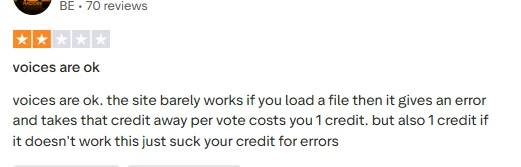
The reviews are mixed. Some users praise the tool as a convenient alternative, while one negative review mentions file-loading errors and credits being used when a task failed. PopPop AI replied that it had experienced server issues in the past and said those issues had been improved.
Because the review base is small, the fair interpretation is this: PopPop AI has useful features, but users should test the free plan first before paying.
PopPop AI vs Alternatives
Tool
Best For
Main Difference
PopPop AI
Free all-in-one AI audio tools
Best for casual creators who want TTS, vocal removal, covers, and SFX in one place
ElevenLabs
High-quality AI voice generation
Better for premium voice realism and professional narration
Murf
Business voiceovers and presentations
Better for branded business videos and e-learning
LALAL.AI
Vocal and stem separation
More focused on audio separation than all-in-one AI creation
Kits AI
Music and AI voice workflows
Better for music creators needing voice models and singing tools
Audacity + plugins
Manual audio editing
Better for users who want full editing control
PopPop AI’s advantage is convenience. It gives beginners multiple audio tools without forcing them into a complex editing workflow. Its weakness is that it may not match specialized tools in every category.
Is PopPop AI Worth It?
For casual creators, PopPop AI is worth trying before paying for a more specialized audio platform.
Its strongest argument is not that it has the industry's best tool in every category. It is that one platform gives you access to TTS, AI voices, vocal removal, karaoke creation, AI covers and generated sound effects with a relatively low barrier to entry.
The vocal remover is especially attractive because PopPop currently promotes it as free and usable without an account. The browser TTS is convenient for short narration, while the newer TTSFree AI desktop app makes the ecosystem more relevant for longer documents and multi-voice projects.
There are still trade-offs.
The free TTS allowance is limited, vocal separation depends on the source material, voice-cloning availability varies by product, and public review data is too thin to make strong reliability claims.
That leaves PopPop AI in an interesting middle ground.
It is more versatile than a single-purpose free audio utility, but it is not necessarily a replacement for specialist professional tools.
Start with the free version. Try the exact workflow you need. If the quality works for your content and you repeatedly hit the free limits, the $9.95 Basic tier becomes much easier to justify.
FAQs
Is PopPop AI Completely Free to Use?
Yes, PopPop AI is free to access. Some usage limits may apply, such as restrictions on file size, processing length, or number of daily conversions. Users can perform most tasks from text-to-speech to vocal removal without subscriptions.
Does PopPop AI Support Multiple File Formats?
PopPop AI works with common audio formats like MP3 and WAV, and in some cases video formats like MP4. This makes it flexible for creators who want to upload tracks directly without converting files first.
Can PopPop AI Be Used Without an Internet Connection?
No, PopPop AI is entirely browser-based and requires a stable internet connection. This makes it easy to access from any device but limits offline usability.
How Accurate Is PopPop AI’s Vocal Remover?
For simple tracks with clear mixing, the results are fairly clean. However, in complex songs where vocals and instruments overlap, users may hear faint echoes or distortion after separation. It is best suited for karaoke practice and casual remixing rather than professional studio work.
What Languages Does PopPop AI Text-to-Speech Support?
PopPop AI supports more than 20 languages, including English, Hindi, Japanese, Spanish, French, Arabic, and Korean. Regional accents such as American, British, and Indian English add further flexibility.
Is It Safe to Use PopPop AI for Commercial Projects?
Users should exercise caution. While personal projects and educational content are generally fine, AI-generated covers or cloned voices can raise copyright and licensing issues. Always verify rights before publishing commercially.