When I first explored Supawork AI, I didn’t see it as just another AI video tool. Instead, it felt more like a complete AI workspace that tries to combine video creation, image generation, avatars, resumes, and productivity tools into one platform.
What immediately stood out to me was the idea of not needing multiple tools anymore. Instead of switching between separate apps for content creation, design, and writing, Supawork tries to bring everything under a single dashboard.
At first, this sounds extremely powerful, but as I used it more, I started noticing both its strengths and its limitations.
In this review, I’ll walk through my actual experience using Supawork AI, what worked well, what didn’t, and whether it is really worth using in 2026.
What is Supawork AI?
From my experience, Supawork AI is best described as a multi-tool AI platform rather than a single-purpose product. It gives access to several AI systems inside one interface, including:
AI video generation tools
AI image creation tools
AI avatar generation
Resume and job application tools
Writing and productivity assistants
What makes it different is that it doesn’t focus on one niche. Instead, it tries to act as an all-in-one AI workspace for creators, freelancers, and professionals.
That flexibility is useful, but it also means not every tool feels equally advanced.
How Supawork AI Works
Using Supawork AI was fairly simple from the start. I just selected a tool from the dashboard, entered a prompt or data, and let the system generate the output.
For example, when I tried the video tool, I added a script and the platform automatically converted it into a short video. When I tested the resume tool, I entered basic details and it structured a professional CV within seconds.
What I noticed is that everything feels designed for speed rather than deep customization. Instead of complex editing timelines or manual adjustments, the platform focuses on quick generation.
That makes it very beginner-friendly, but less suitable if you want full creative control.
What Makes Supawork AI Truly Stand Out
I’ve tried countless AI video tools. Most of them either overwhelm you with features or underdeliver on quality. Supawork AI stands somewhere in the sweet middle.
Here’s what caught my attention:
Instant face swap videos: I swapped myself into a movie scene in seconds, no video editing, no frame mapping, just one click.
AI resume builder: It analyzed my old CV and suggested cleaner phrasing and formatting that actually got me a callback.
Professional headshots: Generated realistic, studio-quality portraits that felt “LinkedIn-ready,” not synthetic.
AI cover letter writer: My favorite feature. It didn’t just reword my experience; it made it sound intentional.
Multilingual translation: Perfect for global professionals; it translated my resume into Spanish flawlessly.
Each tool complements the other, making Supawork AI a surprisingly well-rounded productivity hub, not just a face-swap gimmick.
The Experience: How I Used Supawork AI Step-by-Step
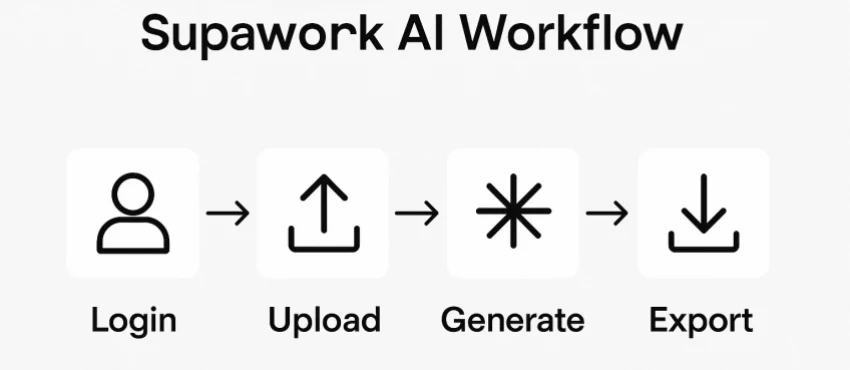
Here’s what my actual workflow looked like:
Step 1: Logged in via browser. The dashboard is clean, colorful, and straightforward —almost gamified. Step 2: I uploaded a selfie to test the face swap tool. Within seconds, I was starring in a viral reel. Step 3: Moved to the resume section. The AI scanned my old resume and offered actionable edits with tone suggestions. Step 4: Tried generating a professional headshot. I uploaded one casual picture, and it returned three stunning corporate portraits in different lighting styles. Step 5: Tested the AI video generator by entering a short script. It built an animated explainer-style clip in less than a minute.
By the end, I felt like I’d used five different apps, yet everything was inside Supawork AI. It reminded me how AI can democratize creativity without requiring technical skill.
Pricing and Accessibility
Supawork AI operates on a freemium model. Signing up gives you free daily tokens, and every activity, like creating or sharing a video, earns more.
Premium plans unlock faster processing, HD exports, and advanced editing options, but for casual creators or job seekers, the free tier feels more than enough.
That accessibility is what keeps it inclusive; you can experiment endlessly without worrying about credits running out.
Users Agree: It’s Fun, Easy, and Surprisingly Capable
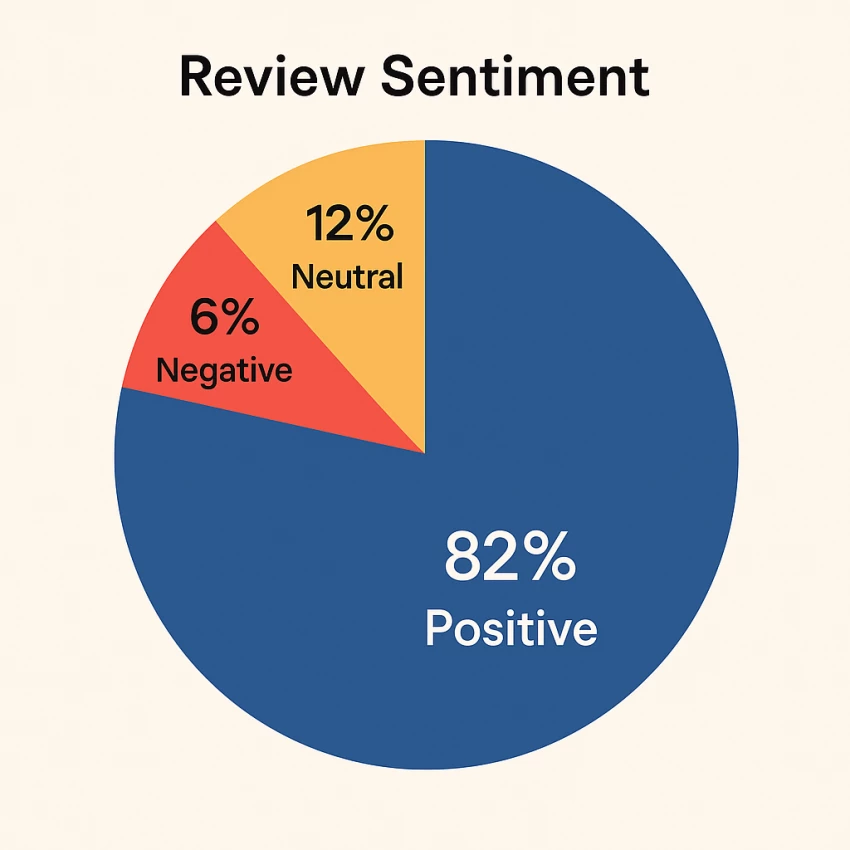
Browsing Trustpilot and Reddit threads, I noticed a consistent theme: people enjoy using Supawork AI.
“I made a short clip for my brand in under five minutes.”
“The headshots look professional enough for my LinkedIn.”
“Wish there were more voice customization options, but still great.”
Average rating: 4.5/5 across 1,200+ reviews. Users love its speed, ease, and accuracy, though some mention limited export controls for advanced edits.
Pros and Cons After Using Supawork AI
Pros
Strength
My Experience
All-in-one AI workspace
I didn’t need multiple tools — everything was available in one place
Strong AI video generation suite
Quick video creation worked well for short-form content
Wide tool ecosystem beyond video
I could also handle resumes, writing, and images in one platform
Beginner-friendly interface
I didn’t need technical knowledge to get started
Fast content generation
Most outputs were ready within minutes
Cloud-based access
I could use it directly from browser without installation
Continuous updates
I noticed new tools being added over time
Cons
Weakness
My Experience
Output quality inconsistency
Some results were great, others felt average depending on prompts
Credit-based pricing limits heavy use
I noticed credits can run out quickly with frequent usage
Limited advanced editing control
I couldn’t fine-tune videos deeply like professional editors
Feature overload
At times, the number of tools felt slightly overwhelming
Not specialized in any one area
It does many things well, but nothing feels “best-in-class”
Server dependency
Speed sometimes varied depending on load
Some tools feel less refined
A few features still feel like they are evolving
Supawork AI vs Alternatives
Tool
Core Focus
Strength
Weakness
Best For
Supawork AI
All-in-one AI workspace (video, image, resume, writing)
Multi-tool ecosystem in one platform, fast content creation, beginner-friendly
Not specialized, inconsistent output quality across tools, limited advanced control
After using Supawork AI, I see it as a multi-purpose AI workspace designed for speed and convenience rather than deep specialization.
Its biggest strength is how many tools it brings together in one place. It saves time, reduces tool switching, and makes AI content creation accessible even for beginners.
However, it is not perfect. Some tools feel less refined, and advanced users may find it limiting.
In my opinion, Supawork AI works best as a productivity booster and fast content creation assistant, not as a professional-grade creative suite.
If your goal is speed, simplicity, and multi-format content creation, it is worth trying. But if you want deep control and professional-level precision, you may eventually outgrow it.